


Aydınlatma metni yükleniyor…
Üretim yönetimi yazılımı; talebi üretim planına, planı malzeme ve kapasite ihtiyacına, ihtiyacı iş emirlerine, gerçekleşen üretimi de kalite ve maliyet kayıtlarına bağlayan sistemdir. Amacı yalnızca “kaç adet üretildi?” sorusunu cevaplamak değildir. Hangi ürünün, hangi reçete ve rotayla, hangi kaynakta, ne zaman, hangi malzemeyle ve hangi sonuçla üretildiğini güvenilir biçimde izlemeyi amaçlar.
Her üretim işletmesinin aynı kapsamda bir yazılıma ihtiyacı yoktur. Ürün çeşidi az, süreçleri sabit ve izlenebilirlik gereksinimi sınırlı bir işletmeyle; çok seviyeli ürün ağacı, alternatif rota, lot takibi ve yoğun kalite kontrolü kullanan işletmenin gereksinimleri farklıdır. Bu nedenle seçim, genel bir modül listesinden değil gerçek üretim modeli ve karar noktalarından başlamalıdır.
Üretim yönetimi yazılımı nedir?
Üretim yönetimi yazılımı; ürün ana verisi, ürün ağacı veya reçete, operasyon rotası, üretim planı, malzeme ihtiyacı, kapasite, iş emri, gerçekleşen tüketim, üretim bildirimi, fire, yeniden işleme, kalite ve izlenebilirlik verilerini bir araya getirebilir. Kapsam ürüne göre değişir: Bazı ERP çözümleri bu işlevlerin önemli bölümünü kendi üretim modülünde sunarken bazı işletmeler ayrı MRP, ileri planlama veya MES katmanı kullanır.
Sistemin değeri ekran sayısından değil, planlananla gerçekleşeni aynı tanımlar üzerinden karşılaştırabilmesinden gelir. Ürün kodu, ölçü birimi, reçete versiyonu, rota, çalışma takvimi ve iş merkezi kapasitesi tutarlı değilse ayrıntılı bir yazılım da güvenilir plan oluşturamaz.
ERP, MRP, MES ve üretim yönetimi yazılımı arasındaki fark nedir?
Bu terimler birbirinin yerine kullanılsa da odakları aynı değildir:
- ERP, finans, satın alma, stok, satış, insan kaynakları ve üretim gibi kurumsal süreçleri ortak işlem ve ana verilerle bağlayan üst sistemdir. Kapsamlı açıklama için ERP yazılımı rehberini inceleyebilirsiniz.
- MRP, üretim planı ve talebi karşılamak için hangi malzemenin, ne miktarda ve ne zaman satın alınması ya da üretilmesi gerektiğini hesaplayan planlama işlevine odaklanır. SAP, MRP'yi mevcut stok, talep, tedarik ve ürün ağacı verilerini dikkate alarak malzeme ihtiyacı ve tedarik önerileri üreten bir işlev olarak açıklar (SAP: MRP).
- MES, üretim sahasındaki yürütme ve veri toplama katmanıdır. IBM, MES'i üretim süreçlerini fabrika sahasında izleyen ve kontrol eden; ERP ile gerçek üretim operasyonları arasında köprü kurabilen sistem olarak tanımlar (IBM: MES nedir?).
- Üretim yönetimi yazılımı, işletmenin ihtiyacına göre planlama, iş emri, saha bildirimi, kalite, izlenebilirlik ve raporlamanın bir bölümünü veya tamamını kapsayan daha genel bir ifadedir.
Doğru mimari “hangisi daha iyi?” sorusuyla değil, hangi kararın hangi sistemde alınacağı ve hangi verinin ana kaydının nerede tutulacağıyla belirlenir.
Hangi veri ve modüller gerekir?
Ürün ağacı, reçete ve rota
Ürün ağacı veya reçete, bir ürün için gereken bileşenleri ve miktarları tanımlar. Rota ise işlemlerin sırasını, iş merkezini, hazırlık ve çalışma sürelerini gösterebilir. Versiyon, geçerlilik tarihi, alternatif malzeme ve alternatif rota yönetimi özellikle ürün veya proses sık değişiyorsa önemlidir.
Talep ve üretim planı
Müşteri siparişi, tahmin, stok hedefi ve güvenlik stoğu gibi girdilerden hangi ürünün ne zaman üretileceği planlanır. Planlama ufku, donmuş dönem, öncelik ve yeniden planlama yetkisi tanımlanmalıdır. Sürekli değişen plan, sahada güven kaybına ve gereksiz hazırlık değişimlerine yol açabilir.
Malzeme ihtiyacı
MRP; talep, mevcut stok, açık satın alma ve üretim siparişleri, terminler, lot büyüklükleri ve ürün ağacına göre eksikleri hesaplayabilir. Sonuç doğrudan otomatik siparişe dönüşmeden önce istisna mesajları, kritik malzemeler ve planlayıcı onayı değerlendirilmelidir.
Kapasite ve iş merkezleri
Makine, hat, kalıp, ekip veya vardiya kapasitesi ayrı kısıtlar olabilir. Takvim, bakım, hazırlık süresi, verim katsayısı ve alternatif kaynaklar tanımlanmadan “sonsuz kapasite” varsayımıyla oluşan plan uygulanabilir görünmeyebilir.
İş emri ve saha bildirimi
İş emri; üretilecek miktarı, reçete ve rota versiyonunu, planlanan tarihleri, malzemeleri ve operasyonları taşıyabilir. Saha bildiriminde başlama–bitirme, iyi ürün, fire, yeniden işleme, duruş nedeni ve kullanılan lotlar kaydedilir. Kayıt yöntemi operatörün çalışma akışını gereksiz yere yavaşlatmamalıdır.
Kalite ve izlenebilirlik
Girdi, proses ve son kontrol noktaları; numune planı, ölçüm, tolerans, uygunsuzluk ve serbest bırakma kararlarıyla bağlanabilir. Lot veya seri takibi gereken işletmelerde hangi ham maddenin hangi iş emri ve sevkiyata gittiği geriye ve ileriye doğru izlenebilmelidir.
Maliyet ve performans analizi
Planlanan ve gerçekleşen malzeme, süre, dış işlem, enerji veya genel gider verileri karşılaştırılabilir. Ancak gösterge tanımı açık olmalıdır: Duruş, fire, çevrim süresi veya zamanında tamamlama farklı sistemlerde farklı hesaplanıyorsa raporlar birbiriyle çelişir.
Kumsal'ın yedi aşamalı üretim kontrol döngüsü
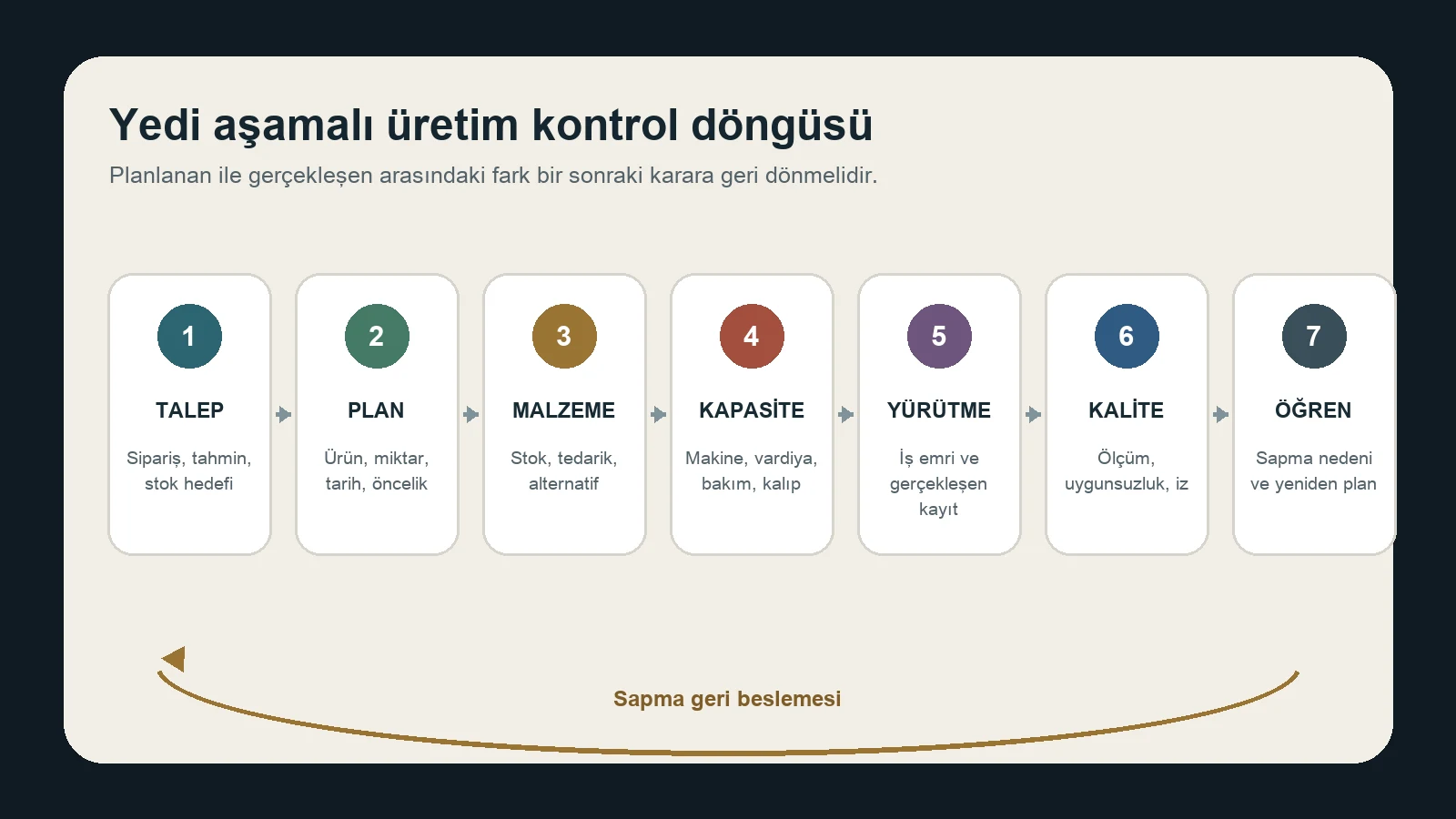
- Talebi netleştir: Sipariş, tahmin, stok hedefi ve teslim önceliğinin kaynağını belirle.
- Planı oluştur: Ürün, miktar, tarih, parti ve öncelikleri planlama kurallarıyla eşleştir.
- Malzemeyi doğrula: Stok, açık sipariş, rezervasyon, alternatif ve kritik terminleri kontrol et.
- Kapasiteyi dengele: Makine, iş merkezi, vardiya, bakım, kalıp ve iş gücü kısıtlarını uygula.
- İşi yürüt: Doğru reçete, rota ve talimatla iş emrini sahaya aktar; gerçekleşeni kaydet.
- Kaliteyi serbest bırak: Ölçüm, uygunsuzluk, yeniden işleme ve lot/seri bağlarını doğrula.
- Öğren ve yeniden planla: Sapmanın nedenini ayır; ana veri, kural, bakım veya plan kararını güncelle.
Bu döngü, yalnızca rapor üretmek yerine sapmayı bir sonraki plan kararına geri taşır. Her aşama için veri sahibi, karar sahibi, istisna kuralı ve kabul ölçütü yazılmalıdır.
ERP ve diğer sistemlerle entegrasyon nasıl kurulmalı?
Üretim yönetimi katmanı ERP'den ürün, müşteri talebi, satın alma, stok ve maliyet verisi alabilir; iş emri durumu, malzeme tüketimi, üretilen miktar, kalite sonucu ve gerçekleşen süreyi geri gönderebilir. WMS, bakım, PLM, kalite, laboratuvar, makine veya IoT sistemleri de mimariye dahil olabilir.
Her bağlantı için şu kararlar yazılı olmalıdır:
- Alanın ana sistemi ve veri sahibi kim?
- Veri hangi olayla, hangi yönde ve ne sıklıkta aktarılır?
- Birim, ürün, iş emri, lot ve iş merkezi kimlikleri nasıl eşleşir?
- Hatalı, eksik veya yinelenen kayıt nasıl yakalanır ve tekrar işlenir?
- Bağlantı kesildiğinde saha hangi işlemleri sürdürebilir?
- Mutabakat ve olay yönetiminden hangi ekip sorumludur?
Siparişlerin kurumsal müşterilerden geldiği yapılarda B2B yazılımı rehberi, hesap, fiyat, sipariş ve ERP ilişkisini tamamlayıcı olarak açıklar.
Üretim yönetimi yazılımı seçerken sorulacak sorular
- Kesikli, proses, proje tipi veya karma üretim modelimizi destekliyor mu?
- Çok seviyeli ürün ağacı, reçete ve rota versiyonlarını nasıl yönetiyor?
- Sonlu kapasite, alternatif kaynak ve hazırlık sürelerini planlayabiliyor mu?
- Lot, seri, kalite ve yeniden işleme izini hangi ayrıntıda tutuyor?
- Operatör bildirimi çevrimdışı veya bağlantı sorunu sırasında çalışabiliyor mu?
- ERP, WMS, bakım, PLM ve makinelerle entegrasyon sınırları nedir?
- Ana veri taşıma, temizleme ve sahiplik sorumlulukları kimde?
- Yetki, işlem izi, yedek, güvenlik ve iş sürekliliği nasıl sağlanıyor?
- Güncelleme, destek, dokümantasyon ve sağlayıcı değişiminde devir koşulları neler?
- Lisans dışında uyarlama, entegrasyon, cihaz, eğitim ve işletim maliyetleri neler?
Bir demo, ideal senaryo yerine gerçek ürün, reçete, istisna, fire, yeniden işleme ve plan değişikliği örnekleriyle değerlendirilmelidir.
Uygulama için pratik yol haritası
- Üretim ailesini, akışları, istisnaları ve mevcut kayıt kaynaklarını haritalayın.
- Ürün, reçete, rota, iş merkezi, takvim, birim ve lot ana verisini temizleyin.
- İlk faz için sınırlı ürün ailesi ve ölçülebilir kabul senaryoları seçin.
- ERP ve saha sistemleri arasındaki veri sahipliği ile hata kurallarını yazın.
- Gerçek iş emirleriyle planlama, tüketim, bildirim, kalite ve mutabakat testi yapın.
- Operatör, planlayıcı, kalite, depo, bakım ve finans rollerini eğitin.
- Pilot sonrasında sonuçları doğrulayın; sonra kapsamı kontrollü biçimde genişletin.
Başarı yalnızca sistemin açılması değildir. Ana veri doğruluğu, saha kayıt disiplini, plan istikrarı, hata çözüm süresi ve finans–stok–üretim mutabakatı birlikte izlenmelidir.
Sonuç
Üretim yönetimi yazılımı, fabrika sahasına bir ekran eklemekten daha kapsamlıdır. Talep, plan, malzeme, kapasite, iş emri, kalite ve maliyet verilerinin aynı karar zincirinde çalışmasını sağlar. Doğru çözüm; genel vaatlerden önce üretim tipini, ana veriyi, istisnaları, entegrasyon sınırlarını ve saha sorumluluklarını açıklar. İlgili rehberleri web ve mobil yazılım içeriklerinde bulabilirsiniz.