


Aydınlatma metni yükleniyor…
A B2B bulk-ordering system lets buyers prepare product-and-quantity lists through a quick-entry grid, Excel/CSV upload, saved list or order history; validate each line against item, pack, price, inventory and authority rules; review the outcome; and create one controlled order. A dependable solution does not merely “add a file to the basket”. It explains why every line was accepted, corrected, excluded or sent for review.
This guide is for dealer-channel, wholesale, ecommerce, operations and technology managers. The “Kumsal six-stage bulk-order contract” and line-decision matrix are original scoping tools created for this article. They do not guarantee a processing time, conversion gain, error-free outcome or ERP compatibility. Validate behaviour against the catalogue, pricing, stock, credit, approval and integration rules of the organisation.
Bulk ordering is four buyer tasks, not one screen
B2B buyers do not always order in the same way. Someone entering a few known codes may prefer quick-entry rows; a buyer exporting a long list from an internal system may choose file upload; a buyer selecting size and colour combinations may need a variant matrix; and a repeat buyer may start with a saved list or previous order.
Microsoft's B2B quick and bulk-order documentation also treats item-number entry, variant views, order templates and order-history reorder as separate capabilities. The product-independent design lesson is that every entry channel should connect to the same commercial-validation and order-creation core.
| Entry route | Buyer task | Main risk |
|---|---|---|
| Quick-entry rows | Type known item codes and quantities | Wrong code, duplicate row, ambiguous unit |
| Variant matrix | Select colour, size or measurement combinations together | Wrong variant and total quantity |
| Excel/CSV upload | Transfer a long list exported from another system | Schema, encoding, formula, stale price and file security |
| List/reorder | Use frequently purchased items or a previous order as a starting point | Discontinued items and outdated commercial terms |
The Kumsal six-stage bulk-order contract
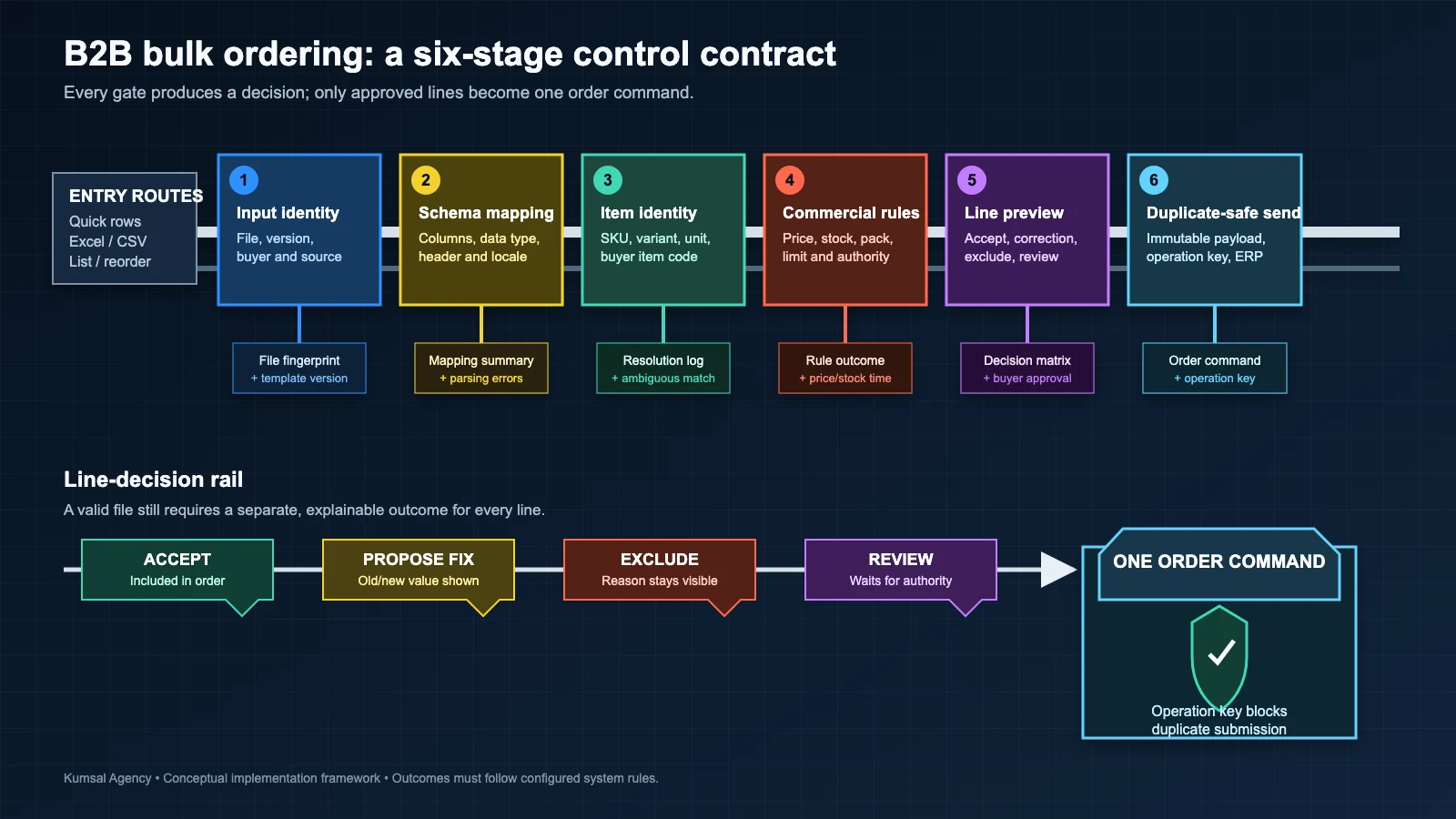
Treat bulk ordering as an evidence-producing data contract rather than a file feature. Every upload or quick-entry session should pass through six stages:
- Input identity: Session/file fingerprint, uploading account, time, channel and template version.
- Schema mapping: Map item code, quantity, unit, requested date, project or shipping address to the correct fields.
- Item identity resolution: Link customer code, internal SKU, barcode, manufacturer code or permitted alternate to exactly one item/variant.
- Commercial validation: Saleability, minimums, pack multiples, inventory behaviour, customer pricing, currency, credit and other order rules.
- Line-decision preview: Accepted, corrected, excluded or held for review, with previous and proposed values visible.
- Immutable submission: Convert the buyer-approved line set into one versioned order command that remains duplicate-safe on retry.
The same contract can serve Excel, paste, an editable grid and reorder. Product and commercial rules then behave consistently even when the entry channel changes.
Define the file and template contract explicitly
“Supports Excel” is not a complete requirement. Document supported file types, maximum size and row count, template revision, character encoding, decimal and thousands separators, date formats, header rows, blank rows and empty-cell behaviour.
RFC 4180 documents that a CSV header can be optional, records are separated by line breaks and fields containing commas, line breaks or quotes require special handling. Real exports can still use different delimiters and encodings. When the system infers a format, show the result to the buyer instead of silently accepting ambiguity.
Place a visible or machine-readable version in the downloadable template. If a buyer uploads an older template, explain the revision difference and offer remapping rather than assuming column positions.
Treat upload security as part of order validation
Do not trust a bulk-order file merely because an authenticated customer supplied it. Validate extension, content type and file signature together; apply an allow-list; generate storage names; limit size and rows; and isolate parsing. Files containing macros or unnecessary rich features need an explicit policy.
The OWASP File Upload Cheat Sheet recommends not trusting the extension alone, validating content type and signature, renaming files, setting size limits and controlling storage. A bulk-order service parses rather than publishes the file, but the upload surface still needs this discipline.
Column matching may be suggested; the buyer owns the decision
One dealer may use “Item Code”, another “Stock No” and another “Material”. The system can suggest a mapping but should not silently equate item code with description or quantity with case count.
| Field | Validation | Behaviour when ambiguous |
|---|---|---|
| Item code | Must resolve to one saleable item/variant | Show candidates and ask the buyer |
| Quantity | Positive number with permitted precision | Stop the line; reject zero or text |
| Unit | Permitted piece/case/pallet for the item | Show the default explicitly or ask |
| Ship-to/project | A record available to the account | Reject unauthorised values |
| Requested date | Format and business rule | Show raw value and expected format |
Mapping profiles can be saved by customer or source system, but retain revision history and the last validation date.
Resolve item identity before calculating price or stock
A code that maps to several items, variants or a retired item must not trigger a silent selection. Define the resolution order: customer item code, internal SKU, barcode, manufacturer code and approved equivalent. Make the source and confidence of each match visible.
Automatically replacing a discontinued item can create commercial and technical risk. Offer alternatives, but where specifications, price or customer approval matter, do not turn a suggestion into an order line without the buyer's decision.
Commercial validation should be line-level and time-stamped
Never treat price, stock or discount values in the file as authoritative. They can provide context or a comparison, but the current result should be calculated from server-side customer, legal-entity, ship-to, currency, date, contract and item rules.
Minimum order quantity and pack multiple are different rules. “At least 12” and “multiples of 6” may both apply. If the system proposes rounding, show the original value, proposed value, rule and commercial effect in the preview; do not round silently. N‑12 focuses on applying a pricing decision to bulk lines, not defining the entire dealer-price engine.
The line-decision matrix should keep the buyer in control
| Line outcome | Example | Buyer action | Order effect |
|---|---|---|---|
| Accept | Valid item and quantity | None | Included in approval scope |
| Proposed correction | Adjust to a pack multiple | Accept or reject old/new value | Approved value is included |
| Exclude | Discontinued item | Remove line | Other lines may proceed under policy |
| Review | Ambiguous code or authority/credit exception | Correct, explain or route to sales | Not submitted until resolved |
Whether one invalid line blocks the whole file or valid lines may proceed is a company policy. Before submission, show the buyer exactly which lines are excluded. Upload history should retain a line-outcome summary, not just a filename.
Separate preview from order creation
A preview is a calculation at one price and inventory instant; order creation is a later commercial decision. Price, inventory, promotions or credit can change while the buyer reviews the preview. Revalidate critical rules at submission and return material differences to the buyer.
Microsoft's batch-upload documentation similarly separates template completion, upload, review, submission, invalid-order handling and batch history. This supports a broader design rule: File Accepted and Order Created should never be the same state.
The quick-order grid must support keyboards and assistive technology
Requiring a mouse in a long order grid undermines efficiency and accessibility. Row creation, cell editing, error discovery, copy/paste, selection and preview should have consistent keyboard behaviour.
The W3C WAI-ARIA grid pattern explains that an interactive data grid needs application-managed focus and can use Arrow, Home/End and Page Up/Down keys for cell navigation. Adding an ARIA role is not sufficient; test actual keyboard, screen reader, zoom and mobile behaviour.
Prevent duplicate orders with an operation key
A buyer can press Submit twice, lose connectivity before the response arrives or trigger an integration retry. Every create-order request should be unique to the account, a fingerprint of the approved line summary and a client operation ID. When the same key returns, respond with the previous outcome instead of creating another order.
Uploading the same file twice does not always mean an accidental duplicate; the buyer may genuinely intend to reorder. Use the file fingerprint for a warning, while enforcing duplicate protection on the approved submission command.
ERP transfer is the final stage of the bulk-order flow
Accepted portal lines may become one or several ERP sales orders. Legal entity, warehouse, ship-to, currency, tax or project rules can split the result. Make the split visible and link the portal order identity to every created ERP document.
The data-ownership, duplicate-protection, exception-queue and replay approach in the ecommerce–ERP integration guide also applies here. When integration fails, do not leave the buyer with an ambiguous “order missing” message; show a verifiable pending or review state.
What must be locked before order approval begins?
If internal approval is required, first make the buyer-approved line set and commercial context an immutable revision. A later item or quantity change may invalidate the related decisions. The quick-order module creates an order draft; authority and budget approval are another lifecycle. This keeps N‑12 distinct from N‑09.
Write acceptance tests around boundary cases
| Test | Expected behaviour | Evidence |
|---|---|---|
| Same item appears in two rows | Merge or retain under policy; show the total | Raw rows and decision |
| Item code begins with zero | Numeric conversion does not remove the zero | Raw and normalised value |
| Quantity breaks the pack multiple | Do not round silently; propose a correction | Old/new quantity and rule |
| File contains formulas or unexpected content | Apply safe parsing or reject | File-control outcome |
| Price changes after preview | Revalidate on submission and expose the difference | Two price revisions and times |
| Submission response times out | Same operation key does not create another order | Request key and final document |
| Unauthorised ship-to is uploaded | Reject the line or order | Account-to-address authorisation check |
| One line is invalid and others are valid | Apply the company's partial-submission policy explicitly | Included/excluded line summary |
Which measures should define success?
Establish a baseline for the current process. Track order-draft preparation time, first-pass valid-line rate, correction types, template revisions, buyer-rejected suggestions, duplicate-submission attempts, ERP exception age and post-order corrections. “The upload was fast” can hide poor commercial decisions.
What should an implementation proposal deliver?
- Buyer roles, entry routes and ordering scenarios;
- File/template contract, column mapping and security controls;
- Resolution table for item codes, variants, units and customer codes;
- Minimum, pack, price, inventory, credit and date rules;
- Line decisions, partial submission and buyer preview;
- Keyboard, screen-reader, mobile and high-row-count testing;
- Operation keys, ERP/WMS API contracts and exception queues;
- Acceptance tests, pilot customer group, training and handover.
Use the web-software integrations guide to evaluate the wider integration scope. In a bulk-order project, however, correct line decisions and buyer control come before the API connection.
Conclusion
B2B bulk ordering is not a shortcut that copies spreadsheet rows into a basket without question. It combines the buyer's preferred entry route with a secure file/field contract, item identity, commercial validation, understandable line outcomes and a duplicate-safe order command. Pilot the first release with one customer group, a limited template and real error examples.
If you want to scope quick order, Excel/CSV import and ERP connectivity for a dealer or wholesale channel, explore Kumsal Agency's ecommerce services. Before discovery, gather sample files, item identities, pack rules, price/inventory sources and the approval lifecycle.