


Aydınlatma metni yükleniyor…
Google Analytics 4 setup for a B2B e-commerce platform or corporate website should do more than count visitors and page views. Its real purpose is to make a long, complex customer journey measurable—from initial product research and account registration to quote requests, internal approval and order confirmation. Achieving that requires business goals, user experience, web development and data requirements to be addressed within one measurement architecture.
A standard tag can capture page views and some automatic interactions. It cannot, on its own, explain which activities generate qualified demand, where buyers abandon a quotation workflow or which step prevents an order from reaching the ERP. Reliable analysis depends on well-defined events, meaningful parameters and integrations with the systems that confirm business outcomes.
Why is GA4 setup different for B2B businesses?
In B2C commerce, a conversion is often associated with a purchase completed by one person during a relatively short journey. A B2B decision may take days or weeks and involve buyers, technical specialists, managers and finance teams. A visitor might download a specification sheet, return to compare products, register for a corporate account and request a quotation. The final order may then be completed through a dealer portal, sales representative, CRM or ERP system.
Focusing only on the purchase event would therefore hide much of the platform’s commercial value. Account applications, dealer logins, authorised price views, product-list interactions, quote creation, quote submission, approval and order confirmation can all represent meaningful progress. Tracking these micro and macro conversions separately helps marketing teams evaluate demand sources, sales teams identify qualified opportunities and e-commerce teams locate friction in transactional workflows.
Create a measurement strategy before implementation
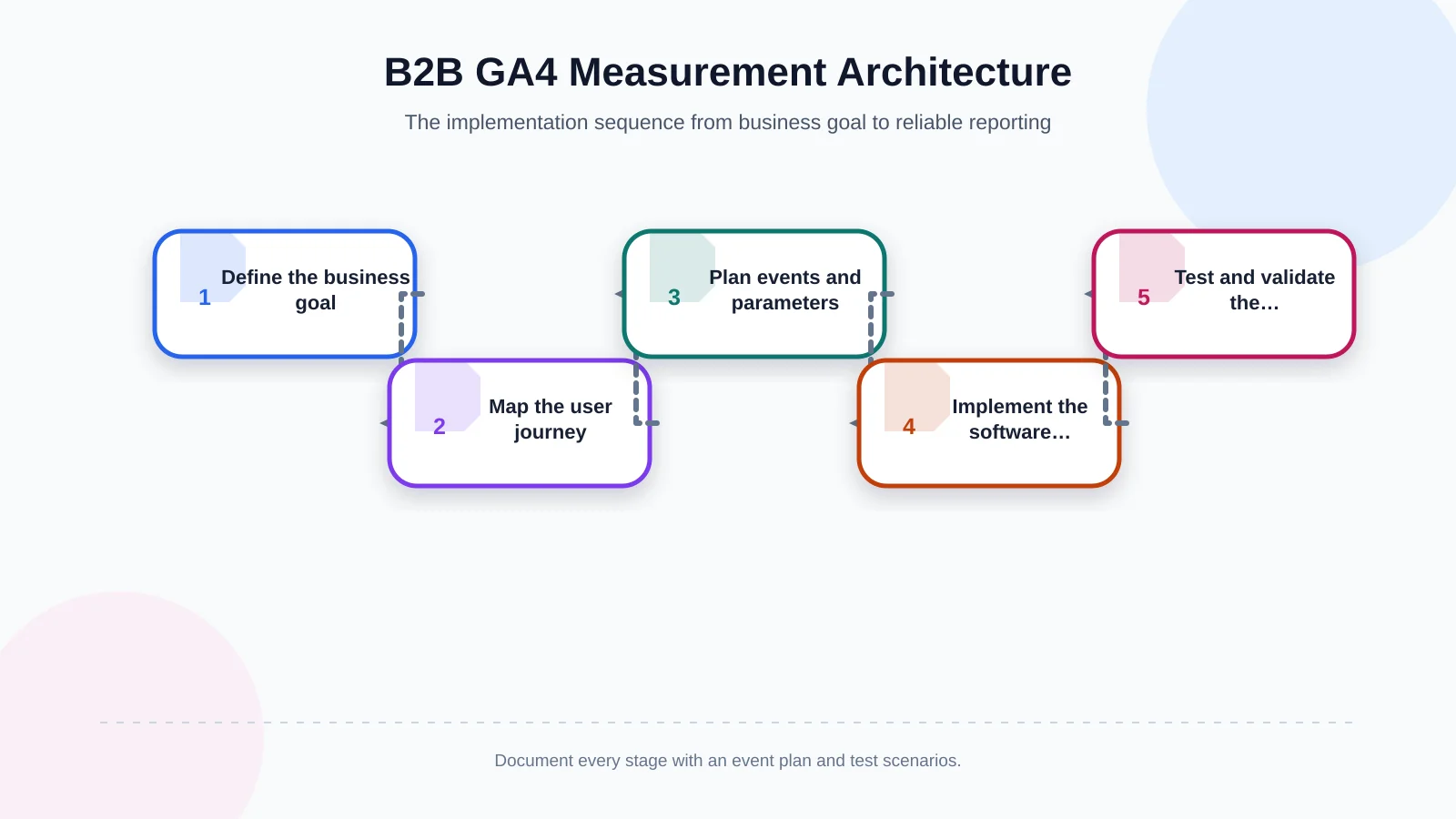
Before creating tags or configuring Google Tag Manager, answer one question: “Which business decision will this data support?” Traffic volume alone rarely provides a useful answer. If the objective is to increase quotations, for example, the business should distinguish between people who open the form, begin entering information, submit it successfully and eventually become sales-qualified opportunities.
Define business goals and KPIs
Connect each goal to an observable user or system behaviour. “Expand the dealer network” might be measured through registration starts, completed applications and approved dealer accounts. “Increase the share of digital orders” could be connected to product views, cart additions, checkout completion, approval and ERP acceptance.
GA4 event counts and real business outcomes are not interchangeable. A browser can report that a form was submitted, while the CRM determines whether a valid lead was created. The website may display an order confirmation, while the ERP decides whether the order was accepted. The measurement plan should identify both the behavioural signal and its authoritative operational record.
Map the user journey
Document the paths followed by different roles. A first-time visitor may use a contact form, while an existing dealer signs in to view negotiated prices. A purchaser without approval authority may prepare a cart and submit it to a manager. Other users may request samples, download certificates or ask a sales representative to complete the transaction.
The journey map should connect anonymous visits, registration, authentication, product discovery, quotation, approval, ordering and after-sales activity to the actual interfaces and systems involved. This prevents the analytics implementation from being based on assumptions that do not reflect how the B2B platform works.
How to build a GA4 event and parameter plan
GA4 measures interactions through events. Google defines events as specific interactions or occurrences, such as loading a page, clicking a link or completing a purchase. Using recommended event names and their specified parameters makes standard reports and future integrations more useful. Google’s recommended GA4 events documentation should be the starting point.
The event plan should include the event name, trigger condition, parameters, data source, responsible team and test scenario. Establish naming conventions early and avoid sending the same behaviour under different names on different pages. Event names and parameters must not contain email addresses, phone numbers, personal data or unrestricted form content.
Example events for B2B websites
- generate_lead: A contact or project enquiry is successfully recorded.
- sign_up: A dealer or corporate-account application is completed.
- login: An authorised user successfully accesses the portal.
- file_download: A catalogue, technical sheet or certificate is downloaded.
- request_quote: A quotation request is successfully saved.
- quote_submitted: A prepared quotation basket is sent to the sales team.
Custom events can express company-specific processes, but a recommended event should be preferred when it accurately represents the same behaviour. For example, form_start can indicate interest in a form, while generate_lead represents a successful result. A button click alone must not count as a completed submission. Validation errors, network failures and server rejections need to remain distinguishable.
The data flow between the form and the sales process also matters. The website–CRM integration guide explains how field mapping, duplicate resolution, ownership, exceptions and sales feedback can be planned around a reliable lead lifecycle.
Recommended events for B2B e-commerce
Product discovery and ordering can use recommended commerce events such as view_item_list, select_item, view_item, add_to_cart, view_cart, begin_checkout, add_shipping_info and purchase. Google’s GA4 e-commerce measurement guide describes how products should be sent through the items array and how the available parameters are structured.
In a B2B environment, standard events may be enriched with non-personal parameters such as quote mode, customer segment, sales channel, currency or approval requirement. Product ID, product name, category, quantity, unit price and transaction ID should be populated consistently. If customer-specific prices are measured, commercial confidentiality, access permissions and reporting visibility must also be considered.
Which events should be marked as key events?
Events that represent meaningful business value can be marked as key events in GA4. Marking every click, filter change or interaction as important makes reports harder to interpret. Prioritise outcome-based actions such as a successfully recorded quote request, qualified form submission, completed account application or confirmed order. Form opens, product comparisons and filter usage can remain supporting analysis events.
Duplicate events caused by refreshes, returns or double clicks should be prevented. Orders need unique transaction IDs, while quotations and applications should use non-personal references that allow duplicates to be identified. Whenever possible, success should depend on a confirmed application or server state instead of merely reaching a thank-you page.
Choose the right technical implementation
The Google tag can be added directly to the source code or managed through Google Tag Manager. A tag-management implementation may be sufficient for a straightforward marketing website. Platforms with multiple roles, negotiated prices, dynamic carts and multi-stage quotations generally require the application to produce a dependable data layer.
The data layer acts as a controlled contract between what happens in the interface and what is sent to GA4. It can expose a successful form result, quote reference, commerce item data or workflow status without relying on fragile selectors or visible button text. Development, analytics and quality-assurance teams should agree on this contract before implementation.
Single-page applications also require deliberate handling of virtual page views, history changes and component-level interactions. If payment services or portals operate on different domains, cross-domain measurement and unwanted referrals must be tested. For results completed on the server, such as ERP acceptance, browser events should be reconciled with back-end records.
Measure business outcomes through CRM and ERP integrations
GA4 can show that a form was submitted, but it cannot independently determine whether the record became a valid opportunity or sale. When a CRM record ID, campaign context and necessary attribution fields are transferred securely, teams can build a more reliable connection between the marketing source and the sales outcome. Personal information must not be sent to Analytics, and access permissions and retention periods should be explicitly defined.
Likewise, an “order received” message in a portal is not necessarily the same as ERP acceptance. The architecture can distinguish order creation, approval submission, ERP transfer, acceptance and failure through separate system states. GA4 remains useful for behavioural analysis, while CRM and ERP records remain the authoritative sources for commercial, financial and operational accuracy.
| Stage | GA4 event | Validation source | Success criterion |
|---|---|---|---|
| Enquiry | generate_lead | CRM record | Form successfully recorded |
| Registration | sign_up | Portal database | Application completed |
| Quotation | request_quote | Quotation system | Quotation number created |
| Order | purchase | ERP | Order accepted |
Privacy and consent management
Analytics cannot be separated from customer privacy. Cookie preferences, privacy notices, processing purposes and retention policies should be reviewed with the organisation’s legal and information-security stakeholders. According to Google, Consent Mode does not provide a consent banner. It adjusts tag behaviour using choices received from an existing banner or consent-management platform, and basic and advanced implementations behave differently. Google’s Consent Mode documentation provides further details.
Names, email addresses, phone numbers, company contact details and other directly identifying form fields must not be sent to GA4. If a user ID is required, the organisation should assess its legal basis, access model and technical implementation. Consent, rejection and preference-update scenarios should all be tested before launch.
Testing and data validation
An implementation is not complete merely because a tag fires. Prepare successful, unsuccessful and duplicate scenarios for every important event. GA4 DebugView, Tag Assistant, browser network records and application logs can be reviewed together. E-commerce events should be validated in real time with debugging enabled before production data is trusted.
- Does the event fire only after the intended user action?
- Are failed forms or rejected orders incorrectly counted as conversions?
- Do event names and parameters match the measurement plan?
- Are currency, value, item data and transaction IDs correct?
- Do refreshes or double clicks create duplicate records?
- Does tag behaviour reflect consent acceptance and rejection?
- Do GA4 totals reasonably reconcile with application, CRM and ERP records?
Quality control should continue after launch. Monitor sudden event losses, unexpected spikes, missing parameters and significant changes in channel distribution. New forms, payment steps and portal releases should not go live without updating and testing the measurement plan.
Common GA4 implementation mistakes
- Treating every button click as a conversion.
- Confusing a form click with a successfully recorded submission.
- Sending recommended commerce events with incomplete or incorrect parameters.
- Failing to prevent duplicate quote and order events.
- Leaving test traffic and internal usage mixed with customer activity.
- Excluding CRM and ERP outcomes from the measurement scope.
- Sending personal or commercially sensitive data to GA4.
- Failing to assign responsibility for post-launch data quality.
How Kumsal Agency approaches GA4 conversion tracking
Kumsal Agency treats GA4 implementation as part of the user experience, web software, e-commerce and integration architecture—not as an isolated tagging task. The process begins with needs analysis and mapping business goals, user roles, quotation steps and order workflows. The team then plans the event dictionary, parameters, key events, data layer and validation scenarios.
Where custom web development is required, B2B events can be connected directly to confirmed application states. Forms, CRM, ERP and e-commerce integrations are designed alongside their measurement requirements. Tags, events, consent behaviour and data consistency are tested after implementation, creating an auditable analytics foundation that teams can trust and extend as the platform evolves.
Make B2B performance visible through real conversions
A well-designed GA4 implementation delivers more than a dashboard with impressive traffic numbers. It reveals which content generates qualified enquiries, which products enter quotation lists, where users leave the journey and which part of the digital ordering process needs improvement. The essential requirement is to describe analytics, software behaviour and operational processes in the same language.
Contact Kumsal Agency to plan GA4 conversion tracking around the business goals and real user journeys of your B2B website, dealer portal or e-commerce platform.