


Aydınlatma metni yükleniyor…
A B2B order-tracking portal is more than a page that says an order is “being prepared.” A useful portal translates events from ERP, warehouse, carrier and document systems into buyer-facing states. It shows which line is at which stage, what evidence exists, why an exception occurred and what should happen next.
This guide is for dealer-channel, wholesale, sales-operations, customer-service and technology leaders. The “Kumsal order-visibility contract” is an original scoping framework developed for this article. It does not guarantee a delivery time, fewer support calls, higher satisfaction or ERP compatibility. Validate the behaviour against the organisation’s order, inventory, production, shipment, invoice and authority rules.
Order tracking is more than one status field
A corporate order may move through sales, finance, warehouse and logistics processes at the same time. Its header and lines may also disagree: one line can be shipped, another in production and a third held for credit review. The portal should therefore not expose one internal ERP code without interpretation.
Microsoft’s order-history module describes searching and filtering by fields such as order number, confirmation number, date, channel, status and total before opening line, shipment and payment details. This supports treating list discovery and order detail as separate buyer tasks. See the Microsoft order-history documentation.
The Kumsal order-visibility contract
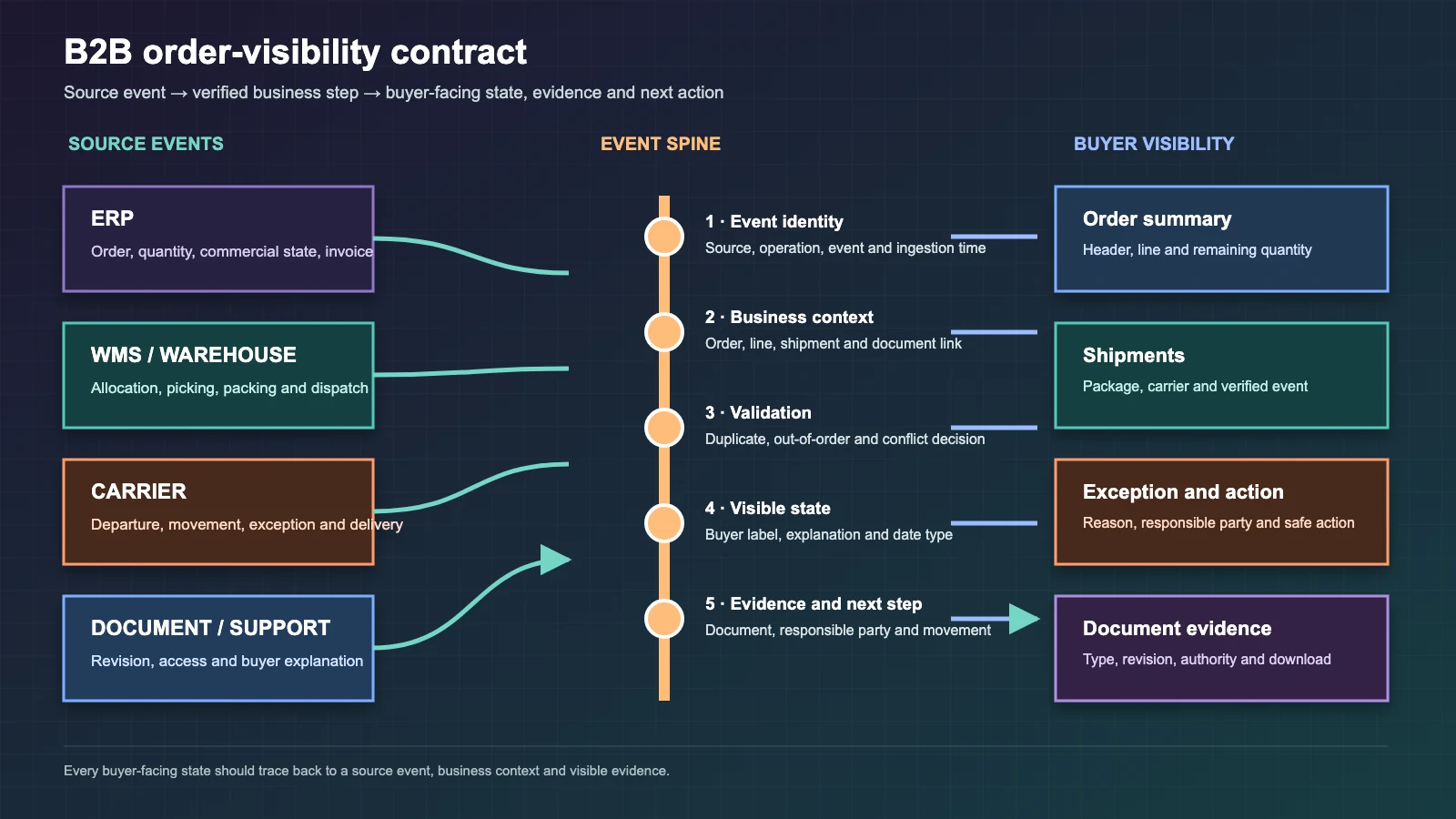
Before exposing a state to a buyer, answer six questions:
- Source event: Which system, person or physical action produced the change?
- Buyer-facing state: What understandable meaning replaces the technical code?
- Document evidence: Is there an order confirmation, invoice, dispatch note, package or carrier record?
- Exception reason: If progress stopped, what can safely and usefully be explained?
- Responsible party: Is the next movement waiting for the buyer, seller, warehouse, carrier or finance team?
- Expected next step: What should happen next, and is its date committed, estimated or unknown?
These fields do not have to appear together on every screen, but they should be defined together in the state dictionary. That turns a raw-code display into an explainable, testable customer experience.
Define internal states before writing buyer-facing language
An ERP or WMS may record detailed codes such as open, released, picking, partially shipped and invoiced. Buyers may not need every internal distinction, but they do need differences that change a decision. A generic “processing” label is not useful if it hides the difference between waiting for stock and already packed.
Map each source code to a buyer label, short explanation, header or line scope, starting and ending events, available evidence, exception reason, date type and visibility role. Include holds, cancellation requests, partial fulfilment and replanning instead of modelling only the happy path.
Separate order-header and line visibility
A header state may be enough for a simple single-delivery order. B2B orders are often split by warehouse, production timing, pack constraints or customer request. The portal should summarise the order and then expose ordered, confirmed, allocated, shipped, cancelled and remaining quantities per line.
“Complete” is reliable only when its closure rule is explicit. Does an order close when every line ships, when the invoice is issued or when proof of delivery arrives? Customer service, finance and logistics should agree on the rule.
Store events, not only the current state
A current-state field cannot explain why a value changed. Record events such as order confirmed, credit review started, stock allocated, picking started, package closed, handed to carrier and delivery confirmed, each with its own timestamp. The current state can then be derived from evidence.
The GS1 EPCIS standard is designed to let different applications capture and share visibility events about physical or digital objects in a business context. EPCIS is not mandatory for every portal, but its “what, when, where and why” model is a useful reference. The GS1 EPCIS 2.0 standard describes visibility events as records of completed business-process steps.
Present partial shipments as separate fulfilment units
One tracking-number field fails when an order becomes several shipments. Store each shipment or handling unit with its lines and quantities, source warehouse, carrier, tracking identity, planned and actual dates and latest verified state.
When a buyer asks where the order is, the answer should come from the relevant shipment rather than only the order header. The unshipped balance must remain visible with a remaining quantity and reason.
Show dates together with their confidence
Order date, requested delivery date, confirmed date, estimated ship date and actual delivery date are not interchangeable. If the interface blurs them, a buyer may read an estimate as a commitment.
Define the source and type of every date: buyer request, ERP plan, production plan, carrier estimate or actual event. When an estimate changes, retain the revision and reason in the operational history instead of silently replacing the previous value. Show buyers only the level of detail they need.
Connect the document centre to order events
Order confirmations, pro-forma invoices, invoices, dispatch notes, packing lists, quality documents and proof of delivery should not disappear into a separate file archive. Link each document to its order, shipment and, where necessary, line identity.
Record document type, revision, creation time, validity, language, access role and source system. If the portal says an invoice is ready, verify that the downloaded file belongs to the same order and current revision. Restrict financial or personal details by account and role.
Turn exceptions into actions instead of hiding them
“On hold” is not an adequate explanation. An inventory hold, credit hold, technical approval, address problem or buyer-response wait has a different next action. The portal should explain what the buyer can do without exposing inappropriate internal notes.
- Provide the required document or contact route for a payment or credit hold.
- Offer a controlled correction request for an invalid address.
- Let an authorised buyer choose whether available lines ship while the balance waits.
- Show the revision under review and responsible team for technical approval.
- For a carrier exception, expose the last verified event and current estimate.
Microsoft’s order-hold documentation demonstrates examining a hold through detailed state and reason. A customer portal should not copy the internal screen; it should translate the hold into an appropriate explanation and action. See Microsoft’s order-hold documentation.
Assign field ownership across ERP, WMS and carriers
The portal should not become another system of record. Ordered quantity and commercial state may come from ERP, physical picking from WMS, transport events from the carrier, and buyer-facing explanations from a controlled state dictionary. Assign one authoritative source and update direction for every field.
Use the field-level approach in the ecommerce–ERP integration guide. Preserve the event identity, revision and time from the source system and do not apply the same event twice.
Design for delayed and out-of-order events
A carrier event may arrive before the ERP update; a network interruption may delay an older warehouse message; a user may retry the same operation. Arrival time alone cannot define the business sequence.
Every event should carry a unique identity, event time, ingestion time, source, order or shipment relationship and revision. Reject duplicates, re-evaluate out-of-order events under explicit rules and send conflicts to a visible review queue. Do not present unverified temporary data as a committed fact.
Generate notifications and portal truth from the same source
If email, SMS or application notifications use different rules from the portal, the buyer receives two versions of the truth. Notifications should use the same visible-event dictionary, link to the relevant order or shipment and avoid unnecessary sensitive data in message content.
Not every event deserves a notification. Select decision-changing events such as order acceptance, a hold requiring buyer action, shipment departure, delivery exception and completion. Manage channel consent, preferences and repetition limits separately.
Plan accessible status updates
Do not communicate state through colour alone. Combine a label, concise explanation, date and, where useful, an icon. Do not move keyboard focus unexpectedly when data refreshes, but announce significant results caused by a user action to assistive technology.
W3C explains that advisory dynamic information can use the status role without forcing focus. This technique does not make a page accessible by itself; meaningful wording, logical focus order, keyboard operation and error explanations still need testing. See the W3C status-role definition.
Enforce access through account, role and order relationship
A buyer, finance user, warehouse user and manager may need different details. A group company or dealer network should also access only its own orders. Knowing or changing an order number in a URL must never grant access.
Validate customer account, user role, order ownership, document class and, where relevant, location relationship on the server for every request. Exports, document downloads and support actions must follow the same authority model.
Write acceptance tests that are harder than sample orders
- One order is fulfilled from two warehouses in three shipments.
- One line ships while another waits for credit review.
- A carrier event arrives late, twice or in the wrong order.
- An estimated date changes twice while the reasons remain auditable.
- A cancellation request arrives after packing has started.
- A user from another account attempts to access an order or document URL.
- An invoice revision changes and an older link is used.
- Filters, detail and status updates are operated with a keyboard and screen reader.
For each scenario, verify the source event, portal state, buyer explanation, notification, document, authority result and exception queue together.
Which measures should define success?
Do not rely only on portal sign-ins. Measure visibility latency, unmapped events, duplicate events, denied cross-account access, support requests after a buyer views the state, successful document retrieval and exception-resolution time. Treat these as baseline observations, not guaranteed targets; accountable people should set thresholds from real operations.
What should an implementation proposal deliver?
- Order, line, shipment, package, document and event data model;
- Source-code-to-buyer-state dictionary and visibility rules;
- ERP, WMS and carrier field ownership plus integration contracts;
- List, filter, detail, timeline, document and exception experiences;
- Role, customer-account and document authority matrix;
- Duplicate/out-of-order event handling, retries and review queue;
- Notification policy, accessibility and boundary-case tests;
- Pilot customer group, training, monitoring and technical handover.
Conclusion
A B2B order-tracking portal is not a row of technical codes from different systems. It is a visibility product that translates source events into buyer decisions while preserving the relationships among lines, shipments, dates, documents, exceptions and authority. Pilot the first release with a limited customer group, real partial shipments and difficult failure examples.
If you want to scope order visibility, ERP/WMS connectivity and a customer or dealer portal, explore Kumsal Agency’s ecommerce services. Before discovery, gather state codes, sample orders, shipment splits, documents and recurring support questions.