


Aydınlatma metni yükleniyor…
A warehouse mobile app should do more than move receiving, putaway, picking, transfers, counting and shipping onto a small screen. It should prove every physical movement with the item, quantity, location, serial or lot, worker, device and server outcome. Dependable planning therefore starts with a different question: which warehouse decision must be verified, by whom, at which point and with what scan?
This guide is for warehouse and logistics managers, operations teams, technology owners and project sponsors. The “Kumsal warehouse movement envelope” and offline reconciliation model are original scoping tools developed for this article. They do not guarantee the capabilities of any device, ERP or WMS product. Validate the final scope against the warehouse layout, identity scheme, connectivity, applicable requirements, device hardware and existing systems.
Which work should a warehouse mobile app cover?
The first release does not need to mobilise every warehouse process. Start with high-volume tasks where an incorrect record has a meaningful operational consequence and the physical confirmation is clear. Common candidates include:
- Receipt against a purchase, production or transfer document;
- Putaway of an accepted pallet, parcel or item to a storage location;
- Order picking, consolidation and packing;
- Transfers between bins, warehouses or quality zones;
- Cycle counting, variance review and authorised adjustment;
- Parcel, pallet, route or vehicle confirmation at the shipping gate;
- Exception movements for returns, quarantine, repair or damage.
For every task, define the initiating document, permitted items and locations, mandatory confirmations, cancellation behaviour and evidence of successful completion. Microsoft's warehouse mobile-device configuration documentation similarly distinguishes inquiries, work creation and execution of existing work, and shows that product, location or quantity confirmation can depend on work type. This is not a recommendation to copy one product; it is a useful example of modelling work and evidence together.
The Kumsal warehouse movement envelope: What should every scan prove?
“Barcode scanned” is not an auditable warehouse movement. The code may identify the correct item but belong to the wrong task, location, document revision or already completed operation. Store the following envelope for every critical movement:
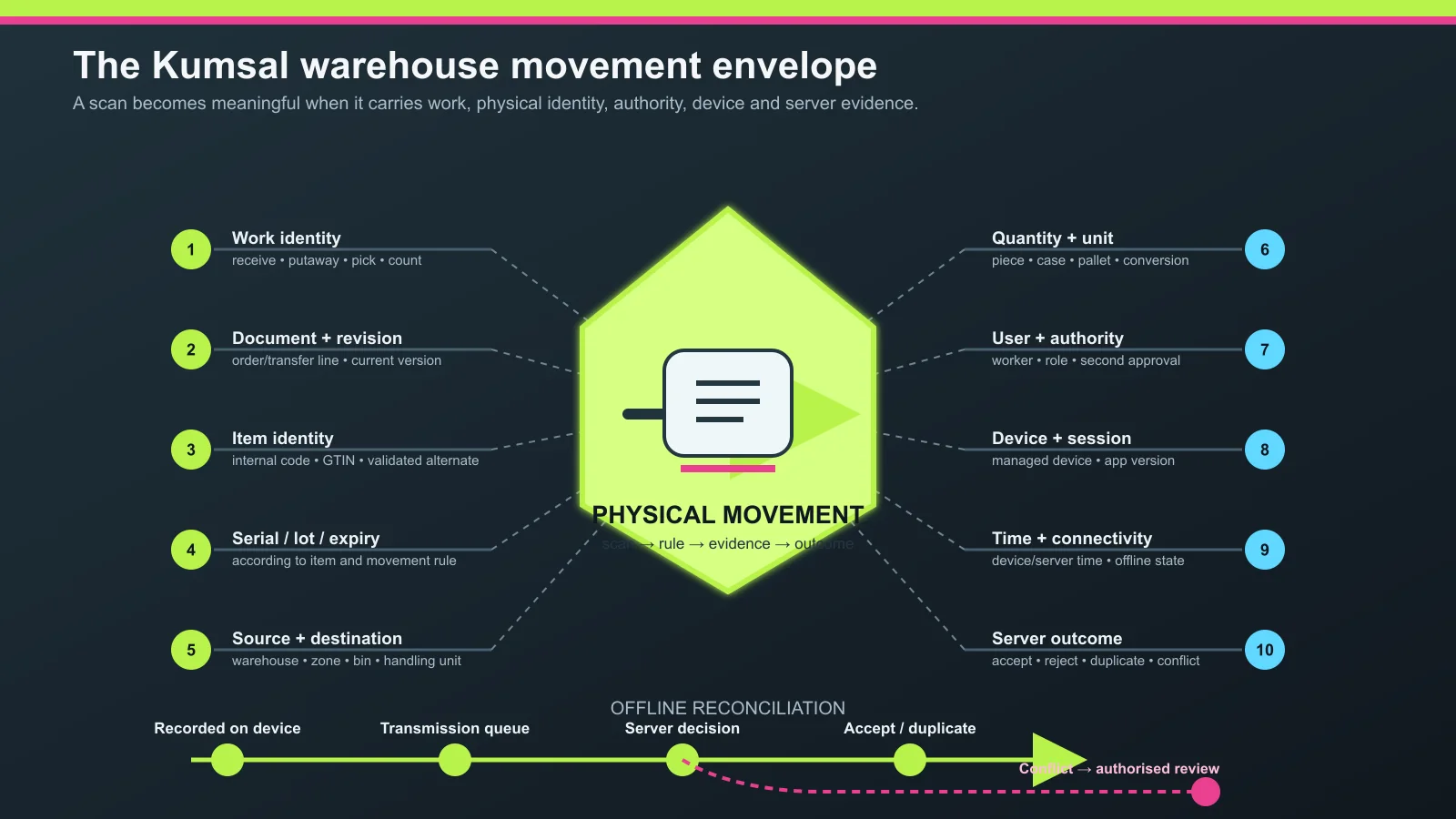
- Work identity: Receipt, putaway, pick, count, transfer or shipping task.
- Document and revision: Order, shipment, production or transfer line and its current version.
- Item identity: Internal code, GTIN/barcode or another validated identifier.
- Traceability dimension: Serial, batch/lot, expiry date or another required attribute.
- Source and destination: Warehouse, zone, aisle, bin, licence plate or handling unit.
- Quantity and unit: Pieces, cases, pallets or a value with its conversion rule.
- User and authority: Worker, role and any second approval.
- Device and session: Managed device identity, app version and secure session.
- Time and connectivity: Device time, server time and online/offline state.
- Server outcome: Accepted, rejected, duplicate, conflicted or held for review.
The purpose is not indiscriminate data collection. It is to answer “why is this stock here?”, “who moved this serial number?” and “why did the same movement appear twice?” through one evidence chain.
Model the physical flow before designing screens
Warehouse workers use the app to complete physical work safely, not to fill out long forms. Derive screens from movement decisions, not department names.
| Movement | Starting evidence | Mandatory confirmation | Completion evidence |
|---|---|---|---|
| Receipt | Expected document/line | Item, quantity, serial/lot, handling unit | Received quantity and accept/quarantine outcome |
| Putaway | Accepted inventory | Source handling unit and destination bin | New location movement |
| Picking | Assigned work | Source location, item and quantity | Pick container/licence plate and remainder |
| Counting | Count task and scope | Location, item and counted quantity | Variance, review or authorised adjustment |
| Shipping | Ready shipment/load work | Parcel/pallet, door, route or vehicle | Load event and related document |
Model short and excess quantities, unreadable labels, wrong bins, split pallets, cancellation, device replacement and simultaneous counting as carefully as the happy path.
Barcodes, 2D codes and RFID do not solve the same problem
A barcode often suits deliberate line-of-sight confirmation of one label. RFID can detect multiple tags without line of sight when tags, readers, antennas, frequency and the physical environment are designed together. Metal, liquids, tag placement, read zones and false positives require field testing. Select technology around the identity and event you must capture—not around which option sounds newer.
GS1's RFID resources treat EPC tag data, air interfaces and reader/software interfaces as distinct standard layers. The GS1 Global Traceability Standard likewise separates identification, data capture and data sharing in interoperable traceability. The practical implication is simple: decide which object must be identified, at which event and at what granularity before choosing a label technology.
| Question | Barcode/2D may fit | An RFID pilot may fit |
|---|---|---|
| Reading mode | A worker deliberately confirms one label | Multiple tags pass through a controlled read zone |
| Error control | The selected item is explicit to the worker | Software filters the read zone against an expected set |
| Infrastructure | A camera, imager or laser scanner may be enough | Tags, readers, antennas, field tests and integration are required |
| Decision | Precise user confirmation at low/medium volume | High-volume repetitive flow validated by a pilot |
Scanning must remain usable in the warehouse environment
Consumer camera scanning and warehouse work under gloves, dust, low light, movement, long shifts and high scan volume are different conditions. Test barcode density, working distance, label quality, drop resistance, battery replacement, display readability, gloved input and accessories before selecting devices.
Zebra's DataWedge documentation shows that capture from an integrated scanner, camera or connected peripheral; delivery as keystrokes or application intents; and audio, haptic, LED or screen feedback are separate configuration choices. The vendor-neutral requirement is that the app distinguish successful, rejected and uncertain scans, and make accidental repeated scanning visible.
Serial, lot and expiry rules must follow the task
Demanding serial or lot entry for every item can damage usability; omitting it where required destroys traceability. Answer these questions by item and movement class:
- Is serial capture mandatory on receipt, issue or both?
- Are batch, production and expiry dates parsed from the code, and can a user correct them?
- How does the task split when one case contains multiple lots?
- Is FIFO or FEFO direction mandatory, and may an authorised user override it with a reason?
- Does an unknown serial or lot go to quarantine or a review queue?
The screen should enforce the policy context, not merely display fields. If serial tracking is mandatory, workers should not be able to bypass it by typing an aggregate quantity.
Offline work is more than “send it when the connection returns”
Metal racking, cold rooms, loading areas and access-point handoffs can make connectivity intermittent. Not every operation should be available offline, however. Classify decisions into three groups:
- Readable offline: A secure local copy of assigned work, item master data and permitted locations.
- Queueable: A movement that can be stored with a unique operation identity while server confirmation is delayed.
- Online-only: A financial, hard-to-reverse or concurrent decision that depends on current state held by other users.
The official Android offline-first guide separates local and network data sources and treats retries and conflict resolution as explicit design decisions for queued or local-first writes. In a warehouse project, every offline movement should retain a unique operation ID, work revision, device time and user context. When the server receives the same ID twice, it should not apply the movement twice.
Offline reconciliation states
A single Synced/Not Synced indicator is not enough. Distinguish at least: recorded on device, awaiting transmission, accepted by server, recognised as a duplicate, conflicted with a newer work revision, invalidated by changed stock/location state and awaiting authorised review. A failed movement should not disappear; the worker should see its reason and next action.
Assign ERP/WMS ownership field by field
If the mobile app becomes its own stock authority, several truths can collide when connectivity returns. Document which system owns items, barcodes, warehouses, bins, work, stock, serial/lot and users. The mobile app should produce operational evidence while the central system applies business rules and returns the final outcome.
The data-ownership, duplicate-protection and exception-queue approach in the ecommerce–ERP integration guide also applies to warehouse movements. Carry the work/document revision, unique operation key, expected previous state and requested next state in each command.
Device and user management belong in scope
Store-installed apps and shared passwords make movement ownership ambiguous. Define device registration, worker/role, warehouse scope, session duration, lost-device access removal, app versions, remote configuration and update policy. Microsoft's Warehouse Management mobile-app installation guide treats managed configuration for larger deployments and removing access from a lost or compromised device as separate operational responsibilities.
Write acceptance tests around real warehouse exceptions
| Test | Expected behaviour | Evidence retained |
|---|---|---|
| The same barcode is scanned twice | Quantity increases or a duplicate warning appears according to the work rule | Two scan events and one/two acceptance outcomes |
| Correct item at the wrong location | Reject or route to an authorised exception | Expected and scanned locations |
| Connection fails and device restarts | Unconfirmed queue survives and its status remains visible | Local operation ID and queue state |
| Two devices complete one task | Server applies the first valid outcome and conflicts the other | Work revisions and server decisions |
| Lot-controlled item has a code without lot data | Stop or route to review under policy | Item rule and missing field |
| ERP response times out | User does not create a second unknown movement | Operation key, retries and final response |
| Device is marked lost | New sessions and data synchronisation are blocked | Device state and access-removal time |
Which measures should define success?
Establish a reliable baseline instead of promising a percentage improvement. Track task completion time, rescan rate, wrong-location attempts, synchronisation delay, conflicted movements, manual-review age, inventory variance and device/app errors. Segment results by shift, warehouse, task and item class, and do not evaluate workers through speed alone. Speed, accuracy and safety belong together.
What should an implementation proposal deliver?
- Inventory of warehouse work, roles, identities and exceptions;
- Barcode/2D/RFID decisions and a field pilot;
- Compatibility matrix for devices, scanners, printers and accessories;
- Localised mobile flows and accessible feedback where TR/EN is required;
- Offline data model, queues, retries and conflict rules;
- ERP/WMS API contracts, data ownership and exception handling;
- Role, device, session, logging and access-removal controls;
- Acceptance scenarios, pilot-warehouse plan, training and handover documentation.
Use the native versus cross-platform decision guide to examine the wider product choice. For a warehouse app, however, evaluate platform fit together with scanner SDKs, offline storage, managed devices and full-shift testing.
Conclusion
A good warehouse mobile app is not a miniature ERP that forces workers to fill more fields. It guides the right task through the right item and location, captures the required serial/lot and quantity evidence, protects work when connectivity fails and reconciles it with the central system's decision. Begin with one pilot warehouse, a limited task set and measurable acceptance tests.
If you want to map work from receiving to shipping, choose a device approach and define ERP/WMS integration for your operation, explore Kumsal Agency's mobile application services. Before a discovery session, list your warehouses, daily movement volumes, current labels and devices, connectivity constraints and existing systems.