


Aydınlatma metni yükleniyor…
B2B quote management software is not merely a screen that generates PDFs. A dependable system connects the request, pricing assumptions, quote revisions, authorised approvals, the final version released to the customer, acceptance evidence and order conversion in one traceable workflow. The aim is not to make salespeople complete more fields. It is to remove doubt about which version is current, who approved what and which commercial conditions entered the order.
This guide provides a planning framework for manufacturers, distributors, exporters and project-based B2B service firms. The state model and control matrix were developed for this article. They are not results from a Kumsal Agency client or industry performance benchmarks.
Define where the quote process starts and ends
Quote management does not begin only when a customer asks for a price and end when a PDF is sent. A request may originate from a website form, dealer portal, salesperson, email or CRM opportunity. The finish line also varies: customer acceptance, receipt of a purchase order, creation of an ERP sales order or completion of a contract check are different business outcomes.
Projects that skip these boundaries usually create two problems. Sales marks a quote as won while operations is still waiting for technical or commercial conditions. Meanwhile, the CRM, portal and ERP track the same transaction under unrelated identifiers. The first analysis session should answer four questions:
- Which event and source record open the quote?
- Which checks are mandatory before it is released to the customer?
- What evidence records acceptance?
- Which values become immutable when an order is created?
If the website or catalogue must also collect quotation requests, our guide to planning an export website from catalogue to quotation request covers the customer-facing beginning of this workflow.
Design permitted transitions, not just a list of statuses
A status label says where a record is. The real business rule defines the conditions under which it may move. Microsoft Dynamics 365 documentation for quotes, orders and invoices describes how activating a draft makes it read-only, revising it creates another version and acceptance can lead to an order. This is not a product recommendation. It is a verifiable example of why state and revision need to be separate concepts.
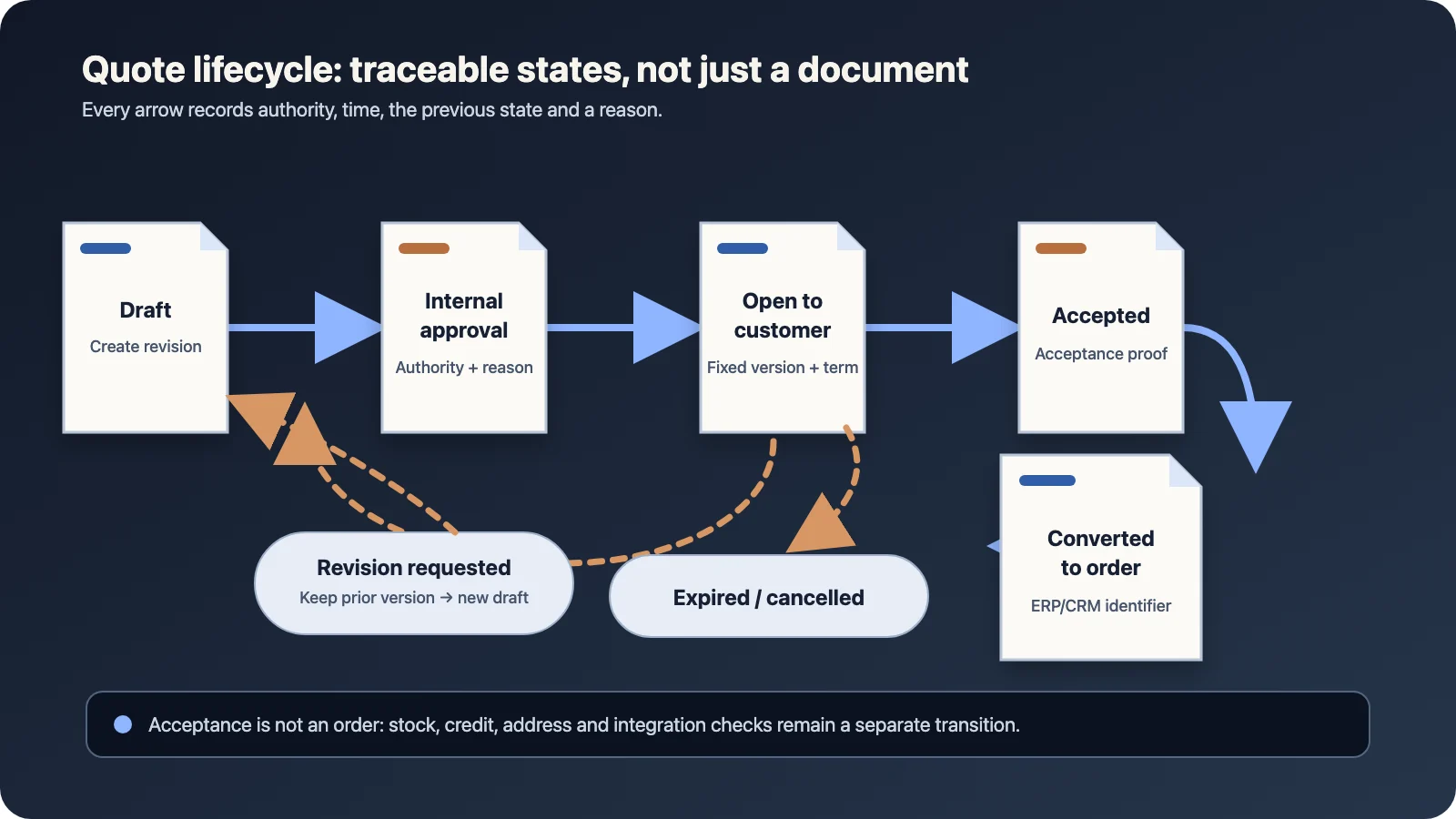
The Kumsal Agency planning framework can begin with seven states:
| State | Who may act? | Required evidence | Possible next state |
|---|---|---|---|
| Draft | Sales representative or quotation specialist | Customer, currency, lines and price source | Internal approval or cancellation |
| Pending internal approval | Approvers selected by the authority matrix | Triggered rule, decision, time and comment | Approved, revision requested or rejected |
| Open to customer | Customer and authorised sales user | Immutable version, release time and validity | Acceptance, revision request, expiry or cancellation |
| Revision requested | Sales team | Reason and previous-version link | New draft revision |
| Accepted | Authorised customer user or sales operations | Actor, time, channel and accepted revision | Order conversion |
| Converted to order | Integration or sales operations | ERP/CRM order identifier and transfer result | Completed or error review |
| Expired / cancelled | System or authorised user | Reason and closure time | New quote or closed |
Names can change with the organisation. What matters is that actions such as reopen, return or quick approval do not become unauthorised shortcuts. Every transition should record the actor, time, previous state and reason.
Keep a revision as a new version instead of overwriting the same PDF
Replacing a quote after it has been sent hides the moment at which price or conditions changed. Microsoft’s activation and revision documentation explains that an active quote is revised into a new draft with an incremented revision number. Stripe’s quote lifecycle similarly separates draft, open, accepted and cancelled states while distinguishing quote and revision sequences.
At minimum, store these values for each revision:
- Root quote identifier and revision number
- Previous revision identifier and reason for change
- A snapshot of product or service lines
- Price list, currency, exchange-rate date and tax assumptions
- Discount, payment, delivery and validity conditions
- A digest of the PDF or web view released to the customer
- Internal approvals and customer decision tied to that revision
The customer accepts a specific revision. A general accepted flag is insufficient if a later editable draft also exists.
Connect the approval matrix to commercial risk rather than job title alone
Routing every quote to the managing director slows the process. Allowing every discount without control weakens commercial authority. Approval should be derived from the properties of the transaction. Current ServiceNow quote approval documentation describes sequential, parallel and combined steps triggered by conditions such as pricing or discount thresholds, payment terms and product characteristics.
An early release does not require an elaborate rules engine. A matrix like this is enough to clarify the requirement:
| Trigger | Review question | Role | Reapproval condition |
|---|---|---|---|
| Discount exceeds authority | Price and margin assumption | Sales manager / finance | Discount or quantity changes |
| Non-standard payment term | Term and credit risk | Finance | Term extends or currency changes |
| Custom technical scope | Deliverability and dependencies | Technical owner | Scope or delivery date changes |
| Non-standard contract clause | Legal exception | Authorised legal role | The relevant clause changes |
The approval screen should show more than approve and reject. The approver needs to see the revision, triggered rule and relevant commercial summary. A rejection or revision request can require a comment, but the software should not present itself as making the legal or financial judgement.
Validity does not automatically reserve price, stock and capacity
A validity date defines the period in which the customer may accept a quote. It should not silently imply that inventory, an exchange rate or production capacity is reserved. SAP quotation conversion analytics treats validity and conversion to sales order as separate dimensions. That distinction is useful when designing the workflow.
When validity ends, decide explicitly whether the system will:
- Block acceptance and request a new quote
- Create a repricing task for the salesperson
- Leave the document available only for viewing
- Allow an authorised user to extend the date under defined conditions
An extension should create a traceable event or a new revision instead of silently changing a document that the customer has already seen.
Model acceptance and order conversion as separate operations
A customer click may record commercial acceptance, but order creation can still require delivery details, tax data, inventory, credit status, a project code or purchase-order reference. Keep accepted and converted to order as separate states.
Repeating the order-creation request must not create a duplicate order. The integration design needs a persistent quote-revision-to-order mapping, a unique operation key and an error queue for failed transfers. Our API integration cost and proposal comparison guide provides a related checklist for comparing scope and failure handling.
Also identify the source of truth for each value. If addresses come from the CRM, stock and price from ERP, and technical options from a configurator, ownership must be explicit. Otherwise the accepted quote and resulting order may differ without a visible decision.
Treat technical attachments as part of the quote record
A drawing, specification or purchase document should be linked to the quote root, revision, uploader, upload time and access permission. The OWASP File Upload Cheat Sheet recommends restricting allowed extensions, validating file type without trusting the browser-provided content type alone, generating filenames in the application, applying size limits and allowing only authorised uploads.
These controls do not prove the commercial accuracy of a file; they help secure the upload surface. Malware scanning, retention, download access and deletion policy still need to match the organisation’s risk profile.
Which screens are required in the first useful release?
Split scope by user tasks rather than a long feature list. Six screens can provide a practical starting point:
- Quote queue: owner, customer, state, validity and pending action.
- Quote workspace: lines, price source, terms, notes and attachments.
- Revision comparison: quantity, price, discount, scope and delivery changes.
- Approval inbox: triggered rule, owner, elapsed time and decision history.
- Customer view: only the released revision, with acceptance or revision request.
- Transfer and error view: CRM/ERP order ID, last attempt and controlled retry.
Live chat, advanced configuration, electronic signatures, multi-company approval and automatic renewal can wait until evidence justifies another phase. The first release creates value by getting the core states and data ownership right.
Do not measure success only by quote volume
Fix event definitions before launch. Does preparation time run from request creation to the first customer revision, or measure only active editing? Is conversion calculated by quote count or quoted value? A changed denominator makes the result incomparable.
Useful starting measures include:
- Time to first customer-ready revision
- Revisions per quote and reason for revision
- Waiting time at each approval step
- Expired, cancelled and accepted quote counts
- Time from acceptance to order record
- Integration errors and manual corrections
These measures do not automatically prove a sales increase. Pricing, campaigns, product availability and customer mix can change at the same time. Use them first to reveal waiting time and process failure.
How should you prepare the scope for quote management software?
Write the scope in verifiable rules rather than product names. For each rule, record the trigger, inputs, decision owner, output, failure path and evidence retained. Select two real but anonymised examples: one standard quote and one that requires the most revision and approval. Walk both through the state matrix to expose missing fields.
When planning a quote management or B2B portal module with Kumsal Agency, you can share the current quote template, approval authority matrix, CRM/ERP systems and one anonymised revision example. The first workshop focuses on process boundaries, data ownership and integration responsibilities before drawing screens.