


Aydınlatma metni yükleniyor…
For B2B companies using Logo Tiger, Logo Netsis or Mikro, the sales process is often more complex than a standard CRM can accommodate. Customer-specific prices, tiered approvals, regional responsibilities, payment terms, credit limits, inventory reservations and order exceptions may all affect the same transaction. When an off-the-shelf CRM cannot reflect these rules, teams usually fall back on spreadsheets, email threads and repeated data entry. The result is delayed quotations, conflicting records across systems and limited visibility into who performed each action.
The answer is not to replace the ERP with another system. A better approach is to preserve the ERP as the authoritative source for financial and operational data while developing a custom CRM around the company’s actual sales processes. Logo’s own integration solution similarly emphasises the central collection of customer, order, inventory and invoice data and its two-way exchange with ERP products, as described in the Logo Data Collection and Integration solution.
What does custom CRM–ERP integration mean?
Two-way integration does not mean copying every field freely between two systems. It requires explicit decisions about where each record is created, which application may change each field and when an update should be transferred. The CRM might be the workspace for opportunities and quotation drafts, for example, while an approved sales order is submitted to the ERP. Confirmed inventory, credit, shipment and payment statuses can then return from the ERP to the CRM.
This model lets sales representatives see an account’s current balance, available inventory and order status without searching across separate applications. Finance and operations teams no longer need to re-enter orders created by sales. Achieving these benefits, however, requires more than a technical connection. Data ownership, process controls, permissions and failure handling must be designed as parts of the same operating model.
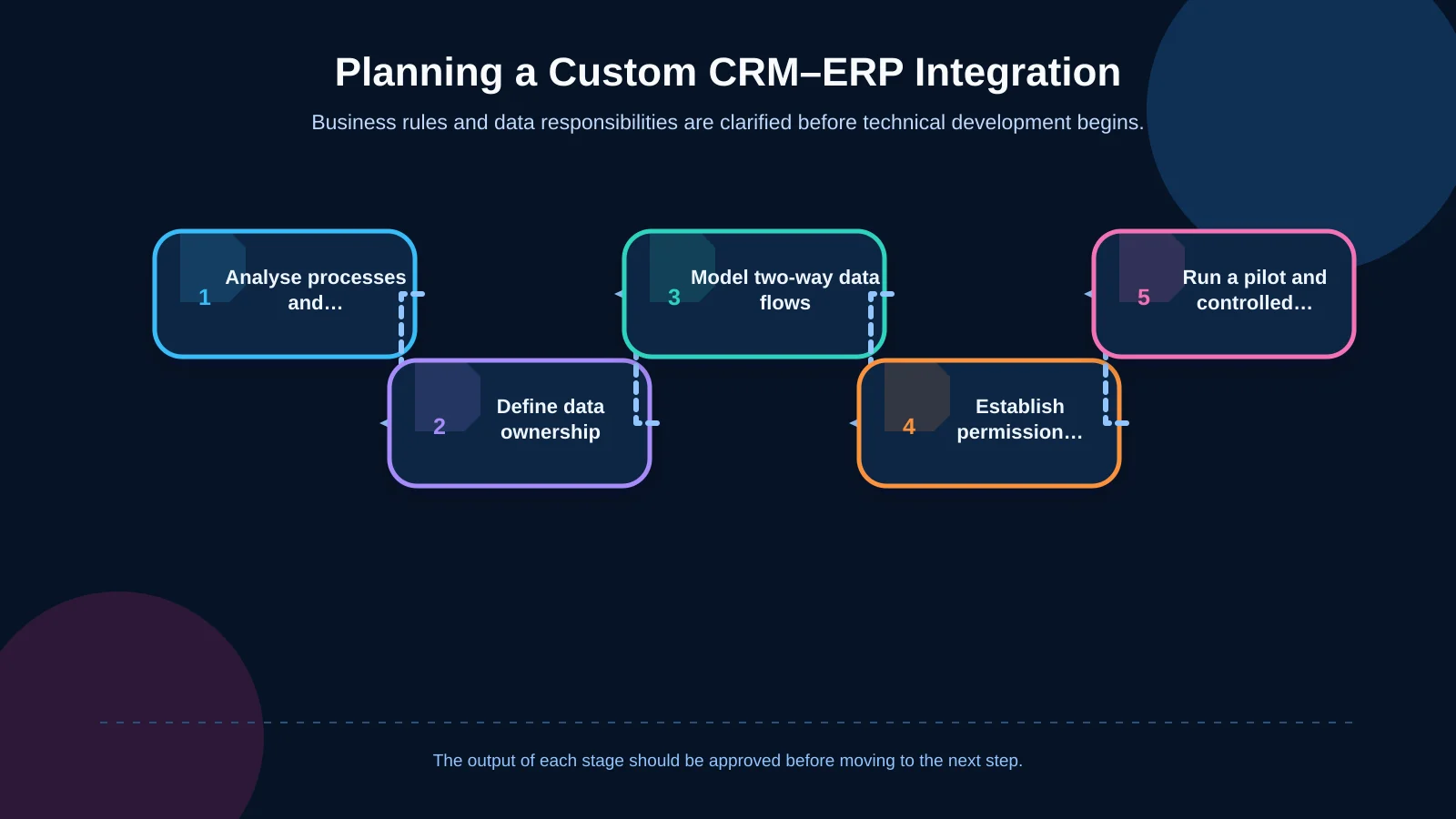
Start with process and requirements analysis
The project should begin with the way the business actually operates, not with interface mock-ups. Document the complete journey from a salesperson’s request to create a customer through quotation, approval, order submission, shipment and payment visibility. Sales, finance, operations, warehouse, IT and ERP owners should participate. Each team must explain not only which screens it uses but also the controls it expects and the exceptions it regularly encounters.
The analysis should produce concrete answers to questions such as:
- Who can request a new customer or current-account record, and whose approval is required?
- Which system is authoritative for products, prices, discounts, payment terms and inventory?
- Under which conditions does a quotation become an order, and which approvals must it pass?
- How should credit-limit breaches, blocked accounts, insufficient stock and invalid prices be handled?
- How much payment and shipment detail does a salesperson genuinely need in the CRM?
- Which companies, branches, regions, customers and documents may each user access?
The resulting deliverables should include scope boundaries, user roles, business rules, a data dictionary and an integration catalogue. This discovery stage is what turns custom web software into a manageable business product rather than a collection of disconnected screens.
Create a data ownership matrix
The most important integration decision is the system of record for each data object. Allowing both applications to update everything may sound flexible, but it creates conflicts that are difficult to resolve. Legal company names, tax information, accounting codes and credit limits should generally remain under ERP control. The CRM can own sales-specific information such as account ownership, visit notes, opportunity stages, activities and working versions of quotations.
Product codes, units, tax rates and official inventory quantities should originate in the ERP and be displayed to authorised CRM users. Pricing requires more than synchronising a single number: the integration may need to evaluate price lists, customer agreements, currencies, quantity breaks, validity dates and discount precedence. The decision order for these rules is explored further in the guide to special pricing and discount rules in dealer portals.
How should two-way data flows be modelled?
Customer and current-account records
A lead created in the CRM should not automatically become an ERP current-account record. It should first pass validation for tax identifiers, contact details and possible duplicates. After approval, the request can be submitted to the ERP, and the account code generated there should be linked back to the CRM record. Subsequent changes need field-level controls: sales may request a new delivery address, for instance, but should not be allowed to alter a credit limit.
Products, prices and inventory
The CRM needs more than a product list. It should receive the context required for a valid sales decision, including active status, unit conversions, variants, warehouse availability, usable quantity and price validity. Whether inventory is refreshed in real time or at scheduled intervals depends on the business. In high-volume environments, the quantity displayed while preparing a quotation should be distinguished from the final availability check performed by the ERP when the order is submitted.
Quotations and sales orders
Quotations should be versioned in the CRM, with products, quantities, prices, discounts, payment terms and delivery details recorded together. Once approved, the accepted version should be preserved as an immutable snapshot. When creating an order, the CRM must send a unique transaction key. If a network interruption causes the same request to be retried, the ERP must not create a second order. After processing, the ERP should return the document number, acceptance status and any actionable error information.
Order approvals should also be designed as a lifecycle rather than a simple button. Limits, delegation, exceptions and an auditable decision history are covered in the B2B order approval workflow guide.
Payments and operational status
The ERP remains the financial owner of payment records. The CRM should expose only the balance, due dates, overdue position and payment status needed by the sales team. Replicating bank-account data or accounting vouchers without a clear use case increases risk. Likewise, order states such as approved, preparing, partially shipped and closed should be mapped through a shared status dictionary. If buyer-facing visibility is required, the same model can support the principles described in the B2B order-tracking portal guide.
Choosing a connection approach for Logo Tiger, Netsis and Mikro
No single integration method is appropriate for every installation. The ERP product matters, but so do its version, licences, company structure, deployment model, existing customisations and implementation-partner policies. Supported adaptation and integration capabilities should be evaluated for Logo Tiger and Netsis. For Mikro, the available API features must be checked against the deployed version. Mikro publishes REST endpoints and an OpenAPI definition for ERP integration; the applicable technical scope should be confirmed in the official MikroAPI documentation.
Uncontrolled writes directly to an ERP database may appear quick, but they can bypass business rules, damage data integrity and break after upgrades. A supported API, service or vendor adaptation layer should be preferred. Even where direct reads are unavoidable, access should remain read-only, query load should be limited and vendor support should be confirmed. Placing an integration layer between the CRM and product-specific connectors also prevents Tiger, Netsis and Mikro differences from spreading throughout the business application.
| Data object | Primary system | Flow direction | Core control |
|---|---|---|---|
| Customer and current account | ERP + CRM request | CRM → ERP → CRM | Duplicate check and approval |
| Products, prices and inventory | ERP | ERP → CRM | Validity and warehouse |
| Quotations and orders | CRM / ERP | CRM → ERP → CRM | Versioning and duplicate prevention |
| Payments and status | ERP | ERP → CRM | Roles and data minimisation |
Technical rules for reliable synchronisation
A working connection is not enough; the system must demonstrate that each operation completed safely. Every message should carry a unique identifier, source system, timestamp, record version and correlation key. Transfer states such as pending, processed, rejected and scheduled for retry should be visible to authorised support users.
- Repeated requests must produce the same result without creating duplicate records or documents.
- Temporary connection failures should be retried at controlled intervals with sensible limits.
- Business-rule failures should enter an exception queue instead of being retried automatically.
- Field mappings and code transformations should be stored and managed as versioned definitions.
- Successful and failed operations should be traceable end to end through a correlation identifier.
- Bulk synchronisation should support pagination, rate limits and resumable processing.
If the ERP responds that an account is blocked, the CRM should not present a generic technical error. It should provide an understandable explanation, route the record to the responsible team and permit a safe retry after the underlying issue is corrected.
Roles, permissions and data security
Hiding a menu item is not authorisation. Controls must be enforced on the server at endpoint, function, record and field level. A salesperson might see only accounts in their territory, while a manager can review the full team. Finance users may access credit and payment fields. Sensitive actions such as exporting data, changing prices in bulk or cancelling orders require separate permissions.
OWASP identifies broken object-level and function-level authorisation among major API risks. The role matrix must therefore apply to every service call, with access denied by default and each required permission granted explicitly. Current categories and guidance are available from the OWASP API Security Top 10.
Data must be encrypted in transit, and credentials must not be embedded in source code. Personal and commercial information should not be copied unless the receiving system has a defined need for it. Audit records should capture the user, time, previous and new values, source system and outcome without recording passwords, access keys or unnecessary personal data. Backup, retention, access reviews and incident-response ownership also belong within the project scope.
Testing and rollout
Integration testing cannot be limited to successful examples. Scenarios should include duplicate customers, inactive products, invalid prices, insufficient stock, closed accounting periods, timeouts, partial transfers and unauthorised access. Test company structures, codes and customisations should resemble production closely enough to reveal genuine problems. Any personal data used for testing should be masked.
Before launch, decide how initial data will be migrated. Define which customers and products will enter the CRM, whether historical quotations will be imported and how identifiers will be reconciled across systems. Starting with a pilot team or a limited customer group keeps early issues manageable. The cutover window, rollback plan, support ownership and success criteria should be agreed in advance.
After go-live, monitor synchronisation latency, error rates, retries, duplicate records, manual interventions and order-acceptance time. These measures show not only whether the integration is technically running, but whether it is improving the operation.
What should a successful project deliver?
A successful custom CRM project delivers more than interfaces. Its outputs include a process map, data ownership matrix, role and permission model, integration contracts, error catalogue, test scenarios, rollout plan and operating documentation. With a sustainable architecture, a change in an ERP version or business process can be handled in the relevant connector or rule layer instead of forcing the entire application to be rewritten.
Kumsal Agency is an Istanbul-based digital agency that designs and develops custom web software and enterprise resource planning solutions around how organisations actually work. To define a custom CRM compatible with your Logo Tiger, Logo Netsis or Mikro environment—including data ownership, two-way synchronisation rules, permissions, failure scenarios and rollout—contact Kumsal Agency.