


Aydınlatma metni yükleniyor…
For an appointment-led service business, web software is more than a calendar screen. Customers need to choose an appropriate time, teams must manage capacity, CRM records need to remain consistent, notifications must reach the right recipient and a portal must expose only authorised data. Designing these parts separately creates duplicate records, incorrect messages, overbooking and manual reconciliation.
This guide uses Etiler, Nisbetiye and Akatlar as a bounded project scenario; it does not claim a Kumsal Ajans office or measured local outcome. Its purpose is to scope appointments, CRM, notifications and a client portal through data ownership, state transitions, permissions and acceptance evidence rather than feature names.
Model operating rules before selecting systems
“We need online booking, CRM and a client portal” is not a sufficient requirement. Document which services can be booked, their duration and preparation time, staff or resource capacity, cancellation limits, waiting-list rules, payment requirements and repeat-booking conditions. Software can enforce defined operations; it cannot repair an undefined process by itself.
Assign a decision owner to each rule. Operations may own capacity, a business team may own customer data, a security owner may approve access policy, and brand or legal teams may approve notification copy. Proposals should state who supplies each dependency, when and in which format.
A seven-state transaction chain from request to portal
Kumsal Ajans developed this chain to make the state of one customer request visible across systems. Every transition needs a trigger, owner, side effect and recovery condition.
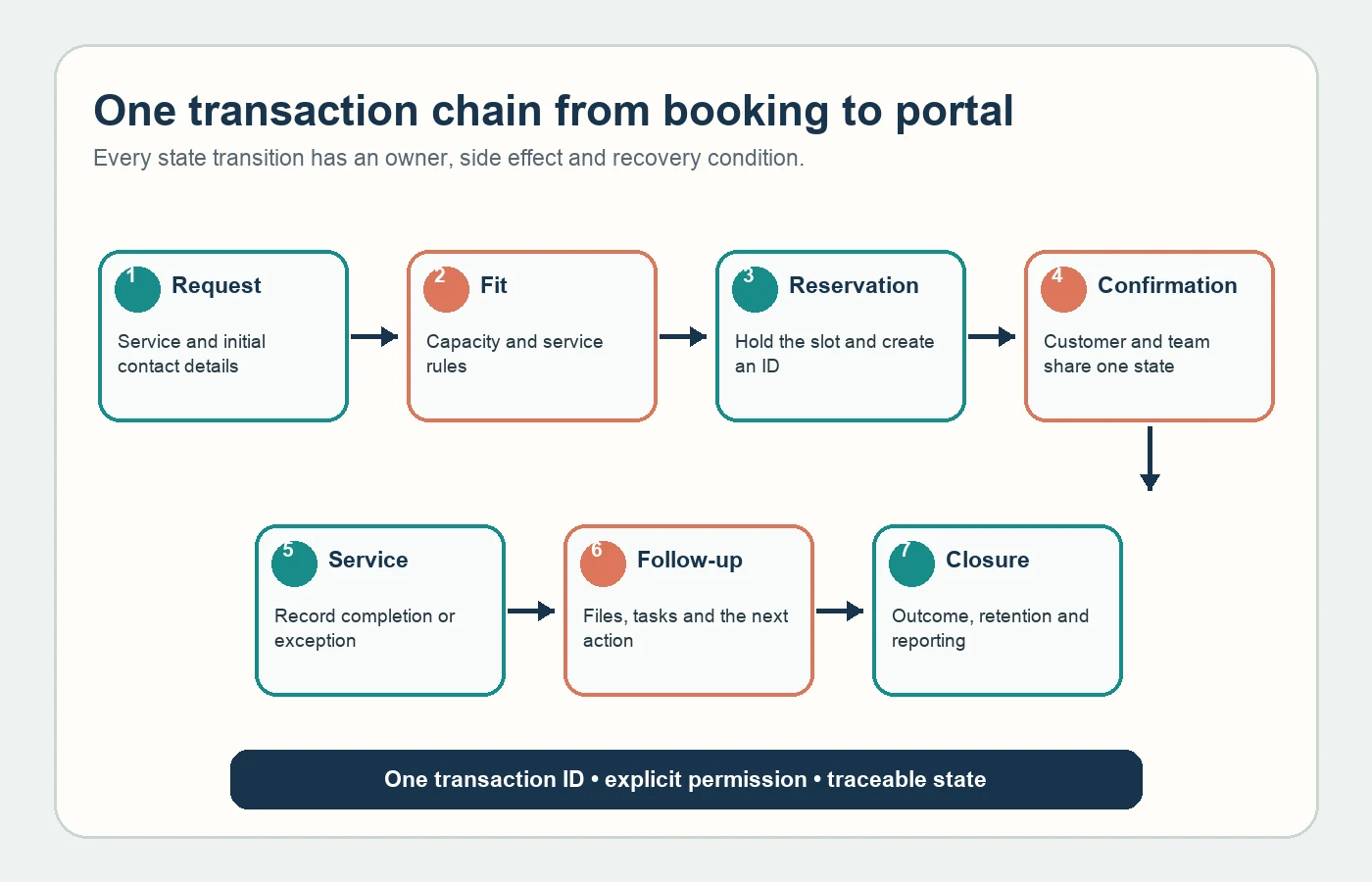
- Request: The customer supplies the service, contact preference and necessary initial details.
- Fit: Capacity, service rules and any team review are applied.
- Reservation: The selected time is held and a unique transaction identifier is created.
- Confirmation: Customer and team see the same state; notifications are attached to the record.
- Service: An authorised team records completion, rescheduling or non-attendance.
- Follow-up: Documents, tasks, payment or a next appointment are exposed within the customer's permissions.
- Closure: Outcome, retention rules and reporting data are completed.
Specify appointment states and transitions
Minimum states might include draft, pending, confirmed, cancelled, rescheduled, completed and no-show, but names should reflect the real operation. Document which role can make each transition, when capacity is released and which notification follows. Repeated clicks or retries must not create duplicate reservations.
Availability should consider duration, preparation or clean-up buffers, parallel resources, staff leave, room or branch capacity and time zones. For external calendars, add synchronisation direction, acceptable delay, conflict resolution and outage behaviour to acceptance tests.
Choose a master source and matching rule for CRM
“CRM integration” does not identify the master customer record. Define matching by phone, email or customer number; shared contact details; duplicate merging; legacy migration; and how deletion or correction requests propagate. When a match is uncertain, the system should not merge records automatically.
Turkey's data protection authority states that personal data should serve specified, explicit and legitimate purposes, remain relevant, limited and proportionate, and be retained only as required (KVKK general principles). Connect each form field, CRM field, portal view, retention rule and access role in one data inventory. Have qualified owners verify legal grounds and notices.
Design notifications around events, not channels
Choosing email, SMS or push does not complete notification scope. Define which event sends what message, to whom, in which language, after what delay and how often. Creation, changes, reminders, cancellation, payment failure and portal tasks require different templates and owners.
Specify retry limits, alternative channels and team alerts for delivery failures. “Sent” is not the same as delivered or read; keep provider responses, application state and customer history distinct. Do not put transactional notices and marketing messages under one preference rule.
Authorise every portal request
A portal must expose only the appointments, files, tasks and messages associated with the current customer. OWASP recommends least privilege, deny by default and permission validation on every request (OWASP Authorization Cheat Sheet). Hiding a button in the interface is insufficient; the server must verify the user–record relationship for each object and action.
Build the role matrix around real responsibilities such as customer, representative, specialist, operations manager and administrator. Separate view, create, change, approve, export and delete permissions. Test account closure, staff departures, role changes and shared customer accounts.
Treat logging and error handling as deliverables
Operations cannot answer “Why was this appointment not created?” from the customer screen alone. OWASP recommends application logs that preserve enough context to analyse when, where, by whom and with what outcome an event occurred; the logs themselves also require protection from unauthorised access and alteration (OWASP Logging Cheat Sheet).
Define a transaction identifier, critical state changes, integration responses, error classes, alert thresholds and log ownership. Do not log passwords, complete payment details or unnecessary personal data. Technical logs, operational history and legally required records should be treated as separate datasets.
Accept outage and recovery behaviour before launch
When CRM, messaging or calendar services are temporarily unavailable, the request should not disappear. Select appropriate queuing, controlled retries, manual worklists and team alerts. Test that recovery does not apply the same transaction twice or overwrite a newer state with stale data.
Backups are more than creating files. Define recovery time, acceptable data loss, encryption, access, test cycles and evidence. State how customer, appointment, document, permission and transaction history can be exported if a supplier changes.
Proposal comparison and acceptance checklist
- Business rules and appointment state transitions
- Data dictionary, master records and duplicate-matching model
- Role–object–action permission matrix
- Notification events, template owners and failure behaviour
- Integration, queue, retry and reconciliation scenarios
- Logging, alerts, support and incident ownership
- Migration, backup, export, documentation and training plan
Verify these through working acceptance scenarios rather than demo screens. Use the off-the-shelf and custom web software guide to evaluate the delivery model and review the Kumsal Ajans web software service for implementation scope.
Success is not the largest feature list. It is an operating platform in which customers progress through a single record, teams can manage exceptions, permissions remain bounded and the organisation can recover or export its data when circumstances change.