


Aydınlatma metni yükleniyor…
Warranty claims, faults, returns and replacement requests across distributor, dealer and authorised service networks are often managed through a mixture of email, phone calls, messaging apps and separate spreadsheets. As volumes grow, it becomes harder to determine when a product was sold, whether it remains under warranty, who approved the request, whether the warehouse received it and whether the financial transaction was closed. The result is duplicate data entry, delayed responses, incorrect replacements, missing evidence and a weaker audit trail.
B2B distributor and dealer warranty tracking and RMA portal software brings this fragmented process together around a single case record. RMA—return merchandise authorisation—is the controlled process used to approve and manage a product returned for inspection, repair, replacement or refund. A well-designed portal does more than collect forms: it connects decisions, physical movements, evidence and responsibilities from product validation through to ERP closure.
For Kumsal Agency, this is not a standard product delivered identically to every organisation. It is custom web software designed around each company’s warranty policies, channel structure, user roles, warehouses and data sources. The objective is not simply to reproduce an existing process online, but to clarify ambiguous steps, automate appropriate controls and make exceptions visible.
Why should warranty and RMA processes be managed in one portal?
A warranty request can simultaneously be a customer-service issue for a dealer, a technical assessment for a service centre, an inbound-goods task for a warehouse, a credit or return-invoice process for finance and a data-integrity concern for IT. When each team maintains its own file, the product, decision and shipment information for the same case can quickly diverge.
A shared portal makes the RMA number the common reference. Each participant sees the current record within their authorised scope. Central teams can monitor open requests by dealer, products sent for service, approvals waiting for action and time to resolution. Dealers can check status, missing evidence and shipping instructions without repeatedly asking for updates.
The system must also keep screen status aligned with operational reality. A warehouse should not mark a product as received merely because a shipment label exists, and finance should not close the ERP transaction before the operational decision becomes final. Success should therefore be measured through indicators such as time to first review, cases returned for missing information, out-of-warranty reasons, warehouse ageing, repeat faults and transactions that failed to reach the ERP—not only the number of requests created.
How should the end-to-end RMA lifecycle be designed?
The precise lifecycle will vary by organisation, but every status needs a clear owner, entry condition and exit condition. Broad labels such as “In progress” provide little operational value. Action-oriented statuses—“Awaiting documents”, “Pending preliminary approval”, “Handed to carrier”, “Awaiting warehouse receipt”, “Under technical inspection”, “Replacement approved” and “Awaiting ERP closure”—show what has happened and who must act next.
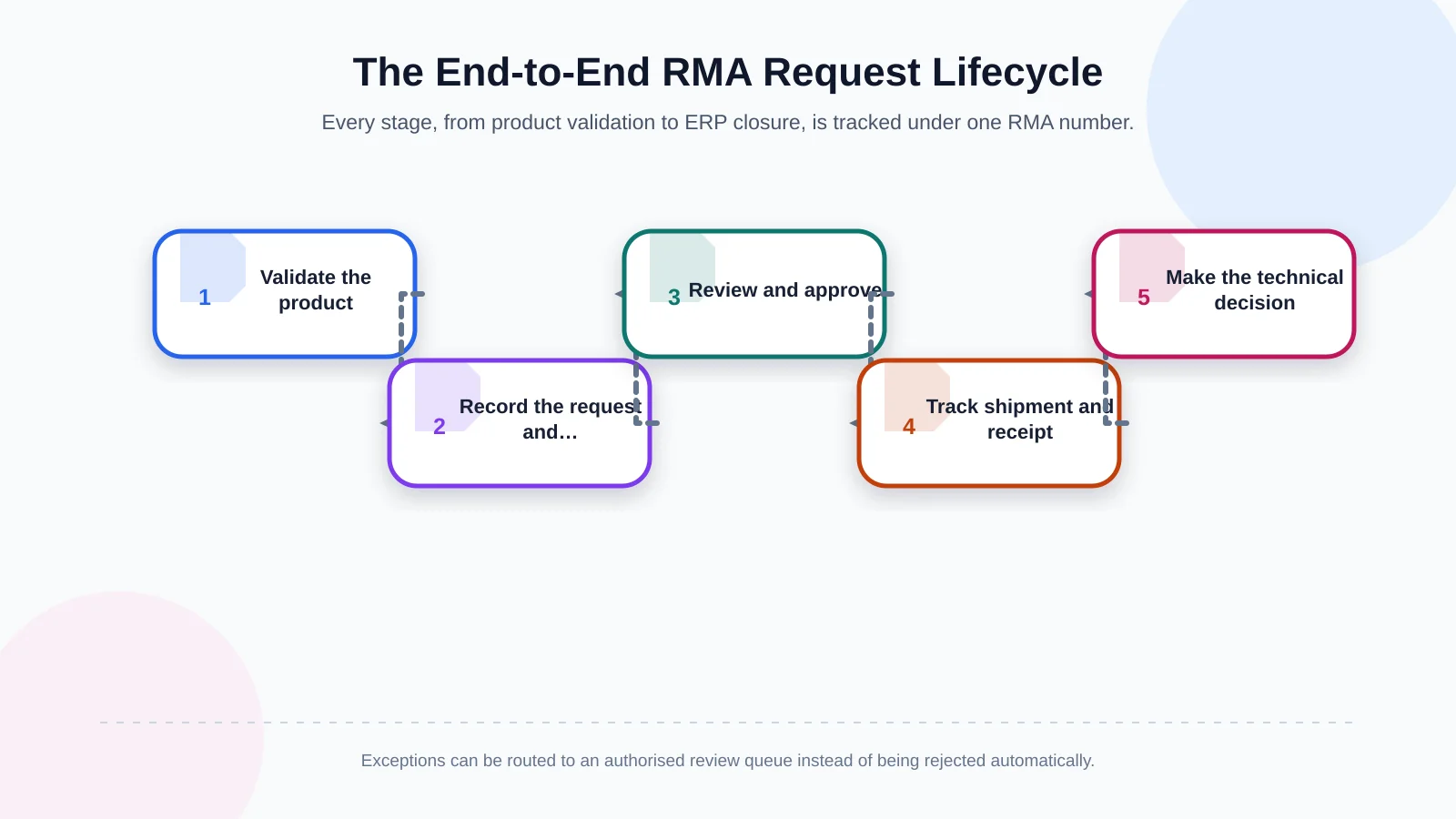
1. Validate the product and warranty terms
A dealer or service centre starts a case using a serial number, lot number, product code, invoice number or barcode. The portal can check the purchasing account, sale date, warranty period, earlier cases and any applicable campaign or contract terms. If validation fails, the request need not be rejected automatically; it can enter a controlled exception queue for authorised review.
The required identification level should reflect the product. The GS1 Global Traceability Standard distinguishes traceability at batch or lot level from identification of an individual physical item through serialisation. Serial tracking may be critical for durable equipment, while lot control may be more appropriate for consumables or production batches.
2. Record the request and supporting evidence
Structured fields can capture the request type, fault code, description, quantity, end-user details and preferred outcome. Photos, videos, invoices, service forms and delivery documents may be attached where required. Mandatory evidence should change by product group and claim reason. Asking for every possible document in every case slows dealers down and increases unnecessary personal-data collection.
3. Manage preliminary review, approval and exceptions
Rules can route straightforward cases to the appropriate queue automatically. If the warranty has expired, the serial number belongs to another dealer, the invoice cannot be found or the product has already been replaced, an authorised user should issue a reasoned decision. Approval may involve one or more levels based on value, product group, dealer classification or exception type. Delegation, overdue actions and escalation rules should be defined before launch.
4. Track logistics and warehouse receipt
Once authorised, the portal can produce an RMA label, shipping instructions and, where applicable, a carrier record. “Shipment created”, “Collected by carrier” and “Received by warehouse” must remain separate events. At receipt, warehouse staff can scan the barcode, check package and item quantities, photograph physical condition, note missing accessories and confirm the serial or lot match.
For a deeper treatment of reverse-logistics controls, see How to Digitise B2B Returns Management: From Dealer Request to Warehouse Receipt.
5. Complete technical inspection and disposition
The service team records test results, fault cause, warranty eligibility, available parts and the recommended disposition. Possible outcomes include repair, like-for-like replacement, equivalent product, paid service, refund, scrapping, return to supplier or rejection. The system should record who made the decision and which evidence and rule supported it. Customer-facing explanations can be separated from technical notes intended only for internal teams.
6. Verify ERP and financial closure
After the physical and technical outcome is complete, the ERP may create a return order, inventory movement, replacement shipment, service order, credit note or accounting document. The portal should retain both the request sent and the ERP acceptance response, including the resulting document number. Failed integrations must enter a visible error queue. Safe retry and idempotency controls should prevent the same transaction from being created twice.
Roles, permissions and visibility boundaries
Distributors, dealers, service centres, warehouses, finance teams and central administrators should not receive identical access. Dealers should see requests associated with their own branches and customers; service centres should see assigned inspections; warehouse teams should see expected and received physical movements; and finance should see only decisions ready for financial processing. Even central users may require restrictions by company, region or product family.
Access control is not simply a matter of hiding menu items. Permissions to view, create, edit, download documents, approve, reopen and export records should be managed separately. Sensitive actions may require a second approval, a mandatory reason or additional authority above a defined value. Automated delegation expiry, prompt access removal when a user leaves and periodic entitlement reviews should form part of the operating model.
| Role | Primary responsibility | Visible scope | Critical control |
|---|---|---|---|
| Dealer | Submit requests and evidence | Own records | Product validation |
| Authorised service centre | Perform technical inspection | Assigned cases | Reasoned decision |
| Warehouse | Complete physical receipt | Expected returns | Serial or lot match |
| Finance | Complete financial closure | Finalised decisions | ERP document number |
| Central team | Approve and manage | Authorised regions and products | Exceptions and audit |
How should integrations and the shared data model be planned?
An RMA portal commonly exchanges data with ERP, CRM, product information, warehouse management, service-management, carrier and identity systems. The project should first establish which application is the authoritative source for each field. Product and sales-invoice data may come from ERP, while photographs and inspection reports remain in the portal and shipment events arrive from a logistics provider.
Timing matters as much as field mapping. Will warranty eligibility be checked in real time? Will product master data be synchronised periodically? Can a dealer open a request during an ERP outage? Every exchange should retain a unique key, timestamp, source system and integration status. Partial responses, timeouts and duplicate submissions need to be tested before release.
The shipment layer shares many requirements with order visibility. The relationship between ERP status, carrier events, documents and exception ownership is explored further in How to Plan a B2B Order-Tracking Portal: ERP Status, Shipment and Document Visibility.
Which data-security and audit controls are required?
The portal may process contact details, invoices, device serial numbers, fault descriptions and occasionally end-user documents. Collection purpose, retention periods and access scope should therefore be established during discovery. The European Commission’s overview of GDPR data-processing principles covers purpose limitation, data minimisation, accuracy, storage limitation, integrity and confidentiality. Applicable Turkish data-protection requirements, contracts and sector obligations should also be assessed with legal and information-security teams.
Technical measures may include role-based access, strong authentication, session controls, appropriate protection in transit and at rest, backups, file-type restrictions and malicious-content scanning. Document links should not be publicly accessible, while downloads and exports should remain subject to permission and logging policies. Data that has reached the end of its retention period needs a defined deletion or anonymisation workflow.
An audit trail should show who opened the case, the old and new values of changed fields, the decision, its reason, timestamps and integration results. The OWASP Logging Cheat Sheet highlights the audit value of recording events such as data creation, modification, deletion and export, alongside restricting and monitoring access to logs. Transaction audit trails and security-event logs serve different purposes, so their access and retention rules may differ.
Reporting and operational management
A management dashboard should go beyond total request volume. Useful measures include open-case age, waiting time by status, dealer and product-family distribution, rejection reasons, replacement cost, recurring faults, warehouse receipt discrepancies and integration failures. Users need filtered worklists aligned with their responsibilities, while notifications and escalations should activate as critical deadlines approach.
Metrics also require shared definitions. Does “resolution time” end when a decision is made, when the product reaches the dealer or when ERP closure is confirmed? Are days spent waiting for dealer evidence excluded? Without agreed rules, teams may interpret the same dashboard differently and optimise incompatible outcomes.
Developing a custom RMA portal
The first stage maps the current process with dealer, service, warehouse, finance, operations and IT stakeholders. Existing spreadsheets, emails, decision rules, exceptions, data owners and integrations are inventoried. The target model can then define RMA statuses, the role matrix, screens, notifications, reports and acceptance criteria.
Delivery may be phased. An initial release might include product validation, request creation, document management, basic approval and status tracking, followed by warehouse, carrier, service and ERP capabilities according to priority. Phased delivery should not mean creating a temporary data model or integration architecture that cannot support later stages.
A pilot should use real cases from a limited group of dealers and product families. Scenarios should include expired warranties, unreadable serial numbers, incomplete packages, partial receipt, equivalent-product replacement, ERP downtime and reopened requests. After launch, clear ownership, support levels, release management, monitoring and an improvement schedule help keep the portal sustainable.
Conclusion: An RMA portal is a controlled after-sales service backbone
A B2B warranty tracking and RMA portal is more than a claim form. It validates product identity and warranty terms, collects evidence in one case, applies authorised decisions, tracks logistics and technical inspection, and closes the outcome against ERP and finance records. This continuity gives dealers a clearer experience while providing central teams with an explainable, measurable and auditable operation.
As an Istanbul-based digital agency, Kumsal Agency designs and develops custom RMA portal software around real business processes, user roles, data-security requirements and integrations. Contact Kumsal Agency to define a project-specific portal scope for the roles, rules, data sources and integration needs across your warranty and RMA operation.