


Aydınlatma metni yükleniyor…
An extranet is a controlled digital workspace through which an organisation gives authorised external users—such as customers, dealers, suppliers, contractors or project partners—access to selected information and business processes. It is not merely a file-sharing area or an intranet exposed to the internet. A useful scope must explain who can access which resource, what action they may perform, when that access ends and how activity can be reviewed.
When it is planned well, an extranet can move scattered email attachments, uncertain document versions and person-dependent approvals into a more controlled workflow. Adding a username and password, however, does not automatically make the system secure, usable or efficient. Value comes from designing the business process, access model, data ownership and operating responsibility together.
How Does an Extranet Differ from an Intranet and a Customer Portal?
An intranet is primarily intended for people inside an organisation. An extranet gives selected external users access only to defined resources and actions. The decisive difference is not simply whether the system uses the internet. It is the user’s relationship with the organisation, the permissions granted and the boundary around the data.
A customer or dealer portal may be implemented as an extranet focused on a specific audience. Yet an extranet does not always consist of one portal screen. Identity management, document storage, ordering, support, reporting and integrations may operate as separate components. A portal can bring these components into one user experience.
To compare portal types and broader project scope, see the portal software types and project planning guide. This guide has a narrower task: defining the boundary and lifecycle of access granted to external stakeholders.
What Business Tasks Can an Extranet Support?
The need for an extranet is better identified through recurring external-stakeholder tasks than through an industry label. Common examples include:
- A dealer checking current prices, stock, campaigns and order status
- A supplier submitting quotations, documents, delivery updates and quality records
- A customer reviewing contracts, invoices, support requests and project files
- A contractor accessing only the documents for an assigned project
- An authorised service provider managing assets, warranty details, parts and work orders
- A member of an association accessing dues, notices, documents and applications
- Distributed teams collaborating through approved documents and workflows
Each scenario requires different data, permissions and integrations. For example, “a dealer can see prices” is not an adequate requirement. The scope should state which dealer group sees which price list, in which currency and date range, and whether the user can download or alter that information.
The Kumsal Ajans External-Stakeholder Access Card
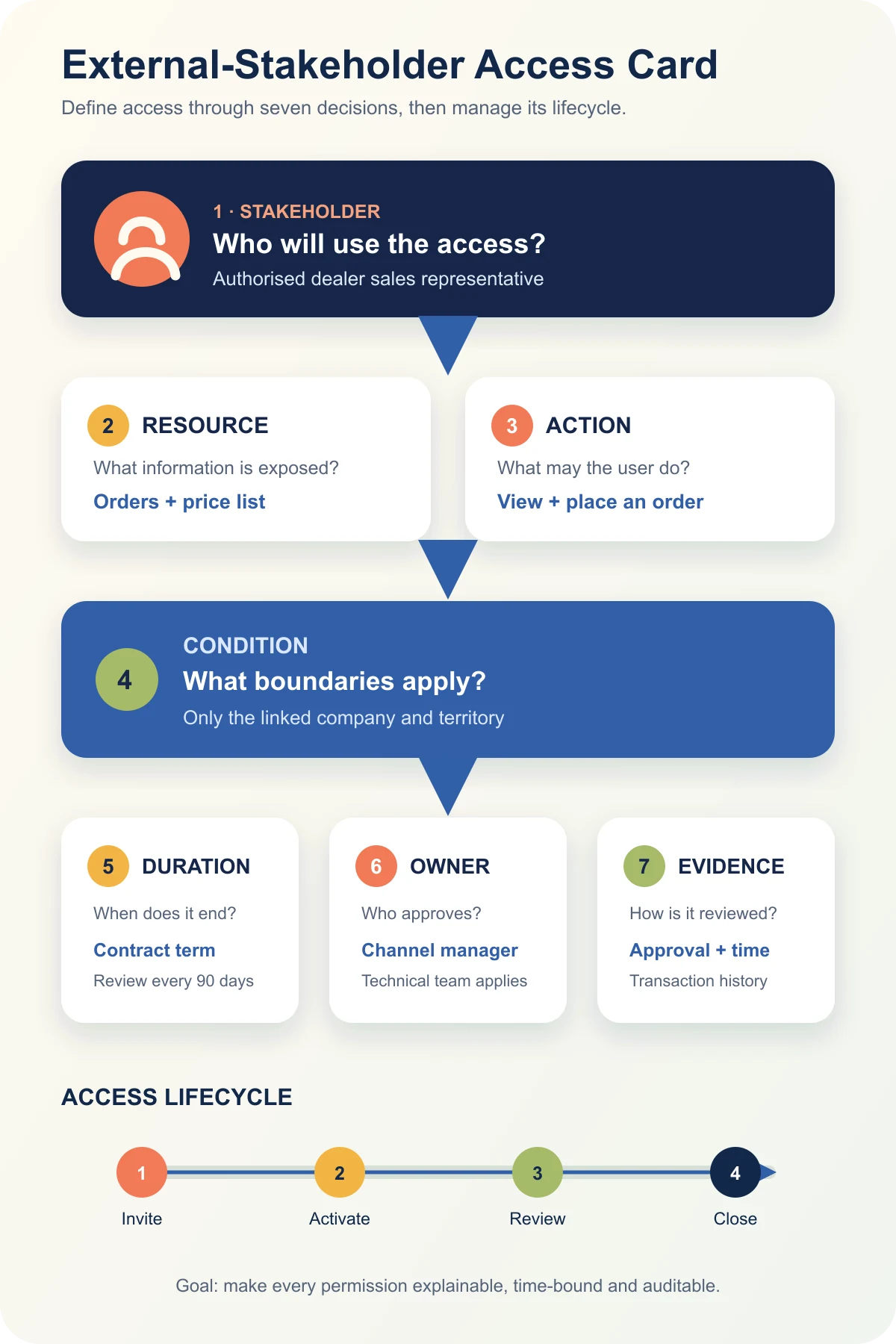
Instead of defining extranet scope as a list of screens, record every critical scenario through seven access decisions:
| Field | Question | Example |
|---|---|---|
| Stakeholder | Who will use the access? | An authorised dealer sales representative |
| Resource | Which information or record is exposed? | The dealer’s orders and applicable price list |
| Action | What may the user do? | View and place an order; no price editing |
| Condition | What limits apply? | Only the linked company and territory |
| Duration | When does access begin and end? | Contract term; review every 90 days |
| Owner | Who approves the permission? | Channel manager; implemented by the technical team |
| Evidence | How is activity reviewed? | Approval record, timestamp and transaction history |
The card is not intended to give a user the broadest possible access. Its purpose is to make the access required for the task explainable and testable. The same role may need different data boundaries across companies, projects or regions.
How Should the Access Lifecycle Be Planned?
Extranet security is not established only at first sign-in. Invitation, activation, change, periodic review and closure should form one managed lifecycle.
1. Connect the invitation to the correct person and organisation
Record who requested the account, which organisation the user represents and who approved it. Depending on the business model, an invitation or approval flow may be more suitable than open registration. Shared accounts require particular care because they make it harder to identify the person who completed an action.
2. Grant access according to the task
The OWASP Authorization Cheat Sheet recommends least privilege, deny-by-default behaviour and permission validation on every request. A user should not gain access to every record merely because they signed in. The system should evaluate role, relationship or context for the requested resource and action.
3. Reflect changes without avoidable delay
Permissions may stop being correct when the user’s role, employer, territory or project relationship changes. The scope should identify who reports a change, who implements it and the target handling process.
4. Review permissions periodically
The system should make it possible to identify active but unused accounts, completed projects and permissions that have expanded beyond the user’s task. Review frequency depends on data sensitivity and business risk; there is no universal interval that suits every extranet.
5. Use an offboarding checklist
When a contract, project or business relationship ends, close the account and review active sessions, API credentials, sharing links and delegated authority. Data retention, export and deletion are separate business and legal decisions. Disabling the account does not automatically resolve them.
Why Is Authentication Not Enough?
Authentication helps establish who a user is. Authorisation determines what that user may do with a particular resource. Multi-factor authentication, additional verification for risky sessions and secure account recovery are useful controls, but they do not repair an overly broad permission model.
NIST SP 800-207 explains that network location or asset ownership should not create implicit trust and shifts attention towards users, assets and resources. For an extranet, the practical lesson is to avoid assuming that someone can see everything once they have crossed a network boundary.
At minimum, the security scope should address:
- Identity source, MFA and account recovery
- Authorisation based on role, organisation, project and data ownership
- Server-side permission checks for every request
- Sensitive downloads, exports, approvals and administrative actions
- Session duration, device context and risky-access rules
- Activity logs, alerts and investigation ownership
- Backup, recovery and business continuity
- Vulnerability, update and dependency management
TLS helps protect communication in transit. It does not, by itself, prevent an incorrect permission, an overly broad query or an account that remains active after a relationship ends. A layered control model is more accurate than claiming that SSL alone secures every document.
How Should Data and Integration Boundaries Be Defined?
An extranet often exchanges information with ERP, CRM, document-management, service, e-signature, notification or payment systems. For every integration, identify the source system, data owner, direction of transfer, update timing, failure behaviour and retry rule.
Hiding information in the interface does not prove that it is technically inaccessible. APIs, exports, search, file URLs and notification content must enforce the same data boundary. Use the web software company technical capability checklist when comparing implementation proposals against these requirements.
Data ownership also affects correction and reconciliation. If an order changes in ERP while the extranet is temporarily unavailable, the project needs a rule for which record wins, how the mismatch becomes visible and who resolves it. Silent use of stale data can create an operational problem even when the page itself appears to work.
Why Are Usability and Accessibility Part of the Scope?
External stakeholders may not receive the organisation’s internal training, managed devices or familiar support channels. Clear navigation, understandable status messages, task-focused dashboards, mobile use, keyboard access and useful error handling should therefore be addressed from the beginning.
Replace promises such as “no training is required” with task-based testing. Ask representative users to place an order, upload a document, approve a request or close a work order on desktop and mobile. Turn help content, error messages and support routes into acceptance criteria.
Accessibility should not be treated as a cosmetic check at the end. Form labels, focus order, error identification, contrast and keyboard operation influence whether external users can complete the task at all. The required standard and test method should be written into the project scope.
Packaged Platform, Configuration or Custom Development?
A configurable packaged platform may be sufficient for standard document sharing, simple approvals and a limited number of user groups. Custom development becomes more relevant as data boundaries vary by company, project or contract; critical ERP and CRM integrations grow; or the workflow requires specialised approvals and reporting.
Do not compare only the initial licence or development price. Include identity services, integration, migration, testing, training, support, updates, log retention and exit costs. The off-the-shelf versus custom web software guide provides a broader comparison of these delivery models.
A hybrid approach is also possible. An organisation may use an established identity provider and document service while building a custom workflow and interface. The right boundary depends on data ownership, integration risk, required flexibility and the team that will operate the system after launch.
12 Questions to Ask When Reviewing an Extranet Proposal
- Which external stakeholder groups will use the system?
- Which data and actions will each group access?
- How will company, project, territory or contract boundaries be enforced?
- How will account requests, identity checks and approvals work?
- Which users and actions require MFA?
- Who reports permission changes and stakeholder departures?
- When and by whom will access be reviewed?
- Which actions will be logged, and who may inspect the records?
- Which application owns the data shared with ERP, CRM or document systems?
- What will the user see when an integration fails, and how will data be reconciled?
- What are the mobile, accessibility, browser and performance acceptance criteria?
- What are the rules for export, technical handover, maintenance and exit?
Common Scoping Mistakes
One common mistake is to list modules while postponing access decisions. “Document management” does not explain who may upload, approve, download or delete a document. Other risky approaches include:
- Giving every external user one broad role
- Relying only on interface hiding to separate companies’ data
- Leaving account-closure ownership undefined
- Using shared accounts without an adequate audit trail
- Treating download and export as ordinary viewing actions
- Displaying stale information silently when an integration fails
- Promising one security model or delivery duration for every project
These mistakes are not solved by adding more screens. They require clearer ownership, testable permission rules and an operating process that continues after launch.
Conclusion: Begin with Access Decisions, Not Screens
An extranet is not an uncontrolled doorway into internal systems. It is a manageable workspace in which external users complete defined tasks against defined resources and conditions. A useful scope describes the stakeholder, resource, action, condition, duration, owner and evidence together.
As a first step, choose the three most important external-stakeholder tasks and complete an External-Stakeholder Access Card for each one. The result will make the platform decision, integration scope and proposal comparison more concrete. To discuss roles, data, integrations and ongoing operation with Kumsal Ajans, review our web software development service.