


Aydınlatma metni yükleniyor…
Short answer: a technical handover should begin by making the current system, its assets and account ownership visible, then taking a complete backup. Once the new provider has the required access, the live version, database, DNS and email configuration, forms and integrations should be checked. The former provider's access should be removed only after the new access has been verified and the website's essential functions are working. The customer gives the final transition approval.
The order matters. Removing old access too early can make recovery difficult. Starting a migration without verification can leave the new team working with an incomplete database, outdated code or broken integrations. The objective is not to change everything in a day. It is to transfer responsibility without losing control of the website.
Why Is a Technical Handover More Than a File Transfer?
A website is not limited to the files stored on a server. Its domain registration account, DNS records, hosting or server, database, uploaded media, email service, SSL configuration, management panel, source-code repository, analytics accounts and third-party services may all depend on one another.
For that reason, sending a file archive does not complete the handover. Each of the following questions needs a clear answer:
- Which copy of the source code matches the live website?
- Were the files and database backed up at a compatible point in time?
- Who controls the domain registration and authoritative DNS service?
- Will website changes preserve the DNS records used by email?
- Which service accounts are used by forms and integrations?
- Who owns the analytics and search-performance properties?
- Which backup and version will be used if the transition must be reversed?
The new provider may be able to log in without having everything needed to manage the system safely and sustainably. A technical handover therefore needs to establish ownership, verify assets and record unresolved gaps—not merely exchange passwords.
Define Owners and a Change-Freeze Window Before the Handover
Before technical work begins, name a decision owner on the customer side, a contact who can deliver assets and access on behalf of the former provider, and the team responsible for checks at the new provider. The route for questions and the person authorised to give final acceptance should be documented.
Where possible, Kumsal Agency prefers a short period of parallel working. The existing system remains accessible while the new team examines the assets and connections. Non-critical content or code changes may be paused temporarily. This reduces the risk of the website changing unnoticed after the backup and makes it clearer which version is being transferred.
A change freeze does not have to mean the same duration or a complete operational stop for every project. Websites that receive orders, memberships, form submissions or frequent content updates need a specific plan for data created during the transition. At minimum, record the backup time, the live version and the changes that remain permitted during the handover.
The 12-Field Website Technical Handover Record
The following record turns a general statement such as “delivered” into fields that can be checked. For each row, note the current owner, new authorised party, access or asset supplied, verification result and remaining action.
| Field | What to verify during the handover |
|---|---|
| 1. Domain | Registration account, customer ownership, administrator access, renewal and contact information |
| 2. DNS | Authoritative DNS service, export of current records, website and email records |
| 3. Hosting/server | Control panel, FTP/SSH, server resources, runtime and access method |
| 4. Source code | Current repository or package, match with the live version, setup and deployment information |
| 5. Database | Access, current backup, character set, connection information and data-integrity check |
| 6. Email | Account owner, DNS dependencies, form notifications and sending service |
| 7. SSL | Where the certificate is managed, renewal method and covered domains |
| 8. Backups and media | Website files, database, uploaded media, date and storage location |
| 9. Licences | Owner and renewal terms for themes, libraries, services or commercial components |
| 10. APIs and secrets | Keys in use, responsible account, secure transfer and rotation plan where required |
| 11. Administration and analytics | Management panel, GA4, Search Console and relevant user roles |
| 12. Integrations | Payment, CRM, ERP, shipping, email, webhook and other external connections |
Not every project needs the same level of detail in every field. Payment and order integrations may be critical for an ecommerce platform, while form delivery and email configuration may be more important for a straightforward corporate website. Marking an irrelevant field as “not applicable” and recording why is more useful than filling it with unnecessary information.
For the broader acceptance checks used when a new project is first delivered, see our corporate website handover checklist. K-018 has a different purpose: it manages the operational transition from an existing provider to a new one.
How Should Ownership of Domains, DNS and Analytics Accounts Be Verified?
A domain is not only the website's address. Its DNS configuration can affect both website and email traffic. Access to a DNS panel alone is therefore not enough. Check whose account holds the domain registration, who controls renewal and contact information, who can pass multi-factor authentication and whether the current DNS records have been exported.
The ICANN guide to protecting domain registration accounts addresses the protection of registration-account credentials against unauthorised access. During a technical handover, this does not mean the domain must automatically be transferred to another registrar. The priority is to verify customer ownership and authorised access, and to document any changes.
In GA4 and Search Console, being able to view a report is not the same as holding administrator or owner rights. Google Analytics user-management documentation explains that users can be assigned different roles at the account or property level and that access can later be changed.
The Search Console owners and users guide distinguishes between owners, full users and restricted users. Removing an old verified owner from the user list may not always be sufficient; Google also recommends checking verification tokens that could allow ownership to be regained. A handover record should therefore include the role, verification method and removal result rather than only an email address.
Why Should Old Access Remain Until New Access Is Verified?
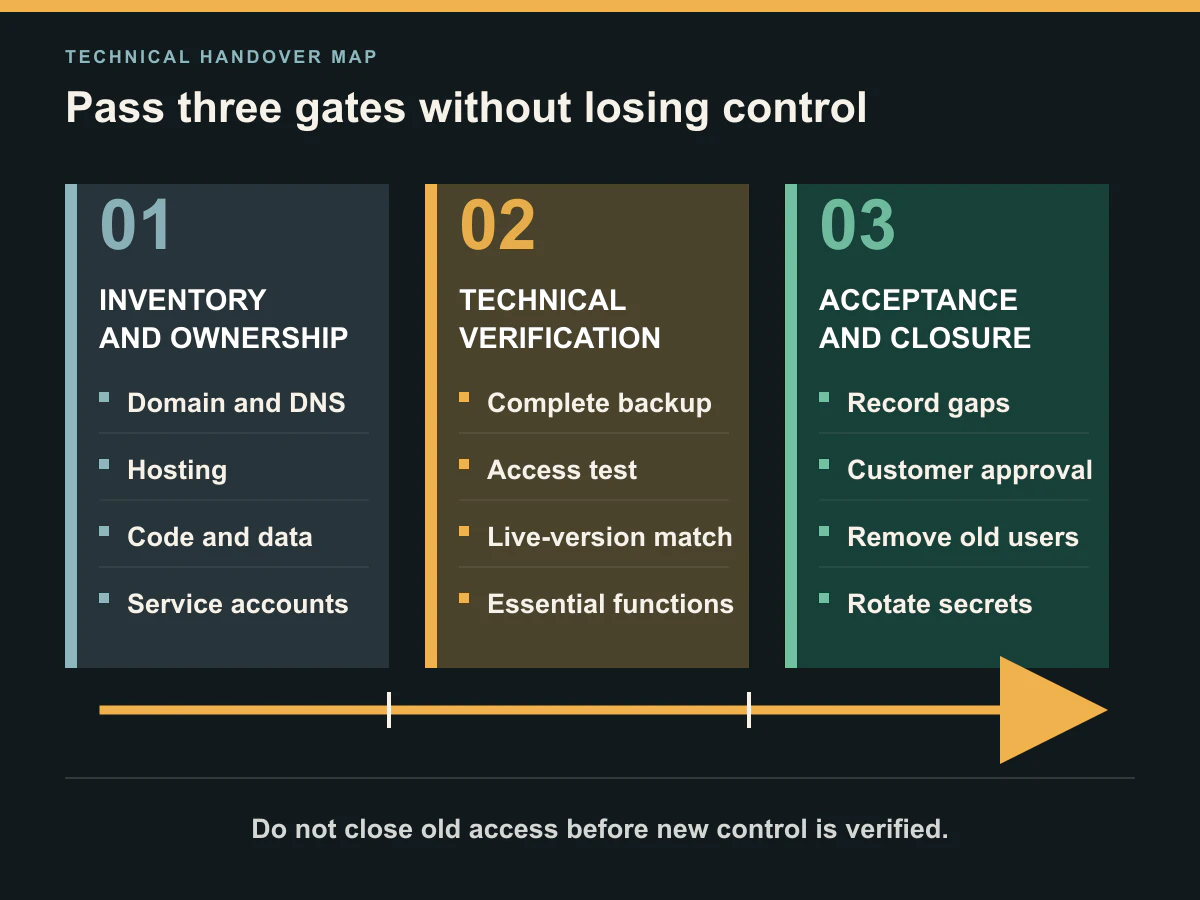
Closing the former provider's access as soon as the commercial relationship ends may initially appear safer. If the new team then discovers that it cannot reach the hosting account, DNS service, source code, database or a critical service account, the transition can become locked.
Kumsal Agency uses this sequence:
- Prepare an inventory of the accounts and assets to be transferred.
- Create new permissions or verify existing customer-owned access.
- Take a complete backup and record the live version.
- Have the new team perform the agreed technical checks.
- Resolve missing or non-working access.
- Obtain the customer's approval of the transition result.
- Remove obsolete users and revoke or rotate secrets where required.
The OWASP Secrets Management Cheat Sheet treats revocation of secrets that are no longer required—and rotation when need or risk calls for it—as part of the secrets lifecycle. The implementation differs by account type. Changing a shared FTP password, removing an individual administrator account and rotating a third-party API key are separate operations.
Passwords should not be collected inside the handover article, a broad email chain or project notes available to everyone. Record which secret was transferred to whom, through which approved secure channel, and which former access was closed afterward. Do not copy the secret value into the general handover register.
How Should the Backup and Live Version Be Captured?
Before the transition, back up the website files, database, uploaded media and the current live version. If a source-code repository exists, confirm whether it matches the deployed website. Rather than recording only “a backup exists,” include its date, scope, file or version identifier, storage location and the person responsible for rollback.
For systems that continue to create data, taking file and database backups at different times can produce an inconsistent set. Orders, accounts, enquiries or content created during the handover need their own migration or final-synchronisation plan. This is one reason to use a short change-freeze window when the project permits it.
The existence of a backup does not prove that it can be restored. Depending on risk, the team can verify that the archive opens, the database connects and essential functions work in a separate environment. Storing a backup and verifying recovery should be recorded as separate checks.
What If Source Code, the Database or Critical Access Is Missing?
When a critical asset is missing, the objective should not be to continue the transition at any cost. Record the gap, explain its effect and state which work cannot begin until it is resolved.
Kumsal Agency does not begin a live migration, development work or a major intervention when the source code, database or critical access is incomplete. The missing items are requested first. This is not a judgement about the former provider. It prevents the new team from making risky changes without knowing which system it is changing or whether a reliable recovery point exists.
Access to a management panel does not necessarily include server or database access. A source-code archive may exist without containing the most recent changes deployed to the live website. Each asset should therefore be checked with outcomes such as “received, opened, version verified and matched to live,” rather than a simple yes-or-no status.
Which Checks Should Be Repeated After the Transition?
The handover is complete when essential functions have been verified under the new responsibility model, not merely when credentials have been delivered. Depending on project scope, Kumsal Agency checks:
- Access to the Turkish website and any other language versions
- Critical pages and redirects
- Form submission and email notifications
- SSL certificates and HTTPS access
- DNS records for website and email services
- Database connection and essential data-viewing or processing journeys
- Management-panel access and required user roles
- Payment, CRM, ERP, webhook and other project-specific integrations
- Mobile layout and essential user operations
- Error logs and, where appropriate, closer monitoring after the transition
The checklist should reflect the website's real functions. A basic corporate website does not need an invented payment test. For a platform that takes payments, however, confirming that the home page loads is not an adequate acceptance test.
After the technical team records the results, the customer gives final approval. This approval does not mean that every future problem has been eliminated or that the new provider has accepted every unknown condition in the previous system. Known gaps, accepted risks and follow-up work should be listed separately.
An Anonymised Real-World Handover Example
In one project taken over by Kumsal Agency, the supplied database was incomplete and the file backup did not contain the current live version. The transition was paused. The effect of the missing assets was recorded, and the correct database and a current file backup were requested.
Once the correct backups were supplied, access and essential system checks were repeated and the transition was completed. The lesson is not that every missing item will become a major incident. It is that migration or development should not begin before the delivered package has been opened and verified.
We do not disclose the customer, industry, former provider, date, duration, platform or version details that could identify the project. The example does not claim zero downtime, completion within a fixed period or a measured performance result.
How Should Customer, Former Provider and New Provider Responsibilities Be Divided?
As the account owner or authorised representative, the customer manages the transition decision, contacts and final acceptance. Keeping the domain, hosting, email and third-party services in customer-owned accounts where possible can reduce dependency during a handover. Actual ownership and usage rights must still be confirmed from the relevant accounts and agreements.
The former provider is asked, subject to the agreed delivery scope, for current files, the database, access, technical notes and known limitations. The new provider verifies the received assets, makes gaps visible, plans the transition sequence and performs the agreed checks.
This division does not automatically transfer every technical or contractual issue to the new provider. Unknown legacy code, expired licences, third-party restrictions and missing documentation may need to be assessed as separate risks and work items.
Common Technical Handover Mistakes
- Receiving FTP access without checking the database and service accounts
- Assuming that the domain is held in a customer-owned account
- Changing nameservers or hosting before exporting DNS records
- Accidentally changing email records together with website records
- Failing to match a source-code archive with the live version
- Starting critical changes before taking a complete backup
- Removing old users before verifying new access
- Storing shared passwords and API keys in broadly accessible notes
- Treating forms, email and integrations as operational merely because pages load
- Failing to document incomplete deliveries and accepted risks
These mistakes do not produce the same outcome in every project. The checklist is not intended to create fear. It makes the owner of each asset and the current transition stage visible.
Conclusion: Verify Control Before Transferring Responsibility
When changing a website maintenance provider, the controlled sequence is inventory, ownership verification, complete backup, verification of new access, technical checks, customer acceptance and removal of obsolete access. The sequence can be adapted to the project, but missing critical code, data or access should be resolved before migration or major development begins.
The 12-Field Website Technical Handover Record brings the domain and DNS, source code and database, email and SSL, APIs, integrations and analytics accounts into one trackable record. It cannot guarantee an interruption-free transition. It can make decisions, gaps and owners visible.
If you are planning to transfer an existing website to Kumsal Agency, we can review the asset inventory and incomplete deliveries with you before access is shared.