


Aydınlatma metni yükleniyor…
Account reconciliation software helps two organisations compare receivables, payables, invoices, payments and allocations for the same accounting period. A well-designed system is more than a statement-delivery screen. It identifies the source of each record, explains why a difference exists, shows who reviewed it and records the exact scope that both parties accepted.
The project should therefore not begin with “generate a PDF and email it.” It should begin with authoritative data sources, matching keys, tolerances, dispute workflows, permissions and an audit trail. Otherwise, the uncertainty of a manual process is simply moved into a new interface.
What should account reconciliation software solve?
The core task is to prove whether both parties see the same commercial balance and the transactions that produce it at a defined cut-off. A matching closing balance is not enough by itself. Opening balance, period activity, closing balance, currency, due date, document reference and allocation relationships must remain explainable.
The value of automation is not that it closes every difference without review. It separates reliable matches from uncertain records and routes each exception to an accountable owner. Microsoft’s account-reconciliation model similarly distinguishes automated reconciliations from open exceptions that must be addressed before a period can be treated as fully reconciled (Microsoft Learn account reconciliation documentation).
The Kumsal account-reconciliation control model
Splitting the scope into seven control areas makes proposals and acceptance tests easier to compare:
- Source: Which ERP, accounting, banking or collection system owns each record?
- Cut-off: How are period, time zone, closing moment and late records handled?
- Normalisation: How are document references, account codes, currencies and signs standardised?
- Matching: Which rules govern exact, tolerant, many-to-one and manual matching?
- Exception: Who owns a missing document, exchange difference, duplicate or partial payment?
- Approval: How are counterparty authority, declared scope and response time established?
- Evidence: How are data version, notification, response, explanation and change history preserved?
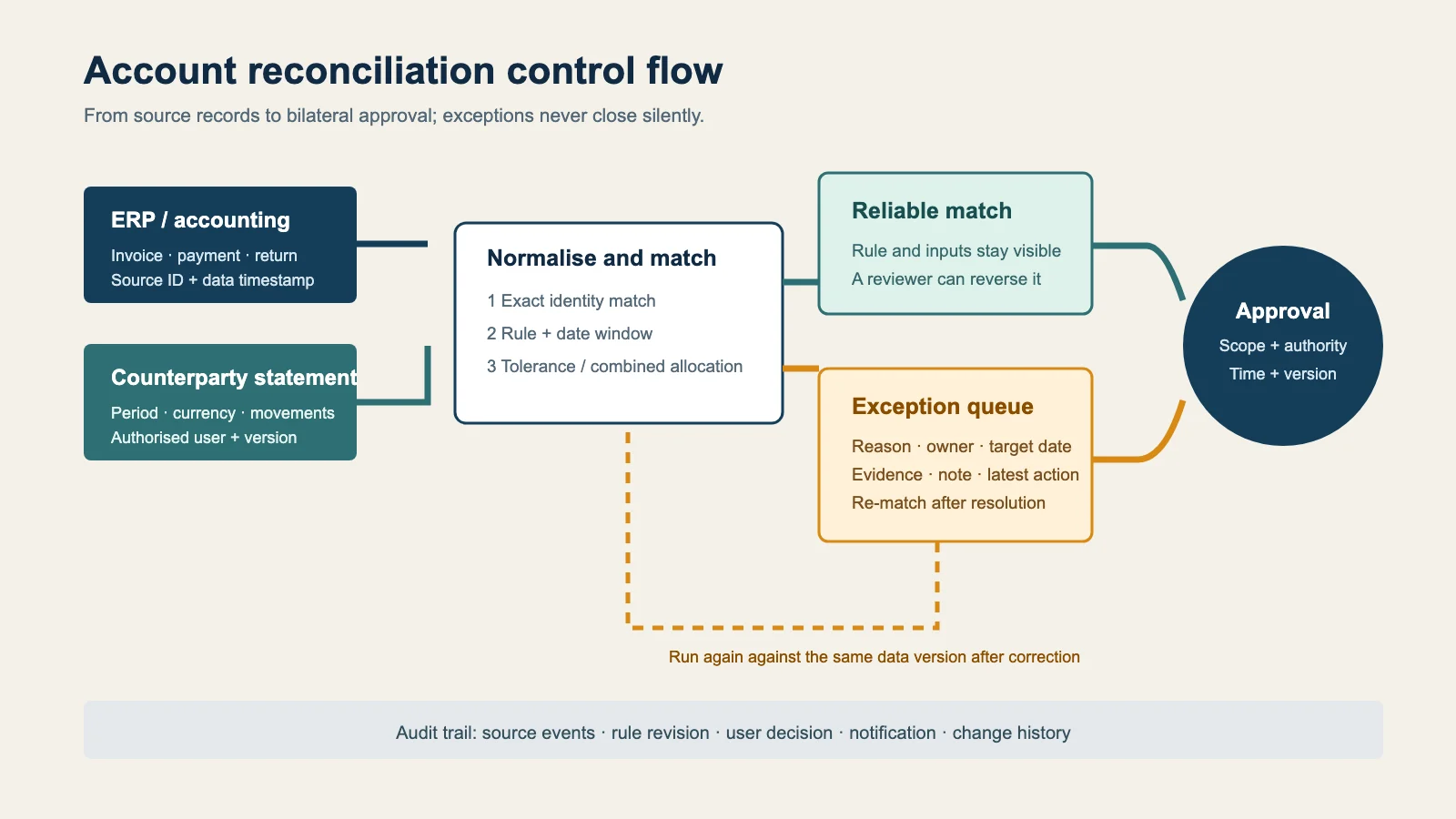
Prepare ERP and accounting data before matching
First decide which records the system will read. Customer entries, invoices, payments, returns, exchange differences and allocations may live in separate tables. Instead of exposing each source table directly to portal logic, the integration should map them into a stable reconciliation contract. Useful fields include source identifier, legal entity, account, document type, document date, due date, currency, debit or credit direction, original amount, open amount and source update time.
A transaction changed after the cut-off must not silently alter a statement that has already been sent. Each issue should retain the exact data version used. Late transactions should follow an explicit next-period or new-version rule. This prevents both parties from believing that they are discussing the same balance while viewing different data snapshots.
Matching rules must remain explainable
An identical unique document reference and amount is a strong match, but production data includes prefixes, spacing, rounding, consolidated payments and partial allocations. Classify rules by confidence:
- Exact match: the unique source or document identity is the same.
- Rule-based match: account, currency, amount and date window agree.
- Tolerant match: the difference is within an approved rounding or exchange threshold.
- Combined match: one payment covers multiple invoices or one invoice is covered by multiple payments.
- Review required: several candidates exist or the financial effect exceeds a defined threshold.
Display the rule and inputs beside every automatic decision. Ask for a reason when a reviewer breaks a suggested match, then use that feedback to measure rule quality. If a statistical model or similarity score is involved, never present its output as certainty.
Exception management is a separate work queue
The unmatched list is often the most important area of the product. A difference should have a selectable reason, a free explanation and supporting evidence. Missing invoice, wrong account, partial payment, pending return, exchange difference and duplicate record should not share one generic status.
Each exception needs an owner, target date, latest action and waiting party. Finance may correct an internal posting while sales requests a document from the customer. The portal should not compress these responsibilities into one approval checkbox. Once work is complete, the record should return to matching or be closed by an authorised reviewer with a recorded reason.
Design the counterparty experience around decisions
Before presenting a long table, show the period, currency, opening balance and closing balance. Let the reviewer drill into movements, unresolved items and evidence. “Agree” and “Disagree” must refer to a clearly described statement scope.
An invitation link must not grant indefinite access by itself. Validate the organisation relationship, user role, session lifetime and, where appropriate, an additional authentication factor. Statements may include personal or commercially sensitive information, so access, logging, masking and retention controls should be proportionate to risk. Turkey’s data-protection authority likewise describes technical and organisational measures as risk-dependent rather than one universal checklist (KVKK data-security obligations).
Do not confuse notification with a legal declaration
Email, SMS and in-app messages invite a user into the process; they are not the reconciliation decision itself. Store sending, delivery, viewing and response as separate events. The legal effect of electronic approval can depend on the method, agreement between the parties, sector and dispute. The software should not promise that every click is conclusive evidence. Configure the declaration text and evidence requirements with the organisation’s legal and accounting advisers.
Define a controlled MVP
Instead of automating every accounting scenario, begin with a high-volume, well-understood customer group. A practical MVP may include one ERP entity, a limited set of document types, one primary currency, versioned statements, exact matching, a manual exception queue, authorised counterparty approval and an append-only event history.
Later phases can add multiple entities, foreign currency, intercompany allocations, consolidated payments, advanced tolerances and ERP write-back. Before write-back, test duplicate protection, retries, partial failure and reversal scenarios.
Acceptance tests should contain real differences
Do not test only two identical statements. Cover a late invoice, duplicate reference, payment covering several invoices, foreign currency, partial payment, wrong account code, withdrawn approval, expired invitation, unauthorised file request and an integration retry during an ERP outage.
Also change a source record after reconciliation completes. The system must not silently preserve the old approval. It should reopen the affected scope or issue a new version with a clear relationship to the earlier decision.
What should the data model and reports explain?
If a reconciliation record contains only an account and period, operations will quickly fall back to spreadsheets. The period should carry the data version, issued scope, parties, currencies and overall status. Each transaction needs its source identity, document relationship, match group, applied rule, confidence class and exception reason. Each task requires an accountable team and user, target date, waiting party and closure reason.
Management reporting should go beyond “how many statements were sent?” Track the initial match rate, distribution of exception reasons, time waiting for review, counterparty response time, reopened periods and integration failures. These measures are not savings or collection guarantees. They are operational signals that help distinguish poor source data from unclear ownership or slow counterparty communication.
Define the denominator for every metric. An automatic match rate might refer to all transactions, only eligible transactions or total financial value. Using the same label for different calculations creates misleading comparisons. Version the reporting definition when matching policy changes and state the limitation when comparing earlier periods.
How should you compare project proposals?
Look beyond screen count. Compare data ownership, integration direction, matching policy, exception model, authorisation, event history, retention, testing and operational ownership. A broad promise such as “AI-powered automatic reconciliation” is not a sufficient scope unless the proposal explains the inputs, human-review threshold and reversal path for an incorrect match.
If reconciliation will become part of an existing B2B sales and payment journey, Kumsal Agency’s web software services can address ERP integration, financial controls, security and user experience as one system. The best starting deliverable is not a screen mock-up; it is a scope document built from sample data, difference reasons, a role matrix and acceptance scenarios.