


Aydınlatma metni yükleniyor…
Speed in B2B distribution is not measured solely by how quickly products arrive at the warehouse. Total lead time also depends on how quickly each incoming item can be allocated to an order, whether it can move directly to a dispatch area without being stored, which load it should join and when it can be handed over to the carrier. When order, inventory, warehouse and transport data sit in separate systems, these decisions often depend on spreadsheets, phone calls and individual experience.
Cross-docking and consolidation software digitises this coordination through explainable business rules. The word “robot” in this context does not necessarily describe a physical warehouse robot. It refers to a decision engine that continuously evaluates orders, expected receipts, inventory, shipments, vehicles and delivery conditions, then recommends actions or creates automated tasks. The goal is to combine eligible products into the correct load, route and delivery plan without unnecessary storage or manual coordination.
What are cross-docking and freight consolidation?
Cross-docking directs incoming products to an outbound area or dispatch staging zone while bypassing standard put-away and subsequent picking wherever possible. Microsoft’s planned cross-docking guidance shows how the quantity required for an order can be moved from receiving to the relevant outbound dock or staging location, while any remaining quantity follows the normal storage process. Cross-docking therefore does not mean transferring every incoming product from one dock to another without validation.
Consolidation combines order lines, pallets, warehouses or supply sources under a shared shipment plan. The decision may depend on the customer, delivery address, time window, route, carrier, vehicle capacity, product compatibility and service level. Cross-docking determines the product’s shortest valid path through the warehouse; consolidation determines which load it will leave with. Managing both through the same decision framework keeps receiving activity aligned with the dispatch plan.
What should a “consolidation robot” mean in 2026?
The 2026 label should not become shorthand for unverified artificial-intelligence promises or claims of a fully autonomous warehouse. A more practical objective is operational software with explainable rules, identifiable data sources, clearly defined human approval points and a complete record of every action. Machine learning may support forecasting or prioritisation, but explicit business rules should continue to protect the commercial, physical and regulatory boundaries of each shipment decision.
The engine first identifies eligible candidates, then checks blocking conditions and finally produces a feasible load recommendation. Two orders for the same delivery region may appear compatible by date yet remain unsuitable for the same vehicle because of cold-chain requirements, hazardous-goods classifications, customer receiving hours or vehicle restrictions. The system should not simply return a “consolidate” result. It should show which conditions passed, which rule blocked the decision and why an authorised user selected a different option.
Core data required by the decision engine
A single order table cannot support reliable decisions. The software needs current information from the ERP platform, warehouse management system, carrier services and operations workspace. Kumsal Agency designs custom web applications around an organisation’s business processes, user roles, data model and integration requirements, making these considerations part of the software architecture rather than an afterthought.
- Order data: Customer, address, line item, quantity, requested date, priority, service level and permission for partial shipment.
- Inventory data: Available quantity, reservations, location, quality status, serial or lot identity and expiry constraints.
- Receiving data: Expected arrival time, supplier, delivery note, dock appointment and actual accepted quantity.
- Shipment data: Route, stop sequence, loading dock, vehicle capacity, volume, weight and planned departure.
- Carrier data: Service area, cut-off time, vehicle type, tracking number, shipment status and proof of delivery.
- ERP data: Order blocks, credit status, invoice or delivery-note requirements and master-data codes.
These records must be joined through shared identifiers and a controlled status vocabulary. Terms such as “ready”, “picked” or “eligible for dispatch” may have different meanings in the ERP, WMS and carrier platform, creating a serious automation risk. Data ownership should therefore be established first. For every field, the team should document the system of record, update frequency and expected behaviour when data is missing or inconsistent.
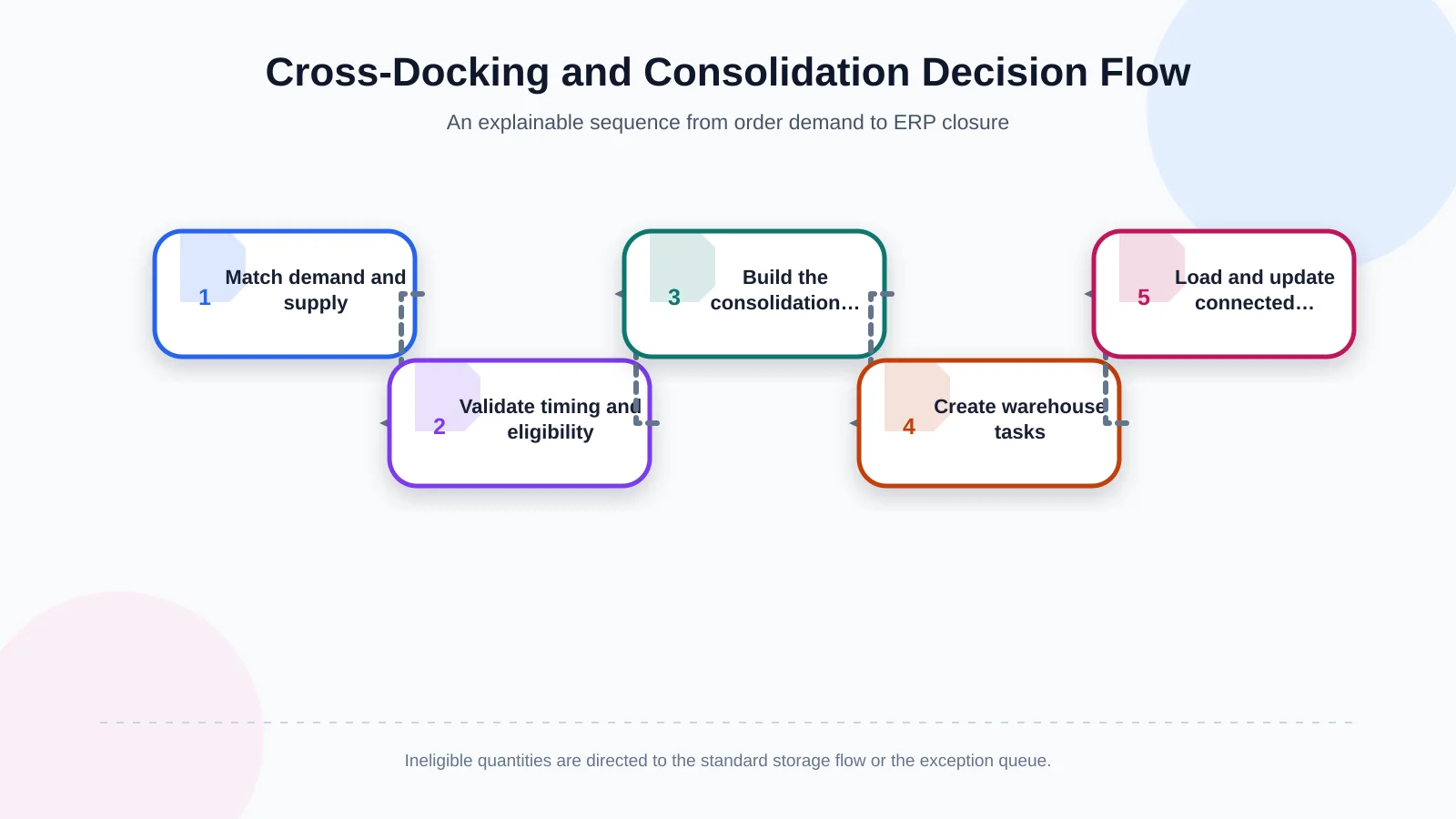
How does the cross-docking decision flow work?
1. Match demand with available and expected supply
The system matches open order lines against current inventory, expected receipts and production output. It checks not only the SKU but also the unit of measure, variant, serial or lot, quality status and reservation relationship. If only part of a matched quantity qualifies for cross-docking, the line can be split: the eligible portion moves to outbound staging while the remainder goes to a storage location.
2. Validate timing and physical feasibility
The engine compares the expected arrival time with the dispatch cut-off and required preparation time. A theoretical match is not operationally valid if the vehicle must close before the product arrives. Dock capacity, temporary staging occupancy, handling equipment, packaging integrity and mandatory quality inspections should also be evaluated before work is released.
3. Build the consolidation group
Eligible products are grouped by customer, delivery point, route, date, carrier and loading conditions. In addition to volume and weight limits, the software applies stacking constraints, temperature classes and product-separation rules. It may present several feasible load plans with their reasoning instead of producing one opaque “best” answer.
4. Create warehouse tasks and documents
An approved plan becomes a controlled sequence of receiving, sorting, labelling, consolidation and loading tasks. Barcode scans confirm that each product has reached the correct transfer zone. If a delivery note, loading list, label or carrier document is unavailable, the task can be placed on hold. The missing document should remain visible as a distinct exception rather than being confused with a physical stock problem.
5. Return the result to the ERP and carrier
Once loading is complete, the actual quantity, serial or lot, logistics unit, vehicle and tracking details are sent to the relevant systems. A failed transfer should enter an error queue instead of disappearing or silently leaving systems out of sync. Every retry, manual correction and authorised closure must be retained in the audit trail.
Barcode, serial/lot and logistics-unit visibility
Cross-docking should improve speed without weakening traceability. The GS1 Global Traceability Standard addresses the relationship between product and batch or lot identities and logistics units such as pallets. The GS1 Logistic Label Guideline identifies the SSCC as a required element of the logistics label and provides a framework for connecting physical movements with electronic messages.
In practice, scans can verify each receipt, split, repack, consolidation and loading event. When a new pallet is created, the relationship between parent and child logistics units must be preserved. For serial- or lot-controlled goods, confirming the total quantity is not enough: every loaded unit must satisfy the serial or lot conditions permitted by the order. A related Kumsal Agency guide explains how to plan a warehouse mobile app for barcode, serial/lot and offline workflows, including task execution and ERP reconciliation.
| Stage | Core data | Decision | Exception |
|---|---|---|---|
| Receiving | ETA, quantity, lot | Is it a cross-docking candidate? | Delay or quantity shortage |
| Consolidation | Route, volume, due date | Which load should receive it? | Capacity limit or incompatibility |
| Loading | SSCC, dock, vehicle | Is this the correct logistics unit? | Incorrect scan or missing document |
| Closure | Actual quantity | Can the result be transferred to the ERP? | Integration failure |
Which screens should the operations workspace include?
The operations workspace should be more than a reporting dashboard. It is where users inspect, approve and revise decisions. Incoming vehicles, open orders, cross-docking candidates, pending consolidations and outbound docks should appear on a shared timeline. A user should be able to see which orders form a load and why a particular order line is waiting without navigating through multiple disconnected applications.
- Candidate pool: Automated matches, eligibility scores, blocking conditions and recommended movements.
- Load plan: Orders, pallets, volume, weight, route, stops and capacity utilisation.
- Dock and timeline view: Appointments, estimated arrivals, cut-off times and delays.
- Error queue: Integration failures, missing master data, document issues and retry status.
- Document visibility: Delivery notes, labels, loading lists, carrier documents and proof of delivery.
- Audit trail: Rule outcomes, user interventions, previous and new values, reasons and timestamps.
Not every user needs the same authority. A warehouse operator may complete assigned tasks, a planner may revise a load, a manager may approve defined capacity or delivery-date deviations, and an IT user may inspect integration messages. Permissions should cover actions, fields, warehouses, companies and exception types as well as screen access.
Why exception management belongs in the core process
Real operations do not repeat an ideal flow without disruption. A vehicle may arrive late, a delivery may be short, a barcode may fail to scan, inventory may enter quality hold or a carrier service may stop responding. These situations should be managed with coded reasons, responsible roles, resolution targets and permitted actions—not buried in free-text notes.
If a product will miss the shipment cut-off, for example, the engine might close the load automatically, suggest an alternative carrier or request planner approval. The applicable response depends on the customer commitment and cost threshold. Closing an exception should never erase the original failure. The previous plan, revised plan, user rationale and ERP outcome should remain available for review. This also complements the visibility principles described in Kumsal Agency’s guide to planning a B2B order-tracking portal.
How should ERP, WMS and carrier integration be structured?
Integration design should assign clear ownership instead of making every system responsible for the same records. The ERP may own orders and commercial blocks, the WMS may own physical inventory and warehouse tasks, and the carrier system may own delivery services and tracking events. The consolidation engine evaluates events from these sources under common rules without creating uncontrolled copies of source records.
Messages should contain a unique transaction identifier, version, timestamp and source-system identity. Safe idempotent processing must prevent a duplicate message from creating a second load. Temporary failures can trigger controlled retries, while business-rule violations should be sent for user review. Integration status must remain visible to both operations and IT teams, particularly when physical movement has occurred but confirmation has not reached the ERP.
How should success be measured?
The project should not be judged by shipment count alone. Teams should measure how much cross-docking-designated stock actually bypasses storage, receiving-to-loading time, touches per unit, vehicle utilisation and on-time dispatch. Misloads, last-minute plan changes, integration errors, manual interventions and exception-resolution times reveal whether higher speed is being achieved without sacrificing quality.
Improvement percentages are unreliable without a baseline. First document current lead times, failure types and data gaps, then define targets for a pilot warehouse, route or customer segment. Compare results by period, warehouse, route and product family. Any reduction in cycle time should be considered alongside changes in errors, service levels and transport cost.
Where should the project begin?
Start by observing the physical flow and mapping events from order creation through receiving, loading and delivery. Then document the data sources, system owners, rule priorities, user roles and exceptions. A measurable pilot is usually more useful than activating every integration at once because it allows the decision rules to be tested against real operational data and revised under controlled conditions.
Kumsal Agency can design and develop a custom web-based operations workspace, ERP–warehouse–carrier integrations, barcode and mobile warehouse workflows, role-based permissions, error queues, document visibility and audit trails around the organisation’s actual processes. Contact Kumsal Agency to analyse the data sources, business rules, user roles and integration requirements behind your cross-docking and freight-consolidation operation.