


Aydınlatma metni yükleniyor…
Why is MOQ more than a minimum unit limit in B2B e-commerce?
In B2B e-commerce, minimum order quantity (MOQ) is the lowest quantity a customer can order for a product. For manufacturers, wholesalers and distributors, however, a rule such as “minimum 100 units” is rarely sufficient. A product may ship in cases of 24, a pallet may hold 40 cases, or a particular customer may only be authorised to buy full pallets. The sales platform must evaluate all these conditions together.
Poorly designed quantity rules lead to split cases, incomplete pallets, incorrect prices, manual warehouse corrections and orders rejected by the ERP system. If validation happens only when the order is submitted to ERP, buyers may encounter an error after building a large cart. A well-designed B2B platform explains the permitted sales unit on the product page, guides quantity entry and prevents invalid orders as early as possible.
MOQ, order multiple and packaging unit: what is the difference?
Although MOQ, order multiple and packaging unit are closely related, they answer different questions. MOQ defines the lowest acceptable order. The order multiple determines the increments allowed above that minimum. The packaging unit describes whether the product is defined, ordered or shipped as individual units, packs, cases or pallets.
Suppose a product has an MOQ of 120 units, contains 24 units per case and has an order multiple of 24. Quantities of 120, 144 and 168 are valid, while 130 is not. If the MOQ is 100 and the multiple remains 24, the valid sequence must be defined explicitly: should increments begin at 100, or must every order also be a complete-case quantity? Without a clear data model, the storefront and ERP may calculate different results.
The Microsoft Dynamics 365 documentation on B2B product quantity limits describes how minimum, maximum and multiple quantities can be managed together. This illustrates why MOQ and order multiple should be stored as separate fields.
How should the unit, pack, case and pallet hierarchy be modelled?
A product’s base unit may be an individual item, while its orderable unit is a case and its shipping unit is a pallet. Storing only a “units per case” value is therefore inadequate. The product model should contain a unit hierarchy in which quantity, barcode or GTIN, weight, volume, dimensions, orderability and shippability can be defined at every level.
The GS1 trade item hierarchy guidance explains how base units, inner packs, cases and pallets can be represented as connected trade items. Defining each level separately helps commerce, barcode, warehouse and logistics systems interpret the same packaging structure.
If a case contains 12 bottles and a pallet contains 60 cases, one full pallet equals 720 bottles. When a buyer selects two pallets, the interface can show the corresponding 120 cases and 1,440 bottles. The unit sent to ERP depends on the integration contract, but every channel should obtain its conversion factors from one trusted source.
Why should packaging changes be versioned?
Units per case or cases per pallet can change over time. Overwriting an existing configuration may alter the meaning of open orders and historical documents. Under the GS1 rule for pack and case quantity changes, changing the number of trade items in a case or the number of cases in a predefined pallet configuration requires a new GTIN. Packaging should therefore be managed through effective dates or a new trade-item record rather than an untracked update.
At what level should MOQ be defined?
A single global MOQ field may appear convenient, but real B2B terms are more specific. The same product might be sold by the case to retailers and by the pallet to major distributors. Export channels may have container or loading constraints, while domestic orders use lower thresholds. Customer contracts may also specify exceptions to the standard minimum.
The rule engine should support contexts such as product, product group, customer, customer group, sales channel, warehouse, delivery address and date range. When several rules match, their precedence must be predetermined. A customer–product exception might take priority over a customer-group rule, which in turn overrides the product default. Administrators should be able to see both the result and why a particular rule was selected.
How should customer-specific exceptions be managed?
An exception should not be implemented by editing master data or hard-coding a customer condition. An authorised user should create a record containing the customer, product, revised MOQ, order multiple, start and end dates, and a reason. Critical exceptions can require approval, while every change is retained in an audit trail. When an exception expires, the platform should automatically return to the standard rule.
If the exception affects pricing, the order of quantity validation and price calculation must also be explicit. The approach described in managing special pricing and discount rules in a dealer portal can help resolve customer prices, quantity breaks and overlapping discounts consistently.
Core case- and pallet-based sales scenarios
Full-case sales
For full-case sales, a quantity entered as individual units must still be divisible by the case size. The product page should state “1 case=24 units,” and quantity controls should increase or decrease in steps of 24. If a buyer enters 50 units, the interface should suggest the nearest valid options—48 and 72—instead of displaying only “invalid quantity.”
Full-pallet and layer-based sales
Pallet capacity must be calculated from the product’s current packaging configuration. Some operations require full pallets; others permit complete pallet layers. If a pallet has five layers and each layer contains eight cases, a full pallet contains 40 cases, while layer-based orders increase in multiples of eight cases. The product page should show both conversions clearly.
Mixed pallets
A mixed pallet combines different products within one logistics unit. Each product must retain its case multiple while the platform checks the pallet’s overall case count, weight, volume or layer capacity. Where case dimensions vary, total case count alone may be misleading. Compatibility may also depend on stackability, hazardous-material classification or temperature requirements.
A simple rule such as “at least 30 cases” can be validated at cart level. Physical loading optimisation may require integration with a palletisation or warehouse system. If the commerce platform cannot verify physical suitability, it should route the order for operational approval rather than presenting an uncertain calculation as final.
In what order should cart validation run?
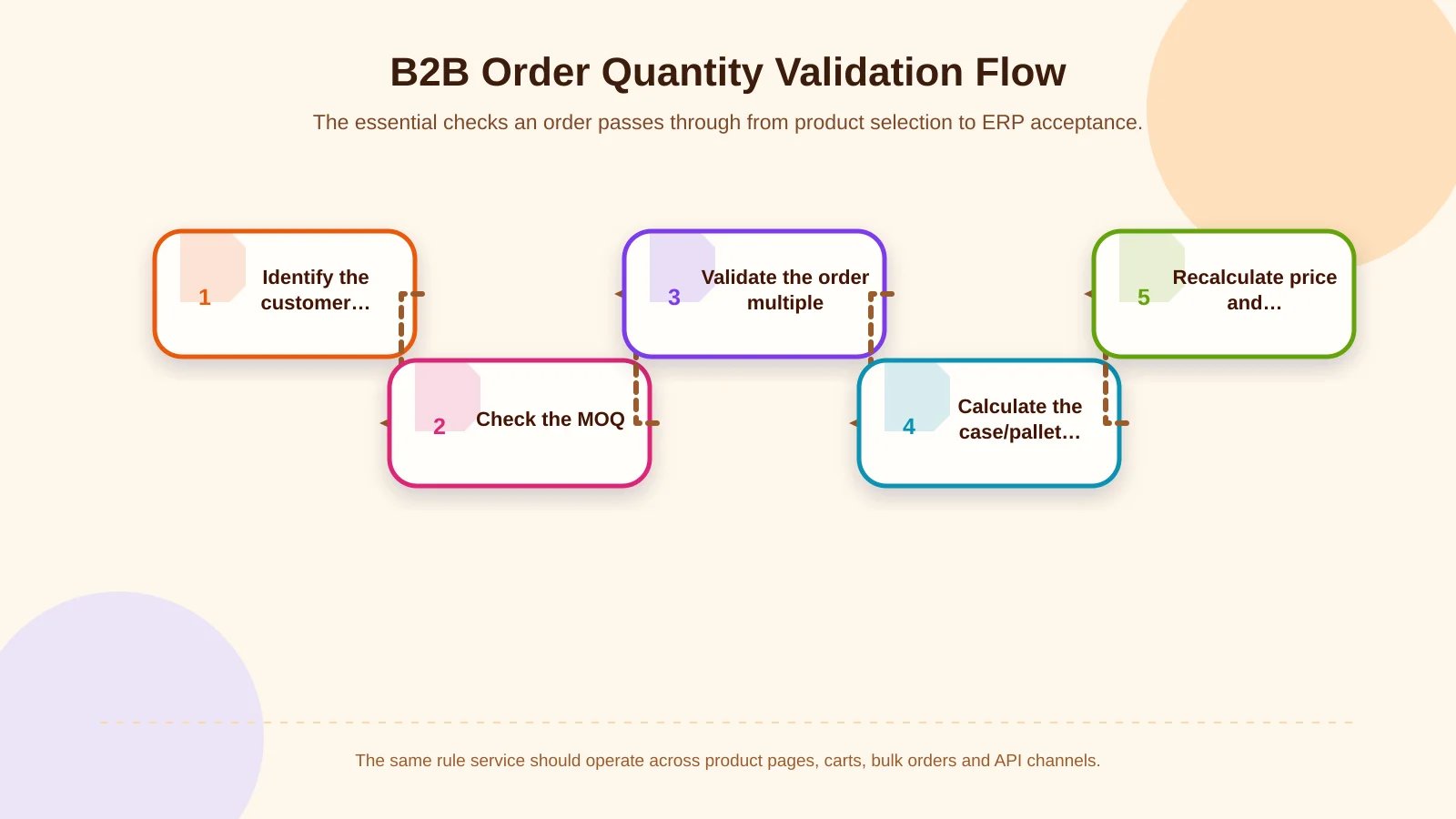
Validation should not wait until the buyer selects “Place order.” It should run during quantity entry, when an item is added, whenever the cart changes and immediately before ERP submission. The same rule service should also support quick-order forms, spreadsheet uploads, field-sales applications and API orders.
- Confirm that the product and selected packaging unit are available to the customer.
- Check that the quantity satisfies both the MOQ and the permitted order multiple.
- Calculate case, layer and pallet conversions using the current configuration.
- Apply the customer price and quantity break to the validated quantity.
- Check available inventory, reservations, warehouse and delivery conditions.
- Compare the order summary with the unit and quantity that will be sent to ERP.
Orders uploaded through Excel or CSV require the same line-level checks. Invalid lines should be reported with the product code, entered quantity, expected rule and a correction suggestion without discarding valid rows. See how to plan B2B bulk ordering for a broader treatment of uploads, previews and error handling.
How should quantity rules be explained to buyers?
A buyer must understand why a quantity was rejected. Replace “Invalid quantity” with a message such as: “This product must be ordered in a minimum of five cases and in full-case increments. One case contains 24 units, so the valid minimum is 120 units.” In the cart, show the selected sales unit, its base-unit equivalent and the total number of packages together.
Automatic rounding should require confirmation. Silently changing 125 units to 144 can affect order value, freight cost and purchasing authority. A safer interface offers “Reduce to 120” and “Increase to 144,” including the price difference. If the change crosses a spending or approval threshold, the relevant approval workflow should be evaluated again.
| Sales model | Core rule | Cart validation | Information displayed |
|---|---|---|---|
| Individual units | MOQ + unit multiple | Minimum and multiple compliance | Valid unit range |
| Full case | Units per case | Case multiple | Case and unit equivalents |
| Full pallet | Cases per pallet | Pallet multiple | Pallet, case and unit equivalents |
| Mixed pallet | Product case multiple + capacity | Total load compatibility | Capacity used and quantity remaining |
Consistency with pricing, discounts and inventory
Quantity rules cannot be separated from the pricing engine. Prices may be stored per unit and displayed per case, or defined directly at case level. Currency, tax, discounts, quantity breaks and rounding must produce consistent results through the same calculation service. If a pallet selection triggers a discount based on total units, the interface should explain that relationship.
Inventory should not be presented only as a base-unit total. If 250 units are available but the product is sold only in cases of 24, the sellable quantity is 10 full cases; the remaining 10 units cannot be ordered under that rule. Damaged cases, reserved inventory, lot restrictions and quantities split between warehouses may reduce sellable packaging availability further.
How can ERP integration establish a single source of truth?
MOQ may be maintained in ERP, packaging conversions in a product information system and customer exceptions in the B2B platform. The essential requirement is to designate an authoritative system for each data element. The integration contract should define product code, sales unit, conversion ratio, MOQ, order multiple, price unit, effective date and customer mapping.
When synchronisation fails or is delayed, the platform should expose the record’s status instead of silently accepting orders with stale data. Administrators need visibility into the last successful update, transfer logs, error queues and retry results. If ERP rejects an order, buyers should receive an understandable explanation, while operations teams retain access to the raw request, response and applicable rule version.
What should the administration panel include?
- Base units and conversion factors by product and packaging level
- MOQ, maximum quantity, order multiple and permitted sales units
- Rule scope by customer, group, channel, warehouse and date
- Mixed-pallet capacity and eligible product groups
- Priority, validity period, approval status and exception reason
- ERP mapping codes, synchronisation status and error records
- Change history, responsible user and previous values
Role and permission management is critical. A sales representative may request a temporary customer exception, a sales manager may approve it, and product or logistics teams may update packaging information. Each role should access only its area of responsibility, and critical changes should be verified before publication.
Questions to answer before implementation
Begin with business rules, not screen design. Document which products are sold by unit, case or pallet; where MOQ changes by customer or channel; whether partial pallets are allowed; how residual inventory is handled; and which unit the ERP accepts. Then create a decision table using real orders.
Test standard cases, full pallets, mixed pallets, customer exceptions, insufficient inventory, packaging changes and integration outages during the pilot. Success should cover more than order creation: monitor manual correction rates, ERP rejections, cart abandonment, support requests and shipping discrepancies.
Make MOQ rules a natural part of the buying experience
A successful B2B e-commerce platform presents MOQ and case/pallet rules as useful guidance, not last-minute restrictions. Product hierarchy, customer exceptions, pricing, inventory, logistics and ERP submission all belong to the same rule framework.
Kumsal Agency approaches B2B e-commerce as custom web software shaped around real sales and operational processes—not merely an ordering screen. Contact Kumsal Agency to turn your MOQ, order-multiple, case and pallet conversion, special-pricing, cart-validation, permission and ERP requirements into a manageable B2B e-commerce solution aligned with your existing operation.