


Aydınlatma metni yükleniyor…
A B2B product configurator is not a form that merely lists options. It is a rule-driven product that allows only combinations that can be engineered, sold, costed and quoted.
This guide helps scope complex products such as machinery, industrial equipment, servers, electrical panels, building systems and packaging. The goal is not a visual selector alone. It is one traceable structure connecting product rules, BOM and routing, cost, price, quotation and revision.
What problem does a configurator solve?
Power, capacity, material, dimensions, accessories, certification and delivery conditions are not independent. One choice can require or prohibit another and can change cost. When those relationships live only in an experienced salesperson’s memory, quotation quality depends on the individual.
Microsoft’s product configuration model brings together attributes, constraints, calculations, subcomponents and product variants derived from user requirements. The Microsoft product configuration models documentation relates the model to manufacturing information such as BOMs and routes.
The configuration spine from need to quotation
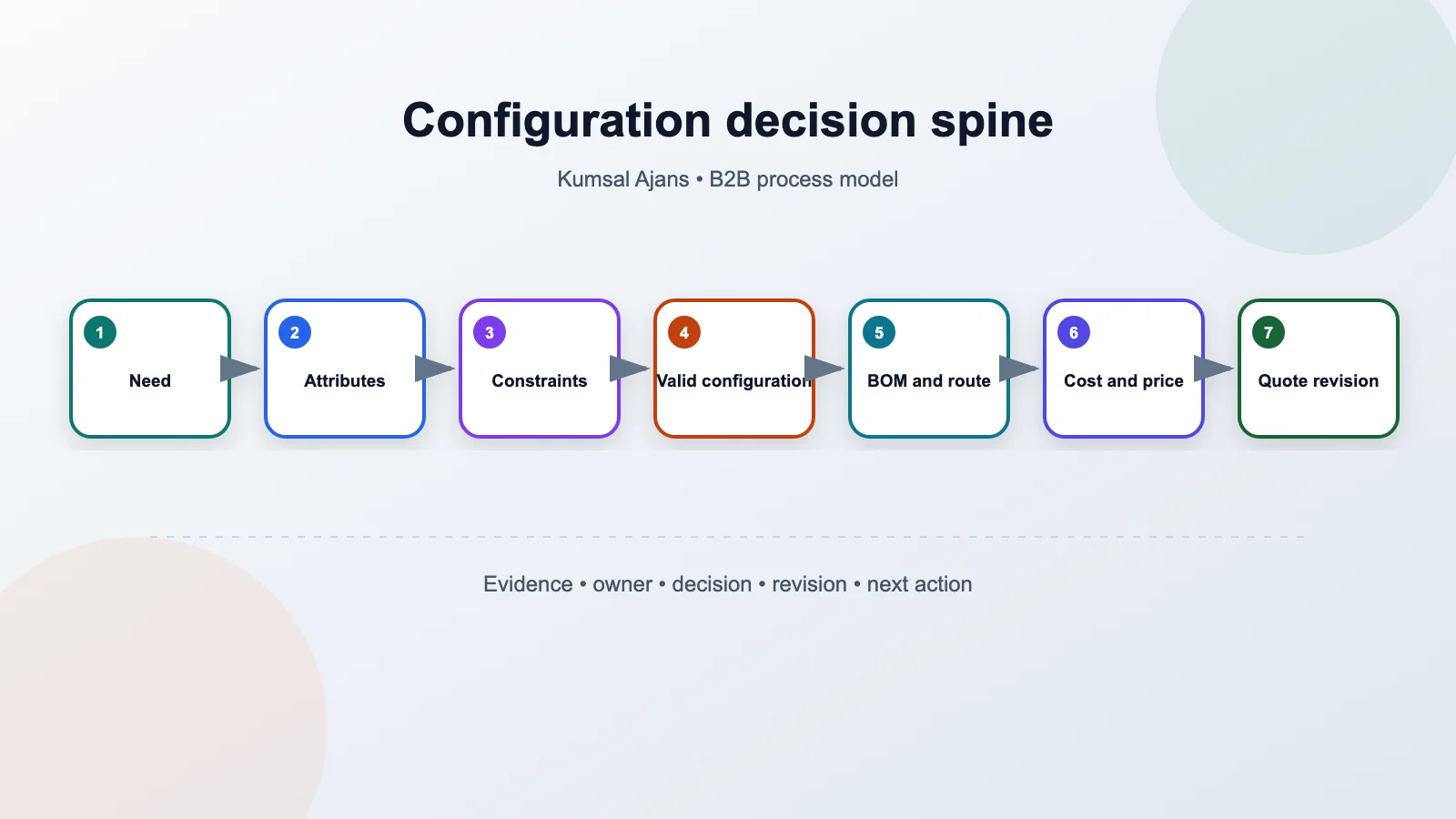
- Need: capture use case and success conditions.
- Attributes: translate technical and commercial options into controlled values.
- Constraints: apply required, prohibited and conditional relationships.
- Valid configuration: produce a buildable structure and clear warnings.
- BOM and route: derive parts, operations and services.
- Cost and price: apply source data and commercial rules.
- Quotation revision: freeze, approve and transfer the result to an order.
Build the product model before the option list
Product family, component, attribute, allowed value, unit and default are different concepts. A customer-facing choice such as high capacity may translate into a specific motor, cable, cooling unit and enclosure. Marketing language needs a controlled mapping to the engineering model.
Record the owner, data type, unit, valid range, visibility and change impact of every attribute. Use free text only for genuinely custom design; otherwise equivalent options multiply under different spellings.
Turn constraints into explainable rules
A rule may state that A requires B, C cannot coexist with D, a value over E requires enclosure F, or a certificate is available only in a target market. Give every rule an identity, explanation, owner, effective date and revision.
Do not show only “invalid selection.” Explain which decisions conflict, which option can change and whether the system proposes an automatic correction. Never apply that correction silently; let the user confirm its effect.
Derive the BOM and route from the same model
Valid choices should determine required parts, quantities, operations and external services. The result should be reproducible from a rule revision rather than copied from a loose template. Show the BOM and routing effect of a change before quotation approval.
Reusable subcomponents reduce maintenance, but a dependency report must reveal which product families are affected when a shared component changes.
Separate cost from price
Cost may come from materials, operations, external services, installation and logistics. Selling price may depend on customer group, currency, quantity, territory, promotion and approval thresholds. A cost update must not silently rewrite an issued quotation.
Microsoft relates BOM calculation groups to policies such as warnings and validity, and costing versions to planned or standard cost records. The BOM calculation groups and costing versions documentation provides useful references for separating policy and revision.
Store the quotation as an immutable snapshot
Version the quotation together with choices, rule revision, BOM summary, pricing inputs, currency, tax, validity, delivery assumptions and approvals. A new selection creates a new revision instead of changing an earlier quotation in place.
The PDF and portal view shared with a buyer must point to the same revision. If order conversion recalculates the configuration, block differences or require authorised approval.
Design the experience as a question tree
Begin with use context instead of placing hundreds of technical choices on one screen. Early answers can hide irrelevant steps, but explain which dependent choices will reset when the user changes an earlier decision. Keep technical and commercial summaries available throughout.
A visual preview is useful but does not replace engineering truth. If it is representative, say so; avoid implying that colour, proportion or accessories are a binding visual specification.
Governance, tests and measurement
- Boundary values for capacity, dimensions and unit conversion;
- Three rules that indirectly require one another;
- An older quotation containing a discontinued component;
- Currency, quantity and price-approval thresholds;
- An open session and saved draft during a rule update;
- A retried ERP transfer that must not create a duplicate order.
Observe invalid combinations, unexplained rule failures, manual engineering intervention, quotation revisions, pricing differences, transfer errors and rule-publishing time. These are baseline measures for a pilot, not guaranteed outcomes.
Conclusion
Make model governance part of the product
A configuration model is not built once and forgotten. Product managers should own attributes, engineering should own constraints and BOMs, cost teams should own source data, and sales management should own pricing and approval rules. No single role should publish an untested model alone.
Define draft, review, approved, published and retired states. Run every revision through automated regression tests using representative configurations and expected BOM and price results. Keep a rollback plan for critical defects and a way to identify quotations affected by the faulty revision.
Proceed through a narrow pilot
Choose a product family with meaningful business value and a manageable rule set. Collect simple, boundary, exceptional and incorrect historical quotations. Do not open the model to buyers until sales, engineering, manufacturing and finance agree on its output.
The first release does not need complete 3D visualisation or every ERP field. Validate the spine: valid combinations, explainable constraints, reproducible BOM, controlled pricing and versioned quotations. Expand visualisation and self-service after that spine is reliable.
What should the implementation proposal deliver?
- Product family, attribute, value, component, rule and revision data models;
- Question tree, summary, error explanations and saved-draft experience;
- Constraint engine, calculations and reference-configuration tests;
- BOM and route derivation plus ERP field and identity mapping;
- Cost sources, price formulas, approval thresholds and currency treatment;
- Quotation revision, PDF or portal presentation and order conversion;
- Model publication, rollback, audit and technical handover.
A successful B2B configurator is a governable product model before it is an impressive option screen. It links attributes, constraints, BOM, routing, cost, price and quotation revision into one evidence chain. To scope your product family, explore Kumsal Agency’s ecommerce services and bring product trees, rule tables, BOM examples and price approvals to discovery.