


Aydınlatma metni yükleniyor…
Appointment scheduling software cost is not determined by a calendar screen or staff count alone. Locations, services, staff, rooms or equipment, availability, duration and buffer rules, cancellation and rescheduling, notifications, payments, integrations, reporting, security, testing and operations shape the scope.
A comparable proposal defines one booking end to end: who books which service, with which resource, in which time zone and under what condition; how capacity and payment change after an exception; and who owns failure. This guide offers a scope method, not a fixed price.
An Appointment Request Is Not Necessarily a Confirmed Booking
A simple form collects a preferred time and contact details for later confirmation. A confirmed booking verifies availability, reserves capacity, creates a unique operational record and states the condition of confirmation. If a “book” action only sends a request, label it accurately.
In a hybrid flow, the customer selects a time but the business confirms after documents, payment, eligibility or staff review. Pending, confirmed, rejected, rescheduled, cancelled and completed states need clear ownership and capacity effects.
The Kumsal Appointment Transaction Unit Matrix
This original matrix defines one appointment through nine components: customer, service, location, resource, time, capacity, state/exception, communication/payment and operational owner. It is not a price list or sector-compliance claim. Record the source data, rule, exception, acceptance test and operating cost for each component.
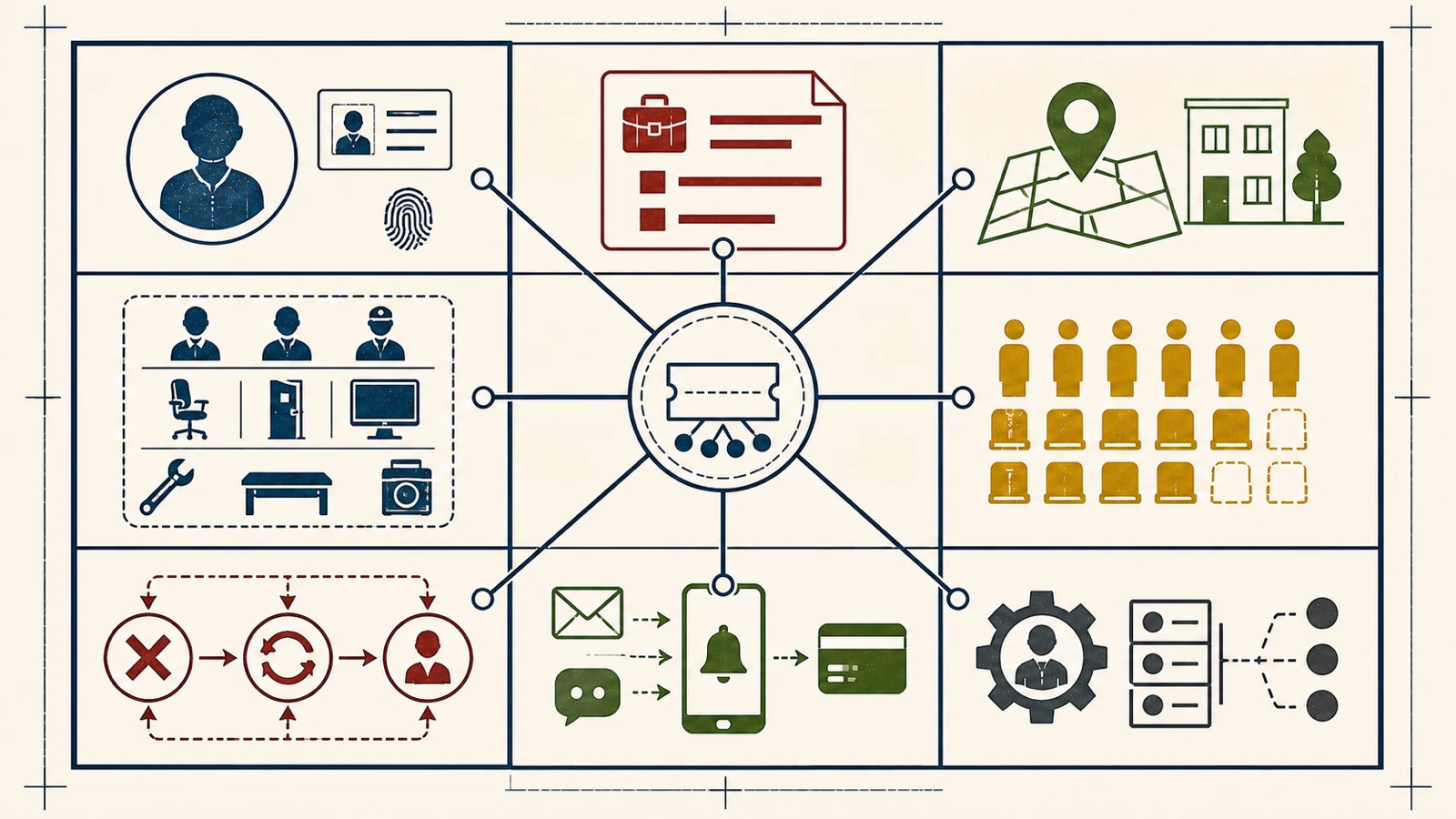
| Component | Primary question | Cost driver |
|---|---|---|
| Customer | Guest, member or organization account? | Registration, verification, profile, consent and history |
| Service | Duration, preparation and eligibility? | Variants, prerequisites, forms and documents |
| Location | On-site, online or at customer premises? | Hours, territory, room and access |
| Resource | Staff, room, vehicle or equipment? | Skills, concurrency and maintenance blocks |
| Time | How are slots generated? | Duration, buffers, breaks, holidays and time zone |
| Capacity | Individual, group or shared resource? | Quota, holds, waitlist and overbooking |
| State/exception | How do cancellation, change and no-show work? | Deadline, charge, reopening and human decision |
| Communication/payment | When is it reminded and collected? | Channel, provider, delivery, refund and reconciliation |
| Operations | Who monitors, corrects and takes over? | Back office, reports, logs, support, backup and handover |
Location, Service and Resource Models
A service may not be offered at every location; the same staff member may have different service durations; a room or device may be a shared resource independent of staff. “Staff available” does not prove that the required room or equipment is available. Model resources required together and alternatives explicitly.
Online meetings, business premises and customer-location services have different setup, travel, territory and connection rules. Multi-location organisations may separate hours, holidays, capacity and local managers while retaining central governance.
Slots, Duration, Buffers and Capacity
Slots can use fixed intervals, service duration, start windows or dynamic availability. Include preparation, cleaning or travel, breaks, resource maintenance and closing time. A 30-minute service does not necessarily start every 30 minutes.
Group capacity may count people; shared equipment may count concurrent use; sequential services may require both staff and room. Define how long a temporary hold lasts, which simultaneous request wins and how waitlist offers expire.
Why Time Zones and Daylight Saving Are Scope
A local appointment in one city may be simple. When customers, staff or online services cross countries, time zone becomes data. Displayed local time, stored time, reminder and external calendar event must represent the same instant.
The IANA Time Zone Database maintains changing local-time and daylight-saving rules around the world. Do not assume a fixed UTC offset applies to every date. Test zone identity, historic or future rule changes, recurring bookings and the viewer’s display zone.
Cancellation, Rescheduling, Waitlists and No-Shows
Define the cancellation deadline, who may cancel or change, when capacity reopens, notifications, charges and refunds. Staff absence, location closure or resource failure requires a different bulk-change process from one customer cancellation.
A waitlist needs order, preferred window, automated offer, offer expiry and progression. A no-show record should not automatically create penalties; apply verified business policy, accurate evidence and any appropriate legal or specialist review.
Notification Development and Operating Cost
Email, SMS, push or messaging requires an event, recipient, locale, template, time, preference, retry and delivery-failure decision. Creation, confirmation, rescheduling, reminder, cancellation and follow-up are not the same message.
Current pricing and limits vary by provider, country and use. Separate integration development from per-message or subscription operating charges. “Sent” does not prove delivery; assess delivery state and fallback needs.
Payment, Temporary Holds and Refunds
A booking may be free, prepaid, deposit-based, collected later or deducted from a subscription or credit. If capacity is held before payment, release it after expiry. Test two customers paying for the same slot, delayed provider callbacks and duplicate requests.
A success screen alone is not financial certainty. Reconcile provider outcome, booking status, accounting record, cancellation and refund. Relevant specialists must determine payment, consumer, tax and refund obligations.
Calendar, CRM and Other Integrations
An external calendar integration may read busy time, write events or update both directions. Define the source of truth, visibility of private event details, deletion and rescheduling, recurring events, webhook outages and reconciliation.
The Google Calendar API quota guide is a current product example showing quotas at project and user levels and the need to handle exceeded limits and backoff. It is not a universal rule for every calendar provider; verify each service’s documentation.
Use the web software integration guide to define CRM, ERP, payment, video, map, workforce or call-centre flows by field and failure behaviour.
Back-Office Roles and Permissions
Central administrator, location manager, staff, call centre, finance and support do not need identical access. Separate viewing, moving, bulk cancellation, fees and refunds, customer notes and acting for a user. Record a reason and audit event for critical changes.
Staff might see only their calendar while managers change capacity rules. Do not expose customer data, private notes or payment information beyond role need. Access removal and calendar ownership transfer belong in staff-offboarding and handover.
Accessible Forms and Calendars
Test date and time selection with keyboard, screen reader, focus order, labels, error messages and mobile touch. Colour-only availability or inaccessible custom calendar controls can block task completion.
The W3C Forms Tutorial treats labels, grouping, instructions, validation and error notification as parts of accessible form design. Confirm the applicable standard and legal requirement separately; automated tests do not replace human task testing.
Packaged, Custom or Hybrid Scheduling
| Approach | Potential fit | Comparison boundary |
|---|---|---|
| Packaged | Standard services, calendars, reminders and payment are sufficient | Licensing, staff/location tiers, features and data exit |
| Custom | Capacity, roles, eligibility, payment or integrations are distinctive | Discovery, development, testing, maintenance and ownership |
| Hybrid | Packaged calendar/payment with custom customer and operations flows | Boundaries, version compatibility, incidents and support |
Compare licensing, messaging, payments, calendar/video services, infrastructure, support, security updates, migration and exit over the same lifecycle—not launch cost alone.
Which Proposal Lines Should Remain Separate?
- Service, location, resource and capacity discovery
- Customer journeys, UX, accessibility and visual design
- Availability engine, state and exception rules
- Customer and back-office interfaces and role matrix
- Calendar, CRM, payment, video, messaging and other integrations
- Data/account migration and external calendar mapping
- Functional, conflict, security, performance, device and accessibility tests
- Pilot, training, launch, backup and rollback
- Licensing, usage, messaging and transaction charges
- Maintenance, incidents, new development, data and source-code handover
Use the web software provider technical evaluation checklist to compare suppliers with the same test and handover evidence.
Pilot and Measurement
Run a pilot with representative locations, services and staff. Test customer creation, valid slots, concurrent requests, cancellation and rescheduling, resource closure, reminders, payment, external-calendar outage and support intervention.
Measures may include correctly completed bookings, conflicts, availability errors, completion time, abandonment, cancellation and rescheduling, no-shows, reminder delivery, payment variance, integration failures and assisted completion. Use the website form monitoring guide to verify that appointment requests reach the accountable team.
Do not claim improvement without a baseline, definitions and a record of operational changes. Software cannot guarantee utilization, fewer no-shows, satisfaction or revenue.
Conclusion
Appointment-system cost is shaped by the customer, service, location, resource, time, capacity, exception, communication/payment and operations rules behind one booking—not the calendar screen. The Appointment Transaction Unit Matrix makes those responsibilities comparable across proposals.
To assess appointment, customer-portal and custom web software scope, contact Kumsal Agency’s web development team.