


Aydınlatma metni yükleniyor…
A field service mobile app should do more than put a paper service form on a phone. It needs to manage who owns a work order, what happened on site, which parts were used and when the record reached the office. Begin planning with work-order states and the information that must survive a lost connection, not with a list of screens.
This guide is for service operations managers and teams preparing a development scope. Its lifecycle, ownership model and acceptance tests are illustrative design tools, not completed Kumsal Agency client work or measured performance results. It does not provide equipment repair instructions, safety procedures or legal advice about document validity.
Choose the operational problem the app needs to solve
Moving technicians onto an app is not, by itself, a measurable requirement. Are jobs being assigned twice? Is parts consumption reported late? Is equipment history unavailable on site? Do completed jobs reach billing with missing information? Each problem implies a different first-release scope.
Prepare a sample set of actual work orders with personal and confidential details removed. Include jobs awaiting parts, unsuccessful visits, reopened orders and work performed without connectivity, alongside straightforward completions. If the design covers only the happy path, technicians may still need a separate record outside the app.
For each example, document the starting information, the roles allowed to change it and the evidence required at closure. Check that the service manager and technicians mean the same thing by each status. “Completed” may mean the site visit has ended or that office review has finished; these can require different states.
Define the lifecycle through transition rules
The following model is a starting point, not a mandatory process. What matters is knowing who can move a job into each state and what must be recorded before that transition is accepted.
| State | Owner | Required record | Important exception |
|---|---|---|---|
| Request received | Service desk | Equipment or service requirement and contact details | Duplicate request |
| Assigned | Operations coordinator | Technician and planned visit | Skills or availability mismatch |
| In progress | Assigned technician | Start record and observations | Handover to another technician |
| On hold | Technician / operations | Reason and follow-up owner | Waiting for a part or customer response |
| Submitted for review | Technician | Work summary, time and parts used | Missing attachment or transfer |
| Closed | Authorised reviewer | Required checks completed | Reopening with a reason |
A job on hold should not disappear. Show its reason, last activity and next responsible person together. Reopening should preserve the earlier work summary and explain why the previous closure has changed, rather than overwriting history.
Separate an assignment notification from the current assignment itself. A push notification does not prove that a technician has seen or accepted a job. When the plan changes, the app should display the valid assignment; opening an old notification should still lead to the current record.
Describe offline behaviour operation by operation
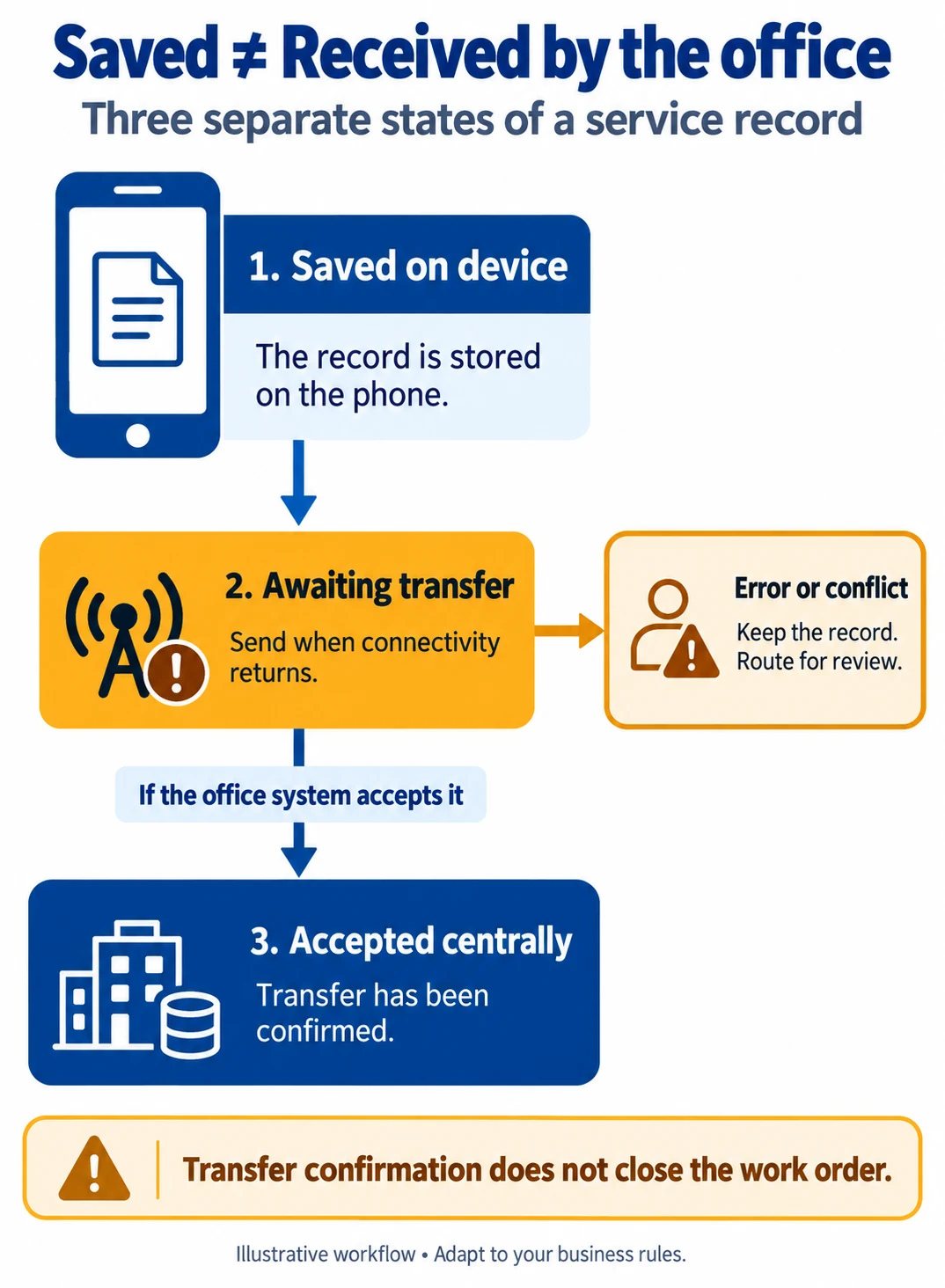
“Works offline” is not a sufficient specification. Can the technician view jobs, create a new order, take photographs or record parts consumption without a connection? Define local saving, server transfer and failure behaviour separately for each action.
The Android offline-first architecture guide explains reducing network dependence for critical functionality and coordinating local and network data sources. It also highlights the additional conflict-handling work required for offline writes. That does not mean every business operation can be finalised without a connection.
Our suggested interface distinction is saved on device, awaiting transfer and accepted by the office system, with additional actionable states for transfer failure or conflict. One green tick should not make all of these look equivalent. Otherwise a technician may believe the office has the record when it exists only on the phone.
For example, a technician might record parts consumption offline, but that cannot update central availability at that moment. Show the freshness of the last known stock information and explain the business rule governing use. An operation requiring current authorisation may need to wait for connectivity rather than being presented as final.
Decide what must survive a data conflict
The office may reassign a job while its previous technician adds a note offline. Silently discarding either change is unsuitable. In our example, the central assignment remains authoritative, while the field note is retained with its author and time and sent for review if necessary. This illustrates why every field cannot share one conflict-resolution rule.
A parts-consumption record sent twice should not become two consumptions. The acceptance criteria can require each field operation to carry a traceable identity and prevent a repeated delivery of that operation from being applied again. Describe the expected user outcome as well as the implementation approach.
Photographs and form data may arrive separately. Receiving the work summary does not prove that all attachments are present. Define which attachments are required for closure and how interrupted transfers, retries and missing files will be tracked.
Separate ownership across parts inventory and ERP integration
The service app does not have to own the product catalogue, van stock and accounting record. Identify which system creates product codes, approves inventory movements and controls work-order closure. Specify ownership field by field instead of allowing the same information to change independently in two systems.
Issuing a part to a vehicle, using it on a job, returning it unused and separating a faulty item are different movements. Do not compress them into a single stock-reduction button. Barcode scanning can simplify code entry, but it does not resolve an incorrect label, wrong warehouse or changed product mapping on its own.
When integration fails, the record should remain traceable and technicians should not have to interpret a technical error message. The user can see a clear status while the support team receives the operation identifier, failure reason and retry information. Name the person responsible for unresolved transfers in the operating plan.
Test the technician interface in realistic conditions
Do not evaluate the first prototype only on a large monitor. Test the intended phones, camera access, limited connectivity, enlarged text and one-handed use. Work-order identity, equipment details and current state should be easy to distinguish. A critical save action should not disappear at the bottom of a long page.
Connect permissions such as photographs and location to an actual task. When permission is declined, provide an appropriate explanation or alternative instead of closing the entire workflow unnecessarily. Assess employee and customer data purposes, access and retention with the relevant internal teams. This article is not a compliance certification.
If customer acknowledgement is required, retain the version of the work summary being acknowledged and the time of the action. Do not describe a signature drawn on a screen as a qualified electronic signature without appropriate assessment. Confirm the document requirement with suitable specialists and accurately name the operation the software performs.
Add acceptance tests to the development brief
These scenarios make an offline capability claim testable. Run them with controlled test records rather than real customer information.
| Scenario | Expected result |
|---|---|
| Save a form offline, then close and reopen the app. | Saved text and transfer state remain available. |
| Retry the same parts-consumption record after a connection failure. | No second consumption appears centrally. |
| Change the assignment centrally while the device holds a new note. | The current assignment applies; the note is retained with a defined review route. |
| Interrupt a photograph upload. | The missing attachment remains visible; the job is not treated as fully documented. |
| Have the ERP reject an operation. | The failure is traceable and retries do not create duplicates. |
| Attempt to access another technician's restricted record. | The permission rule is enforced on the server as well. |
Keep the first release small but complete end to end
One service category, a limited user group and a clear work-order lifecycle can be a manageable starting point. Assignment, field recording, reliable transfer and office review should work together in that release. Prioritise route optimisation, predictive maintenance or advanced reporting only when a verified operational need justifies them.
Evaluate technology after clarifying acceptance criteria. Device access, offline data, background transfer and maintenance needs should inform the choice; no development approach is right for every organisation. Teams considering platform-specific development can also explore our guide to native mobile application use cases.
During a pilot, examine pending transfers, reopening reasons and incomplete inventory movements as well as completed-job volume. A rapidly closed job with an incomplete office record should not count as success. Define the meaning of each measure with the service team.
To scope a field service mobile app with Kumsal Agency, share a sample service form, work-order states, the ERP or inventory system in use and the offline scenarios you need to support. These inputs provide a starting point for defining screens and integrations alongside concrete acceptance tests.