


Aydınlatma metni yükleniyor…
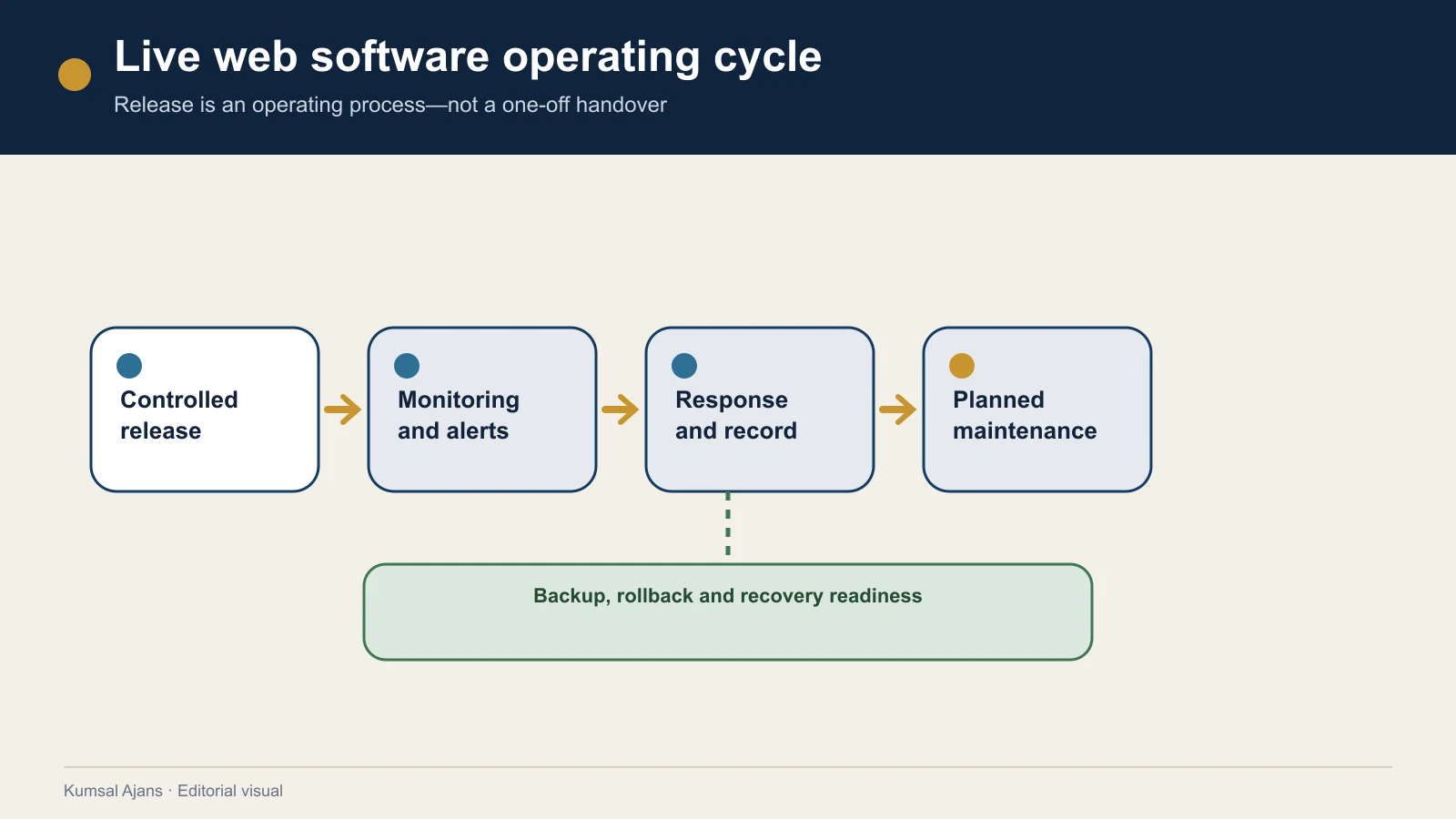
Web software security and maintenance are not one-off checks completed on launch day. Users, data, dependencies, infrastructure, integrations and business rules change while an application remains live. A secure and operable service needs written ownership for monitoring, testing changes, responding to incidents and restoring operations.
A useful operations plan connects seven areas:
- Governance: Owners of risk, decisions, budget and responsibility.
- Asset and risk inventory: Application, data, accounts, services and dependencies.
- Protection: Access, updates, configuration and data security.
- Change and release: Test, approval, deployment and rollback.
- Detection: User journeys, errors, performance and security signals.
- Response: Incident classification, communication, containment and correction.
- Recovery and improvement: Restoration, service validation and lessons learned.
The NIST Cybersecurity Framework 2.0 organises cybersecurity outcomes under Govern, Identify, Protect, Detect, Respond and Recover and notes that implementation actions vary by organisation and use case (NIST CSF 2.0). The seven areas in this article are an original editorial adaptation for web software operations; they do not claim NIST compliance or certification.
Separate security, maintenance, support and new development
- Defect support: Investigating and correcting delivered behaviour that fails because of a project defect.
- Maintenance: Repeated planned work that keeps the system current, observable and operable.
- Security work: Risk identification, safeguards, security monitoring, verification and incident response.
- Operational support: Handling usage, access or live-transaction requests.
- New development: A new feature, role, integration, report, design or changed business rule.
A short task is not automatically free support. A small interface field may affect data, permissions, integrations, notifications and reports. Classify requests by approved scope, cause, recurring operational need and expected outcome.
The existing free-support versus ongoing-maintenance guide explains this boundary in detail. WS-007 places it inside the wider security, incident and recovery model.
1. Governance: identify who operates the system
“The agency handles it” or “IT owns it” is not enough. Record the business/product owner, technical application owner, infrastructure owner, security/risk owner, data/content owners, access administrator, integration/service owners, incident communication owner and maintenance-budget approver.
A person can hold several roles in a small team, but the name, duty, backup person and contact route should be known.
Decision boundaries
Define who can approve an emergency security fix, maintenance window, temporary shutdown, user communication, specialist escalation, third-party adaptation classification and time-limited risk exception.
2. Create an asset and dependency inventory
An inventory should cover more than servers:
| Asset area | Information to record |
|---|---|
| Application/code | repository, active version, owner, release method |
| Environments | development, test, staging, production and access owners |
| Data | databases, files, sensitivity, owner, retention need |
| Accounts | admin, service and third-party accounts; roles and renewal |
| Infrastructure | hosting/cloud, DNS, TLS, network, storage, backup |
| Integrations | ERP, CRM, payment, email, messaging, mapping and API owners |
| Dependencies | framework, package, plugin, runtime and licence |
| Monitoring | error, performance, availability and functional checks |
| Documentation | setup, release, rollback, incident and recovery instructions |
Add criticality, owner, expiry or renewal, support channel and change impact. Retire unused accounts, services and endpoints safely instead of leaving them indefinitely active.
3. Build protection from risk and requirements
Access and identity
Check individual rather than shared accounts, role-based least privilege, stronger verification for critical administration where appropriate, joiner/mover/leaver processes, service-account ownership, temporary-access expiry and records of critical actions.
Updates and vulnerability management
Define covered software and services, security-advisory owner, risk prioritisation, test environment, temporary mitigation/exception, outcome record and residual risk.
NIST SSDF recommends keeping security requirements known throughout the life cycle and managing risks from third-party components (NIST SSDF SP 800-218). This does not make every update equally urgent; exposure, affected capability, exploitation and business impact require assessment.
Security verification
Automated scans, manual review and independent penetration testing do not prove the same scope. The OWASP Web Security Testing Guide includes areas such as configuration, identity, authorisation, sessions, input validation, business logic, client-side behaviour and APIs (OWASP WSTG).
Define application/version, method, environment, test accounts, exclusions, test-data protection, report, severity, remediation and retest ownership. Frequency and depth depend on risk, change and contract. No test guarantees that a system can never be compromised.
4. Put change and release management at the centre
Every change record can include reason, scope, affected functions/data/integrations, risk, tests, data/configuration steps, approval, release date, active version, rollback method and post-release validation.
Environments and tests
Separating development, test/staging and production helps teams verify changes with realistic structures without unnecessary real personal data. Record material differences between environments.
Rollback
Code rollback may not reverse database changes, new records or a third-party change. Define the rollback trigger, decision owner, known-good release, database forward/backward strategy, pre-release backup, critical validation and communication.
5. Detect user-outcome failure, not only server outage
Separate monitoring layers:
- Availability/infrastructure: endpoints, latency, capacity, DNS/TLS/licence expiry.
- Application/errors: error trends, failed jobs, permission problems, scheduled work and post-release regressions.
- Functional: forms, notifications, payments, order reconciliation, integrations and critical end-to-end journeys.
- Security/anomaly: unusual administrator actions, repeated failures, unexpected exports or service warnings.
For each signal, define trigger, recipient, support period, first action and record. Do not place passwords, keys, full payment data or unnecessary personal data in logs.
The existing form-monitoring guide explores one critical function in depth. The hub plan connects that check to the broader technical and incident process.
6. Prepare incident response
An incident can include attack, critical loss of access, incorrect data exposure, failed payment flow, broad outage or a damaging release.
NIST SP 800-61 Rev. 3 recommends incorporating incident response across cybersecurity risk management and preparing detection, response and recovery activities (NIST Incident Response SP 800-61 Rev. 3). A real plan requires qualified review against legal, contractual and sector requirements.
Example priority matrix
| Level | Example impact | Initial action |
|---|---|---|
| Critical | sensitive-data risk, unauthorised critical action, total outage | assign incident owner; begin containment, evidence preservation and communication |
| High | core transaction unavailable to broad group | determine scope; evaluate workaround or rollback |
| Medium | limited feature/integration failure with manual alternative | record, assign owner and target plan |
| Low | minor issue not blocking the critical journey | prioritise in maintenance/product backlog |
This is not a universal SLA. Define levels from data, business impact, affected users, duration and obligations.
Record timeline, affected assets/data/users, verified facts versus assumptions, containment, access/change history, communications, decisions, recovery, contributing causes and follow-up work.
7. Test backup, recovery and improvement
“Daily backup” is not a recovery plan. Define scope, frequency, retention, location, owner and restoration test.
Express RPO and RTO in business terms
- Recovery point objective (RPO): How much recent data loss can the organisation tolerate?
- Recovery time objective (RTO): How quickly should the critical service return?
Business and technical owners select these together from impact, data rate, infrastructure and budget. They are planning and verification targets, not unconditional guarantees.
Backup scope may include database, files, code/release artifacts, configuration/infrastructure definitions, secure re-provisioning methods, integration documents, licences and recovery instructions.
The CISA StopRansomware Guide recommends offline encrypted backups of critical data and regular testing of their availability and integrity in recovery scenarios (CISA StopRansomware Guide). It does not establish one universal web-application backup frequency; choose frequency and retention from risk and recovery objectives.
A restoration record should contain backup used, target environment, operator, elapsed time, restored data/version, critical-flow result, missing elements, comparison to RPO/RTO and follow-up action. Finding a backup file does not prove successful restoration.
Maintenance task card and operating calendar
| Field | Description |
|---|---|
| Task | Check or action |
| Purpose/risk | User outcome or risk supported |
| Scope | Application, environment, service, data or integration |
| Trigger/frequency | event, release, advisory or risk-based interval |
| Performer | Person/team doing the work |
| Approver | Person accepting outcome/change |
| Preconditions | access, backup, test data, maintenance window |
| Method | Check and action steps |
| Evidence | date, result, version, report or test record |
| Failure | When does it become an incident/change? |
| Escalation | Who is notified at which level? |
| Next date | Reassessment date |
Example calendar—adapt to the project
| Trigger/interval | Example work |
|---|---|
| Continuous/event-driven | availability, critical error, security and integration alerts |
| Every material release | regression, security impact, backup, deployment and rollback validation |
| Risk-based periodic review | roles, updates, forms/integrations, logs and capacity |
| Defined recovery interval | restoration test and incident/communication exercise |
| Third-party notice | API version, licence, price, certificate or terms impact |
| Business change | data, role, process, retention and acceptance updates |
Monthly or annual labels alone do not show quality. A calendar without task, scope, ownership and evidence is only a reminder.
Client, software team and third-party matrix
| Area | Client/product owner | Software/maintenance team | Infrastructure/third party |
|---|---|---|---|
| Criticality/priority | defines/approves | explains technical impact | states service limits |
| User access | approves access owners | implements roles | provides identity-service conditions |
| Update | approves business window | tests, applies, records | provides release/security notice |
| Monitoring | defines business outcome | operates metrics/alerts | provides platform status |
| Incident | decides business/communication response | detects, contains, corrects | responds to own service incident |
| Backup/recovery | approves RPO/RTO and acceptance | implements/tests application/data method | provides storage/infrastructure service |
| New development | approves need/budget | analyses, builds, tests | provides new capacity/service terms |
Actual ownership follows the contract. An infrastructure backup is not necessarily the same as an application-level database restoration. Provider-only accounts and single-person access also create handover risk.
Write measurable service targets
If used, separate official channel, service hours, priority, initial response, update interval, workaround, permanent-resolution planning, pauses while awaiting client access, third-party incidents, reporting and escalation.
Initial response is not resolution. A security or complex data incident may require containment and evidence preservation before a normal defect fix.
Red flags in a maintenance proposal
- “Regular maintenance” has no task or completion record.
- Backups have no scope, retention or restore test.
- Updates go directly to production without testing or rollback.
- Monitoring checks only server reachability, not user outcomes.
- Shared administrator or indefinite supplier access is used.
- automated scanning and penetration testing are treated as equivalent,
- response and resolution are confused,
- defect support, maintenance and unlimited features are one vague package,
- third-party changes and charges have no owner,
- code, accounts, data and documents remain provider-only,
- security, uptime or no data loss is guaranteed without conditions.
Copyable web software operations plan
- System and business purpose
- Critical user journeys
- Business, technical, security and communication owners
- Asset, data, account and supplier inventory
- Risk and criticality levels
- Access life cycle
- Update and vulnerability management
- Security verification scope
- Environment, change, test and release method
- Version and rollback record
- Infrastructure, application, functional and security monitoring
- Alert and escalation matrix
- Incident priorities, roles and communication
- Backup scope, RPO/RTO and restoration tests
- Maintenance task cards and calendar
- Support channel and service targets
- Defect, maintenance and new-development classification
- Third-party version, charge and renewal tracking
- Periodic outcome report
- Handover, access removal and service exit plan
Operational responsibilities should not be added at the end of delivery. Plan them early in the web software process, make them measurable in the requirements document and align monitoring, failure and reconciliation ownership with the integration plan.
Conclusion
Web software security and maintenance should not be reduced to “updates are applied” or “technical support is provided.” People, assets, risks, changes, signals, incidents and recovery objectives need one operating plan.
Define each task through purpose, trigger or frequency, owner, method, evidence and escalation. Monitor critical user outcomes beyond server availability; plan verification according to risk; release changes with testing and rollback records; and verify backups through restoration. Support, maintenance, security and new development then gain manageable technical and commercial boundaries.