


Aydınlatma metni yükleniyor…
B2B software is business software that helps an organisation manage commercial transactions with dealers, distributors, corporate customers or suppliers. Typical capabilities include role-based sign-in, account-specific products and pricing, quotations and orders, approval workflows, and data exchange with ERP, CRM, accounting, warehouse or logistics systems.
A B2B platform is more than an online catalogue or dealer order screen. If commercial rules, user roles, data ownership, integrations, exception handling and reporting are not designed together, an attractive portal may still fail to support the real operating model.
This guide explains what B2B software is, which modules it may contain, how it differs from B2C software, when it may be useful, and how to compare off-the-shelf, custom and hybrid approaches.
What Is B2B Software?
B2B means business to business. B2B software supports orders, quotations, pricing, inventory, documents, payments, fulfilment and communication between two or more organisations.
A manufacturer displaying different price lists to dealers, a distributor applying credit-limit approval, or a corporate buyer raising purchase requests for several branches are all B2B software scenarios. The system may include both an external customer portal and back-office tools for sales, operations, finance, warehouse and management teams.
IBM defines B2B integration as automating business processes and communication between two or more organisations. Its overview includes standardising, routing, tracking and validating data from different applications. A portal and an integration layer are therefore not identical, but they should be designed as parts of the same operating model. (IBM: B2B integration)
How Does B2B Software Differ from B2C Software?
B2C software normally focuses on a public catalogue, standard or promotional prices, simple registration, a basket and an individual checkout. B2B processes usually depend on account-specific commercial rules.
| Area | B2B software | B2C software |
|---|---|---|
| User | Dealer, distributor, corporate buyer, sales representative | Individual consumer |
| Pricing | May vary by account, contract, volume or customer group | Usually public standard and promotional pricing |
| Permissions | Organisation, branch, department and role levels | Usually one customer account |
| Order | Quotation, approval, limit, terms, minimum quantity and bulk-order rules | Usually a shorter basket and checkout journey |
| Payment | Credit account, limit, bank transfer, card, terms and reconciliation | Consumer payment methods |
| Integration | ERP, CRM, accounting, warehouse, EDI and approval systems | Commerce, payment, delivery and marketing services |
Both models can share a platform, but product visibility, pricing, stock, promotions, tax, account and order rules must be separated clearly. See the focused guide to B2B and B2C integration differences for a narrower comparison.
Which Organisations May Need B2B Software?
The operating model matters more than company size. A discovery exercise is worthwhile when several of these conditions apply:
- Dealers or corporate customers order by email, phone, messaging apps or spreadsheets.
- Each account can have different pricing, discounts, payment terms, credit limits or product permissions.
- Sales representatives enter the same information into several systems.
- Stock, orders, invoices and fulfilment status live in separate sources.
- Orders require approval from several people or departments.
- Customers need self-service access to balances, documents, delivery or return status.
- Corporate accounts require several branches and users.
These signs do not automatically justify a large custom platform. First document the current workflow, existing ERP and CRM systems, user volume and exception rules. An off-the-shelf product may be sufficient, while another organisation may only need a focused customer portal connected to existing systems.
A Six-Layer B2B Software Requirements Map
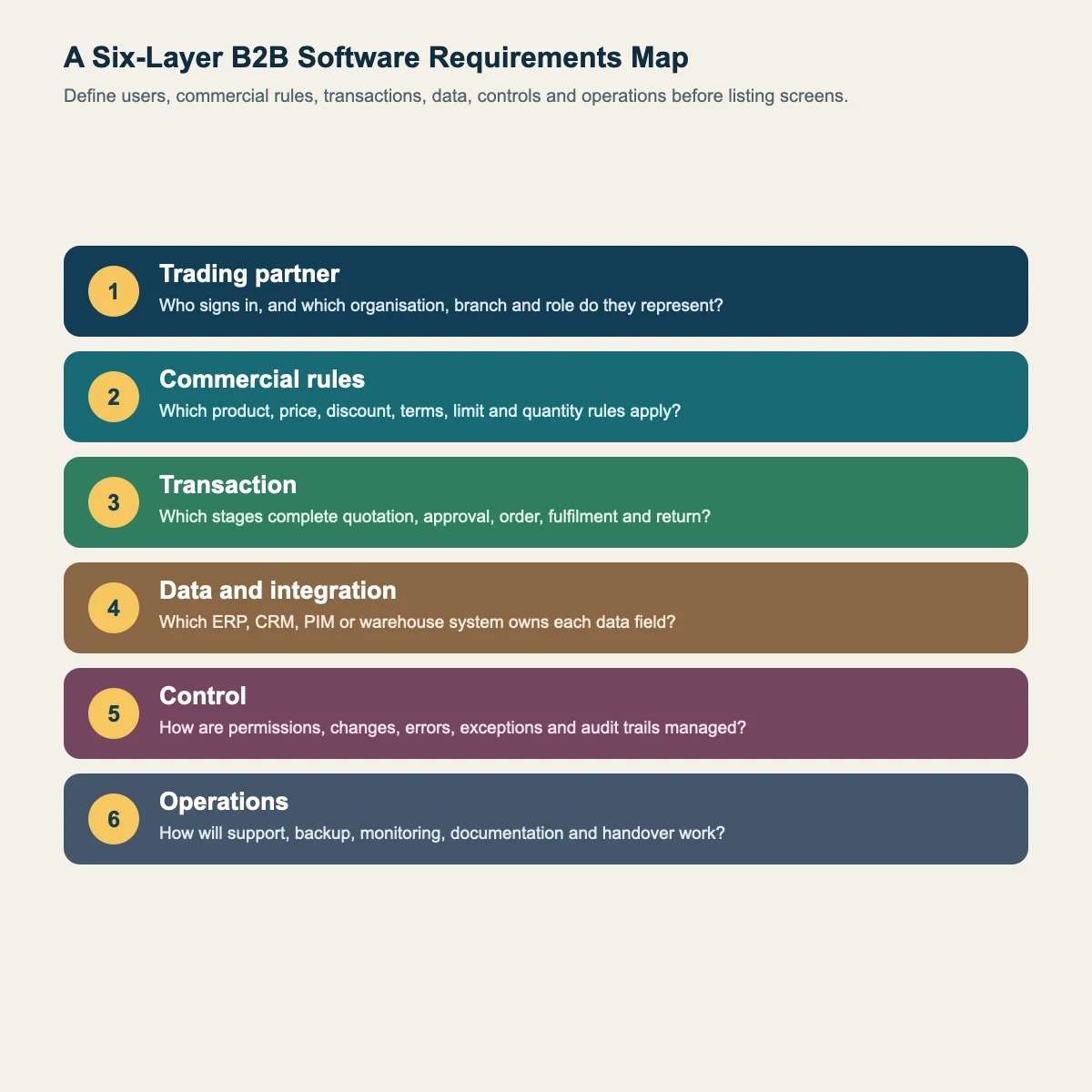
Organising requirements into six layers connects the feature list to actual business rules.
| Layer | Question | Example output |
|---|---|---|
| Trading partner | Who signs in and which organisation do they represent? | Dealer, customer, branch, user and role model |
| Commercial rules | Who can transact with which product, price, terms and limit? | Price lists, discounts, quotas and minimum orders |
| Transaction | Which stages complete the request? | Quotation, approval, order, fulfilment and return flow |
| Data and integration | Which system owns each data field? | ERP, CRM, PIM, warehouse, accounting and API map |
| Control | How are permissions, changes, errors and exceptions recorded? | Role matrix, audit trail, alerts and exception handling |
| Operations | How will the platform be supported, backed up and developed? | Owners, service levels, backup and handover plan |
This is Kumsal Agency's editorial decision framework for grouping B2B requirements around users, commercial rules, transactions, system dependencies, controls and operations. For each layer, record the current state, target state, owner, source of truth, exceptions and acceptance criteria.
Which Modules Can a B2B Platform Include?
Corporate accounts and users
One customer organisation may contain branches, departments and several users. Purchasing, finance, warehouse and management roles may require different visibility and actions. The relationship between a user, organisation, customer record and price group must be explicit.
Products, catalogue and account-specific pricing
Product data may include codes, variants, dimensions, packs, technical documents, images, stock and lead times. Customer-specific price lists, discounts, currency, tax, minimum quantities and product visibility should come from controlled business rules. A price that differs between the portal, quotation and ERP is a critical consistency problem.
Quotation, order and approval workflow
A B2B buyer may request a quotation, share a draft basket or submit a purchase for internal approval rather than checking out immediately. Orders may follow different approvals according to limit, stock, region, product group or value. Partial approval, revision, rejection reasons and transaction history may also be required.
Inventory, fulfilment and delivery
“In stock” may not be enough. The interface can show warehouse-level quantity, allocated stock, estimated availability, split delivery and logistics status. Information shown to customers must respect the freshness and availability limits of the underlying inventory system.
Account balance, payments and documents
Depending on permission, customers may view balances, credit limits, terms, orders, invoices, delivery notes or reconciliation documents. Online collection also requires a payment provider, permission rules, callbacks, failure handling and reconciliation scenarios. Decide whether the portal or the accounting system owns the financial record.
Sales and service tools
Sales representatives may view assigned accounts, draft orders, requests and exceptions. Acting on behalf of a customer requires explicit permission and an audit trail. Service teams need enough context to understand the customer journey without unnecessary access to confidential commercial data.
Reporting and notifications
Operational reporting may cover status, cycle time, errors, rejections, stock mismatches, delayed approvals and account activity. Define each report's source, refresh interval, owner and decision purpose. Notifications should follow role and severity instead of sending every event to every user.
How Should ERP, CRM and Other Integrations Be Planned?
The first integration question is not “is there an API?” but “which system owns this data?” Product master data may come from PIM or ERP, customer and opportunity data from CRM, inventory from a warehouse platform, and payment status from a payment provider. The B2B portal may display this data and create transactions, but bidirectional updates will conflict if no source of truth is assigned.
IBM describes enterprise application integration as connecting different applications, often through APIs and middleware, to reduce data silos and support business processes. In practice, document the fields, direction, trigger, frequency, error behaviour, retry rules, logs and responsible team for every integration. (IBM: enterprise application integration)
Read the ERP software guide for a more detailed view of ERP responsibilities and boundaries.
Why Are Authorisation, Security and Accessibility Design Requirements?
B2B platforms can expose customer-specific pricing, limits, documents and transaction history. A successful login is therefore not enough: each request must verify that the user is authorised for the correct organisation, account and object. The OWASP API Security Top 10 identifies object-level authorisation and authentication failures among the principal API risks. (OWASP API Security Top 10)
At minimum, assess roles and permissions, multi-factor authentication needs, session policy, transaction and change logs, sensitive-data boundaries, backups, incident handling and access removal. The exact controls should follow the system's data and risk profile.
Dealer and corporate customer portals are web applications and should be accessible. W3C's forms guidance recommends labelled fields, grouped controls, clear instructions and understandable error feedback. Apply these principles from the start to sign-in, ordering and payment journeys. (W3C: Forms Tutorial)
Off-the-Shelf, Custom or Hybrid: How Should You Choose?
| Approach | Potential fit | Review carefully |
|---|---|---|
| Off-the-shelf | Processes follow a common model and standard integrations are sufficient | Licence, configuration limits, data export and long-term cost |
| Custom software | Commercial rules, roles, workflows or integrations are materially different | Analysis, development, testing, maintenance, documentation and product ownership |
| Hybrid model | A standard core is retained while selected portals, workflows or integrations are customised | Support ownership and version compatibility across layers |
Do not compare only the initial implementation price. Include licences, development, integrations, migration, training, support, infrastructure, security, upgrades and exit. Compare the process compromises of a packaged product with the delivery and maintenance obligations of custom software.
The guide to web software use cases provides a broader framework for deciding when custom development may be useful.
What Are the Main Stages of a B2B Software Project?
- Current state: Map ordering, pricing, inventory, approvals, documents and communication.
- Users and roles: Define organisations, branches, users, permissions and exceptions.
- Requirements and priority: Separate the first release, later phases and exclusions.
- Data and integration: Assign systems of record, fields, access and error scenarios.
- Prototype: Test critical journeys with realistic user tasks.
- Build and QA: Test functionality, permissions, security, performance, accessibility and integrations.
- Pilot: Run real scenarios with a limited dealer or customer group.
- Transition and operations: Apply migration, training, support, monitoring, backup and handover plans.
When taking over from another provider, verify hosting and panel access, domain and DNS, source code, databases, FTP or SSH and third-party services before major intervention. Take complete backups of application files, data, media and the current live version before critical migration. After transition, check access, forms, email delivery, SSL, DNS, redirects, database connections and essential functions; confirm the final cutover with the client.
How Should Success Be Measured?
Success is not represented by registered users or order volume alone. Depending on the initial objective, useful measures may include:
- the proportion of eligible orders completed through the portal,
- quotation-to-order or request-to-approval cycle time,
- transactions requiring manual entry or correction,
- integration failures, retries and reconciliation records,
- support requests about order status,
- active accounts and task-completion rates,
- critical permission, data or process incidents.
Define each measure before implementation. Reports become ambiguous if “cycle time” has no fixed start and end or “active user” has no specified action. Software alone cannot guarantee sales or profitability; process ownership, data quality, commercial fit and user adoption also influence the result.
B2B Software Discovery Checklist
- Primary user groups and the organisations or branches they represent
- Account-specific pricing, discount, terms, limit and product rules
- Quotation, order, approval, return and exception workflows
- ERP, CRM, PIM, accounting, warehouse, payment and logistics systems
- Sources of truth, update direction and error behaviour
- Roles, permissions, audit trails and security requirements
- Mobile and accessibility needs
- Reports, notifications and success measures
- Migration, training, pilot, launch and rollback plans
- Source code, data, account, documentation, maintenance and handover terms
This is a discovery starting point, not a universal feature list. To review your B2B processes, integrations and first-release scope, contact Kumsal Agency's web development team.