


Aydınlatma metni yükleniyor…
In a mobile app that communicates with a Bluetooth device, proving that “the phone can see and connect to the device” is not enough. The product must also behave predictably when a user denies permission, several identical devices are nearby, the phone is locked, the app moves to the background or the connection drops midway through a data transfer. A credible Bluetooth mobile app testing scope therefore needs to cover the entire connection lifecycle—from first discovery to recovery after failure.
The right scope depends on the physical device’s communication protocol, whether the project uses Bluetooth Classic or Bluetooth Low Energy (BLE), the supported phones and operating system versions, and the business impact of each command. If these variables are not made visible during scoping, the software may appear complete while still carrying field risks, unclear acceptance conditions and unplanned costs.
Why should Bluetooth testing go beyond initial pairing?
A Bluetooth connection is a sequence of states rather than a single event. The app must request permission, scan, identify the intended peripheral, establish a connection, discover services, read or write data, maintain the session and reconnect when necessary. Each transition can fail independently. Seeing a device in scan results does not prove that the required service is available or that the hardware has processed a command.
The device protocol should be the starting point for the test plan. In a BLE project, the service and characteristic UUIDs, read and write properties, notifications, packet format, error codes, security method and timeout rules should be documented. The Bluetooth SIG’s Bluetooth Low Energy Primer describes an architecture extending across the physical layer, ATT, GATT, GAP and security. Testing must consequently validate expected protocol behaviour as well as the interface.
Requirements also need observable conditions. Replace “the app connects to the device” with a condition, action and expected outcome. For example: “When a registered device returns to range, the app starts a reconnection attempt within 20 seconds. After success, it verifies the status of the pending command; after failure, it offers the user a clear retry action.” This makes the requirement useful for development, procurement and acceptance testing.
In what order should Bluetooth connection testing be planned?
An end-to-end flow should cover both the normal journey and the failure paths at every transition. Begin by checking Bluetooth support, system state and permissions. Discover and identify the correct device, connect to it, locate the required services and characteristics, and establish subscriptions or authentication. Once data exchange has been verified, introduce controlled disconnections and test recovery.
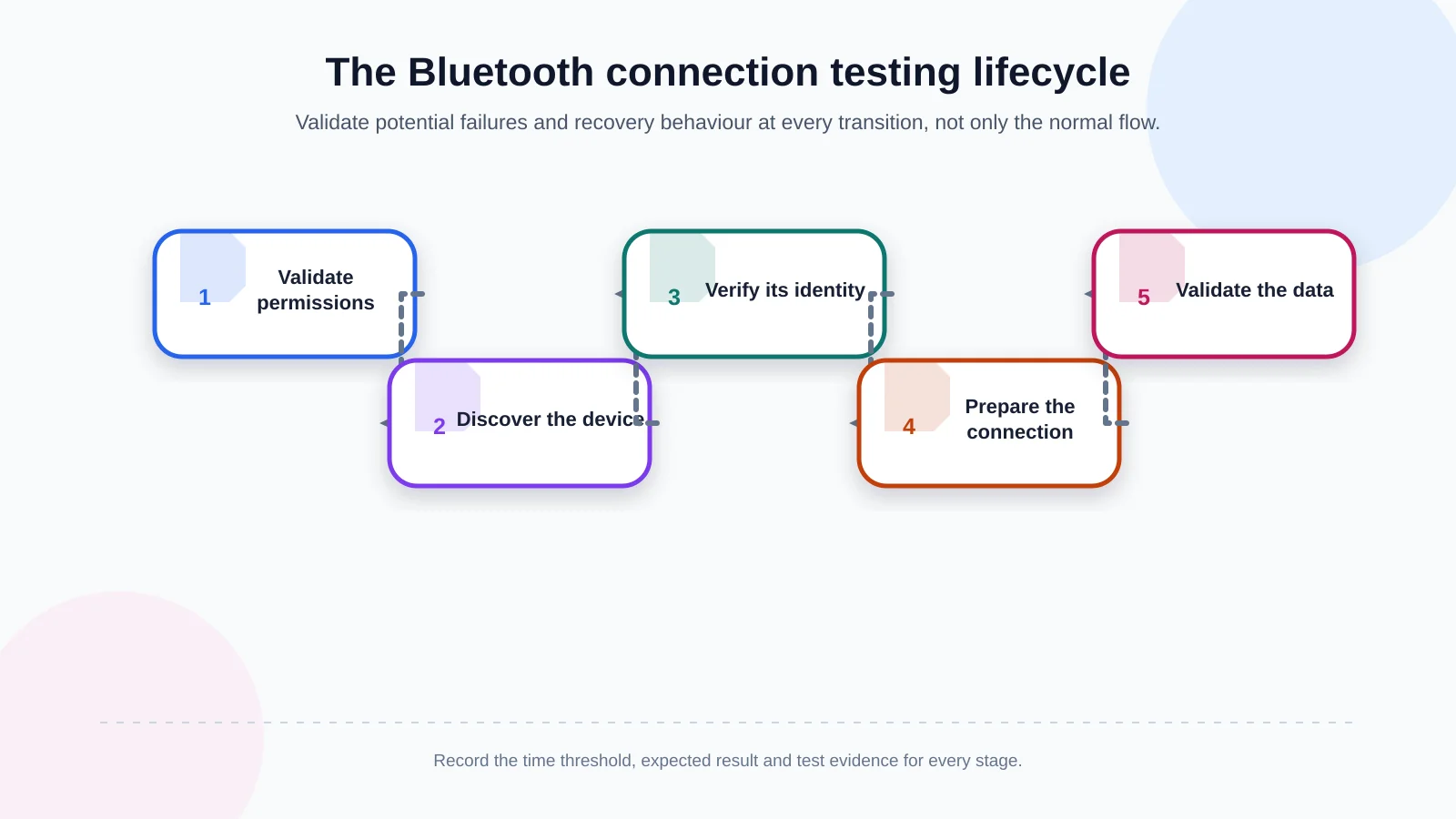
1. Permissions and Bluetooth status
Test Bluetooth being disabled, permission not yet requested, permission denied and permission permanently blocked as separate states. Android version differences are particularly important. Google’s Bluetooth permissions documentation defines distinct runtime permissions for scanning, advertising and connecting on Android 12 and later. Acceptance criteria should confirm that the app requests no unnecessary access, explains the consequence of refusal and directs users to the correct settings screen when needed.
2. Device discovery and correct device selection
A scan test should do more than confirm that one device appears. Observe what happens when discovery is slow, several products share the same visible name, the signal is weak or unsupported peripherals are advertising nearby. Selection based only on a display name can connect the user to the wrong hardware. A serial number, manufacturer data, service UUID or another trusted identifier defined by the business should be used.
3. Connection, service discovery and readiness
A successful connection callback may arrive before the peripheral is ready to accept a business command. The app should wait for required services and characteristics, notification subscriptions and any authentication step. Its interface should distinguish between “connecting,” “preparing,” “connected” and “connection failed.” Actions that require a ready device must remain unavailable until readiness has genuinely been confirmed.
4. Data transfer and business outcome
Testing should prove not only that a packet was sent but also that the device returned the correct response and that the business result was represented accurately. Cover minimum, maximum and invalid values; fragmented packets; delayed, duplicate or out-of-order messages; character encoding; and acknowledgement rules. If the app accidentally submits the same command twice, determine whether a physical action could also be repeated. Idempotency is especially important for access, payment and machine-control operations.
5. Disconnection and reconnection
Turning off the peripheral, moving it out of range, disabling Bluetooth on the phone and having the operating system terminate the app are different failure causes. The app should use defined retry intervals, attempt limits and user feedback instead of retrying forever without explanation. After reconnection, it must clear invalid session state and revalidate subscriptions, device status and incomplete operations.
How should permissions and operating system differences be tested?
iOS and Android pursue similar user outcomes through different lifecycle rules and system policies. Teams can maintain a shared list of business scenarios, but the expected technical behaviour should be specified per platform. React Native can increase code sharing, yet the Bluetooth module, runtime permissions, background execution and manufacturer-specific Android behaviour still require platform-level testing.
- Granting and denying permissions during first-time setup
- Changing permission later in system settings
- Opening the app while Bluetooth is disabled
- Returning from airplane mode and restarting the phone
- Retaining permissions and registered-device state after an app update
- Displaying a safe, helpful error on unsupported phones or OS versions
The device matrix should not consist solely of the newest iPhone and one popular Android model. Consider OS versions, manufacturers, Bluetooth chipsets, memory conditions and the devices the intended audience actually uses. Prioritise combinations by usage share, critical user groups and technical risk. Technology choices should likewise be evaluated against device access, background requirements and long-term testing effort, not code-sharing percentages alone.
Background operation, lock screen and the app lifecycle
Users will not necessarily keep the screen open while a Bluetooth product operates. Define what should happen when the app enters the background, the screen locks, another application opens or the operating system removes the process. Testing should address connection continuity, data loss, notifications, battery consumption and state recovery when the app is reopened.
Apple’s Core Bluetooth background processing guide explains that many Bluetooth activities are limited in the background by default and that scanning can behave differently even when relevant background modes are declared. “Works in the background” is therefore too vague to serve as an acceptance criterion. Specify which event must remain observable, for how long, what happens if the app is suspended and what state must be restored at the next launch.
Useful tests include locking the screen during an active transfer, moving the app to the background before switching off the device, introducing memory pressure while awaiting a notification and restarting the phone. An operating-system termination should not automatically be treated as equivalent to a user force-quitting the app; platform policies can produce different recovery behaviour.
Data integrity, security and error handling
A physical-device command can open a door, record a measurement or alter a machine setting. Assess unauthorised connections, reuse of an old session and exposure of sensitive data. Where pairing or application-level authentication is required, test incorrect credentials, expired sessions and devices registered to another account.
Validate packet sequence numbers, declared lengths, checksums or equivalent protocol safeguards. When a command times out, the app may need to query the device before declaring failure because the physical action could already have occurred. Safe retries and command deduplication are essential wherever repeating an action could create financial, operational or safety consequences.
Logs should contain enough context for diagnosis without exposing personal data or secrets. Useful fields may include the phone model, OS version, app version, device firmware, connection stage, timestamp and error code. Encryption keys, access tokens and raw sensitive payloads should never be recorded. Log retention and access also need ownership rules.
Test matrix for real-world operating conditions
A phone and peripheral placed side by side in a laboratory do not represent movement, interference or physical obstacles in the field. Repeat tests at different distances, behind walls or metal surfaces, in crowded Bluetooth environments and under active Wi-Fi traffic. If low battery levels change advertising frequency or connection stability, include that state explicitly.
Add relevant firmware versions to the matrix and define safe behaviour for unsupported versions. If one phone can control several devices, test connection limits, switching, concurrent data and the risk of sending a command to the wrong peripheral. Where the workflow also depends on an API or management platform, disconnect the internet while BLE remains active and verify whether local work is preserved, queued or clearly rejected.
| Condition | Test performed | Expected behaviour | Evidence |
|---|---|---|---|
| Distance and obstruction | Move the peripheral farther away | The disconnection is visible and the operation has a definite status | Timing and connection log |
| Radio congestion | Increase Wi-Fi and BLE traffic | Delays are managed and the interface remains responsive | Transfer and error record |
| Low peripheral battery | Send data while the battery is weak | Corrupted data is rejected and the condition is explained | Device and app logs |
| Firmware difference | Test older and newer versions | An incompatible version is rejected safely | Version record and error screen |
| Internet outage | Disable the network during BLE operation | Local work is preserved or queued | Synchronisation record |
How should test acceptance criteria and evidence be defined?
Instead of writing “successfully tested,” record the starting condition, actions, expected result, supported device combination and required evidence for every scenario. Evidence may include a screen recording, app or device log, protocol trace, timestamped test record or confirmation of the physical result. Critical scenarios require real phones and peripherals; an emulator cannot reproduce radio conditions or actual hardware behaviour.
- Discovery duration and connection-completion thresholds
- Command response, data accuracy and timeout behaviour
- User messages and retry rules for each disconnection cause
- Activities permitted or restricted in the background
- Supported phone, OS and firmware combinations
- Ownership of pre-release regression and field acceptance testing
Automation is valuable for packet parsing, state management, API integration and repeatable error handling. Radio conditions, system permission dialogs, distance and physical-device behaviour still require manual or hardware-assisted testing. A sound plan treats automated checks and physical testing as complementary layers.
How can the project scope be clarified during the proposal stage?
Before estimating the project, provide sample devices, protocol documentation, firmware ownership, target mobile platforms and critical scenarios. If hardware is not ready, identify who will supply a simulator, development kit or mock peripheral. Firmware changes should be tied to version management because they can affect mobile development and expand regression testing.
Kumsal Agency combines business goals, user needs and technical requirements when delivering React Native-based hybrid mobile applications. Where a project also needs custom web software, data flows or system integrations, the mobile experience can be planned together with secure infrastructure, testable requirements and a sustainable operating model.
Share your device protocol, supported phone and operating system scope, firmware expectations and critical usage scenarios with Kumsal Agency. Contact the team to plan a project-specific mobile application and testing scope that extends from first discovery to real-world operation.