


Aydınlatma metni yükleniyor…
A field sales mobile application lets a representative manage customer visits, current product and price information, order drafts, discount authority and the result of transfer to head-office systems. A dependable app is more than an order form placed on a phone. It must make the price source, offline data currency, ERP acceptance and error ownership explicit.
This guide helps distributors, manufacturers and wholesale teams scope a field-sales application. The visit–price–order–ERP acceptance model and test matrix are original planning tools developed for this article. They are not performance results from a Kumsal Agency client and do not guarantee increases in sales, revenue or visit volume.
Define the field-sales operating model first
A field-sales or sales-representative app can support different operations. A presales team records orders without delivering them. A van-sales team may fulfil from vehicle inventory. A retail-visit team may audit shelves, stock and campaigns without taking an order. Other teams also collect payments or handle returns. These tasks have different data, authority and risk even when they share one application.
Discovery should define:
- Does the representative prepare a draft or submit a binding order?
- Does availability come from a central warehouse, regional warehouse or vehicle stock?
- Does price vary by customer, product, quantity, contract, campaign or payment terms?
- Who approves discount and payment-term exceptions?
- Are collections, returns, delivery or document generation part of the same scope?
Field-service teams can use similar offline foundations, but work orders, spare-parts consumption and service acceptance create a different workflow. See our guide to planning a field-service mobile application for that use case.
The Kumsal four-gate field-order model
Treat a field order as four decision gates rather than one “sent” state. This keeps user action, commercial approval and technical acceptance separate.
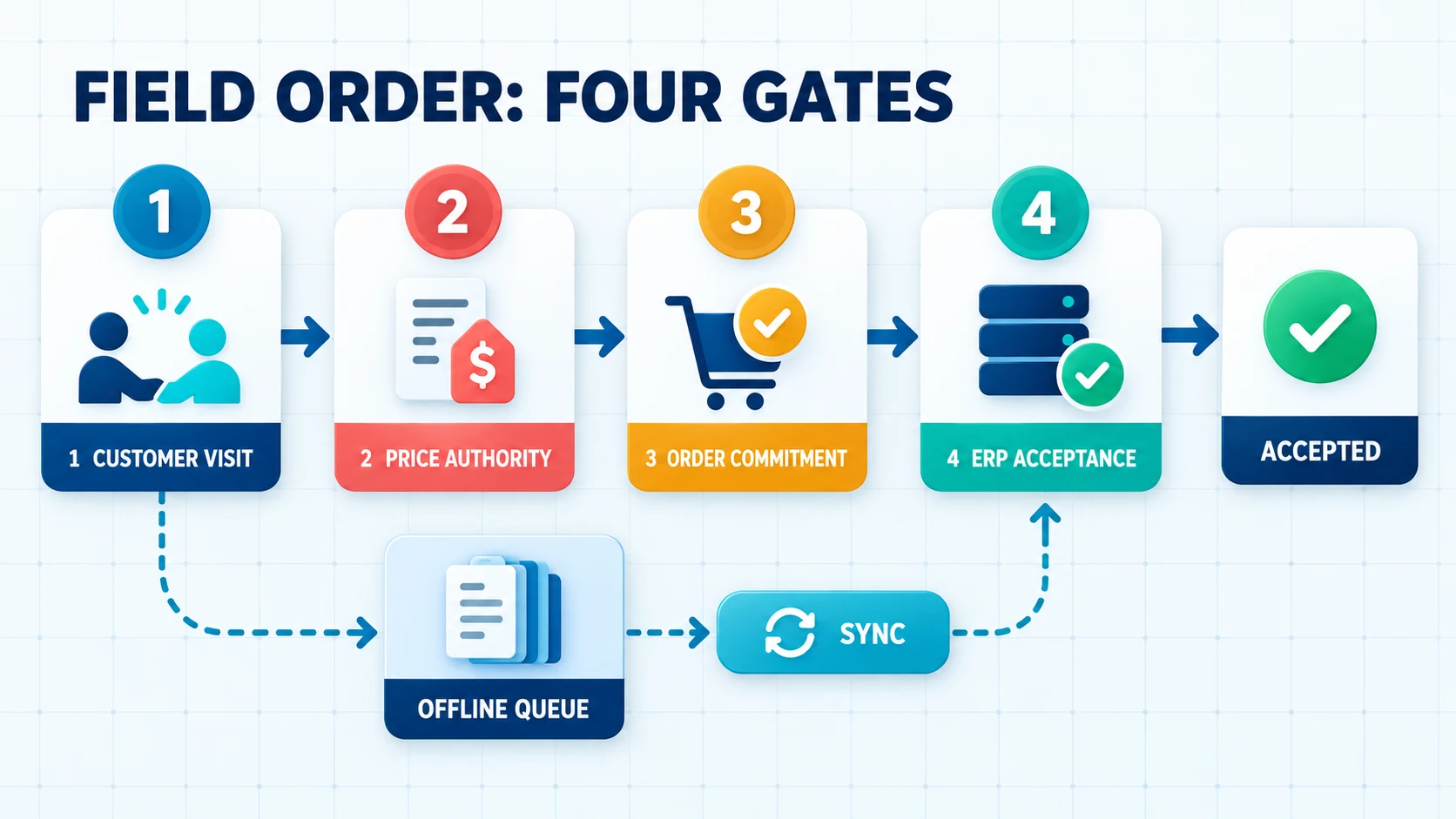
| Gate | Control | Evidence | Failure behaviour |
|---|---|---|---|
| 1. Visit context | Correct customer, representative, task and required permissions | Visit ID, time and optional location/reason | Save as draft or request authorised correction |
| 2. Price authority | Price list, currency, discount, terms and effective period | Price source, revision, calculation time and exception approval | Hold line/approval; do not silently apply stale price |
| 3. Order commitment | Product, quantity, unit, fulfilment and customer confirmation | Immutable mobile order ID and content digest | Expose missing fields and prevent duplicate submission |
| 4. ERP acceptance | Customer, stock, credit, product and business-rule validation | ERP order ID or reasoned rejection/error | Route to a human queue, correct and reprocess with authority |
“The phone sent the data” and “ERP accepted the order” are not equivalent. The record may have left the device and reached an integration service, yet still fail ERP credit or product-mapping rules. Show the last verified state to the user.
Limit customer and product data stored on the device
The app should not download every customer and product record to every representative. Define the required set by territory, portfolio, role, product range and visit plan. Decide separately which customer address, account summary, contract price, catalogue and order-history fields remain available offline.
Expose the refresh time and revision of offline records. “Available” or “price valid” can mislead without data-age information. For sensitive fields, consider not storing them, storing only a summary or requiring a connection for retrieval.
Use an assigned pricing source instead of duplicating rules in the app
A customer price can depend on price list, product, quantity, discount, contract, campaign, currency, tax and effective date. Maintaining an independent copy of these rules in the app can cause field and head-office results to diverge. Assign the pricing system of record and decide which cached result, if any, can be used while offline.
Microsoft Dynamics 365 pricing documentation treats price list, unit price, volume discount and manual discount as separate parts of opportunity, quote, order and invoice calculations. This is not a product recommendation. It illustrates why the price shown on screen should be a traceable calculation and authority result rather than an isolated number.
At minimum, a mobile order should retain:
- Price-list or pricing-engine identifier and revision
- Calculation time, currency and effective period
- Applied discount or campaign and its reason
- User making a manual change and their authority limit
- Currency of offline price and the ERP revalidation result
Offline operation is a data contract, not a screen feature
Offline support does not end when a screen opens without a connection. Specify which data exists locally, which actions are permitted offline, how the queue survives interruption, the order in which items are submitted and how conflicts are resolved.
The Android offline-first architecture guide discusses local and network data sources, local reads, write queues, retries and synchronisation. A project does not have to use the same implementation, but it must acknowledge that device and server records can change at different times.
Typical conflicts include:
- The central price list changes while the representative is offline.
- Two devices create drafts for the same customer.
- A selected item is closed for sale before connectivity returns.
- Another channel consumes inventory while quantities are entered.
- The customer's credit status changes while a discount request is pending.
“Last write wins” is not safe for every object. A visit note may be merged, while a price, limit or order line can require revalidation and an explicit user decision.
Order queues and retries must not create duplicates
If the phone sends a request but receives no response, the user cannot know whether ERP created the order. Pressing submit again must not create another order. Give every order a persistent operation identifier on the device. Integration and ERP should recognise that identifier and return the earlier result when the same intent is retried.
The AWS Builders' Library guide to idempotent APIs explains how a unique client-provided request identifier helps services recognise retried intent. The target service must implement and test this behaviour; adding an arbitrary field to the mobile record is insufficient.
Useful states include draft, waiting on device, transmitting, technically received, ERP accepted, rejected by business rule and awaiting human review. If a user deletes a queued record, account for the audit trail and any copy that may already exist centrally.
Inventory and delivery commitment are not the same value
Physical stock, available-to-sell, reserved stock, vehicle stock, inbound stock and customer allocation are different quantities. Define which quantity the app shows and when it was refreshed. A last-known offline balance should not be presented as a confirmed delivery promise.
ERP can revalidate inventory, permit partial fulfilment or suggest an alternative warehouse when accepting the order. The representative should see which value is an estimate and which is confirmed. Our ecommerce–ERP integration guide provides a complementary ownership matrix for product, inventory, pricing and order fields.
Limit location use to a defined sales purpose
Location can help begin a visit, show a nearby customer or support routing. Continuous background tracking should not be a default technical assumption. Define the business purpose, required accuracy, retention, access authority and fallback when permission is declined.
The Android location-permission guide recommends requesting location in the context of the feature and evaluating background permission separately. Approximate location can be sufficient for some tasks. Where employee monitoring, personal data or employment-law considerations apply, obtain appropriate specialist review; this article is not legal advice.
Treat collection and customer financial information as separate risk areas
Viewing an account balance, recording a collection and processing an actual payment are different operations. Avoid unnecessary payment-data storage. Design provider authorisation, failure, cancellation/refund, receipt and reconciliation flows separately. Offline collection acceptance in particular requires financial and operational risk review.
Limit access to credit, overdue debt and risk information by role and customer portfolio. Plan session revocation, remote access removal and local-data invalidation for a lost device.
Reduce and protect data stored on mobile devices
Offline operation needs local data, but it does not require a copy of the entire ERP. Classify authentication material, customer financial data, prices, orders and location records by sensitivity. Address storage, transfer, backups, screenshots, exports and logs together.
OWASP MASVS secure-storage control requires protection for sensitive data intentionally stored by the app, regardless of storage location. This control alone does not prove security. Authentication, authorisation, network communication, platform interaction, privacy and testing also need project-specific coverage.
Which screens belong in the first useful release?
Complete the representative's daily task chain before adding every possible feature:
- Daily customer/visit list: task, address, priority and last synchronisation.
- Customer summary: authorised balance, limit, order history and notes.
- Product catalogue: search, barcode, pack/unit, last-known inventory and price revision.
- Order basket: quantity, fulfilment, discount, warnings and approval need.
- Synchronisation centre: pending, failed, accepted and correctable records.
- Visit outcome: order, opportunity, loss reason, next task and permitted evidence.
Route optimisation, collections, returns, vehicle stock, mobile printing, campaign presentation or retail audits should enter later phases only when a verified requirement justifies them.
How should end-to-end acceptance tests be written?
| Scenario | Expected behaviour | Evidence |
|---|---|---|
| Order while offline | Record waits securely on device and its state is visible | Local ID, time and queue state |
| Price changed while offline | ERP validation exposes the difference; price is not silently replaced | Old/new price revision and decision |
| Same order submitted again | No second ERP order is created; earlier result returns | One operation ID and ERP ID |
| Insufficient inventory | Partial, pending or reject behaviour follows the business rule | Line result and reason |
| Discount exceeds authority | Order waits for approval; unauthorised price is not applied | Approval rule, decision and time |
| Location permission declined | Defined fallback visit flow works or limitation is explicit | User preference and outcome |
| Lost device/session revoked | New access is blocked and local-data risk controls are verified | Session revocation and device-event record |
Test more than the happy path. Include timeouts, queue growth, invalid data, lost authority, app termination, low battery, version upgrades and partial ERP acceptance.
How should proposals and project scopes be compared?
- Sales model, user roles, customer portfolio and device policy
- Data sets available and editable offline
- Pricing, discount, inventory, credit and fulfilment rules
- ERP/CRM/PIM/WMS field mappings and systems of record
- Order identity, queue, retry, error and reconciliation behaviour
- Location, barcode, camera, signature, printer and notification permissions
- Local data security, sessions, lost devices and access removal
- Pilot users, acceptance testing, training and rollout
- Monitoring, support, release distribution, operations and handover
Visit count alone is not a sufficient success measure. Consider ERP-accepted order rate, records held for price differences, duplicate submissions prevented, synchronisation queue age, correction time and representative task-completion rate. Define each metric and baseline before delivery.
Conclusion: design the contract between field and head office
A field-sales app creates value by connecting the customer, price, order and ERP result in one dependable transaction chain—not by displaying the largest number of screens. Offline storage, price currency, retries, location and sensitive data are foundational scope decisions.
Use the four decision gates and acceptance tests to define the first release. To assess your field-sales process, mobile requirements and ERP connection together, explore Kumsal Agency mobile application services.
A field sales mobile application lets a representative manage customer visits, current product and price information, order drafts, discount authority and the result of transfer to head-office systems. A dependable app is more than an order form placed on a phone. It must make the price source, offline data currency, ERP acceptance and error ownership explicit.
This guide helps distributors, manufacturers and wholesale teams scope a field-sales application. The visit–price–order–ERP acceptance model and test matrix are original planning tools developed for this article. They are not performance results from a Kumsal Agency client and do not guarantee increases in sales, revenue or visit volume.
Define the field-sales operating model first
A field-sales or sales-representative app can support different operations. A presales team records orders without delivering them. A van-sales team may fulfil from vehicle inventory. A retail-visit team may audit shelves, stock and campaigns without taking an order. Other teams also collect payments or handle returns. These tasks have different data, authority and risk even when they share one application.
Discovery should define:
- Does the representative prepare a draft or submit a binding order?
- Does availability come from a central warehouse, regional warehouse or vehicle stock?
- Does price vary by customer, product, quantity, contract, campaign or payment terms?
- Who approves discount and payment-term exceptions?
- Are collections, returns, delivery or document generation part of the same scope?
Field-service teams can use similar offline foundations, but work orders, spare-parts consumption and service acceptance create a different workflow. See our guide to planning a field-service mobile application for that use case.
The Kumsal four-gate field-order model
Treat a field order as four decision gates rather than one “sent” state. This keeps user action, commercial approval and technical acceptance separate.

| Gate | Control | Evidence | Failure behaviour |
|---|---|---|---|
| 1. Visit context | Correct customer, representative, task and required permissions | Visit ID, time and optional location/reason | Save as draft or request authorised correction |
| 2. Price authority | Price list, currency, discount, terms and effective period | Price source, revision, calculation time and exception approval | Hold line/approval; do not silently apply stale price |
| 3. Order commitment | Product, quantity, unit, fulfilment and customer confirmation | Immutable mobile order ID and content digest | Expose missing fields and prevent duplicate submission |
| 4. ERP acceptance | Customer, stock, credit, product and business-rule validation | ERP order ID or reasoned rejection/error | Route to a human queue, correct and reprocess with authority |
“The phone sent the data” and “ERP accepted the order” are not equivalent. The record may have left the device and reached an integration service, yet still fail ERP credit or product-mapping rules. Show the last verified state to the user.
Limit customer and product data stored on the device
The app should not download every customer and product record to every representative. Define the required set by territory, portfolio, role, product range and visit plan. Decide separately which customer address, account summary, contract price, catalogue and order-history fields remain available offline.
Expose the refresh time and revision of offline records. “Available” or “price valid” can mislead without data-age information. For sensitive fields, consider not storing them, storing only a summary or requiring a connection for retrieval.
Use an assigned pricing source instead of duplicating rules in the app
A customer price can depend on price list, product, quantity, discount, contract, campaign, currency, tax and effective date. Maintaining an independent copy of these rules in the app can cause field and head-office results to diverge. Assign the pricing system of record and decide which cached result, if any, can be used while offline.
Microsoft Dynamics 365 pricing documentation treats price list, unit price, volume discount and manual discount as separate parts of opportunity, quote, order and invoice calculations. This is not a product recommendation. It illustrates why the price shown on screen should be a traceable calculation and authority result rather than an isolated number.
At minimum, a mobile order should retain:
- Price-list or pricing-engine identifier and revision
- Calculation time, currency and effective period
- Applied discount or campaign and its reason
- User making a manual change and their authority limit
- Currency of offline price and the ERP revalidation result
Offline operation is a data contract, not a screen feature
Offline support does not end when a screen opens without a connection. Specify which data exists locally, which actions are permitted offline, how the queue survives interruption, the order in which items are submitted and how conflicts are resolved.
The Android offline-first architecture guide discusses local and network data sources, local reads, write queues, retries and synchronisation. A project does not have to use the same implementation, but it must acknowledge that device and server records can change at different times.
Typical conflicts include:
- The central price list changes while the representative is offline.
- Two devices create drafts for the same customer.
- A selected item is closed for sale before connectivity returns.
- Another channel consumes inventory while quantities are entered.
- The customer's credit status changes while a discount request is pending.
“Last write wins” is not safe for every object. A visit note may be merged, while a price, limit or order line can require revalidation and an explicit user decision.
Order queues and retries must not create duplicates
If the phone sends a request but receives no response, the user cannot know whether ERP created the order. Pressing submit again must not create another order. Give every order a persistent operation identifier on the device. Integration and ERP should recognise that identifier and return the earlier result when the same intent is retried.
The AWS Builders' Library guide to idempotent APIs explains how a unique client-provided request identifier helps services recognise retried intent. The target service must implement and test this behaviour; adding an arbitrary field to the mobile record is insufficient.
Useful states include draft, waiting on device, transmitting, technically received, ERP accepted, rejected by business rule and awaiting human review. If a user deletes a queued record, account for the audit trail and any copy that may already exist centrally.
Inventory and delivery commitment are not the same value
Physical stock, available-to-sell, reserved stock, vehicle stock, inbound stock and customer allocation are different quantities. Define which quantity the app shows and when it was refreshed. A last-known offline balance should not be presented as a confirmed delivery promise.
ERP can revalidate inventory, permit partial fulfilment or suggest an alternative warehouse when accepting the order. The representative should see which value is an estimate and which is confirmed. Our ecommerce–ERP integration guide provides a complementary ownership matrix for product, inventory, pricing and order fields.
Limit location use to a defined sales purpose
Location can help begin a visit, show a nearby customer or support routing. Continuous background tracking should not be a default technical assumption. Define the business purpose, required accuracy, retention, access authority and fallback when permission is declined.
The Android location-permission guide recommends requesting location in the context of the feature and evaluating background permission separately. Approximate location can be sufficient for some tasks. Where employee monitoring, personal data or employment-law considerations apply, obtain appropriate specialist review; this article is not legal advice.
Treat collection and customer financial information as separate risk areas
Viewing an account balance, recording a collection and processing an actual payment are different operations. Avoid unnecessary payment-data storage. Design provider authorisation, failure, cancellation/refund, receipt and reconciliation flows separately. Offline collection acceptance in particular requires financial and operational risk review.
Limit access to credit, overdue debt and risk information by role and customer portfolio. Plan session revocation, remote access removal and local-data invalidation for a lost device.
Reduce and protect data stored on mobile devices
Offline operation needs local data, but it does not require a copy of the entire ERP. Classify authentication material, customer financial data, prices, orders and location records by sensitivity. Address storage, transfer, backups, screenshots, exports and logs together.
OWASP MASVS secure-storage control requires protection for sensitive data intentionally stored by the app, regardless of storage location. This control alone does not prove security. Authentication, authorisation, network communication, platform interaction, privacy and testing also need project-specific coverage.
Which screens belong in the first useful release?
Complete the representative's daily task chain before adding every possible feature:
- Daily customer/visit list: task, address, priority and last synchronisation.
- Customer summary: authorised balance, limit, order history and notes.
- Product catalogue: search, barcode, pack/unit, last-known inventory and price revision.
- Order basket: quantity, fulfilment, discount, warnings and approval need.
- Synchronisation centre: pending, failed, accepted and correctable records.
- Visit outcome: order, opportunity, loss reason, next task and permitted evidence.
Route optimisation, collections, returns, vehicle stock, mobile printing, campaign presentation or retail audits should enter later phases only when a verified requirement justifies them.
How should end-to-end acceptance tests be written?
| Scenario | Expected behaviour | Evidence |
|---|---|---|
| Order while offline | Record waits securely on device and its state is visible | Local ID, time and queue state |
| Price changed while offline | ERP validation exposes the difference; price is not silently replaced | Old/new price revision and decision |
| Same order submitted again | No second ERP order is created; earlier result returns | One operation ID and ERP ID |
| Insufficient inventory | Partial, pending or reject behaviour follows the business rule | Line result and reason |
| Discount exceeds authority | Order waits for approval; unauthorised price is not applied | Approval rule, decision and time |
| Location permission declined | Defined fallback visit flow works or limitation is explicit | User preference and outcome |
| Lost device/session revoked | New access is blocked and local-data risk controls are verified | Session revocation and device-event record |
Test more than the happy path. Include timeouts, queue growth, invalid data, lost authority, app termination, low battery, version upgrades and partial ERP acceptance.
How should proposals and project scopes be compared?
- Sales model, user roles, customer portfolio and device policy
- Data sets available and editable offline
- Pricing, discount, inventory, credit and fulfilment rules
- ERP/CRM/PIM/WMS field mappings and systems of record
- Order identity, queue, retry, error and reconciliation behaviour
- Location, barcode, camera, signature, printer and notification permissions
- Local data security, sessions, lost devices and access removal
- Pilot users, acceptance testing, training and rollout
- Monitoring, support, release distribution, operations and handover
Visit count alone is not a sufficient success measure. Consider ERP-accepted order rate, records held for price differences, duplicate submissions prevented, synchronisation queue age, correction time and representative task-completion rate. Define each metric and baseline before delivery.
Conclusion: design the contract between field and head office
A field-sales app creates value by connecting the customer, price, order and ERP result in one dependable transaction chain—not by displaying the largest number of screens. Offline storage, price currency, retries, location and sensitive data are foundational scope decisions.
Use the four decision gates and acceptance tests to define the first release. To assess your field-sales process, mobile requirements and ERP connection together, explore Kumsal Agency mobile application services.