


Aydınlatma metni yükleniyor…
The main difference between a website and a web application is what the user does. On a website, a visitor usually reads information, evaluates products or services and makes an enquiry. In a web application, a user may sign in, create or update data, start a transaction, track its status and collaborate within a permission-based workflow.
This is more than a technical label. It changes design and development scope, budget, testing, security, data responsibility and post-launch operations. A project incorrectly treated as a simple website can expand unexpectedly during development. The reverse can also happen: an organisation may plan application-level complexity for what is essentially a content-led corporate website.
In short:
- If the primary task is to present information, build trust and generate enquiries, the project is mainly a website.
- If people sign in to act on data and workflows, it is mainly a web application.
- Ecommerce, customer portals and larger corporate platforms can combine both.
What is a website?
A website is a collection of pages presented under a shared domain. Corporate websites introduce an organisation, explain services, publish evidence and resources, and help visitors make contact or request a proposal.
A website does not have to be a set of fixed documents. It can include content management, search, filters, multiple languages, forms, maps, video and calculators. Those features alone do not necessarily make it a complex web application.
The practical question is whether the main value comes from published content or from transactions that users complete inside the system.
Typical website examples include:
- a corporate or service website,
- a product catalogue,
- a campaign or brand site,
- a blog, newsroom or resource centre,
- a portfolio and case-study site,
- a multilingual company website,
- a B2B site focused on qualified enquiries.
Content architecture, page hierarchy, mobile experience, performance, accessibility and search visibility are central concerns in these projects.
What is a web application?
A web application is a software product in which people create, change or manage data and complete tasks under defined rules and permissions through a browser. The browser can send a request to a server; server-side code processes it, works with a database or connected service, and returns a response.
MDN explains that in a dynamic system, the server-side web application processes HTTP requests and responses and may work with a database. This interaction pattern is relevant regardless of the programming language or framework selected (MDN client-server overview).
Typical web application examples include:
- customer and dealer portals,
- B2B ordering and account-specific pricing,
- booking and appointment systems,
- membership and subscription platforms,
- service and workflow management tools,
- operational dashboards connected to ERP or CRM,
- marketplaces and listing platforms,
- learning, application and document-management systems,
- employee and supplier portals.
User roles, data models, business rules, integrations, failure behaviour, audit history, testing and security are as important as the visible interface.
Website vs web application comparison
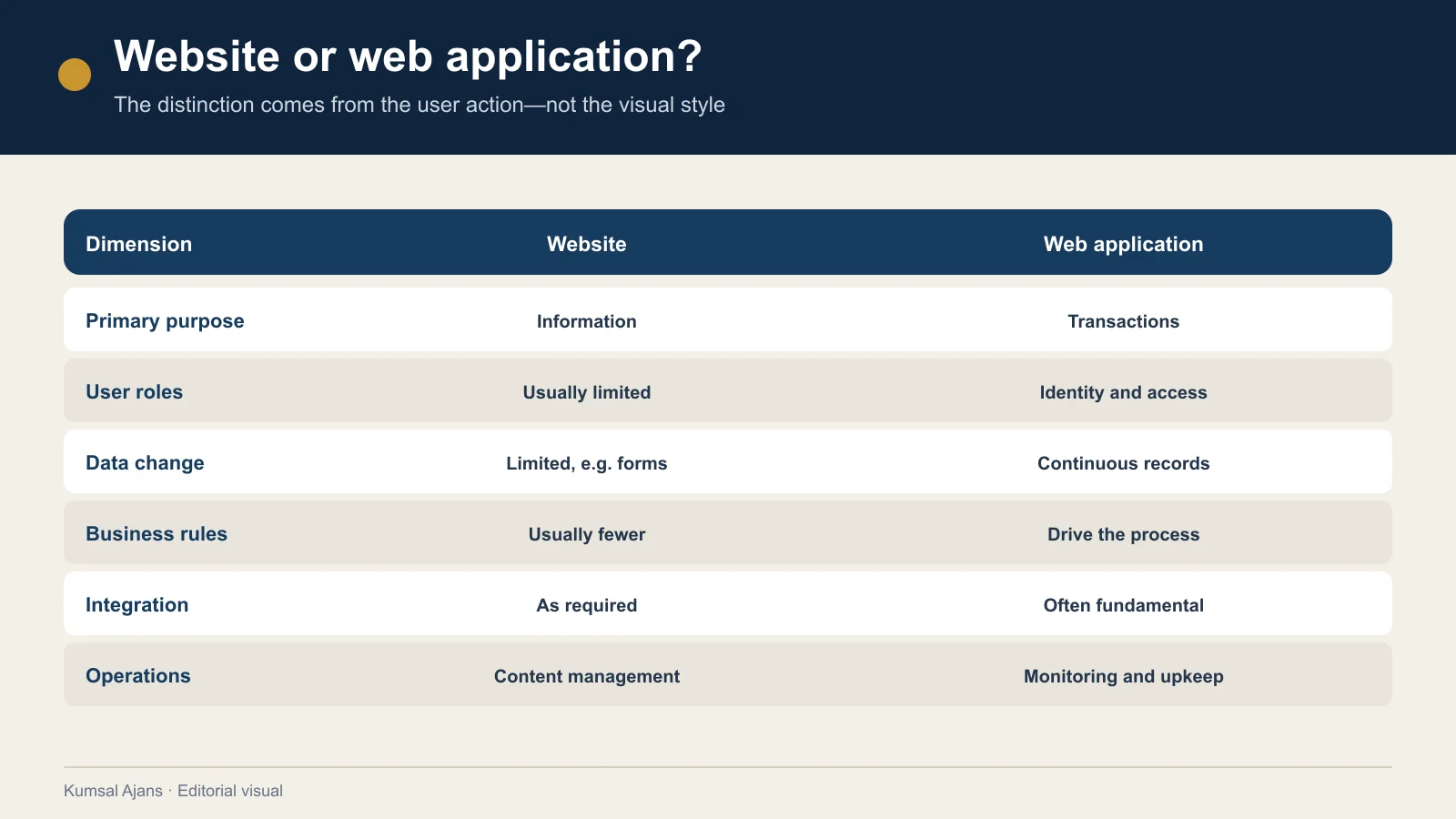
| Decision area | Website emphasis | Web application emphasis |
|---|---|---|
| Primary purpose | Inform, explain and persuade | Let people act, manage and track |
| User | Mainly anonymous visitor | Account holder with role and permissions |
| Content/data | Editor-published content | User and transaction data |
| Interaction | Navigation, search, forms, simple tools | Registration, approval, ordering, payment and status changes |
| Business rules | Limited conditional behaviour | Rules based on roles, data and workflow state |
| Integrations | Analytics, maps and email delivery | ERP, CRM, payments, identity and operational APIs |
| Security | Administration, forms and content | Authentication, authorisation, transactions and sensitive data |
| Testing | Pages, devices, links and forms | Roles, data, rules, integrations, failures and acceptance |
| Post-launch | Content and technical upkeep | Monitoring, releases, support, data and operations |
The table is not a technical specification. It helps teams identify where application behaviour will affect scope.
Does a form turn a website into an application?
Not by itself. A form is a primary interaction point between a user and a website or application. Its data may be sent to a server for processing and storage or used to update the interface (MDN web forms).
A simple enquiry form collects details, sends a notification and confirms submission. Application scope increases when the form involves:
- drafts tied to an account,
- review and approval by different roles,
- document upload and version history,
- payment or identity checks,
- record creation in CRM or ERP,
- user-visible status tracking,
- an audit trail,
- retries and error handling for failed integrations.
A screen that looks like one form can support a substantial multi-stage process. Scope should therefore be based on behaviour, not screen count.
Is ecommerce a website or an application?
It normally contains both. Categories, products, guides and campaign pages support discovery and content. Cart, account, payment, stock, shipping, returns and order history behave as an application.
Using an established ecommerce platform does not remove those requirements; it means an existing product provides much of the behaviour. Scope still depends on product and data migration, design configuration, payment and shipping connections, permissions, testing, licences and operational ownership.
What does a management panel imply?
A content-management panel does not automatically mean a custom web application. Editors may need to update services, projects and articles on an ordinary corporate website.
The project becomes more application-like when the panel manages:
- different employee and partner roles,
- approval of customer transactions,
- price and stock rules,
- work passed between teams,
- data imported from other systems,
- commercially or personally sensitive records,
- operational reporting.
A proposal should not stop at “management panel included.” It should state which users can view, create, change, approve and export each type of record.
How do you decide which structure you need?
1. Write the user outcome
“We need a modern website” and “we need a customer panel” are not scopes. Describe the outcome for each user:
- a visitor compares services and requests a proposal,
- a dealer sees its prices, places an order and tracks fulfilment,
- a customer follows a service case,
- a team reviews and decides applications by role.
The first example is website-led; the others require application behaviour.
2. Define accounts, roles and permissions
If signed-in users do not all see the same records, define who can perform which action on which data. “Administrator” and “user” are rarely enough to describe a real permission model.
3. List data that will be created and changed
Content, customers, orders, applications, payments, documents, pricing, stock and history have different access and retention needs. Record the source, owner, required lifetime and transfer rules for each.
4. Describe integrations as data flows
“CRM integration” is incomplete. State which data moves in which direction, what triggers it, what happens on failure and who owns each connected component.
5. Consider failures and exceptions
Define what happens when a payment fails, stock changes, a document is invalid or an external service is unavailable—not only the successful path.
6. Define post-launch ownership
Content updates, defect correction, warranty, maintenance, security, monitoring and new development are different responsibilities. More application behaviour normally requires clearer ownership of logs, backups, access, releases and support.
How does the design process change?
Website design places more emphasis on content hierarchy, brand communication, page flow and helping a visitor decide. Application design places more emphasis on task completion, understandable states, error recovery and controls appropriate to a user's role.
Application interfaces should explicitly design:
- onboarding and empty states,
- loading, success, failure and disconnection,
- unauthorised actions,
- reversible and irreversible decisions,
- long-running and partially completed processes,
- small and large data sets,
- keyboard and assistive-technology use.
W3C's accessibility principles apply to websites and web applications, including perceivable information and operable interfaces (W3C accessibility principles). Semantic HTML should be the foundation for dynamic interfaces; WAI-ARIA can communicate roles, states and relationships to assistive technology when appropriate (WAI-ARIA overview).
How does scope and budget change?
Website cost can vary with templates, content volume, languages, media, functionality and technical quality. Web applications add roles, data models, business rules, integrations, security, testing and operational requirements.
Two proposals showing the same number of screens may not cover the same work. Ask suppliers to separate:
- discovery and requirements,
- user flows and interface design,
- roles, permissions and data model,
- modules and integrations,
- data migration,
- testing and acceptance,
- deployment and rollback,
- training and documentation,
- warranty, maintenance and support.
Compare delivered user outcomes and acceptance scenarios rather than technology names alone.
If the project is application-led, plan the next steps with the main web software guide. Refine the solution approach through the off-the-shelf versus custom comparison, specify scope with the requirements document and assess commercial implications with the web software budget guide.
Conclusion: Define the task, not just the label
Websites and web applications are not mutually exclusive boxes. A project can publish content, generate enquiries and support user transactions in the same platform. The useful decision is not which label sounds more advanced; it is what users need to do, what data the system handles and who operates it after launch.
For a content and enquiry-led project, begin with the website requirements document guide. For accounts, roles, transaction data and integrations, use the web software pillar to define a deeper software scope. Kumsal Agency's web development service provides the service context for that planning.