


Aydınlatma metni yükleniyor…
The existence of a website backup does not, by itself, show that the website can be recovered when needed. A usable backup should contain the right files, database, uploaded media and project configuration. An authorised team should be able to access it, restore it in a separate environment and confirm that the website’s critical functions still work.
For that reason, do not assess a maintenance proposal’s “backups included” line only by whether a backup file is created. Ask for a written answer to a second question: When was this backup last restored, and how was the result verified?
This guide is designed to help a project owner evaluate backup coverage, plan a restore test and document the result—even without managing the technical process personally.
Creating a Backup and Being Able to Restore It Are Not the Same Thing
A backup creates a copy of system components and data at a particular point in time. A restore uses that copy to rebuild a working system. The two activities are connected, but they do not have the same success criteria.
A backup job may show a “successful” status while one of the following problems still exists:
- The database export may be incomplete or corrupted.
- Recently uploaded images may not be included with the site files.
- Configuration required to run the project may be missing.
- Access may depend on an account that is no longer in use.
- The backup may not be compatible with the current server or software version.
- Files may return while forms, user actions or integrations remain broken.
The NIST SP 1339 backup guide treats testing and reviewing backups during recovery exercises as part of effective backup management, rather than limiting the process to creating copies. The guide is written for operational technology environments, so it does not prescribe a website-specific schedule. Its underlying distinction is nevertheless useful for web projects: having a backup and verifying recovery readiness are different controls.
Define the Backup Scope in Writing
The phrase “the website is backed up” does not explain which assets are included. The visible page files are only one part of a working website. The components that carry content, user data and functionality must also be considered.
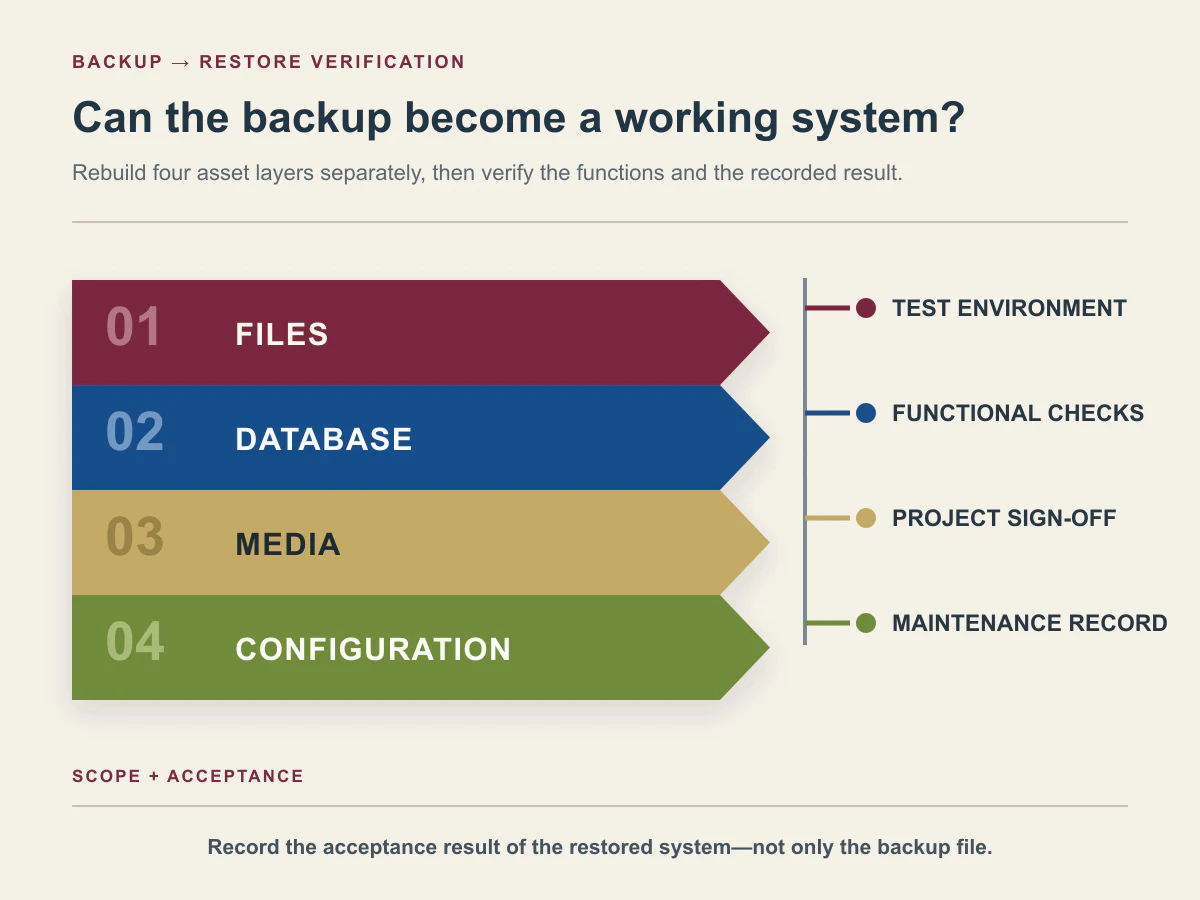
Within the agreed project scope, Kumsal Ajans backs up:
- website files;
- the database;
- uploaded images and other media;
- project configuration.
Not every project has the same technical structure. A static corporate website and a web platform with memberships, custom user roles, form records or third-party integrations have different recovery requirements. Instead of simply ticking “files” and “database”, list the assets that the specific project needs in order to operate.
Answer these questions:
- Which database holds content and user records?
- Where are uploaded images and documents stored?
- How is the configuration needed to run the project protected?
- Are third-party service credentials part of a backup, or managed through a separate secure handover process?
- Where is the latest source-code version maintained?
Do not place passwords or secret keys in an ordinary control form. Record who owns the access, which secure channel holds it and which authorised role can use it.
Identify the Backup Location and the Person Responsible for Access
A recovery cannot begin if nobody can reach the backup when it is needed. The maintenance scope should state where backups are held, which account or role manages them and how access is transferred if the service relationship changes.
In Kumsal Ajans projects, backups are held on a secure server or external storage and are accessible only to the authorised technical team. A project record should translate that practice into clear fields:
- storage owner;
- authorised access role;
- responsibilities of the client, Kumsal Ajans and hosting provider;
- handover method when access changes;
- notification process if a backup is deleted or cannot be reached.
“The hosting provider keeps backups” is not enough detail. The service terms or management interface should confirm which assets the provider copies, under what conditions and for how long. A hosting provider’s infrastructure backup and an agency’s maintenance backup may have different coverage and ownership.
Set Frequency and Retention According to the Project’s Rate of Change
There is no single backup frequency or retention period that suits every website. A system that receives orders, registrations or content throughout the day has a different data-loss impact from a corporate information website that changes infrequently.
At Kumsal Ajans, frequency and retention are determined according to the project’s update frequency and level of risk. The decision should consider:
- How often is new data created?
- What would be the business effect of losing records created after the latest backup?
- Which changes require an additional pre-change backup?
- What are the backup size and storage cost?
- Is there an operational or contractual reason to retain an older recovery point?
- What backup and export limitations apply to third-party services?
The answers belong in the proposal or maintenance plan. Avoid assumptions such as “a daily backup is always enough” or “retaining backups for longer is always safer”. The acceptable data-loss exposure and recovery need should be assessed with the project owner.
Use a Separate Environment for Restore Testing Whenever Possible
Loading a backup over a working production website for test purposes can create fresh data loss or service disruption. Kumsal Ajans therefore performs restore tests in a separate test environment whenever possible.
A separate environment allows the team to:
- open the backup without changing live data;
- inspect missing files or database errors without affecting visitors;
- test forms and integrations without sending real customer notifications;
- identify server or software compatibility issues before touching production;
- document the restore steps and any gaps found.
The test environment should not be publicly accessible. Unauthorised access and search-engine indexing should be blocked. Forms and integrations should use defined test data rather than unnecessary real customer information.
Restore readiness is also connected to the process used before a significant production change. Whether a change needs a separate environment should be decided from its effect on data, user actions, integrations and the live service.
Run a Restore Test in Seven Steps
1. Define the purpose and scope
Are you testing a full-site recovery, a database-only restore or selected files? Record the backup date and why that recovery point was chosen.
2. Confirm access to the backup
Can the authorised technical team actually download the file or use it in the restore process? Confirm that the file exists, has a plausible size and contains the expected components.
3. Prepare the test environment
Create an environment separated from production, restrict access and prevent indexing. Disable or isolate any third-party service that might create real messages or transactions.
4. Restore files, database and configuration
The sequence may differ by project. The technical team should record the steps taken and any errors encountered. If a component is missing, update the backup scope as well as resolving the immediate error.
5. Check critical functions
After a restore, Kumsal Ajans checks the following areas according to project scope:
- pages open and show the expected content;
- authorised users can access the project-specific management panel;
- images and documents load;
- forms submit and follow the intended storage or notification flow;
- sign-in and other user actions work;
- third-party integrations operate as expected;
- data integrity is preserved;
- relevant language content and switching work on multilingual projects.
Opening the homepage is not enough to declare a restore successful. The team should also run the user tasks that matter commercially or operationally to the project.
6. Separate the technical result from business acceptance
The technical team performs the test. The project owner reviews the agreed checks and approves the result. A technical “restore completed” message and the project owner’s confirmation that critical acceptance criteria are met should be recorded separately.
7. Record the result and next action
Mark the result as successful, partially successful or unsuccessful. Record missing assets, error messages, failed functions, corrective work and the retest date. A failed test should be used to improve the backup plan, rather than silently treating the backup as usable.
The CISA #StopRansomware Guide recommends regularly testing the availability and integrity of critical-data backups in a recovery scenario. This does not require the same schedule for every project; the interval should reflect risk, rate of change and available resources.
Website Restore Test Record
| Field | Information to record |
|---|---|
| Project and test environment | |
| Test date | |
| Date of the backup used | |
| Assets included | Files / database / media / configuration / other |
| Backup location and owner | |
| Technical team performing the test | |
| Project owner approving the result | |
| Page and content check | Pass / incomplete / fail |
| Management panel check | Pass / incomplete / fail |
| Forms and user actions | Pass / incomplete / fail |
| Integrations | Pass / incomplete / fail / out of scope |
| Images and documents | Pass / incomplete / fail |
| Data integrity | Pass / incomplete / fail |
| Issues found | |
| Corrective action | |
| Retest required | |
| Final result and approval | |
| Next review date | Set according to project risk |
Do not place passwords, secret keys or personal data in this record. Note only which authorised role has access and which secure channel is used.
An Anonymised Restore Example from a Real Project
In one project, some content became inaccessible after a faulty update. Instead of trying several backups directly on the production system, the team moved the last backup believed to be sound into a separate test environment.
The technical team restored the files, database, media and project configuration. Pages, management functions and data integrity were then checked. Once the backup had been verified as usable, the production recovery was performed and the critical functions were tested again.
This example does not promise a particular recovery time, uninterrupted service or zero data loss. It demonstrates a narrower point: validating the selected backup in a separate environment makes the production recovery decision more controlled.
Questions to Ask About the Backup Clause in a Maintenance Proposal
Look for clear answers to these questions when reviewing a maintenance proposal:
- Which files, data and configuration are included?
- Where are backups stored, and who can access them?
- How are frequency and retention linked to project risk?
- Is an additional backup created before significant changes?
- Can restore testing be performed in a separate environment?
- Who performs the test, and who approves it?
- Which user tasks must pass before recovery is accepted?
- Where are results, gaps and corrective actions recorded?
- Is the hosting provider’s backup the same as the backup included in maintenance?
- How are backups and access handed over if the provider changes?
The answers will vary with the maintenance scope. The objective is to replace the vague phrase “backups included” with explicit fields for assets, ownership, frequency, testing and acceptance. Our website support and ongoing maintenance guide can also help separate initial defect support, scheduled maintenance and new development.
Conclusion: Judge a Backup by a Working Recovery, Not by the File Alone
A reliable website backup process answers four questions: What is backed up, where and under whose responsibility is it stored, how is it restored, and how is a successful result approved?
Match the backup scope to the project’s actual assets. Set frequency and retention according to rate of change and risk. Restore into a separate environment whenever possible. Check not only pages but also the management panel, forms, user actions, integrations, media and data integrity. Record technical execution and project acceptance separately.
This approach turns backup from an assumed background job into a recovery process with a defined owner and a testable outcome. Kumsal Ajans can help define a project-specific maintenance, backup and recovery scope around the requirements of your website or web platform.