


Aydınlatma metni yükleniyor…
A long-serving ERP panel, dealer portal or operations screen may look dated, yet still play a critical role in daily work. Over time, users learn where each field sits, which sequence completes a transaction and what every warning means. Modernising a legacy software interface is therefore much more than changing colours, typography and buttons.
A successful interface modernisation project preserves productivity and business continuity while making the software clearer, more accessible, responsive and manageable. Existing business rules, user roles, data structures, integrations and exceptions must be considered alongside the design. Otherwise, visually polished screens can introduce extra clicks, training demands, data errors and operational disruption.
Why is a legacy interface more than a visual problem?
In enterprise software, the interface is where hidden business rules meet the user. The order of fields on an order screen may reflect pricing logic. The visibility of an approval button may depend on authority. Status labels may translate records received from an ERP into operational decisions. Changing these elements without understanding their relationships can quietly break a process that previously worked.
Some legacy-interface problems are genuinely visual: weak contrast, inconsistent spacing, small interaction targets and tables that overflow on mobile devices. Repeated data entry, unclear error messages, unnecessary approvals and a single crowded screen serving several roles are process-design problems. The scope should distinguish between these two groups before proposing solutions.
Make the existing workflow visible before modernisation
Begin by examining how employees actually use the system, not merely how its documentation says they should use it. Does a sales representative open another window to check inventory while creating an order? Does the operations team track an ambiguous status in a spreadsheet? Does a manager approve only records above a specific value? These behaviours reveal the real workflow that the new interface must preserve or improve.
Combine task observation, user interviews, support requests and usage records. The GOV.UK Service Manual describes moderated usability testing as observing participants while they complete defined tasks, allowing teams to identify problems with language, layout and interaction. The same approach can help teams understand current software and evaluate prototypes. See the moderated usability testing guidance for further detail.
Document critical tasks and exceptions
Not every screen carries equal operational weight. Creating orders, approving prices, closing shipments, recording payments and opening production orders may be business-critical. For each task, document its starting condition, sequence, required data, successful outcome and recovery route. Exceptions—including cancellation, insufficient stock, connection loss, duplicate records and exceeded authority—deserve the same clarity as the happy path.
Align user roles with screen permissions
Dealers, sales representatives, warehouse operators, finance specialists and managers may use the same platform for different purposes. Showing every field to every role creates clutter, while hiding a button alone does not provide secure authorisation. Permissions to view, create, edit, approve, export and delete must be enforced in both the interface and the server-side application.
Role analysis should answer three questions: Which decisions may this person make? Which data should they see? Which actions require a second approval? The redesigned interface can then provide relevant shortcuts without weakening organisational controls. Role definitions should also cover temporary delegation, inactive accounts and what happens when responsibility changes during an open transaction.
A workflow-preserving interface modernisation process
Controlled modernisation does not mean preparing a design file and replacing the entire system overnight. Business rules, user behaviour and technical dependencies should be validated from discovery through release. This allows incorrect assumptions to surface before development costs and operational exposure grow.
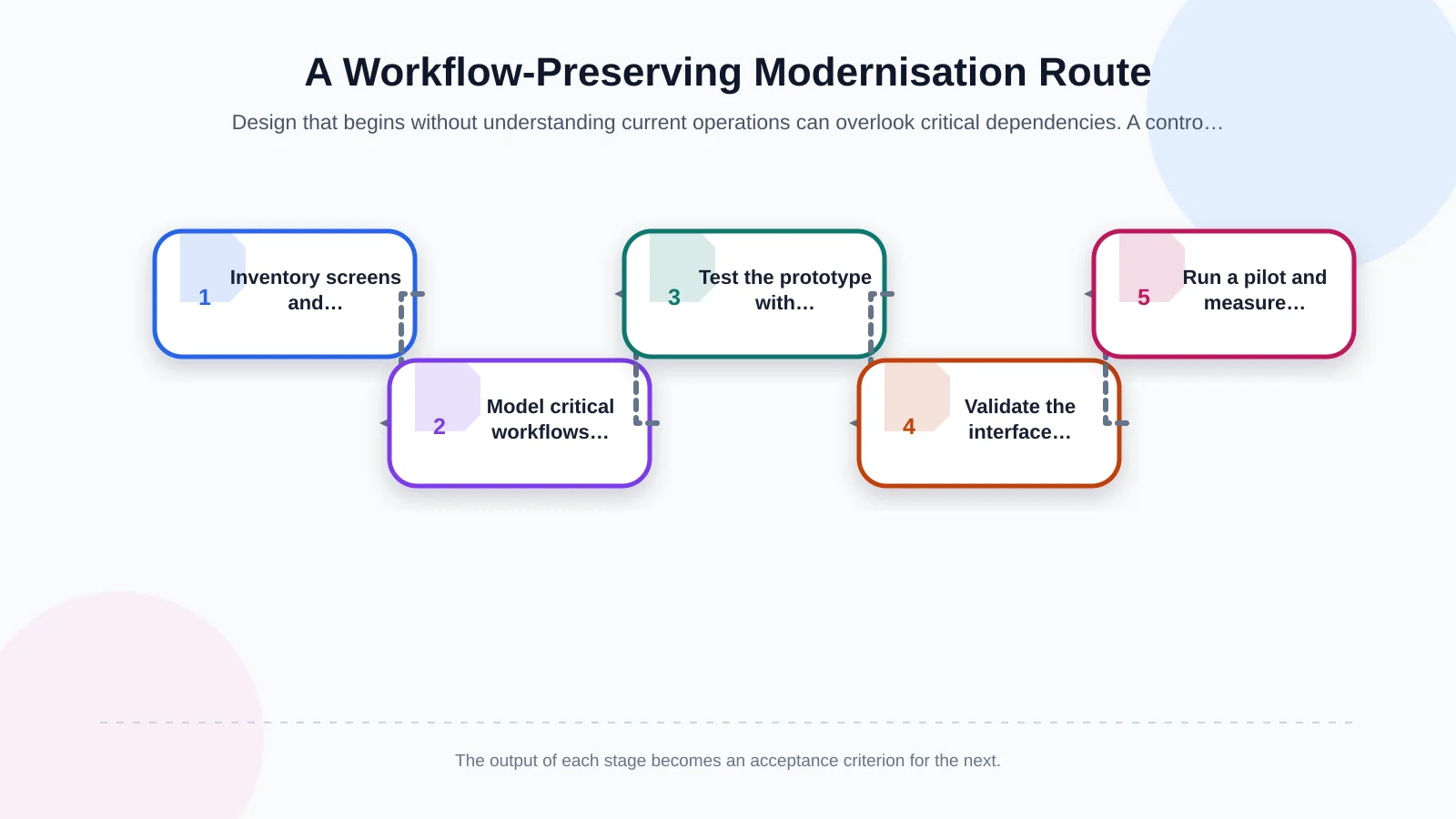
1. Build an inventory and risk map
List screens, reports, roles, data sources, integrations and supported devices or browsers. Mark functions as high risk when they are frequently used, affect revenue or production, or are difficult to reverse. Do not automatically transfer unused features into the new design. Confirm their purpose and ownership first, then consider them for removal.
2. Simplify the flow while retaining familiar cues
The new information architecture should remove unnecessary steps without casually renaming familiar concepts or changing transaction order. The old and new screens do not need to look identical. What matters is that the logic of critical tasks remains recognisable. Field grouping, explanatory errors, visible processing states, confirmation behaviour and safe undo options should be designed at this stage.
3. Test the prototype with real tasks
Test clickable prototypes with working users from every main role, not only project sponsors. Instead of asking whether participants like a screen, ask them to create an order for a specific customer, resolve insufficient stock or reject a record. Record completion, hesitation, wrong choices and requests for help. Familiarity alone should not count as success if a task still produces avoidable errors.
4. Validate development and integrations together
Build the approved interface alongside API contracts and data rules. Kumsal Agency’s custom web development approach considers business processes, user roles, data and integrations within one scope. This helps prevent a screen from communicating a state that differs from the actual record in the ERP, CRM or warehouse system.
5. Run a pilot and measure the outcome
Release the new interface first to a limited user group, branch or process. Keep a tested rollback route available if a critical defect appears. Expand the rollout by monitoring task completion time, failed transactions, support requests, validation errors and user feedback. A phased release is both a deployment method and an operational risk-control mechanism.
What should stay and what should change between the old and new screens?
Preserving every old habit prevents meaningful improvement, while changing everything increases cognitive load. Decisions should be based on task success and operational risk rather than visual preference. A sequence required by regulation, an ERP rule or a departmental hand-off may need to remain. A step caused only by an old technical limitation may be simplified.
Validate field names, keyboard behaviour, filter logic and shortcuts with teams that perform intensive data entry. Colours, typography and component styling can change, but states should not rely on colour alone. Focus indicators must remain visible, and controls need accessible names. The W3C Web Content Accessibility Guidelines (WCAG) 2.2 provide testable criteria for making interfaces perceivable, operable, understandable and robust.
| Interface element | When to preserve it | Modernisation opportunity | Validation method |
|---|---|---|---|
| Transaction sequence | Preserve when required by ERP logic or regulation | Combine unnecessary steps | Task testing |
| Fields and terminology | Preserve when organisational meaning is fixed | Improve grouping and explanations | Role interviews |
| Shortcuts | Preserve when they make frequent users faster | Add a discoverable alternative | Time-on-task measurement |
| States and warnings | Preserve their operational meaning | Use text and icons alongside colour | Accessibility testing |
| Navigation | Preserve familiar routes to critical tasks | Introduce role-based priorities and a simpler menu | Pilot usage |
How can ERP and other integrations be protected?
Document which data the interface sends to the ERP, when it is sent and under whose identity. Determine whether inventory, prices, account limits and order states are read in real time or synchronised at intervals. Define what happens after a failed transfer and whether repeating an action could create a duplicate order. Refreshing only the front end is unsafe until these questions have clear answers.
Create an integration contract covering field mappings, status codes, mandatory-data rules, identifiers and error responses. Test timeouts, missing data, stale record versions, partial success and retry behaviour alongside normal transactions. Kumsal Agency’s enterprise resource planning services approach operations around shared data and a management system aligned with the organisation’s real processes.
Mobile usability is not a smaller desktop screen
Squeezing wide tables into a narrow viewport does not create an effective enterprise mobile experience. Consider the user’s environment, connection quality and tasks that may need to be completed with one hand. Critical summaries, search, barcode scanning, photo capture and status updates may deserve priority, while complex reporting can remain desktop-oriented.
Responsive design may change the layout across screen sizes, but it must not alter data or permission rules. Test touch targets, field visibility when the on-screen keyboard opens, session behaviour and connection-loss messages on real devices. Where offline work is required, define which actions can be queued, how conflicts are resolved and when the user receives confirmed acceptance.
The test plan must reflect real operations
Interface testing goes beyond confirming that buttons respond. Role-based acceptance scenarios, transaction order, calculations, data integrity, accessibility, performance, browser compatibility and security controls should be assessed together. Compare known outputs from the old system with results from the new version to reduce regression risk.
Security should not be postponed until the final project review. NIST’s Secure Software Development Framework recommends integrating secure development practices throughout the software lifecycle. For interface modernisation, this supports keeping dependency management, security requirements, code review, test evidence and release controls within scope.
- Prepare critical-task acceptance scenarios for every role.
- Test data submission, errors and retry behaviour across the ERP and connected systems.
- Check keyboard use, focus order, contrast and understandable error guidance.
- Simulate heavy usage, slow connections and interrupted sessions.
- Approve backup, rollback, ownership and escalation plans before release.
Phased rollout and change management
Define the pilot audience, success criteria and rollback thresholds before launch. A critical transaction error, a growing ERP transfer queue or task duration exceeding an agreed level could justify pausing the release. Explicit thresholds prevent decisions from depending only on broad satisfaction comments.
Instead of long general training sessions, provide short role-based scenarios, contextual guidance and concise change notes. The support team should know new error codes and escalation routes in advance. If the old and new versions run in parallel, specify exactly where each record must be created; otherwise, the organisation may introduce competing sources of truth.
How should modernisation success be measured?
Success cannot be reduced to saying that the interface looks more modern. Establish baseline values before the redesign and compare the same tasks during and after the pilot. Useful indicators include completion rate, average handling time, errors per user, abandoned transactions, support volume, training time and integration failures.
Interpret each metric in the context of role and task. If new employees learn faster but experienced users take longer to enter orders, the design may require rebalancing. Repeat measurement at different intervals to separate temporary adjustment from persistent friction. Qualitative feedback should explain the numbers, not replace them.
A design system and management foundation for a sustainable interface
To stop the application becoming inconsistent again, document shared components, states and usage rules after modernisation. Forms, tables, filters, notifications, confirmation dialogues and error messages can be governed through one design system. This makes future modules faster to build, easier to test and more predictable for users.
The management foundation must also handle content, permissions, integration settings and audit records securely. Assign ownership for components, versioning and change approval. Without governance, local fixes accumulate, terminology drifts and the renewed interface gradually returns to the same inconsistency that prompted the project.
Controlled modernisation puts business continuity at the centre
Modernising legacy enterprise software does not mean erasing every previous decision. The goal is to preserve proven business rules and valuable user habits while removing unnecessary effort, preventing errors and creating a maintainable technical foundation. User roles, critical tasks, data, integrations, security and rollout strategy must therefore be treated as one connected programme.
As an Istanbul-based digital agency, Kumsal Agency approaches interface renewal as more than a cosmetic update. It plans user experience, custom web software, robust infrastructure, data security and manageability together. To review your critical screens, user roles and integrations and define a modernisation scope that protects existing workflows, contact Kumsal Agency.