


Aydınlatma metni yükleniyor…
Buying usability testing for enterprise software involves much more than showing a few screens to users and asking what they think. A well-scoped service investigates whether representative users can complete critical tasks such as placing an order, approving a quotation, checking inventory, closing a work order or preparing a report. It then prioritises the observed problems and turns the evidence into improvements that design and development teams can act on.
The first procurement question should therefore not be “How many screens will you test?” It should be “Which risks do we need to assess while a particular user is trying to achieve a particular business outcome?” This guide helps digital transformation, product, IT, operations, marketing and procurement teams request clear, comparable usability testing proposals for enterprise web software, ERP-connected portals, B2B e-commerce platforms and mobile applications.
What does usability testing actually measure?
ISO 9241-11 defines usability in terms of specified users achieving specified goals with effectiveness, efficiency and satisfaction in a specified context of use. A usability test is therefore not simply a measure of whether people like an interface. Task completion, errors, backtracking, assistance required, time spent and the user’s perception of the experience must be considered together.
Valid enterprise test subjects might include whether a B2B customer can repeat a previous order, whether a warehouse employee notices an incorrect serial number, or whether a manager can route a request beyond their approval limit to the right person. Asking whether a screen looks modern cannot explain these operational outcomes.
Qualitative testing is primarily used to discover problems and understand why they occur. Quantitative testing supports comparisons through measures such as completion rate and task time. The Nielsen Norman Group’s guide to usability testing explains that these objectives require different study designs and sample sizes. A proposal should state not only the name of the method but also the decision it is expected to support.
Define the product stage and decision before procurement
Usability testing can create value at several points in the product lifecycle. At the concept or prototype stage, it can validate information architecture and core journeys before development begins. Testing during development can expose problems in working features before release. Testing a live product can investigate the causes of support requests, low completion rates, repeated input errors or costly operational workarounds.
State the current product stage in the request for proposal: early flow, clickable prototype, test environment or live system. Explain how complete the interface is, whether suitable test data exists, which integrations work and what decision will follow the research. These details determine what can realistically be tested and prevent suppliers from pricing materially different scopes under the same label.
How should the usability testing procurement process work?
Follow a defined sequence to obtain proposals that are both comparable and practical. Each step should provide the input for the next. Participant numbers, session length and research methods should not be fixed before the roles, risks and critical tasks are understood.
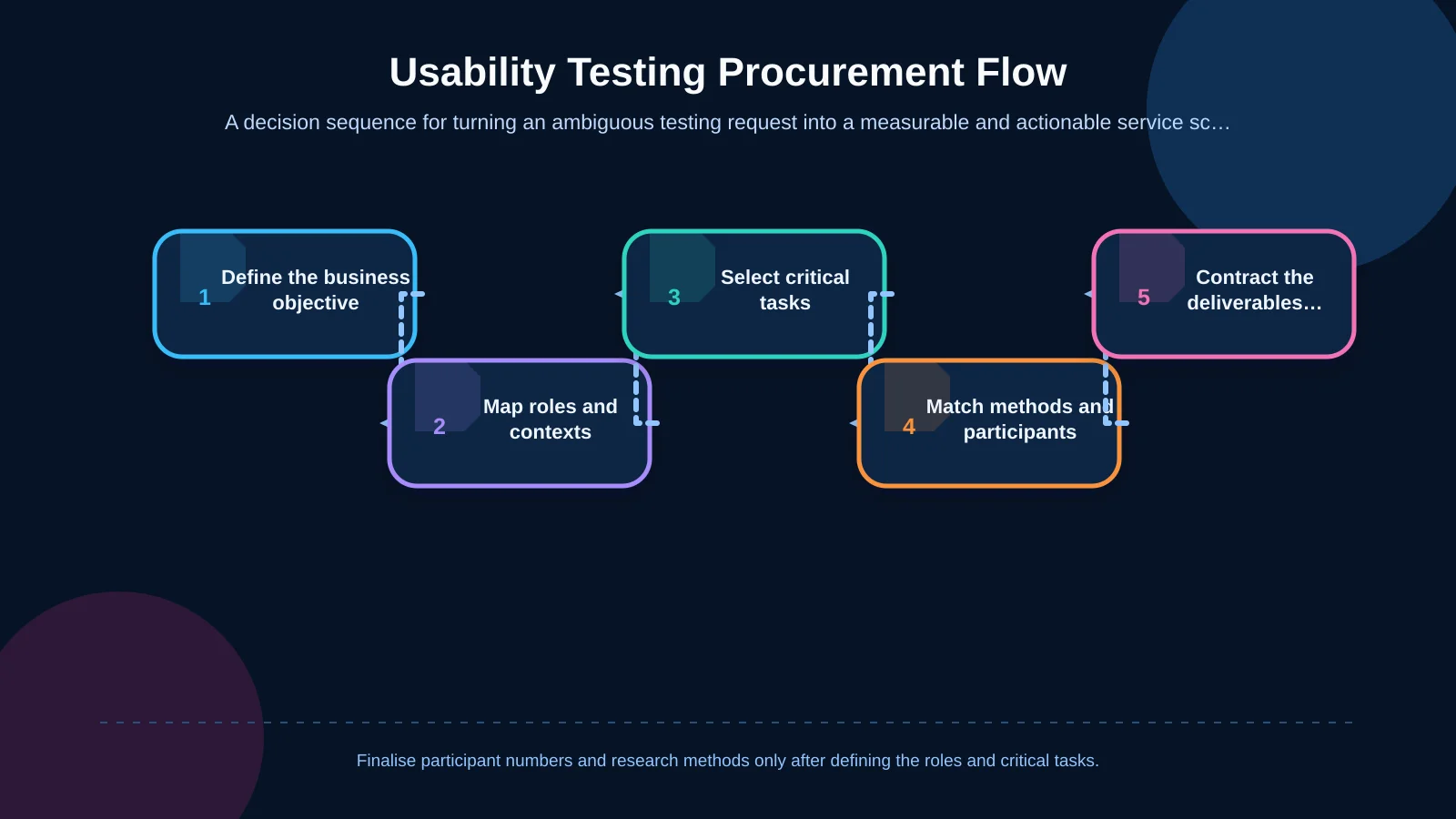
1. Define the business objective and test questions
“Test the portal’s usability” is too broad. Frame questions around decisions: identify what delays order creation, understand why dealers abandon registration, or verify whether field employees can close work orders without connectivity. Link success indicators to observable behaviour such as task completion, critical errors, requests for help, incorrect data entry or successful recovery from a failure.
2. Map user roles and contexts of use
Enterprise systems rarely have one generic user. A dealer employee, procurement specialist, warehouse operator, sales manager, finance professional and system administrator may use the same product with different permissions and goals. For each role, document experience level, device, working environment, frequency of use and accessibility needs. Include approval limits and data visibility where these affect the workflow.
3. Prioritise critical tasks and risks
Trying to test every screen equally spreads the budget too thinly. Prioritise workflows that could cause financial loss, data corruption, customer attrition, regulatory exposure or a heavy support burden. In an ERP-connected portal, these may include viewing the correct price, confirming inventory, approving an order and recovering from an integration failure. In an enterprise mobile application, offline capture, camera or barcode use and synchronisation may be more important.
4. Match the method and participant plan
Moderated sessions are well suited to complex workflows where the team needs to understand both behaviour and reasoning. Unmoderated remote testing can broaden participation when tasks are self-explanatory and the product is readily accessible. Contextual research is valuable when warehouse, manufacturing or field conditions materially affect behaviour. Participants should represent real roles rather than merely being the easiest internal employees to recruit.
5. Put deliverables and improvement ownership in the contract
Expected deliverables should cover the issue, supporting evidence, severity, affected role and task, recommended direction and a findings presentation. If design revisions, prototype updates, transfer into the development backlog or retesting are separate services, show them as distinct items. This turns the report from an archived presentation into a working input for product decisions.
How should task scenarios be prepared?
A task scenario should give the participant a realistic goal and sufficient context without telling them which control to use. “Open Orders and press Reorder” tests instruction-following. “You want to order last month’s products again using the same delivery address” allows the participant to find their own route and reveals whether the system supports their mental model.
Define each scenario through the role, starting condition, objective, required test data and success criteria. Include exceptions as well as the happy path: unavailable stock, insufficient permission, interrupted connectivity, an invalid barcode or an ERP service that does not respond. These conditions are particularly important when usability depends on wider system behaviour rather than the visible interface alone.
For integration-heavy products, the study should distinguish an interface misunderstanding from stale data, delayed synchronisation or an unclear system status. Kumsal Agency’s custom web development approach considers business processes, user roles, data and integration requirements together, providing an appropriate foundation for task-based test environments.
How should participant profiles and numbers be evaluated?
There is no participant number that fits every project. The appropriate sample depends on the number of roles, behavioural differences between those roles, whether the objective is qualitative or quantitative, and the consequences of missing a problem. For qualitative discovery, repeated rounds with a smaller number of accurately recruited participants can be more useful than one large but mixed sample. Quantitative benchmarking requires a larger sample designed around the intended statistical comparison.
Screening should go beyond job titles. Relevant criteria may include the ERP or portal used, transaction frequency, approval authority, device, sector experience and use of assistive technology. If participants will encounter confidential company information, the proposal must also define consent, recording, access, retention, deletion and confidentiality procedures. Test accounts and synthetic data should be used where exposure of live information is unnecessary.
What method and test-environment details should a proposal include?
A strong proposal states whether sessions will be remote or on site, the moderation language, duration, recording format, observer access and pilot-test arrangements. It should identify who prepares accounts and test data and who resolves environment failures during sessions. Devices, browsers, operating systems, screen sizes and network conditions must reflect actual use rather than the supplier’s most convenient setup.
For enterprise applications built with React Native, the plan should cover physical devices, operating-system versions, permissions, notifications, camera access and offline behaviour. These factors can change whether a participant can complete a task. An enterprise mobile application test must therefore assess the whole interaction between interface, device and services—not just a sequence of static screens.
The proposal should also define what happens if an integration is unavailable. Agree whether a stable stub will be used, the session will be rescheduled or the failure itself will become an observed recovery scenario. Without this agreement, technical instability can consume research time and make results difficult to compare.
How should accessibility be included in usability testing?
Automated accessibility scanning and testing with real users are complementary rather than interchangeable. W3C explains that conformance evaluation can require both automated checks and human evaluation, and that technically conforming content may not necessarily be usable by every person. Its WCAG 2.2 guidance on conformance also encourages involving people with disabilities in usability testing groups.
Ask which checks will cover keyboard operation, screen readers, focus order, zoom, contrast, error messages and time-limited processes. Where relevant to the audience, recruit participants who use assistive technologies. Accessibility findings can be distinguished from broader usability problems in the report, but they should enter the same prioritisation process so that ownership and remediation dates remain visible.
What format should the findings and report use?
A long presentation alone is not sufficient. Each finding should identify the affected role and task, observed behaviour, evidence, consequence, frequency, severity and recommended direction. Short video clips may communicate evidence effectively, but participant permission, access rights and retention periods must be agreed in advance.
Severity should not be based only on how many participants encountered a problem. Consider task criticality, whether the error is reversible, financial or operational impact, and dependencies that may block a solution. A wrong-price ordering risk discovered by one participant can deserve greater priority than a frequently observed but easily resolved hesitation over a menu label.
For enterprise teams, the most actionable handover combines an executive summary with a product backlog. Each recommendation should have an owner across design, content, development, integration or operations. Acceptance criteria should specify whether the affected tasks must be retested after critical changes and what evidence will count as resolution.
How should usability testing proposals be compared?
Do not compare proposals solely by total price and participant count. Normalise them against the same roles, critical tasks, methods and deliverables. Check whether recruitment, incentives, travel, test-environment preparation, transcription, prototype revisions and retesting are included, excluded or priced as options. A lower headline price may simply transfer substantial work to your internal team.
Evaluate whether the supplier can understand complex business processes. Experience with B2B commerce, ERP integrations, multi-level permissions and mobile field operations helps scenarios test real outcomes rather than isolated interface behaviour. Kumsal Agency’s enterprise resource planning services connect finance, sales, inventory, purchasing, production and operations around the organisation’s actual processes—relationships that also need to be reflected in enterprise usability tests.
| Review area | Weak proposal | Strong proposal | Procurement evidence |
|---|---|---|---|
| Participants | Provides a number only | Defines roles and screening criteria | Profile and recruitment plan |
| Scenarios | Lists screens | Explains critical tasks and success criteria | Scenario set |
| Environment | Does not specify devices | Defines devices, data and integrations | Environment responsibilities |
| Reporting | Promises a general presentation | Provides an evidence-based, prioritised backlog | Sample finding format |
| Improvements | Ends after testing | Separates revisions and retesting | Delivery and acceptance scope |
Essential questions to include in the request for proposal
- Which user roles and critical tasks are included?
- Who will recruit participants, and which screening criteria will be used?
- Is the study qualitative or quantitative, moderated or unmoderated?
- Are the pilot session and scenario revisions included in the fee?
- Who is responsible for test data, accounts and the integration environment?
- Will raw recordings, an evidence-based findings report, prioritisation and an executive presentation be delivered?
- Are design improvements, development support and retesting included?
- How will confidentiality, personal data, recording retention and deletion be managed?
Ask suppliers to answer these questions in the same order and to state assumptions explicitly. A comparable response format makes omissions easier to detect and keeps procurement discussions focused on scope, evidence and responsibility.
How does Kumsal Agency define a usability testing scope?
Kumsal Agency approaches enterprise products through business objectives, real user needs and technical requirements together. Custom web software, B2B e-commerce, React Native mobile applications, ERP processes, user experience and interface design can therefore be evaluated in one product context. Findings can be connected not only to visual changes but also to roles, permissions, workflows, integrations, mobile behaviour, accessibility and sustainable development decisions.
Share the roles to be tested, the critical business workflows and the product’s current stage. Request a usability testing plan and project proposal that clearly defines the scenarios, participant profiles, method, environment, deliverables and improvement scope. This gives procurement teams a fair basis for comparison and helps turn the testing investment into measurable, prioritised product decisions.