


Aydınlatma metni yükleniyor…
The central challenge in maintenance operations is not simply recording equipment failures. Teams must also decide when each asset should be serviced, which open job should be handled first and what risk a delay creates. When maintenance management software brings asset records, preventive maintenance plans, fault reports, work orders and field results into a shared data model, these decisions no longer depend on personal memory or disconnected spreadsheets.
A well-designed system is more than a task list in which every request can be labelled urgent. Calendar, meter and usage data should trigger upcoming maintenance, while a priority engine evaluates safety, asset criticality, production impact, service-level commitments and resource readiness together. Planners can then reduce unplanned downtime and clearly explain why one job was scheduled ahead of another.
Why preventive maintenance management is more than creating a calendar
Preventive maintenance involves more than assigning a recurring task to a piece of equipment. The system must know which assets are covered, which condition triggers maintenance, what checklist applies, which skills and parts are required, how long the work should take and what acceptance criteria must be met. Evidence of completion and the next due date should remain within the same traceable record chain.
The ISO 55000 approach to asset management addresses the systematic management of value, performance and risk throughout an asset’s life cycle. Applied to maintenance software, this means the data model should include not only task dates but also each asset’s operational contribution, risk profile and maintenance history.
Calendar, meter and usage-based triggers
Calendar-based plans suit fixed intervals such as weekly inspections, quarterly filter changes or annual statutory checks. Meter-based plans respond to operating hours, cycle counts, mileage or units produced. For equipment whose utilisation varies significantly, relying on calendar dates alone can cause maintenance to happen too early or too late.
A hybrid model monitors several conditions and creates a work order according to a defined rule. A service may be due after three months or 1,000 operating hours, whichever comes first. IBM’s explanation of preventive maintenance next due dates provides an example in which the earliest date can apply when time and meter criteria are used together.
From maintenance plan to verified closure
A maintenance plan should identify the asset, location, trigger rule, tolerance window, task template and responsible team. As the threshold approaches, the software can create a draft work order, check for conflicts and place the job within a suitable production window. The technician should record completed steps, readings, photographs, parts consumed and time spent.
Closure should require more than selecting “completed.” Mandatory checks must be finished, readings should fall within accepted limits and supervisor approval should be requested where necessary. A detected nonconformity should generate a linked corrective work order. The next service date can then be calculated from the actual completion date or meter reading, making it possible to verify whether planned maintenance was genuinely performed.
How should a preventive maintenance work order be created?
Automatic work order generation reduces repetitive data entry and helps prevent standard tasks from being overlooked. It must not, however, create uncontrolled duplicates. If an open order already exists for the same asset and maintenance plan, a clear business rule should determine whether the new record is blocked, merged or routed for approval.
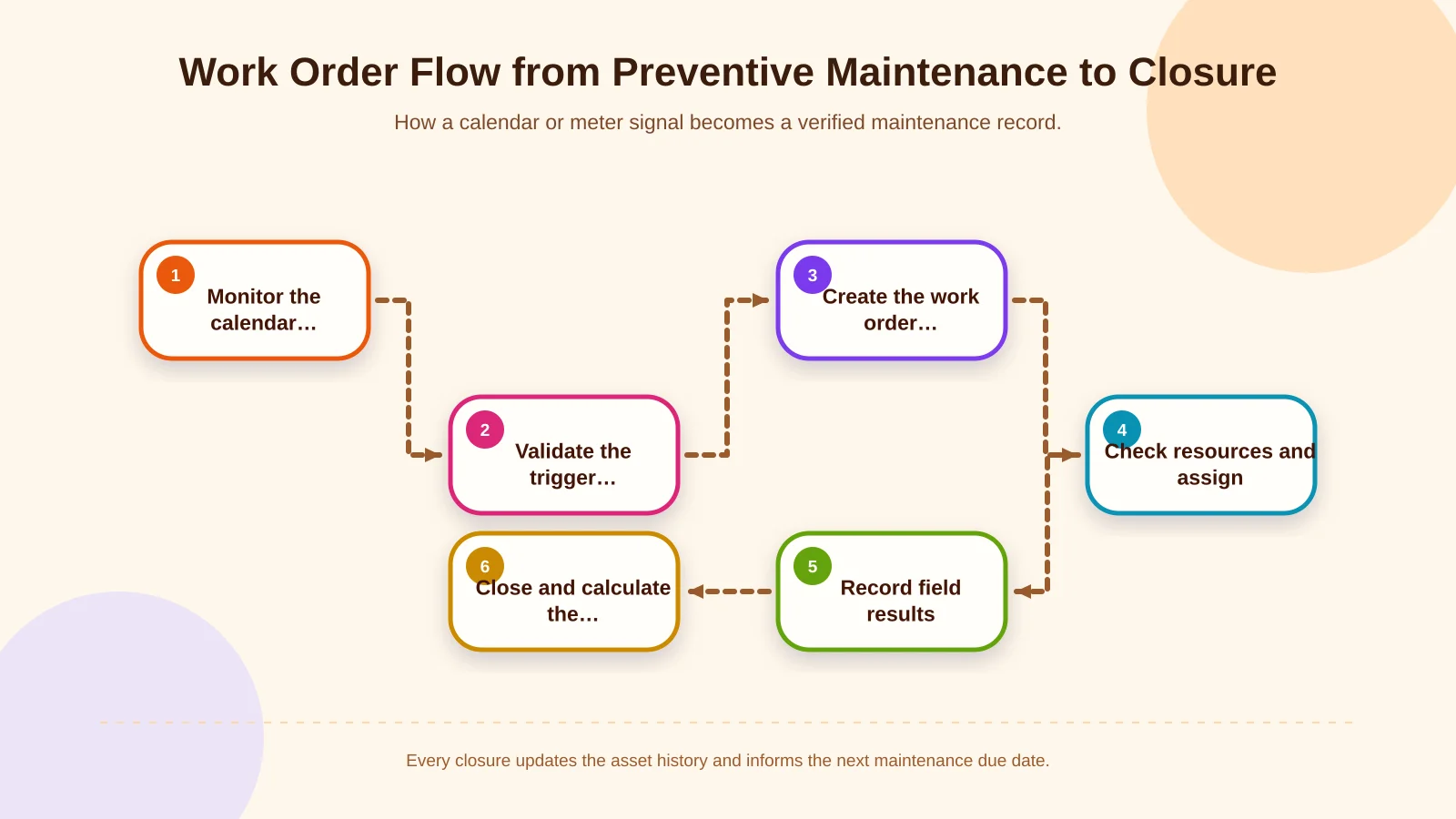
In a reliable workflow, the system first collects calendar, meter and usage signals. Once a trigger condition is met, it checks whether the asset is active and reviews existing work, the production plan and available maintenance windows. The task template, safety instructions, required skills and materials are transferred to the order. After the planner confirms capacity, the task is assigned to a suitable technician. Verified results then update the asset history and the next due-date calculation.
- Each work order should reference one asset or a clearly defined asset group.
- Planned start, due date, tolerance and reason for delay should be stored separately.
- Checklists should be versioned so instructions attached to historical orders cannot change retrospectively.
- Required parts should be checked against available stock, and the task against technician competence.
- Incomplete steps and readings outside accepted limits should be able to create follow-up work.
How should work order priority be determined?
Priority should not be a red label chosen solely by the person submitting the request. If it is, almost every task eventually becomes urgent and the queue loses meaning. A stronger model combines a starting score calculated from objective criteria, a justified override available to authorised roles and a time-based escalation factor for ageing work.
Human and environmental safety comes first. Work involving a credible risk of serious injury, fire, leakage or regulatory breach should rise to the top even when its immediate production impact is limited. OSHA recommends addressing the worst hazards first when resources are constrained and using routine preventive maintenance to avoid incidents caused by equipment failure. The principle is described in its hazard prevention and control guidance.
The second dimension is asset criticality. A compressor that represents a single point of failure should not be treated like a low-cost auxiliary unit with a readily available backup. Production impact may be graded according to a full line stop, reduced capacity, quality exposure or disruption to downstream operations. In technical service environments, an SLA adds response and resolution deadlines to the calculation.
Resource availability should shape the executable sequence, not hide or downgrade critical work. If a certified technician, permit or part is unavailable, the order should remain visible with its blocker, owner and target resolution date. Software may suggest an alternative technician, substitute part or planned shutdown window, but it should never automatically relax a safety decision.
Priority matrix and scoring rules
In an organisation-specific scoring model, safety and legal exposure will often act as overriding criteria. Asset criticality, operational impact, time remaining against the SLA and the likelihood of deterioration can then contribute to the score. Results may be translated into clear classes such as P1 Critical, P2 High, P3 Planned and P4 Low. Each class should define a response target, assignment authority, notification channel and escalation interval.
The formula should remain explainable. Users need to see that a score increased because of a safety hazard, a critical asset and an approaching SLA—not merely receive a number such as 82. Manual overrides should be limited to authorised roles, require a reason and write both the previous and new values to the audit trail. This supports operational flexibility without sacrificing accountability.
| Class | Typical condition | Target action | Control |
|---|---|---|---|
| P1 Critical | Serious safety risk or complete shutdown | Assess and escalate immediately | Authorised team, isolation, instant notification |
| P2 High | Capacity or SLA risk affecting a critical asset | Schedule for the first suitable shift | Parts, competence, production access |
| P3 Planned | Upcoming preventive maintenance or limited impact | Place within a maintenance window | Calendar, meter, workload |
| P4 Low | Redundant asset or cosmetic issue | Group according to available capacity | Ageing work and cost tracking |
Planning, assignment and escalation workflow
Priority answers “What should be done first?” Planning answers “Who can do it, when and with which resources?” A list sorted only by score can become blocked by a task whose parts are unavailable. The planning view should therefore show material readiness, technician competence, shifts, locations, permits and production access windows alongside priority.
IBM’s work order management life cycle connects request intake, approval and prioritisation, planning, assignment, execution, recording and analysis. In custom software, transitions between these stages should be governed by rules rather than free text. Moving an order to “scheduled,” for example, may require an owner, date and confirmed parts; moving it to “completed” should require field results.
- P1 work can trigger instant notifications, supervisor involvement and automatic escalation after a defined interval.
- P2 work can be scheduled for the first suitable shift and production window.
- Planned work can be balanced against weekly capacity and the maintenance calendar.
- Priority can be recalculated as an SLA or due date approaches.
- Waiting work can be separated by parts, access, permit or staffing constraints.
Mobile field application and offline operation
Maintenance evidence originates in the field, so a desktop-only solution can create delays and incomplete records. A React Native application can give technicians access to assigned work, asset history, checklists and safety steps on a phone or tablet. QR or barcode identification helps open the correct asset, while photographs, readings, time entries and digital approvals make execution faster and more reliable. These capabilities can be planned as part of a tailored mobile application.
Offline behaviour needs deliberate design in production areas with weak connectivity. The team must define which jobs are downloaded, how long local data is retained, how conflicting edits are resolved and who sees synchronisation failures. Offline actions should enter a durable queue, retain their local identity and be retried safely. Server acceptance must be confirmed before the device presents a record as fully synchronised.
How should ERP and business-system integration be designed?
Maintenance software may become the operational system of work while ERP remains the master source for materials, purchasing, cost centres, employees or fixed assets. Data ownership must be agreed first: which system creates the asset code, where stock is read, which transaction deducts a consumed part and how an external-service invoice is linked to a work order.
The connection between maintenance software and enterprise resource planning should not be treated as a one-off import. Field mapping, stable record keys, synchronisation frequency, retries, duplicate prevention and reconciliation views need to be designed together. An integration failure must not make work orders disappear. The error queue, last successful transfer and outcome of each retry should remain visible to authorised users.
Roles, permissions, security and audit trails
An operator may report a fault without being allowed to change its criticality. A planner may assign dates and resources, a technician may complete only authorised work, and a manager may approve priority rules or maintenance templates. Role-based access should govern fields, actions, locations and asset scope—not just whether a screen is visible.
Priority changes, postponements, cancellations, meter corrections and closure approvals should record the user, timestamp, previous value and justification. Security design must also cover data stored on mobile devices, API access, session policies, backups and personal information. A sustainable custom web development architecture should make ownership, evidence and escalation responsibilities explicit throughout the live system.
Which metrics should measure maintenance performance?
A dashboard should not stop at total work order volume. Useful measures include preventive maintenance completed on time, ageing of overdue work, response time by priority, unplanned downtime, repeat failures, first-time fix rate and schedule compliance. Waiting time must be distinguished from active work if the figures are to support reliable decisions.
If metrics become a punishment mechanism, users may close jobs too early or understate their priority. Each KPI should therefore document its definition, source, calculation timing and exclusions. A management view becomes operationally useful when users can drill from a delayed-work total to the affected asset, blocker and responsible owner.
How should custom maintenance management software be scoped?
Discovery should map the asset hierarchy, maintenance types, existing forms, roles, approvals, priority rules, ERP ownership and field-connectivity conditions. An end-to-end pilot can then focus on a critical equipment group. It should test automatic order generation, priority calculation, mobile execution, closure evidence and ERP parts movements together.
The objective is not to copy a generic product’s feature list but to model real decision points. Kumsal Agency develops custom web software, React Native mobile products and ERP integrations around the same process architecture. Acceptance testing should cover concrete scenarios: preventing duplicate maintenance orders, escalating critical work correctly, merging offline records safely and reprocessing a failed ERP transfer.
Conclusion: Prioritisation should be visible and explainable
Maintenance management software must do more than generate recurring tasks. It should interpret calendar and meter data correctly, evaluate safety separately from production impact, expose SLA and resource constraints, add field evidence to asset history and exchange controlled data with ERP systems.
This structure helps teams do not merely work faster, but select the right job at the right time for reasons everyone can understand. Delays remain visible with their cause and owner, while management can base decisions on dependable records. To plan maintenance management software around your processes, team roles and existing ERP infrastructure, contact Kumsal Agency.