


Aydınlatma metni yükleniyor…
A website–CRM integration is more than posting form fields to an API. A dependable flow accepts the visitor's submission without losing it, validates and normalises the data, resolves the correct contact or company, creates or updates CRM records, assigns a sales owner and makes the follow-up outcome visible.
This guide helps marketing and sales teams scope the journey from form submission to sales tracking. The “Kumsal six delivery receipts” and acceptance-test matrix are original planning tools developed for this article. They do not recommend a particular CRM or guarantee more sales or higher conversion.
A submission, contact, company and opportunity are different records
A visitor submitting a form is an immutable request event. A CRM contact is the evolving profile of a person. A company record represents the business account, while a lead, enquiry or opportunity represents a particular commercial possibility. Collapsing all of them into one record may appear to reduce duplicates but can erase the context of earlier enquiries.
An existing customer might submit two forms for different services six months apart. The contact can be updated because the email address matches, but the second request must not overwrite the first note. Retain every submission with its own identifier, time, source, form revision and content summary, then link it to the relevant contact, company and sales record.
Assign record ownership before mapping fields
Before asking “which CRM field receives this value?”, decide which system owns each fact:
- Does the website own form definition, page and campaign provenance?
- Are contact details mastered in CRM or another customer-data system?
- Does company resolution use domain, an approved business identifier or an account number?
- Under which conditions are a lead, enquiry, task and opportunity created?
- Will qualification and sales stage return to the website or marketing layer?
- Which system records consent, communication preference and retention decisions?
A technically functioning form and a functioning CRM integration are different checks. Use our website form-monitoring guide for browser validation, server delivery, notification and test-submission controls.
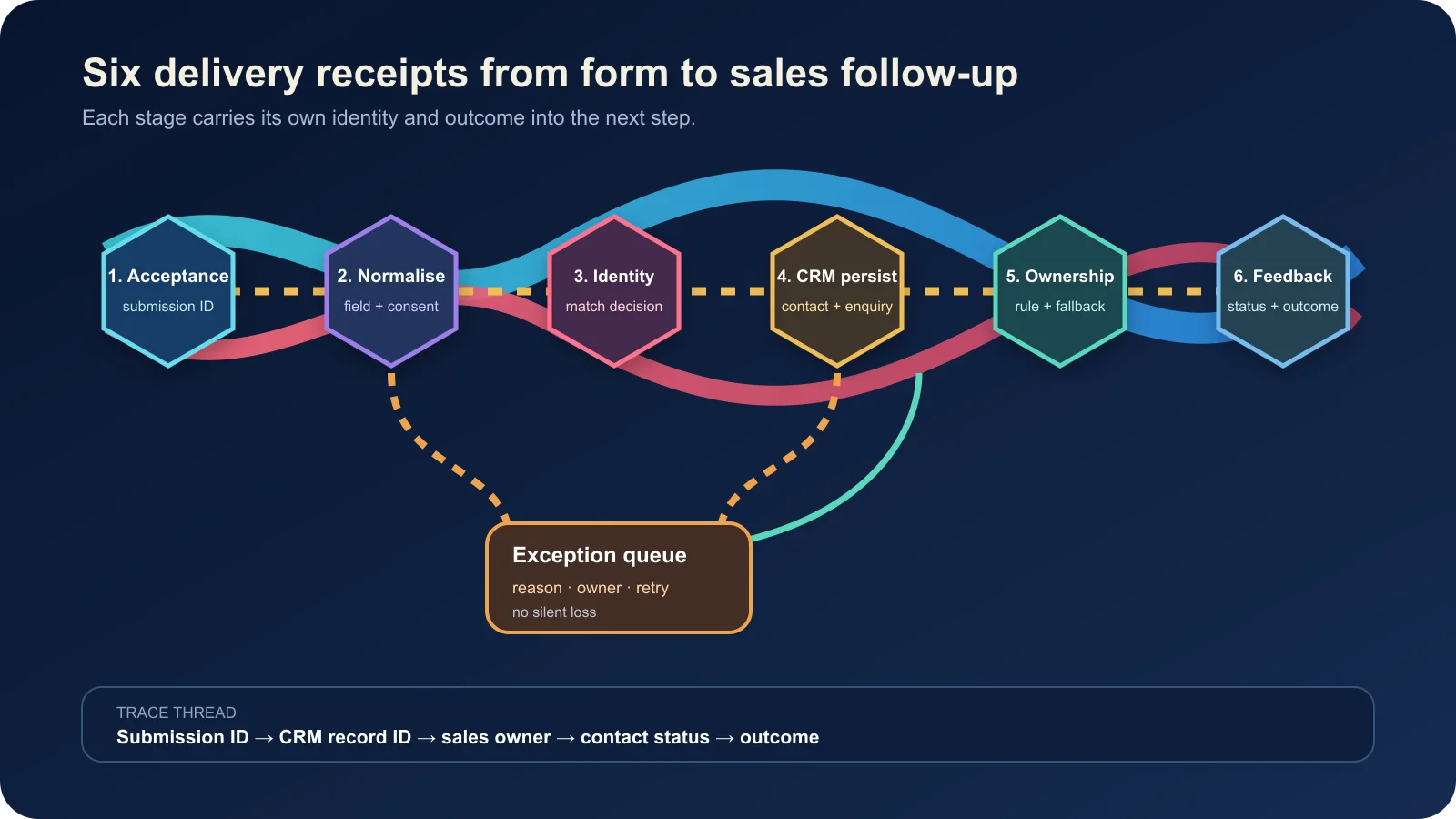
The Kumsal six delivery receipts
A single “success” or “failure” state does not reveal where an enquiry stopped. Each stage should produce separate evidence.
| Stage | Decision | Evidence | Failure behaviour |
|---|---|---|---|
| 1. Submission acceptance | Is the request valid and processable? | Persistent submission ID, time and form revision | Clear user error; do not send invalid data to CRM |
| 2. Normalisation | Were fields converted to the shared format? | Source field, target format and validation result | Keep source evidence and route for correction |
| 3. Identity resolution | New contact/company or an existing record? | Match rule, candidates and decision | Send ambiguous matches to human review |
| 4. CRM persistence | Does CRM contain the submission and relationships? | CRM record ID and write result | Retry without creating a second record |
| 5. Owner assignment | Did the right team or person take ownership? | Rule revision, owner and assignment time | Fallback queue and alert |
| 6. Sales feedback | Was the enquiry handled and classified? | First contact, qualification and next action | Operating alert; never delete the record |
In this model, “we received your form” confirms only initial acceptance. CRM persistence, owner assignment and sales follow-up may complete later. To avoid a misleading “sent to sales” message, identify which stages are synchronous and which run through a queue.
A field map needs more than two column names
A mapping such as “telephone → phone” is not enough for production. Record each field's data type, requirement, length, allowed values, transformation, blank-value behaviour, owner and error outcome.
| Website field | CRM destination | Transformation/validation | Blank or invalid |
|---|---|---|---|
| Full name | Contact name fields | Retain source value instead of blindly splitting every name | Reject or review according to form policy |
| Business email | Contact email | Format check and case normalisation | Clear error if no usable contact channel |
| Telephone | Telephone | Country code, character cleanup and source value | Leave blank if optional; never invent a value |
| Company | Company/account | Name similarity alone must not auto-merge records | Candidate account or new-company review |
| Service selection | Enquiry type/product interest | Versioned dictionary between web label and CRM code | Unknown code enters the exception queue |
| Message | Submission description | Length, attachment and malicious-content controls | Warn before truncation or use a protected related record |
| Provenance | Campaign/source fields | Separate URL, referrer, campaign and form revision | Unknown instead of guessing “direct” |
When CRM options change, a static list on the website can become invalid. Assign an owner, revision and distribution method to the shared code dictionary. Keep localised labels shown to users separate from stable integration codes.
Duplicate prevention is more than matching an email address
Updating a record when an email already exists is suitable for some flows, but shared purchasing inboxes can represent several people and one person can have several work addresses. Telephone numbers change, company names vary and forms may use aliases. Define duplicate behaviour by record type.
HubSpot's current contacts API guide documents batch upsert with email or a custom unique identifier to create or update contacts. Microsoft Dataverse upsert documentation likewise discusses alternate keys for locating a record during integration before create or update. These are product examples; the business data model must determine which property is genuinely unique.
Use three possible outcomes:
- Exact match: Link to an existing record through an approved external identity or reliable unique key.
- Possible match: Name, company, email or phone signals are similar; create a review task instead of automatically merging.
- New record: No sufficient match exists; create the contact or company and link the submission.
Preserve the submission identifier even when CRM provides duplicate detection. Microsoft's duplicate-detection documentation describes field-based matching rules and notes that records processed at the same moment can still produce duplicates. A retried web request and a similar CRM contact are therefore separate problems.
Retrying the same submission must not create another enquiry
A visitor can press Submit twice, a browser can retry after losing the response, or the integration can disconnect after CRM processes the request. Give every accepted event a persistent submission ID and carry it through each stage. When the same ID returns, find and return the earlier outcome rather than creating another enquiry or opportunity.
The submission ID is not the CRM contact ID. One person can make several genuine enquiries over time. Identity resolution can consolidate the person while retaining every request as its own event, protecting both retry behaviour and sales history.
Assignment needs a rule, fallback and timeout
Ownership may depend on country, language, product family, existing-customer status, account manager, company size, partner channel and operating hours. Define whether the first match, most specific rule or a score wins.
Salesforce's lead-assignment documentation separates rule-entry order, matching conditions and the user receiving the record. The same design principle applies beyond one CRM: each assignment rule needs a priority, scope, owner and test example.
Specify what happens when the owner is absent, inactive or beyond capacity. If no rule matches, use a visible fallback queue rather than leaving the record unowned, then alert when it remains unclaimed past the agreed operating window. Sending a notification and assigning a CRM owner are separate checks.
An exception queue keeps failed records visible and repairable
A temporary CRM outage and an invalid service code should not receive the same retry behaviour. Technical failures can retry under controlled intervals. Data or business-rule failures should wait for correction instead of repeating forever with identical input.
An exception record should include the submission ID, stage, error class, safe summary, attempt count, last attempt, next action time and responsible team. Reprocessing after correction should preserve the same submission ID and earlier error history. Failed submissions must not disappear into an unmonitored table.
Combine traceability with data minimisation
A shared correlation identifier can connect the website request, queue operation, integration call and CRM write. W3C Trace Context defines standard HTTP context fields for correlating requests across distributed services. A project does not have to implement this exact standard, but it needs a way to answer “which website request became this CRM write?”.
Traceability does not require copying the complete form into logs. The OWASP Logging Cheat Sheet advises against directly logging access tokens, passwords, sensitive personal data and certain commercially sensitive information, recommending removal, masking, sanitisation, hashing or encryption where appropriate. Define retention, access authority and investigation procedures for the project.
Which CRM data should return to the website?
A bidirectional integration is not mandatory in the first release. The website can reliably send forms to CRM while sales stages remain within CRM. Add a return flow only when it supports a real user experience or measurement need.
For example, a limited qualification result can return to marketing reporting, or an authenticated customer can see the status of their own request in a portal. Internal sales notes, rejection details and sensitive account information should not flow back to the web layer without purpose. Document every returning field, direction, trigger and permission in the data-flow table.
Write end-to-end acceptance tests as business scenarios
| Scenario | Expected result | Evidence |
|---|---|---|
| New person submits a valid form | Submission, contact and sales record persist; owner is assigned | Submission/CRM IDs and assignment time |
| Existing contact asks about another service | Contact updates; new request does not overwrite the earlier one | Match decision and two separate submissions |
| Same request arrives twice after a network retry | No second CRM enquiry; previous outcome is returned | One submission ID and retry result |
| Two possible company matches exist | Human review instead of an incorrect automatic merge | Candidates, confidence and human decision |
| CRM is temporarily unavailable | Record remains queued and writes under the same ID after retry | Queue attempts and CRM outcome |
| Service code is unknown to CRM | No endless retry; data error enters a correction queue | Mapping revision and error owner |
| No assignment rule matches | Enquiry enters the general sales queue and raises an alert | Fallback rule and claim time |
| An operator investigates logs | Flow can be correlated without exposing complete sensitive form content | Correlation ID and masked events |
Do not measure success by lead count alone
Submission volume represents demand, not integration quality by itself. Monitor the percentage of accepted requests persisted to CRM, oldest exception, retry-queue age, possible-duplicate review time, unowned records, time to assignment and records missing a sales disposition.
These measures are not outcome guarantees. Define the baseline, calculation, data owner and review frequency before delivery. If qualification feedback is connected to marketing provenance, report missing and late feedback as a separate data-quality issue.
What should an integration proposal deliver?
- Model for forms, submissions, contacts, companies, leads/enquiries and opportunities
- Field map, code dictionary and systems-of-record table
- Exact, possible and new-record identity decisions
- Submission ID, retry and CRM-persistence behaviour
- Owner assignment, fallback queue, absence and capacity rules
- Error classes, retry policy, correction interface and alerts
- Authentication, authorisation, log masking and retention approach
- Test environment, acceptance scenarios, rollout and operating owners
For common technical scope across API, ERP, CRM and payment connections, use our guide to planning web-software integrations.
Conclusion: complete delivery to sales, not merely form submission
A website–CRM integration is not complete when a CRM record happens to appear. The submission identity, field transformation, contact/company resolution, persistent CRM result, sales owner and follow-up disposition must remain traceable in one chain. Separate receipts make lost and duplicate records repairable at the stage where they occur.
Begin with the six delivery receipts and real business scenarios. To scope website forms, CRM data and sales follow-up together, explore Kumsal Agency web-development services.