


Aydınlatma metni yükleniyor…
Short answer: not every update should be applied at the same speed or in the same way. Priority rises when a security issue directly affects your system, especially when reliable sources indicate that the vulnerability is being actively exploited. Yet “urgent” should not mean installing an update directly on a live website without checking the affected version, dependencies, backups, rollback options and critical functions.
A sound decision manages two risks at the same time:
- Leaving the website exposed to a known vulnerability by delaying an important update
- Breaking the website, an integration or a user journey by updating without adequate preparation
The NIST Guide to Enterprise Patch Management Planning does not reduce patching to installation. It describes a process that includes identifying, prioritising, acquiring, installing and verifying patches, updates and upgrades. The first maintenance question should therefore not be “Can we click update?” It should be “Which risk does this update reduce, and under which conditions can it be applied safely?”
Why Do Updates Have Different Levels of Urgency?
A content management platform, framework, server component, runtime, plugin or third-party integration may receive several kinds of updates. Some address security vulnerabilities. Others fix defects, improve compatibility or introduce features. Because their effects differ, their implementation decisions should differ as well.
For example, a normal version update affecting an unused feature may be placed in a planned maintenance window. A vulnerability affecting an internet-facing component that is actually used by the project, with reliable evidence of active exploitation, requires a faster assessment.
The CISA Known Exploited Vulnerabilities Catalog lists vulnerabilities known to have been exploited in the wild and presents the catalog as an input to vulnerability-management prioritisation. However, finding a vulnerability in this or another advisory does not automatically mean that a particular website is affected. The product, version and relevant feature in use must first be confirmed.
Five Questions That Determine Security Update Priority
1. Is the component and version we use actually affected?
The first step is to check the inventory, not merely the update name. If the versions of the CMS, framework, runtime, server software, libraries, plugins and integrations are unknown, the advisory’s effect on the project cannot be assessed reliably.
The OWASP guidance on vulnerable and outdated components recommends maintaining an inventory of client-side and server-side components and their dependencies, monitoring relevant security advisories and testing compatibility after libraries are updated.
2. Is the vulnerability being exploited, and is the system exposed to the internet?
Evidence of active exploitation should be considered together with internet exposure, accessible data, user privileges and the importance of the affected function. The same technical vulnerability can have a different business impact in an internal component than in a critical component directly exposed to the internet.
A severity score alone is not enough. The vendor advisory, affected versions, recommended remediation or mitigation and the way the project actually uses the component should be reviewed together.
3. Which dependencies could the update affect?
A component rarely works in isolation. An update may conflict with:
- The PHP or Node version
- Database drivers
- Themes and interface components
- Form, payment or account journeys
- APIs and webhooks
- Server configuration
“A new version is available” and “this version is ready for this project” are not the same conclusion.
4. Is there a usable rollback point?
Before an update, backups may need to cover the file system, database and relevant configuration files. The team should also know which backup is considered healthy, who can perform the rollback and which condition triggers that decision.
The presence of a backup file alone is not sufficient operational protection. The restore environment, verification method and decision owner should be defined before the change.
5. Which functions will be verified after the update?
Confirming that the home page loads is necessary, but it is not enough for many projects. Depending on impact, the team may need to verify the management panel, forms, payments, account operations, language switching, mobile layouts, email notifications, APIs and the project’s essential user journeys.
The test scope should come from the project’s real functions. Spending time on an unused feature while overlooking a sales or enquiry journey is poor prioritisation.
How Can Urgent, High-Priority and Planned Updates Be Distinguished?
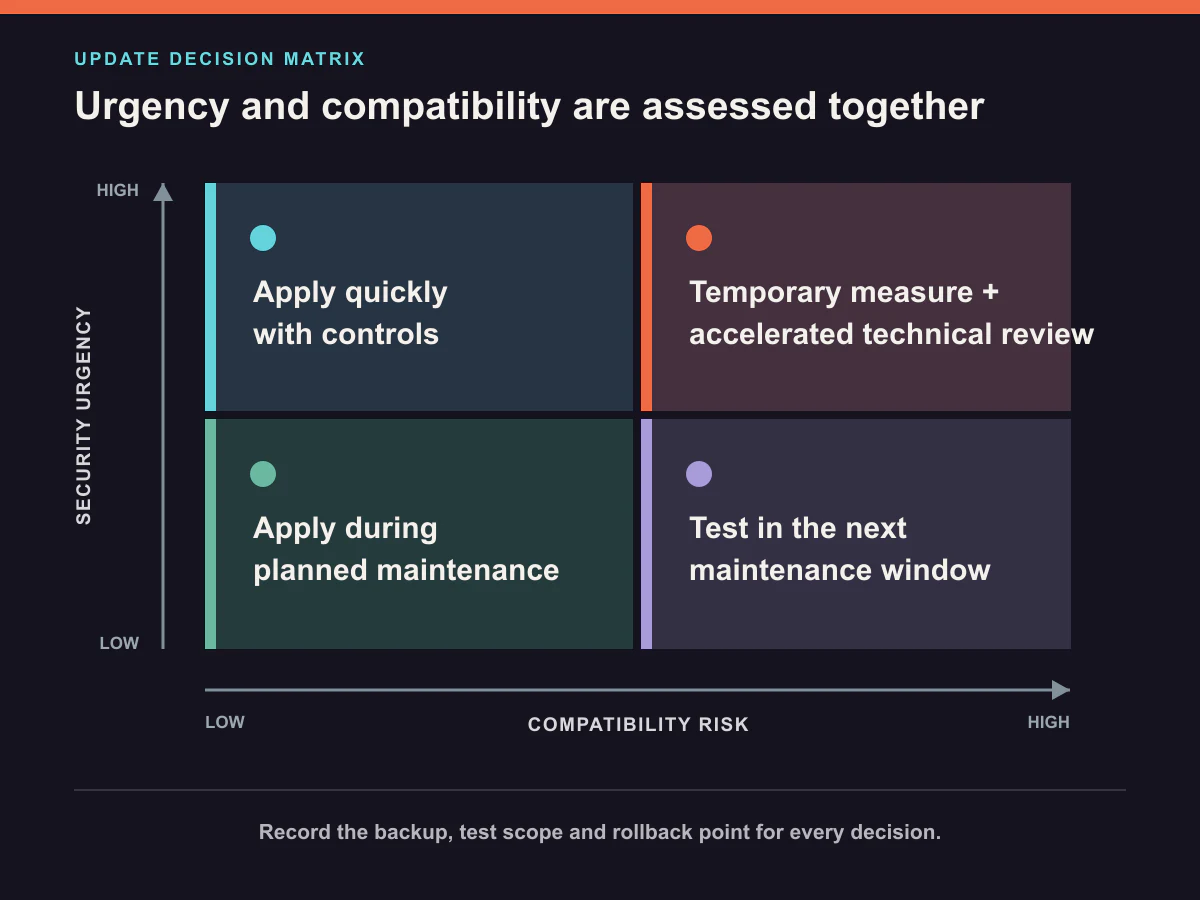
The following classification is a decision framework, not a fixed service-level commitment. It should be adapted to the project, contract and risk context.
| Class | Typical situation | Decision approach |
|---|---|---|
| Urgent security action | A vulnerability affects the version in use and has serious potential impact or credible active-exploitation evidence | Confirm impact promptly; prepare the vendor-recommended remediation or mitigation, backup, controlled implementation and a compressed verification plan together. |
| High-priority update | Important to security or continuity, but active exploitation is not confirmed or additional compatibility assessment is required | Plan a near-term maintenance window and complete dependency and critical-function checks. |
| Planned update | A feature, minor defect fix or version change with low operational impact | Place it in the normal maintenance schedule and apply the appropriate test and approval process. |
An update’s class can change. A new vendor advisory, evidence of active exploitation or newly discovered project impact can turn a planned task into an urgent one. Conversely, the priority can fall if the project is confirmed not to be affected. This is why the reasoning and date of the decision should be recorded.
The 10-Field Security Update Decision Record
The following fields can keep an update decision from disappearing across email threads or verbal conversations:
| Field | Information to record |
|---|---|
| 1. Source | Vendor advisory, official release notes or security bulletin |
| 2. Component | Affected CMS, framework, plugin, runtime, server or integration |
| 3. Affected version | Whether the version used by the project is within scope |
| 4. Urgency and business impact | Possible impact on security, data, access, sales or a core function |
| 5. Dependencies | PHP/Node, theme, plugin, API, database and server compatibility |
| 6. Implementation environment | Test environment, controlled live action or vendor-recommended mitigation |
| 7. Backup and rollback | Backups taken, known-good version and rollback owner |
| 8. Verification scope | Critical functions to verify after implementation |
| 9. Owner and approval | Technical implementer, project owner and customer approval when required |
| 10. Result and follow-up | Implementation time, verification result, issue, rollback or next task |
The record makes the technical reasoning visible. It does not create one universal update deadline. Waiting on a third-party service, licence, server change or customer decision should be recorded separately.
A Controlled Path from Decision to Implementation
Once the decision record is complete, the process usually follows this sequence:
- Verify the advisory source and affected versions.
- Compare the advisory with the project’s component and dependency inventory.
- Determine urgency, business impact and any temporary mitigation.
- Back up the files, database and relevant configuration.
- Choose the implementation environment and critical verification scope.
- Confirm customer approval and a maintenance window when required.
- Apply the update and verify critical functions.
- If a problem occurs, apply the rollback or permanent-fix decision.
- Record the result and follow-up tasks, then inform the customer.
Broad updates are normally verified in a separate test environment, while limited low-risk changes may be handled through a controlled live process. That environment decision should be documented separately from the update’s urgency and business-impact decision.
How Does Kumsal Agency Handle Updates?
For Kumsal Agency projects, official announcements and release notes are followed for the content management platform, framework, plugins, server and security software used by the project. Updates containing a vulnerability that directly affects system security are treated as urgent priorities.
Customer approval is obtained for important updates that could affect functionality, design, integrations or user experience. Before implementation, compatibility is checked against the existing software, plugins, PHP or Node versions and third-party integrations.
The file system, database and required configuration files are backed up. Broad updates affecting the content management platform, framework, theme, critical plugins or integrations are first applied in a test environment.
After the update, checks may cover website access, forms, the management panel, payment and other integrations, mobile layout and essential user operations, depending on project scope. Actions are recorded through project records, support requests or technical notes. For planned and significant work, customers are generally informed before and after the update by email or the agreed support channel.
This does not mean every project receives the same check frequency or a fixed intervention time. Update, maintenance and support scope is defined by the relevant proposal and agreement. Our guide to free support and ongoing maintenance explains how defect support, maintenance and additional development should be separated.
How Was a Real Compatibility Issue Managed?
In an anonymised real project, a plugin update became incompatible with the PHP version in use. Once the problem was identified, the system was rolled back to the last known-good backup. The version and dependency compatibility checks were then completed, the required preparation was made and the update was applied again.
The lesson is not “do not update.” The correct conclusion is that the update’s security or functional benefit, its compatibility with the operating environment and the rollback plan all belong in the same decision.
No customer, project, plugin, version, date or infrastructure detail that could reveal the project is included in this example.
How Should Customer and Technical-Team Responsibilities Be Divided?
The technical team typically reviews the advisory, confirms affected versions and dependencies, and assesses technical risk and the implementation method. The customer or project owner participates when the change can affect functionality, user experience, operational timing or a planned interruption.
At minimum, the decision record should name the owner of each question:
- Who confirms the technical impact?
- Who obtains customer approval?
- Who manages the backup and rollback?
- Who verifies critical functions?
- Who informs the customer about the result or delay?
- Which record must be closed before the work is considered complete?
Documenting responsibility is not about assigning blame after a problem. It makes approval boundaries and waiting points visible before work begins.
Common Security Update Mistakes
Treating every update as an emergency
This can create unnecessary disruption and compatibility risk. First confirm whether the project is actually affected.
Delaying a security update until the next routine maintenance window without reassessment
If there is credible evidence of active exploitation or serious impact, waiting for a fixed calendar date may create unnecessary exposure. Priority should be reviewed.
Checking only the primary component
Updating a framework while overlooking the runtime, plugin, theme, API or server dependency can expose compatibility problems later.
Taking a backup without defining rollback conditions
A backup is not an operational plan if nobody knows which copy is healthy, who performs the restore or which event triggers it.
Looking only at the home page after the update
Forms, payments, accounts, language switching or the management panel may fail even while public pages appear to load normally.
Failing to record the work
Without the version, date, result and issue record, the next maintenance cycle repeats the same investigation and loses the reasoning behind the decision.
A Short Checklist for a Maintenance Proposal
When reviewing a maintenance or technical-support proposal, ask for written answers to these questions:
- Which sources are monitored for update and security announcements?
- Which criteria distinguish an urgent update from planned maintenance?
- How are affected component and dependency versions inventoried?
- Which changes require customer approval?
- Which backups are taken before implementation?
- How are the test environment and rollback approach selected?
- Which critical functions are checked after the update?
- Where are the result and customer communication recorded?
- How does the process continue while waiting on the customer or a third party?
“Updates are included” is not a sufficiently precise service definition. The source, priority, responsibility, controls and result-recording process should be clear.
Conclusion: Speed and Control Are Not Opposites
Website security updates may need to be handled quickly, but speed does not mean uncontrolled implementation. A sound decision considers the official advisory, affected version, active-exploitation evidence, business impact, dependencies, backups, verification scope and rollback plan together.
The 10-Field Security Update Decision Record makes the decision repeatable and visible to both the technical team and the customer. It helps prevent important updates from being delayed without review while also preventing teams from applying every new version without preparation.