


Aydınlatma metni yükleniyor…
The most expensive problems in a corporate website project often appear to emerge during development. In reality, many begin with decisions that were never made earlier: Which information does each user need? How should pages be organised? What fields should a form request? How should the mobile menu behave? What happens after a user completes an action? Wireframing and prototyping make these questions visible, testable and open to discussion before coding begins.
This process involves much more than adding a few screen sketches to a design project. It creates a shared model connecting business goals, user tasks, content structure, technical requirements and brand experience. Decision-makers approve not only how the website may look, but also how it should work. Designers, content teams and developers can then work from the same agreed scope, reducing the likelihood of late discoveries and costly revisions.
What are wireframes and prototypes?
A wireframe is the structural outline of a web page. It shows where navigation, headings, content sections, images, buttons, forms and other components will appear. Colour, typography and detailed visual styling usually remain in the background. The purpose is not to judge whether the design looks polished. It is to determine whether content priorities, page hierarchy and user guidance have been organised effectively.
A prototype makes the relationships between pages, actions and interface states possible to experience. It can simulate what happens when someone selects a menu item, taps a button or submits a form. A prototype may be a low-detail model with a few connected screens, or a realistic interactive experience representing animation and different screen sizes. The GOV.UK guidance on making prototypes recommends using prototypes to explore, communicate and test ideas before committing to production code. It also explains that the appropriate level of detail can range from paper sketches to realistic interactive models.
What is the difference between a wireframe and a prototype?
Wireframes and prototypes complement each other, but they answer different questions. A wireframe asks, “What belongs on this page, and in what order should the content appear?” A prototype asks, “What can the user do here, how do they reach the next step, and how does the system respond?” Interface design then adds brand identity, colour, typography, imagery, visual composition and motion.
A wireframe should therefore not be judged as a finished design. Expecting a grey-box layout to express the full visual impact of a brand misunderstands its role. Likewise, even a highly detailed prototype is not working production software. Live data connections, security controls, performance optimisation, content management and integrations are completed during development. GOV.UK also highlights that prototype code should not be treated automatically as production-ready code.
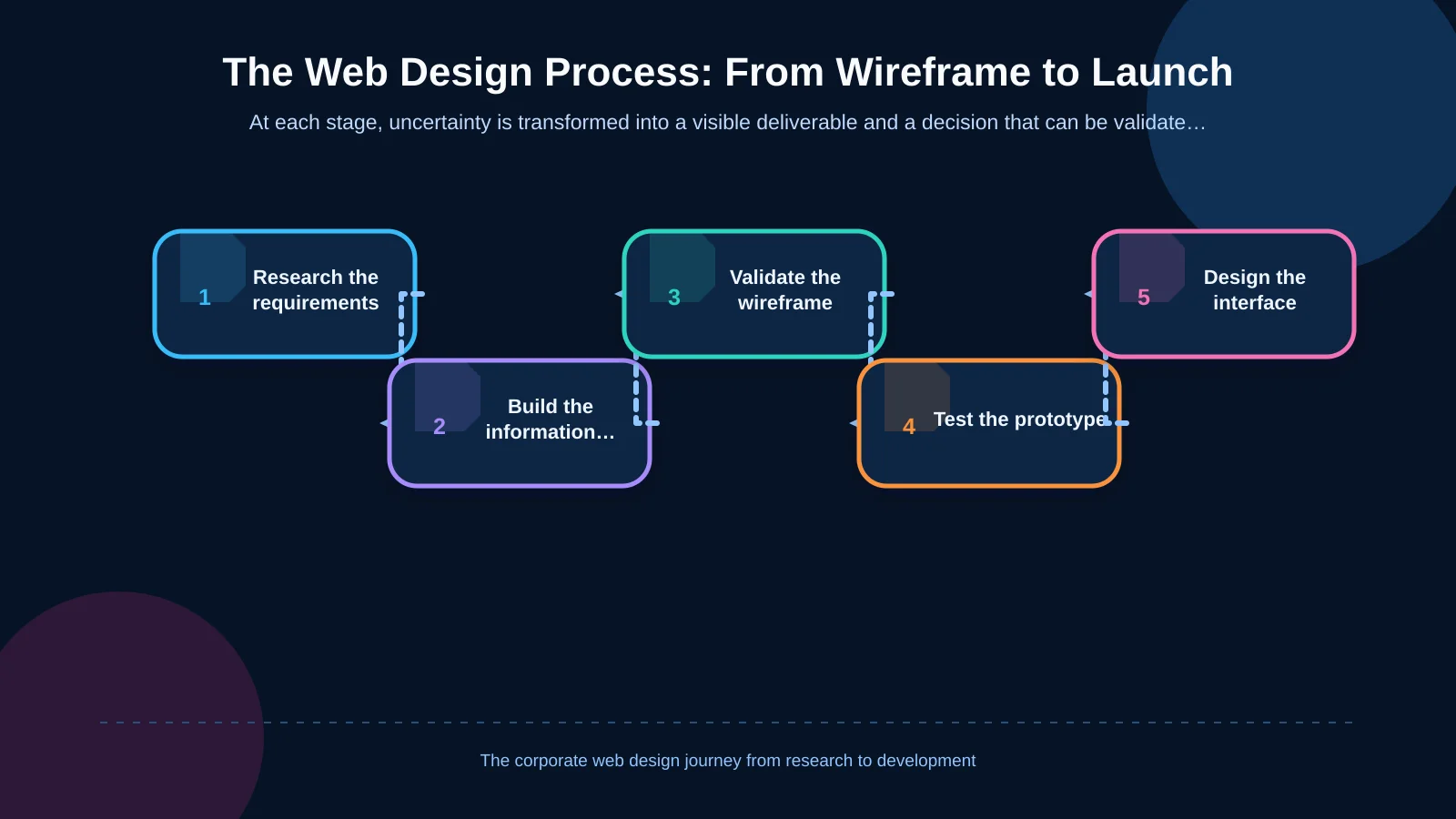
The stages of wireframing and prototyping in web design
1. Research and requirements analysis
A useful wireframe cannot be created without understanding the organisation and its users. The first stage defines the website’s goals, target audiences, primary conversions, existing problems and measures of success. Expectations from sales, marketing, human resources, customer service and technical teams should be considered within the same framework. Competitors are assessed not only by appearance, but also by content coverage, navigation patterns and the tasks they enable users to complete.
User research should distinguish evidence from internal assumptions. A visitor may want to compare services, download technical documentation, request a quotation, review previous projects or obtain support. Each audience has different information needs and a different decision journey. The project should therefore ask, “Which task must the user complete, and what information will support that decision?” before asking what should appear on the home page.
2. Sitemap and information architecture
Research findings are converted into a page inventory and sitemap. Relationships between the home page, company information, services, industry solutions, projects, blog content and contact routes are defined. Page names should use language visitors recognise rather than internal terminology, while overlapping content should not be duplicated without a clear reason.
Information architecture is more than a navigation tree. It also determines where content belongs, how related pages connect and how visitors can reach their goals from different entry pages. Resolving the sitemap early gives content teams a dependable inventory, helps designers identify reusable templates and allows developers to make more realistic estimates.
3. Content planning and page requirements
Before wireframing begins, every page needs a defined purpose. What user question will it answer? What evidence will it provide? Which next step should it encourage? Headings, service explanations, references, project imagery, technical documents, frequently asked questions and calls to action all belong in the content plan.
Excessive reliance on placeholder copy can conceal the true length and complexity of content. Nielsen Norman Group explains that wireframes and prototypes can communicate layouts, information hierarchy and interactions at different levels of fidelity. Its research into commonly created UX deliverables also warns against unrealistic content. Defining content owners, required files and approval dates at this stage prevents the design process from stalling while teams wait for missing material.
4. Creating low-fidelity wireframes
Initial wireframes prioritise speed and clarity. The home page and critical page types are mapped with both desktop and mobile priorities in mind. Rather than drawing every page separately, the team can establish common templates for service details, project pages, listings, articles and contact journeys. This reduces repetition and turns an abstract page count into a measurable design scope.
At this stage, the team should assess whether:
- The most important message is understandable at a glance.
- The content order reflects the user’s decision-making process.
- Primary and secondary actions are clearly distinguished.
- The navigation supports different audience groups.
- Content priorities remain intact on smaller screens.
- Forms request only information that is genuinely necessary.
Review criteria should be explained before feedback begins so that discussions do not drift towards colours or photography. The decisions required in this round concern structure, scope and flow—not final aesthetics.
5. Mapping user flows and system states
Pages should be evaluated as parts of complete tasks rather than isolated screens. For example, a prototype can show how a visitor discovers an industry solution, reviews a relevant project and reaches a quotation form. Submission confirmations, validation errors, empty results, download states and permission requirements should also be represented. This exposes the deviations and exceptions users may encounter beyond an ideal journey.
If a form will connect to a CRM, the project must consider field mapping, consent, duplicate records, ownership assignment and failed transfers alongside interface decisions. These operational and technical considerations are explored in Kumsal Agency’s guide to planning website–CRM integration from form submission to sales follow-up. Showing this journey in a prototype prevents questions such as “Who owns the request after submission?” from remaining unanswered until development is complete.
6. Building an interactive prototype
Approved wireframes are connected in a clickable or tappable model. The prototype can simulate menu behaviour, button destinations, tabs, filters, modal windows and form steps. The objective is not to perfect every micro-interaction. It is to confirm that critical tasks progress coherently and that the interface provides sufficient feedback.
The level of fidelity should match the research question. A simple prototype may be enough to test information architecture. A more detailed model may be appropriate when evaluating brand perception, visual hierarchy or the direction of advanced animation. Producing every screen at maximum fidelity consumes time and can encourage stakeholders to focus on cosmetic details while unresolved structural issues remain.
7. User testing, evaluation and revision
The prototype is tested through realistic tasks with people who represent the target audience. Participants should not be shown how to use the interface. Instead, they might be asked to find an appropriate service, examine a project or submit an enquiry. The team observes where they hesitate, choose the wrong route, misunderstand wording or fail to complete the task.
Accessibility should not be postponed until final quality assurance. W3C WAI states that involving people with disabilities early and throughout a project helps teams understand real barriers, develop more effective solutions and limit later remediation. The W3C guidance on involving users in web projects includes evaluating prototypes through user tasks. Keyboard operation, focus order, form labels, error messages and content reading order should be considered as early as the prototype allows.
How should approvals be managed?
Wireframes and prototypes become more valuable when supported by a clear approval model. The project should define who provides feedback in each round, which decisions are being reviewed and who consolidates comments. A single decision record is more useful than scattered emails or contradictory annotations because it explains what must change and why.
Approval criteria should connect feedback to user tasks and business goals rather than personal taste. “Users cannot find the evidence needed to verify our technical capability” is actionable; “I do not like this section” is not. New requirements outside the agreed scope should be recorded separately and assessed for their effect on timing, budget and technical architecture before being added.
| Deliverable | Primary question | Review focus | Approval outcome |
|---|---|---|---|
| Sitemap | Which pages are required? | Grouping and naming | Information architecture |
| Wireframe | What goes where on the page? | Hierarchy and content | Page structure |
| Prototype | How does the user proceed? | Tasks and system responses | User flow |
| Interface design | How is the brand experienced? | Visual language and accessibility | Design system |
How do wireframes and prototypes reduce costs?
These activities do not eliminate change. They move change to a stage where it is less expensive and easier to manage. Revising a navigation model in a wireframe is fundamentally different from rebuilding developed pages, content-management structures and data relationships. A prototype also makes commercial scope more concrete by exposing the number of unique templates, forms, animations, roles, integrations and content dependencies.
A further benefit is shared understanding. A workflow that may be interpreted differently in a static requirements document can be experienced directly in a clickable prototype. Marketing can identify content gaps, developers can flag technical exceptions, and management can see priorities and scope earlier. This clarity supports both on-time delivery and the website’s long-term manageability.
What happens after prototype approval?
The validated structure becomes the foundation for a brand-specific interface. Colour, typography, imagery, iconography and the creative concept led by the Art Director are developed on top of this framework. Advanced animation is planned to explain hierarchy and provide interaction feedback, not merely to attract attention. Designs are then adapted for relevant screen sizes and handed to developers with their component states documented.
Responsive development, the content management system, forms, analytics and required integrations are implemented according to the approved scope. Content entry, browser and device testing, performance work, accessibility checks, security controls and launch preparation follow. The prototype is not a complete technical specification on its own; it must be supported by data models, integration rules and acceptance criteria.
Kumsal Agency’s approach to corporate web design
As an Istanbul-based digital agency, Kumsal Agency treats corporate web design as more than visual production. Its process begins with research and requirements analysis, then brings business goals and genuine user needs together through sitemap planning, content strategy, wireframes and interactive prototypes.
Once approved, the experience model is transformed into a brand-specific interface through an Art Director-led creative approach, with advanced animation where it adds meaning. Responsive development, custom web software, content management, integrations, performance and secure infrastructure are planned together according to project scope. Testing and launch complete a process intended to make the website understandable for users and sustainable for the teams responsible for managing it.
Make the right questions visible before development
Wireframing and prototyping are not additional stages that slow down a corporate website project. They are decision-making tools that prevent teams from moving quickly in the wrong direction. When information architecture, page hierarchy, user tasks, content needs and interactions are validated early, design and development can proceed with a stronger, more transparent scope.
Contact Kumsal Agency to clarify your corporate website’s user flows, content structure and technical scope before development begins.