


Aydınlatma metni yükleniyor…
In B2B e-export, checkout is not simply the final screen where a buyer enters a delivery address and pays. It is where country, customer account, user role, currency, price list, tax status, delivery method, payment terms and document requirements become one commercial decision. A successful B2B checkout architecture must therefore connect the user experience with business rules, integrations and a reliable audit trail.
The buyer should be able to see which currency governs the order, how the exchange rate was determined, which taxes or additional costs apply and what the total commitment will be. On the seller’s side, the order must reach the ERP with the correct customer, price, tax, inventory, delivery and document data. Bringing those expectations together makes international ordering clearer for buyers and more manageable for sales, finance, operations and IT teams.
Why is B2B e-export checkout different from a standard payment page?
Retail checkout usually revolves around a product total, address, shipping option and card payment. In B2B commerce, several people from the same customer organisation may participate with different permissions. A buyer may prepare an order, a department manager may approve it within a spending limit, and finance may review payment terms or available credit.
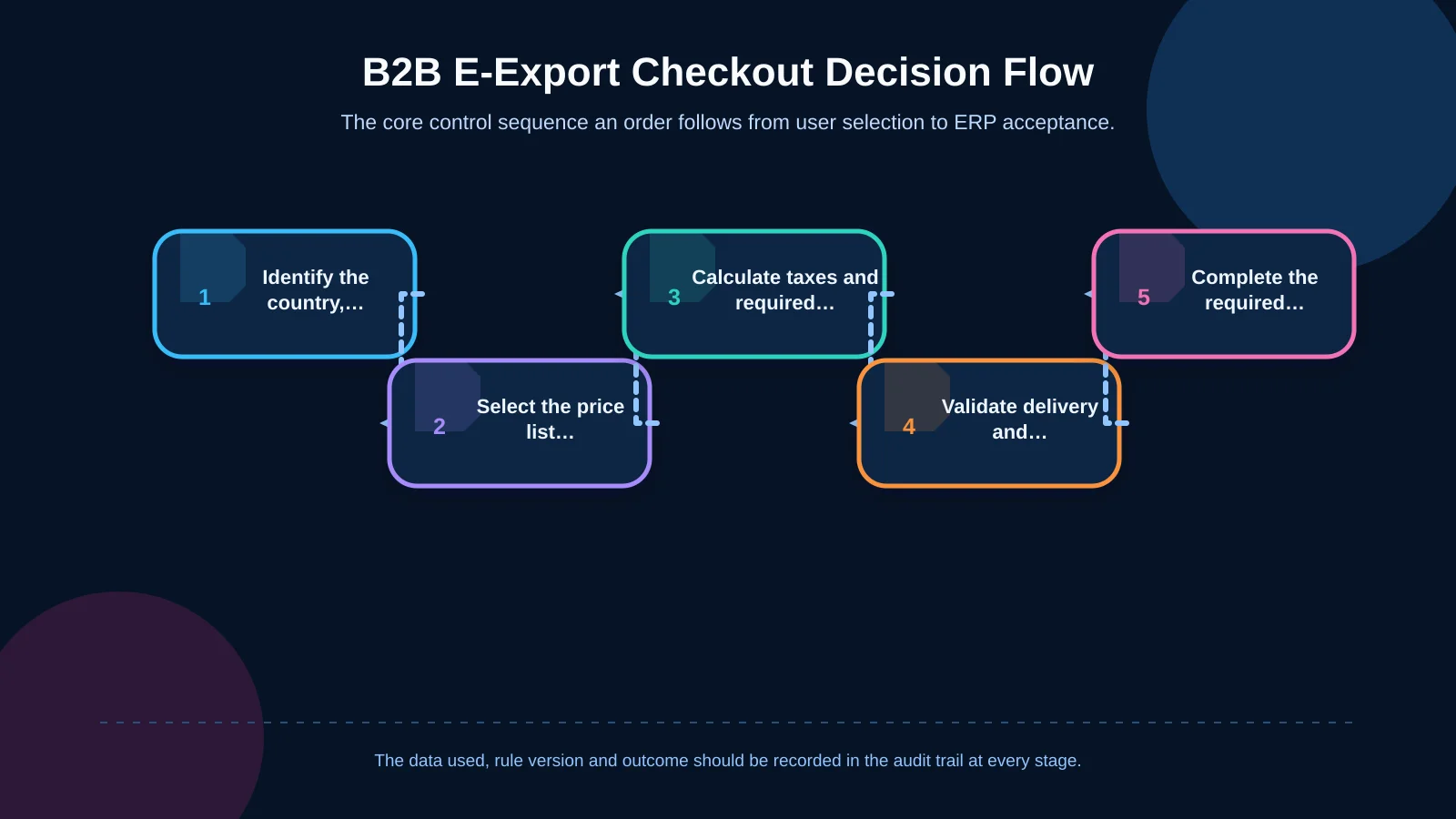
Contract prices, quantity breaks, negotiated discounts, credit limits and agreed delivery terms can also affect the transaction. International sales add language, currency, tax treatment, address conventions, customs information and locally available payment methods. Checkout should consequently be treated as a controlled stage in the order lifecycle—from product discovery and basket creation to approval and verified ERP acceptance—not as an isolated page that calculates everything at the last moment.
How should multi-currency pricing be structured?
The first decision is whether the currency displayed to the buyer is also the binding order currency. An indicative conversion must not be confused with the amount used for invoicing and collection. Price-list currency, tax currency, payment currency and ERP accounting currency may need to be modelled as separate fields, even when they happen to contain the same value.
Separate price lists from currency conversion
Converting every market price from a base currency in real time may appear convenient, but it does not always reflect commercial reality. Freight, market costs, distributor margins, rounding practices and contractual terms can require country- or customer-specific price lists. The system should first look for a valid price list assigned to the account. If none exists, it may apply an explicitly authorised fallback such as a governed exchange-rate conversion.
The European Central Bank publishes reference rates on each working day but states that they are intended for information and are not recommended for transaction purposes. Checkout must therefore record not only the source rate but also how the actual sales rate was produced. The source, buy or sell direction, margin, effective time and rounding policy should be stored together. See the European Central Bank’s exchange-rate guidance for the nature of its reference data.
Lock the rate at a defined order stage
Trust is damaged when a price shown during quotation changes without explanation at approval. The interface should state when the rate becomes fixed, how long it remains valid and what happens after expiry. Saying that a rate is valid for 30 minutes is not enough. The system must also define whether expiry triggers repricing, whether approval must be repeated and how the previous value remains visible in the order history.
- Keep the source currency and binding order currency separate.
- Record the applied rate, timestamp and rule version.
- Use consistent decimal and rounding rules at line, tax and order-total level.
- Define the exchange-rate policy for refunds and credit notes in advance.
When several pricing rules may compete, a clear resolution order is essential. The guide to special pricing and discount rules in a dealer portal explains how contract prices, quantity breaks and concessions can be made understandable and auditable.
What does localisation include beyond translation?
A localised checkout adapts more than interface copy. Date and number formats, decimal separators, address-field order, postcode requirements, company and tax-number labels, telephone formats, delivery choices and legal consent text may vary by market. Long legal company names, multiline addresses and different alphabets should also be tested on mobile devices.
Language and country should not be coupled unnecessarily. A buyer in Germany may prefer an English interface while delivery and tax rules still need to follow the relevant German context. Interface language should come from user preference; commercial and legal rules should be derived from delivery country, billing country, company registration and transaction type.
How should tax and document rules enter checkout?
Tax calculation should not depend on country selection alone. The seller’s establishment, product or service classification, billing and delivery addresses, buyer status, validity of the tax number and agreed delivery terms can all affect the outcome. The European Commission explains that VAT invoices are required for most business-to-business supplies in the EU, subject to national rules, and that responsibility for accounting for tax may shift to the customer in some transactions. Its VAT guidance for businesses provides the general framework; country- and transaction-specific decisions should be confirmed with qualified tax advisers.
Checkout should collect the required evidence and execute configured rules instead of expecting the buyer to make a legal assessment. A tax number may need more than a format check. The validation result, time and exception process should be recorded, including what happens when an external validation service is unavailable.
- Show the tax class and rate at line-item level where relevant.
- Separate the net subtotal, tax amount and gross total.
- Record the reason for reverse charge, exemption or another special treatment.
- Generate pro forma invoices, commercial invoices, packing lists and certificates of origin according to country and order type.
How are delivery and payment options determined?
Not every carrier, warehouse or payment method is suitable for every order. Weight, volume, dangerous-goods status, dispatch warehouse, destination, minimum order value and Incoterms choice can affect delivery eligibility. Checkout should show only valid options while retaining the reason for exclusions for operations and support teams.
Card payment, bank transfer, open account, letter of credit or a payment link may be authorised by customer segment. Before open-account terms are displayed, checkout can request the customer’s risk status, available credit and overdue balance from the ERP. A failed limit check does not always need to block the order; it may route the transaction to finance for review.
Approval logic should consider roles, limits, budgets, delegation and exceptions as a connected lifecycle. Kumsal Agency’s article on building a B2B order approval workflow provides a complementary model for these decisions.
Why are role- and customer-based permissions necessary?
A B2B account rarely represents one person. An organisation administrator may invite users, a purchaser may prepare baskets, a department manager may approve within a threshold, and a finance user may access invoices. Permissions must govern more than screen visibility: they can affect available price lists, discounts, delivery addresses, payment terms, documents and order limits.
The customer hierarchy may include a head office, branches, delivery points and subaccounts. Each user should see and select only authorised accounts and addresses. Support teams should also be able to explain why a price, payment term or approval path was applied without exposing information belonging to another customer.
| Decision area | Primary data source | Core validation | Information shown to the buyer |
|---|---|---|---|
| Price and exchange rate | ERP / pricing engine | Price list, validity and rounding | Currency, rate timestamp and total |
| Tax and documents | Tax rules engine | Country, status and product class | Tax base, tax amount and reason |
| Delivery | ERP / logistics service | Warehouse, country, weight and Incoterms | Option, estimated time and cost |
| Payment | ERP / payment provider | Credit limit, risk and method eligibility | Terms, due date and payment status |
| Order transfer | E-commerce platform / ERP | Unique key, acceptance and error queue | Order number, status and next step |
How does ERP integration protect order integrity?
Product, stock, price, exchange rate, customer, payment-term and document information must remain consistent across systems. A data dictionary should define the system of record for every field. Product content may come from a PIM, available inventory from the ERP and the payment result from a payment service provider.
A submitted order must not rely on a generic success response. Use a unique idempotency key so that a retry cannot create a duplicate order. If an ERP request times out, query the result before resubmitting it. Failed records should enter a controlled error queue with clear ownership. Once an ERP order number is received, update the buyer-facing status and continue exposing shipments and documents. The article on planning a B2B order-tracking portal describes this post-order visibility in more detail.
How can payment remain secure and auditable?
Card data should stay outside the seller’s application environment wherever practical. Redirected or securely embedded solutions from suitable payment providers can reduce direct handling of sensitive details. Outsourcing payment capture, however, does not remove every security responsibility from the commerce site. The PCI Security Standards Council notes that relevant controls can still apply to e-commerce pages that redirect buyers or embed third-party payment forms. Scope should be assessed with the provider and security specialists using the PCI SSC clarification for e-commerce pages.
TLS, secure session management, multifactor access for administrators, data masking, authorisation checks and log integrity should cover the full checkout. The audit trail should connect the pricing rule, exchange rate, tax result, approvals, payment response and ERP transfer without unnecessarily copying personal or payment data.
How should operational exceptions be managed?
Exchange-rate services can fail, tax numbers may not be verifiable, stock can change during checkout and an ERP may become temporarily unavailable. Instead of showing the same generic error for every condition, tell the user what happened in practical terms and what they can do next. Apply automated retries only where they are safe. When a commercial decision is required, keep the order as a draft, under review or awaiting finance approval.
An operations panel should show the cause, affected order, last successful stage, retry count and responsible team. Manual intervention must preserve the previous value and record who changed it, when and why. This prevents exception handling from disappearing into email threads and disconnected spreadsheets.
How do performance and mobile experience affect conversion?
B2B baskets can contain hundreds of lines. Calling pricing, inventory, tax and delivery services sequentially for every item will make checkout slow and fragile. Batch requests, controlled caching, recalculation of changed fields and explicit timeout policies should be designed together. Show the buyer which process is running and prevent repeated submissions caused by uncertainty or double-clicking.
On mobile, summary cards and expandable details can replace wide tables, but exchange rate, tax, delivery and total information must not disappear. Multilingual responsive interfaces should also be tested for keyboard navigation, error focus, field labels, contrast and other accessibility requirements.
A practical implementation roadmap
Begin with country and customer scenarios, not screen design. Create a decision matrix covering selling entities, binding currencies, ownership of pricing and rates, tax treatments, delivery terms, payment methods and required documents. Then define user roles, source systems, integration contracts and exception states.
Select a pilot that includes a representative mix of countries, customer types and payment methods. Test not only the happy path but also rate expiry, inventory changes, rejected payments, ERP timeouts and partial service outages. Measure checkout completion alongside pricing mismatches, manual corrections, ERP transfer failures, completion time and support demand.
Conclusion: Checkout is the decision and control layer of an international order
A multi-currency, localised B2B checkout does more than display the correct price. It converts country, customer, user, currency, tax, delivery, payment and document rules into an explainable order. With reliable ERP integration, secure payment architecture, traceable decisions and manageable exceptions, buyers understand what they are approving while internal teams work from the same order truth.
Kumsal Agency approaches this as a custom e-commerce and web software project spanning the branded buying experience, business rules, data, integrations, security and mobile usability. Contact Kumsal Agency to analyse your country, currency, pricing, tax, delivery, payment and ERP requirements and plan a B2B e-export checkout architecture aligned with your brand and real operating model.