


Aydınlatma metni yükleniyor…
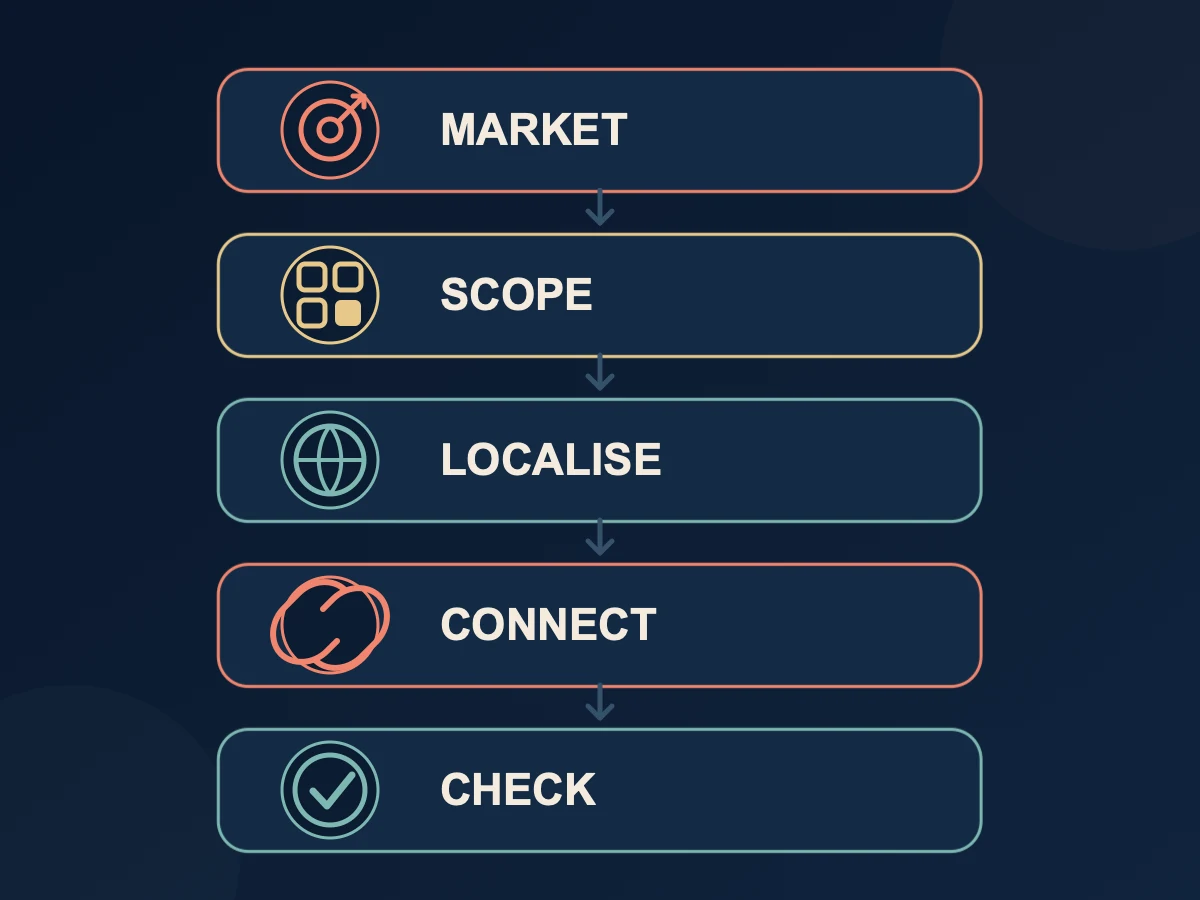
A multilingual website is more than a translated copy of existing pages placed behind a second navigation menu. A dependable setup needs a separate, readable URL for each language, explicitly linked counterpart pages, clear ownership of localisation and updates, a defined rule for missing translations, and two-way checks before publication.
Plan the project around five questions:
- Which markets, countries and users are you serving?
- Which pages will be available in each language?
- How will equivalent language versions be connected?
- Who owns translation, localisation, updates and approval?
- How will language relationships be checked for both users and search engines?
When these decisions are documented before development, URL design, content production, language switching and international SEO stop becoming separate problems that different teams attempt to repair at the end. They become parts of one manageable publishing system.
Decide Whether the Business Actually Needs a Multilingual Website
The ability to publish a few paragraphs in another language is not, by itself, a reason to invest in a multilingual site. Start with the commercial objective and the organisation's ability to serve users in that language.
At Kumsal Ajans, we primarily recommend multilingual websites for:
- Businesses that export products or services
- Companies preparing to enter international markets
- Organisations operating in more than one country
- Businesses that regularly handle sales or service enquiries from international customers
Answer the following questions for every proposed language:
- Which market or audience will this language serve?
- Which products or services are genuinely available in that market?
- Can sales, support and operations continue in the user's language after an enquiry?
- Which pages are required for the initial launch, and which can be added later?
- Is there a named owner and a budget for keeping the content current?
This exercise turns “we should add English” into a defined project scope. To place language requirements alongside the rest of the business and technical needs, begin with the audience, page, content and integration questions in our website requirements document guide.
Build a Language and Page Scope Matrix First
Not every Turkish page has to receive an English counterpart on the first day. The team does, however, need to know whether each counterpart is ready, planned or intentionally outside the scope. Create a language-page matrix before design and development begin.
| Source page | Localised counterpart | Content owner | Status | Language switch |
|---|---|---|---|---|
| Kurumsal | Company | Client + localisation team | Approved | Enabled |
| Ürün A | Product A | Product owner | In review | Disabled |
| Yerel kampanya | None | Marketing | Turkish only | Hidden |
| İletişim | Contact | Client | Approved | Enabled |
This is more than a URL inventory. It brings content production, technical mapping and publication decisions into the same row. Instead of asking only whether an English page exists, the team can ask whether it is current, approved and connected to the right source page.
Review how the multilingual scope is described in supplier proposals as well. “Two-language support” does not necessarily include copywriting, translation, content entry, professional language review or later updates. Treat these as separate responsibilities when you compare website proposals.
Give Every Language Version Its Own Readable URL
The Turkish and English versions of a page should have separate URLs that can be opened directly. Changing the body copy at one address solely according to a cookie, browser language or session can make each version more difficult to share, crawl and manage independently.
Google's guidance for multilingual and multi-regional sites recommends using a different URL for each language version and providing visible links so that users can select another version. It also warns that forced redirection based on an assumed language can prevent users and crawlers from reaching every variation.
For example:
- Turkish:
example.com/hizmetler/web-tasarim - English:
example.com/en/services/web-design
Use language that is natural to the intended reader instead of carrying Turkish words into an English slug. Apply the same standard consistently to service, product, category and article paths. Google permits localised words in URLs; the important operational qualities are that the URL is stable, accessible and accurately represents its page.
Kumsal Ajans prepares slugs independently for each language. We favour lowercase words, hyphens and the removal of terms that add no meaning. This is not a ranking guarantee. It is a publishing standard that helps users and content owners understand what an address represents.
Treat a Slug Change as a Permanent Move When It Is Permanent
When the slug of an existing page changes, external links, bookmarks and search results may continue to use the old address. A permanent move therefore needs a route from the old URL to the closest relevant new page.
Google's redirect documentation defines 301 and 308 as permanent redirects and recommends a server-side permanent redirect where possible for a permanent URL change. A temporary situation should not be labelled as a permanent move.
Use these practical rules:
- Redirect an old Turkish URL to the relevant new Turkish page.
- Redirect an old English URL to the relevant new English page.
- Do not send a large set of unrelated old URLs to the homepage.
- Do not implement the language selector as a 301 redirect. It should be a normal link to the connected equivalent page.
- Test that the target opens in one step and does not create a loop.
These are two different operations: a 301 points a permanently moved URL to its new location, while the visible language control takes a user to an equivalent page in the language they chose.
Manage Turkish and English Pages as Connected Counterparts
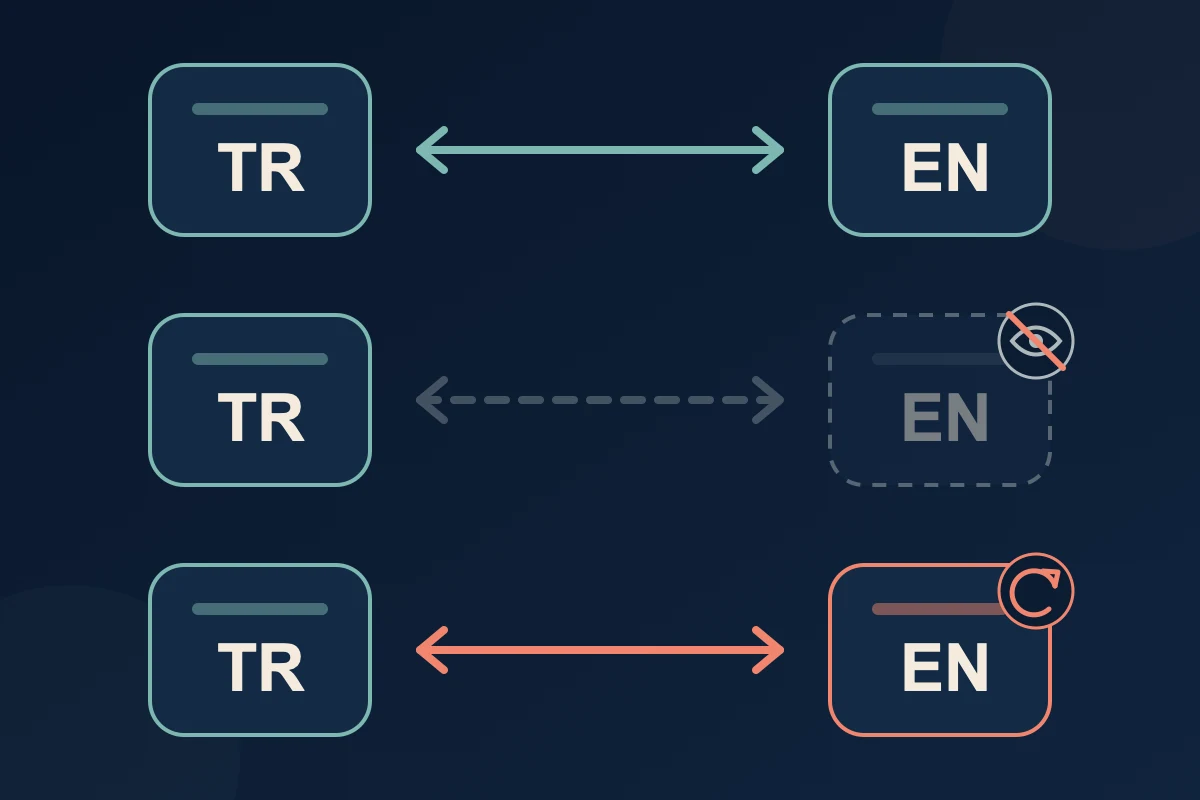
The centre of a multilingual website should not be two disconnected sets of pages. It should be a set of explicit relationships between equivalent pages. A Turkish service page and its English version should not be assumed to match only because their titles look similar. They should be registered as language counterparts in the content workflow.
In the project-specific content management platforms configured by Kumsal Ajans, Turkish and English content is not created as unrelated records. The language versions are connected, and switching is checked in both directions. If that relationship is missing, a user may move from a Turkish page to the wrong English destination or lose the page context entirely.
Record the following for every linked pair:
- Turkish public URL
- English public URL
- Content owner
- Translation and final-review status
- Date of the latest material update
- Result of the language switch in both directions
- Result of the technical language mapping check
Use this approach for service, product, team, contact, campaign and legal pages as well as articles.
Do Not Send Users to an Unrelated Page When a Translation Is Missing
If a Turkish page does not yet have an English version, sending the visitor to the English homepage or to a vaguely similar page breaks the meaning of the language selection. The user expects the same information in another language, not a new starting point.
At Kumsal Ajans, we prefer to hide the language option temporarily on a page whose counterpart is not ready. Once the localised page has been approved, the control can become visible and the two versions can be connected.
Both content and technical teams should use the same status model:
- Ready: Content is approved, the URL is public and two-way switching works.
- In review: Translation or client approval is pending; the language option remains disabled.
- Update required: The source has changed and the localised version must be reviewed.
- Out of scope: No counterpart is planned; no language option is shown for that page.
Hiding an unavailable destination must not mean forgetting it. Keep the status in the content inventory so that it remains visible in the publication plan.
A Visible Language Switch and Hreflang Are Not the Same Thing
People use the language control displayed on the page. Search engines use technical annotations to interpret relationships between localised URLs. These layers complement each other; neither replaces the other.
According to Google's documentation for localised page versions, each version in an hreflang set should list itself and its counterparts. When two pages do not point back to one another, the annotations may be ignored. Adding the English address only to the Turkish page is therefore not sufficient; the English version must also identify the Turkish counterpart.
Check a Turkish-English page pair in this order:
- Can both URLs be opened directly and crawled?
- Does each page keep its visible content and navigation in one language?
- Does each page use the intended same-language URL as its canonical?
- Does each page list itself and the real counterpart with the correct
hreflangvalue? - If the XML sitemap carries language relationships, does it use the same live URLs?
- Does the visible language control open the correct counterpart?
Do not confuse canonical and hreflang. Canonical identifies the preferred URL for a page, while hreflang describes language or regional alternatives. Google's canonical guidance recommends a canonical in the same language when hreflang is used and supports a self-referencing canonical on the preferred page.
Correct implementation does not guarantee indexing or rankings. It does, however, establish a consistent technical relationship and reduces avoidable errors involving disconnected pages or conflicting URLs.
Define Localisation and Approval, Not Translation Alone
Replacing the words in one language with words in another does not necessarily make a page suitable for its target market. Service names, calls to action, currencies, delivery terms, dates, legal wording and contact expectations may need adaptation.
In Kumsal Ajans projects, the client supplies the main Turkish content or develops it with us. The English version is localised with professional translation support. The client completes the final language and content review before publication.
Define these responsibilities in the project plan:
| Task | Primary owner | Review focus |
|---|---|---|
| Main Turkish copy | Client / joint content work | Brand and service accuracy |
| English localisation | Professional translation support | Meaning, tone and target user |
| Product and technical terms | Client subject specialist | Approved terminology |
| URL and technical mapping | Web team | Connected pages and redirects |
| Final publication approval | Client | Content and legal responsibility |
Machine translation or automation can assist the process, but it cannot independently confirm a company's service conditions, legal statements or market-specific meaning. Human language review and client approval remain important, particularly for specialist material.
Review Navigation, Forms, Emails, Images and Legal Copy by Language
A multilingual website is not limited to the main page body. An English page may still display a Turkish validation message, automated email or text embedded in an image. Treat shared components as separate items in the localisation checklist.
Navigation
- Are the menu, categories and breadcrumbs in the correct language?
- Do their links remain within the current language where appropriate?
- Do search results and the 404 page preserve the language context?
Forms and automated email
- Are field labels, instructions and validation messages localised?
- Do the confirmation message and customer email continue in the selected language?
- Can the internal recipient identify the language and source page of the enquiry?
Images and documents
- If an image contains words, is the correct language version being displayed?
- Are alternative text, titles and captions written in the page language?
- Is a downloadable catalogue or PDF current for the intended market?
Legal and commercial information
- Have privacy, cookie, consent and terms pages been approved for their intended use?
- Are prices, currencies, taxes, delivery conditions and regional service boundaries accurate?
- Can the business handle enquiries through the contact channel offered on that page?
Translating a legal document does not automatically make it suitable for another jurisdiction. Where necessary, plan appropriate specialist review for the target country and business model.
Do Not Forget Other Languages When the Source Content Changes
One of the most common operational risks on a multilingual site is that the source language is updated while its counterparts remain unchanged. Outdated information about pricing, service scope, staff, addresses, certifications, contracts or product features can mislead visitors.
In the Kumsal Ajans workflow, when Turkish content changes, other language versions are reviewed through the content inventory and project tracking system. Missing or outdated translations are flagged.
Record one of the following decisions for every material update:
- The localised version is not affected.
- A small update is required in the other language.
- Professional re-localisation is required.
- Legal or technical specialist review is required.
- The language option should be hidden temporarily until the counterpart is updated.
This does not require every language to be published at the same minute. It requires the difference to be visible to the team so that old content is not mistakenly treated as current.
An Anonymised Example of Incorrect Language Routing
During the review of a corporate website, changing the language on an internal page took the user to a different page rather than to the correct localised counterpart. The English page existed, but the page relationship had been configured incorrectly.
The issue was resolved through the following steps:
- The Turkish and English page inventories were compared.
- Correct counterparts were reconnected in the content workflow.
- The targets used by the visible language control were corrected in both directions.
- Where old URLs had permanently changed, the relevant one-to-one 301 redirects were reviewed.
- Turkish-to-English and English-to-Turkish journeys were tested again.
This example does not claim an increase in traffic, rankings or conversions. It illustrates a narrower point: the existence of an English page is not enough. The user control, content relationship and technical language mapping must all point to the same counterpart.
Pre-Publication Multilingual Website Checklist
Apply the following checklist to each important page template before launch:
| Check | Expected result |
|---|---|
| Separate language URLs | Each version opens directly at its own address |
| Localised slug | The URL is natural and readable in that language |
| Connected counterpart | Turkish and English represent the same page |
| Missing counterpart | The option is hidden; there is no unrelated route |
| Two-way switch | TR → EN and EN → TR both open the correct page |
| Content language | Body and navigation use one consistent language |
| Menu and breadcrumb | Links lead to the correct same-language destinations |
| Form and email | Fields, messages and notifications use the right language |
| Image and document | Text, alt text and files match the localised page |
| Canonical | The preferred same-language URL is used consistently |
| Hreflang | The page lists itself and its real counterpart |
| Redirect | A permanently moved URL reaches its relevant replacement in one step |
| Freshness | The content owner and latest review status are recorded |
| Mobile review | The language control and longer copy work on narrow screens |
Assess whether an off-the-shelf platform can support this workflow at the beginning of the project. If connected content, specialised roles or external integrations become central requirements, our off-the-shelf platform and custom web software comparison can help frame the platform decision.
Conclusion: Manage Languages as One Connected System
The quality of a multilingual website is not measured by the number of language options in its menu. The important questions are whether users reach the correct counterpart, whether each version has a stable and readable URL, whether the content remains current, and whether all shared components continue to work in the selected language.
Define the target markets and page scope. Create separate URLs. Connect counterparts explicitly. Hide options whose content is not ready. Assign localisation and approval responsibilities. Test the visible switch and hreflang relationship separately. Apply appropriate redirects to permanent slug changes and place future updates in the content workflow.
This approach turns multilingual delivery from a one-off translation exercise into a publishing system that can develop with the organisation. To plan language, content, technical structure and management needs together, explore Kumsal Ajans web design services.