


Aydınlatma metni yükleniyor…
What is Interaction to Next Paint (INP)?
Interaction to Next Paint is a Core Web Vitals metric that measures how quickly a web page provides visual feedback after a user interaction. It evaluates the delay between an action—such as clicking a link, tapping a mobile menu, selecting a filter or using a keyboard-controlled field—and the browser displaying the next corresponding frame. INP therefore reveals not only how quickly a page loads, but also how responsive it feels while someone is using it.
INP observes click, tap and keyboard interactions throughout a page visit. For most visits, the longest interaction latency becomes the page’s INP value; on pages with many interactions, the calculation limits the influence of extreme outliers. The measured latency includes input delay, event-handler processing and the time required for the browser to present the next frame. It does not measure the completion of every network request triggered by an action. Instead, it focuses on when the first meaningful visual response can appear.
According to the web.dev INP documentation, an INP at or below 200 milliseconds at the 75th percentile is considered good. A result above 200 milliseconds and up to 500 milliseconds needs improvement, while anything above 500 milliseconds is poor. Mobile and desktop visits should be assessed separately so that results from faster devices do not conceal problems affecting users with more limited hardware.
What do INP, LCP and CLS tell you together?
Core Web Vitals track three complementary dimensions of user experience. Largest Contentful Paint (LCP) represents loading performance for the main content. Cumulative Layout Shift (CLS) measures visual stability. INP represents responsiveness to user input. A page that loads quickly still provides an incomplete experience if its menu or add-to-cart button reacts slowly. Likewise, a responsive interface that shifts repeatedly while loading can undermine confidence and cause accidental actions.
These metrics should be connected to user journeys rather than treated as an isolated score-improvement project. On a corporate website, teams might examine the journey from a service page to an enquiry form. An e-commerce review could cover category filters, product details, cart actions and checkout. For custom web software, search, tables, data entry and record updates may each require separate analysis. This journey-based approach also gives SEO, product, marketing, e-commerce and engineering teams a shared set of priorities.
How INP optimisation can affect SEO
Core Web Vitals are among the factors used by Google’s page-experience systems. A good INP score, however, does not guarantee a high ranking. Google prioritises helpful content that is relevant to the query and evaluates page experience as part of a broader group of signals. The Google Search Central page-experience guidance explicitly notes that achieving good Core Web Vitals results does not guarantee top rankings.
INP optimisation is therefore not a substitute for content quality, search-intent alignment or a coherent information architecture. Technical performance becomes valuable when combined with crawlable pages, accurate headings, useful content, mobile usability and clear navigation. A smoother experience may support search visibility when users are choosing between similarly useful results. SEO teams should consequently look beyond a site-wide average and segment data by page type, organic landing page and query intent.
How can slow interactions affect conversions?
If someone taps “Add to cart” and receives no visible feedback, they may assume that the action failed, press the button again or leave the page. Slow filters obstruct product discovery, delayed form validation can produce failed submissions, and heavy mobile menus add friction to content access. These effects cannot responsibly be converted into one universal revenue-loss percentage. Their scale varies with traffic source, device mix, product structure and user intent.
Instead of assuming direct causation between INP and conversion rate, measure the two together. Segment users by device class, page template, acquisition channel and INP range, then compare relevant events such as form completion, add-to-cart, checkout initiation or enquiry submission. Validate performance changes through controlled releases and before-and-after analysis. The goal is not merely to produce a green report; it is to help users complete valuable tasks with less waiting and uncertainty.
How to measure INP correctly
Start with field data
The Chrome User Experience Report, PageSpeed Insights and the Search Console Core Web Vitals report provide field data for pages with sufficient traffic. Because this data reflects different devices, connections and visit conditions, it shows the outcome experienced by real users. However, aggregated 28-day data may not immediately identify the component responsible for a delay, and low-traffic pages may not have enough data for reporting.
A project-specific real-user monitoring setup can send diagnostic information—such as the interaction target, page type, device class and latency components—to an analytics platform. Privacy, consent management and data minimisation must be considered during collection. Prefer aggregated evidence that shows which templates and interactions concentrate the problem instead of tracking identifiable individual sessions.
Investigate the cause with laboratory tests
Field data helps answer “where is the problem?”, while laboratory testing helps explain “why does it happen?”. Chrome DevTools’ Performance panel can record a slow menu opening, product filter or form interaction. Developers can inspect long tasks on the main thread, intensive JavaScript execution, style calculation, layout work and painting. The Chrome guidance on main-thread work explains why user events may not be processed while the main thread is busy.
Repeat laboratory tests under reduced CPU capacity and constrained network conditions rather than relying only on a powerful development machine. Simulation still cannot replace real-user evidence. A reliable workflow uses field data to identify problematic pages and interactions, reproduces the bottleneck in a controlled test, and returns to field monitoring after the change is released.
Common bottlenecks that increase INP
Long JavaScript tasks
Large bundles, unused code and complex calculations executed in one uninterrupted task can block the main thread. If a user clicks during that period, the browser cannot process the event immediately. Splitting large tasks, deferring non-essential code, applying code splitting and moving suitable computation to a Web Worker can reduce input delay. Every optimisation should still be verified against recordings of genuine interactions.
Heavy event handlers and rendering work
Sorting a large dataset, updating a broad section of the DOM or running several synchronous operations after a click increases processing time. An event handler should first perform only the essential update, show a clear status and leave deferrable work for later tasks. Reducing DOM size and component complexity can also limit repeated style, layout and paint work, improving presentation delay.
Third-party code and uncontrolled events
Tag managers, chat tools, personalisation platforms and advertising scripts can consume main-thread resources. Review the business purpose, loading time and performance cost of each third-party dependency. Debouncing or throttling may reduce unnecessary work for frequently triggered search and filter events, but these techniques should not be so aggressive that they postpone useful feedback or make the interface feel unresponsive.
| Symptom | Possible cause | First check | Improvement direction |
|---|---|---|---|
| Click is processed late | Main thread is busy | Long tasks | Split tasks and defer code |
| Processing takes too long | Heavy event handler | Function and call tree | Simplify essential work |
| Visual response is delayed | Intensive layout and painting | Rendering and layout records | Reduce DOM size and update scope |
| Only some pages are slow | Template or third-party code | Page-type segments | Limit or remove the code |
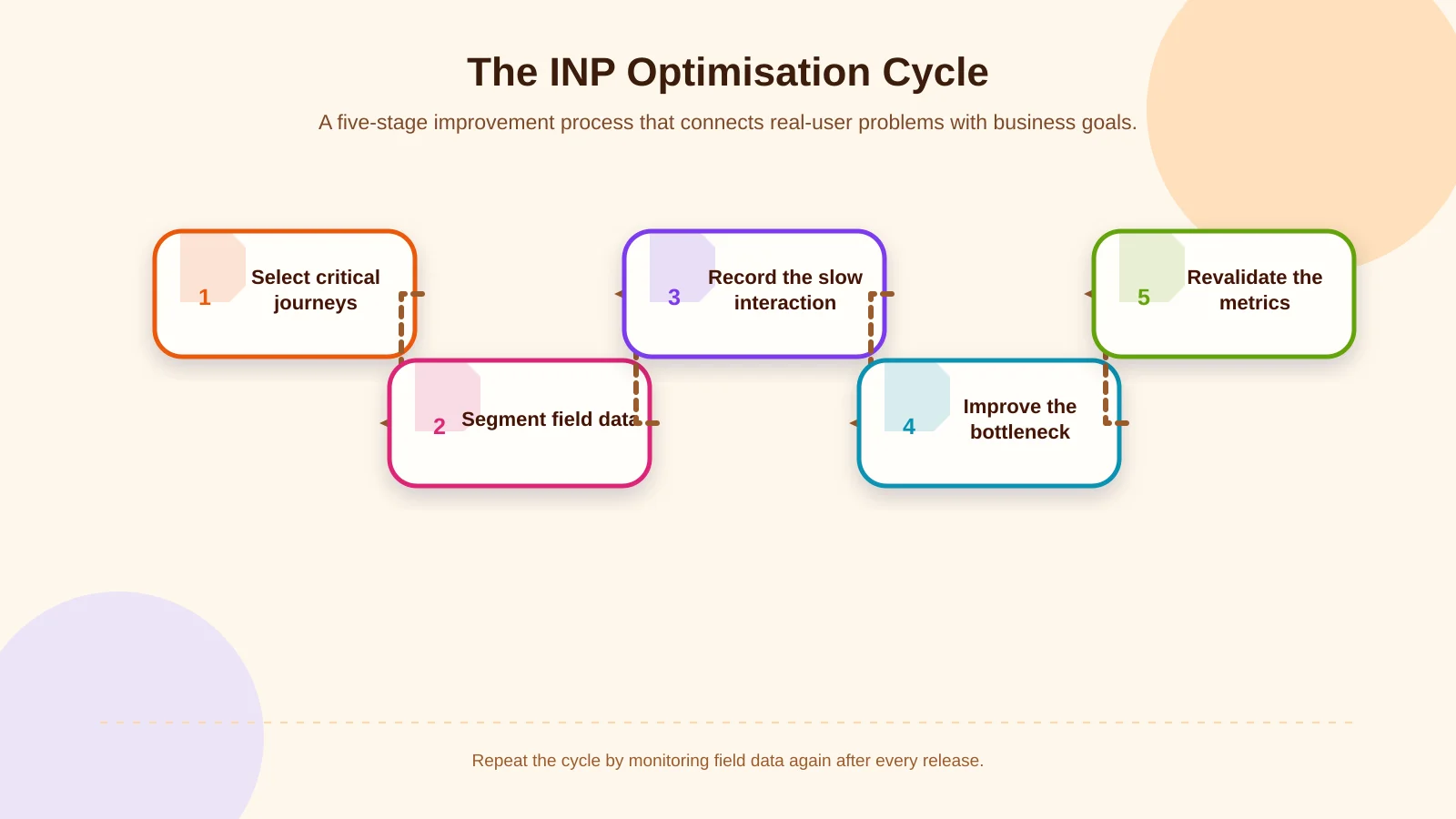
A step-by-step INP optimisation process
1. Identify critical user journeys
List tasks with business value: finding a service through navigation, using site search, applying filters, adding a product to the cart, submitting a form or updating a record in an administrative interface. Define the expected visual response and success event for each journey. This shifts attention from an arbitrary page score to actions that users genuinely need to complete.
2. Segment data by page and interaction
Assess 75th-percentile INP separately for mobile and desktop. Then inspect breakdowns by template, browser, device capability and interaction target. One site-wide average can hide a critical problem limited to checkout or product-listing screens. Combine interaction volume, latency and business importance when deciding what to improve first.
3. Break latency into its components
Determine whether a slow interaction is dominated by input delay, event-handler duration or presentation delay. Main-thread traces, long tasks and layout activity in the Performance panel give developers concrete starting points. Third-party scripts and animations should be examined within the same recording because they may compete with essential interface work.
4. Release small, measurable changes
Reduce unused JavaScript, divide tasks, simplify event handlers and provide visible feedback earlier. For animation, favour efficient properties such as transform and opacity, and test sophisticated motion on lower-powered mobile devices. A distinctive brand experience does not require abandoning performance. Advanced interactions can be planned with technical budgets, progressive enhancement and appropriate fallbacks.
5. Validate results and side effects
After release, monitor LCP, CLS, error rates and relevant conversion events as well as INP. Deferring a script may improve initial loading while making a later interaction slower; changing the DOM may introduce layout shifts. Regression testing across common browsers, screen sizes and real mobile devices helps reveal these trade-offs before they affect a wider audience.
Priorities for corporate websites and e-commerce platforms
On corporate websites, navigation, dropdown menus, project galleries, contact forms and animated sections are common priorities. Clear information architecture can remove unnecessary interactions, while a mobile-responsive interface makes touch targets and feedback states easier to understand. When a custom design system is being developed, considering the JavaScript and painting cost of components during design reduces corrective work later.
For e-commerce, product filters, variant selection, favourites, cart drawers and checkout steps should be tested as separate performance scenarios. As catalogue volume grows, client-side filtering and list updates can become increasingly expensive. Responsibilities must be divided sensibly between server and client, while caching, query design and immediate status feedback are addressed together. Related experience topics are available in Kumsal Agency’s e-commerce blog category.
Sustainable performance management
INP optimisation should not be a one-off pre-launch check. Campaign code, analytics tags, design components and product features can gradually consume the performance budget. Template-level targets, automated tests, real-user monitoring dashboards and post-release reviews should become part of the operating process. Teams should also agree in advance who investigates when critical thresholds are exceeded.
Kumsal Agency approaches custom web design and web software development by considering information architecture, user needs, mobile responsiveness, interaction design and technical infrastructure together. Necessary integrations, cross-browser testing and pre-launch checks are scoped according to each project. The objective is not to promise guaranteed SEO or sales outcomes, but to create a manageable, sustainable experience by reducing measurable bottlenecks.
Conclusion: Connect responsive experiences to business goals
INP makes the relationship between a user’s action and the response displayed on screen measurable. Strong results depend on a continuous cycle of real-user evidence, interaction-level diagnosis, controlled development and repeated measurement. Core Web Vitals can support SEO, but the more durable value comes from enabling people to use critical menus, filters, carts and forms with less friction.
To assess your website or e-commerce platform’s INP and other Core Web Vitals alongside business goals, identify performance bottlenecks and define a project-specific improvement scope, contact Kumsal Agency.