


Aydınlatma metni yükleniyor…
Maintaining a live enterprise application on iOS and Android is not a short update project that begins when an app store deadline approaches. New operating-system behaviour can affect permissions, background tasks, notifications, authentication, device features and third-party dependencies. App Store and Google Play requirements may also require a new build or updated declaration even when the application’s business logic has not changed.
Product, IT and operations teams therefore need a shared mobile app maintenance calendar. It should define when the organisation will monitor announcements, assess impact, update dependencies, test devices, prepare releases and observe production performance. This prevents a critical field, B2B or customer application from depending on a rushed upgrade completed just before a deadline.
Why is a mobile app maintenance calendar necessary?
An operating-system update does not reach every user on the same day. However, developer betas reveal many of the changes an application will eventually encounter. Using this window effectively allows teams to examine location, camera, Bluetooth, file access, push notifications, biometric login and background synchronisation before the final OS release becomes widely adopted.
App store rules create a separate timeline. Apple publishes expectations for submission SDKs, Xcode versions, product pages, privacy and accessibility information in its App Store submission guidance. Google Play explains target API level requirements for new apps, updates and the availability of existing apps on its target API requirements page. Because requirements and dates can change, the annual plan must rely on recurring checks of official announcements rather than fixed assumptions.
The risk of neglected maintenance extends beyond store rejection. An obsolete package can stop a build; a permission change can prevent a field worker from uploading a photograph; an expired certificate can interrupt an API connection. Structured maintenance controls technical debt while protecting operational continuity, access and data security.
How should an annual iOS and Android maintenance cycle be structured?
The calendar should not revolve around a single release date. A repeatable five-stage cycle makes responsibilities visible from initial discovery through safe delivery to users. Exact months can move with platform announcements, but every stage should have an owner, required inputs and measurable completion criteria.
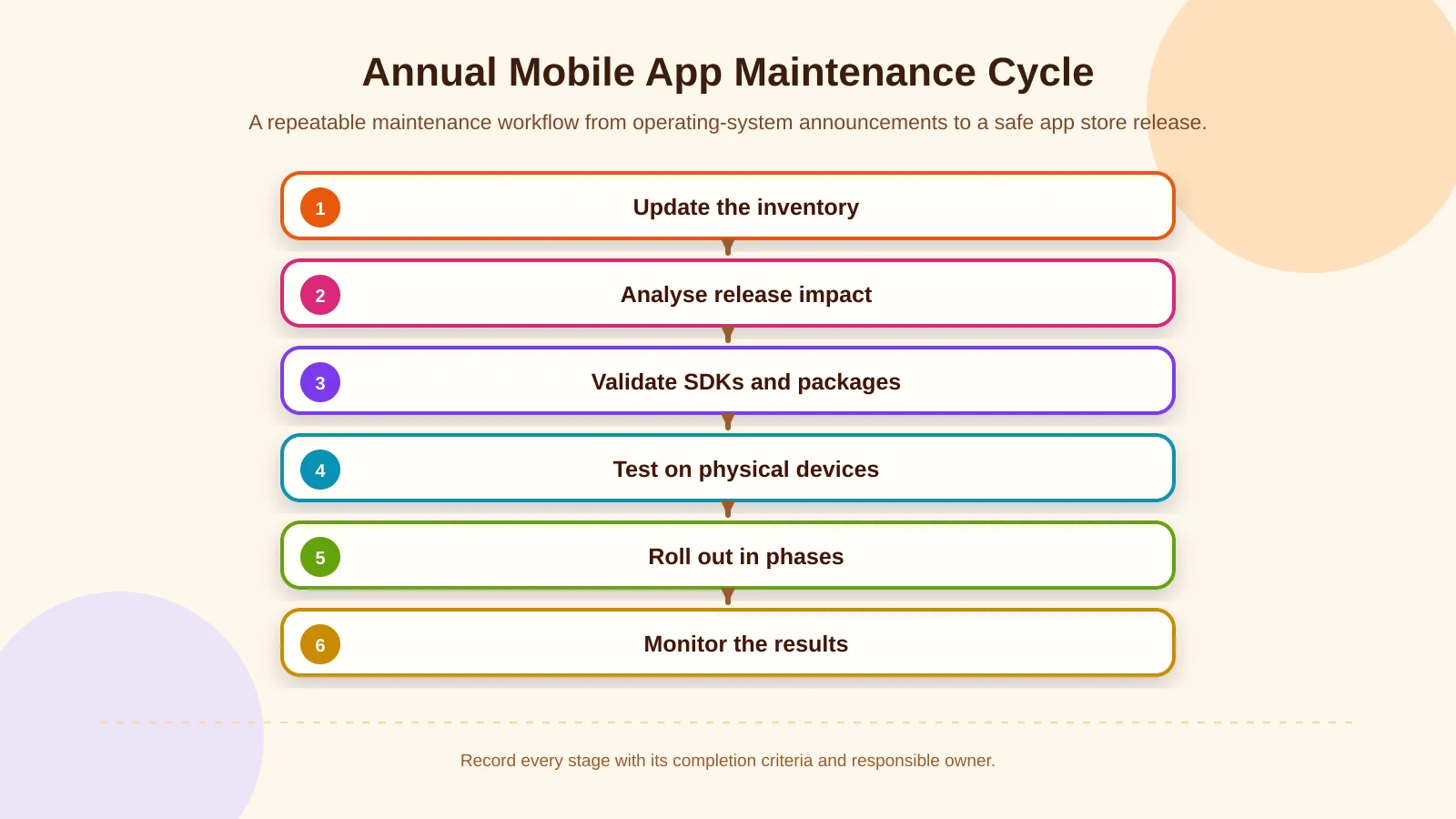
1. Inventory and annual planning
Begin the year with a technical inventory. Record the iOS deployment target; Android minSdk and targetSdk values; and the versions of React Native, Node.js, Gradle, Kotlin, CocoaPods and Xcode. Add analytics, mapping, payment, notification, camera and identity SDKs, including their versions, licences and support status.
This exercise should not belong solely to developers. The product owner defines critical user journeys, IT records account and certificate ownership, and operations explains the business effect of downtime. Assign an owner, review frequency, support deadline and recovery method to every important component. Include store accounts, signing keys, backend environments, feature flags and monitoring tools so that hidden operational dependencies are not discovered during release week.
2. Preview monitoring and impact analysis
When Apple and Google publish operating-system previews, review the release notes beyond visible interface changes. Map changes to permissions, background execution, network security, storage, notifications, screen orientation and accessibility against critical workflows. The result should be an evidence-based record classifying each item as “not affected,” “testing required” or “code change required.”
User roles determine priority. Payment and account creation may dominate a customer application, while barcode scanning, offline queues and ERP reconciliation are more important in a warehouse or field application. For each role, document the task, device capability, expected result and failure recovery. This turns a broad platform announcement into a testable business impact rather than a generic technical concern.
3. Dependency and integration validation
In a React Native project, the JavaScript layer and the native iOS and Android projects must be managed together. Before jumping between major versions, examine support status and the scope of breaking changes, then plan incremental upgrades where appropriate. React Native’s official upgrade documentation explains that changes to generated native project files may need to be applied alongside package updates.
Do not automatically promote every updated dependency to production. Review its changelog, known issues, minimum platform version, permission use and maintenance activity. Remove packages that are no longer used, and identify alternatives for abandoned or security-sensitive dependencies. Reducing the software supply chain also reduces uncertainty in future upgrades.
API, CRM and ERP connections need a dedicated test plan. Validate token renewal, session expiry, timeouts, offline records, retries and duplicate-transaction prevention. Even if field mappings and error codes remain unchanged, new network or background-execution rules can alter synchronisation timing. Confirm which system owns each record, how conflicts are resolved and how failed transfers become visible to operations.
4. Device testing and the release candidate
Emulators and simulators provide fast feedback, but they do not fully replace physical-device testing. The matrix should include the oldest supported OS, the current stable version and an appropriate beta or release candidate for the upcoming version. Cover small and large screens, lower-memory devices and enterprise models actually used in the field.
Write scenarios around user tasks: signing in, denying a permission, attaching a photo or document, opening the correct screen from a notification, creating a record without connectivity and synchronising it safely after reconnection. “The app did not crash” is not sufficient acceptance. Evaluate data integrity, response times, accessibility, battery use and whether recovery messages give users a practical next step.
5. Controlled release and monitoring
Once the release candidate is approved, review store copy, screenshots, privacy declarations, age ratings, reviewer credentials and release notes. Access to signing certificates and developer accounts must not depend on one person. Schedule a business-critical release when support staff and integration owners are available.
Use phased distribution where possible. Monitor crash rate, crash-free sessions, API errors, login success and completion of critical transactions among the first users. If a threshold is exceeded, pause the rollout and activate the agreed response: a server-side feature flag, the previous compatible version or a corrective release. Rollback conditions should be written before deployment, not debated after production begins to fail.
Review frequencies and responsibilities
Applying the same frequency to every check creates unnecessary cost. Platform and store announcements can be reviewed monthly, while urgent security advisories require immediate assessment. Dependency reviews may run monthly or every two months; comprehensive device regression belongs before a major release; certificate and account checks should begin months before expiry.
The product team owns business priority and acceptance criteria. Software teams assess technical impact and implement changes; IT manages accounts, access and security; operations validates field scenarios; and quality specialists maintain test evidence. Even when one person is described as the “app owner,” these responsibilities should remain explicit. Every record should include a date, owner, finding, decision, evidence and next review.
Create a separate fast track for urgent security updates. Assess exploitability, affected users, processed data and public exposure. High-risk fixes may receive priority, but essential login, data-writing and integration tests must remain. A faster release is still a controlled release.
| Check | Frequency | Owner | Evidence |
|---|---|---|---|
| Platform and store announcements | Monthly | Product + software | Impact record |
| SDKs and dependencies | Monthly / every two months | Software | Version inventory |
| Certificates and accounts | Quarterly | IT | Expiry and access record |
| Device regression | Before a major release | Quality + operations | Test report |
| Post-release monitoring | Every release | Product + operations | Metrics and incident record |
Pre-release acceptance checklist
A release decision should rely on completed controls rather than verbal confidence. Adapt the following checklist to the application’s context:
- Official sources have been checked for the required iOS SDK, Android target API and current store policies.
- React Native and critical package versions, support status and known issues have been recorded.
- Permissions, privacy declarations, data collection and user consent have been reassessed.
- Login, notifications, camera, location, file uploads and offline use have been tested.
- API and ERP scenarios cover errors, timeouts, retries, conflict handling and duplicate prevention.
- Physical-device evidence exists for supported older, current and upcoming OS versions.
- Store descriptions, reviewer access, release notes and support links are current.
- Phased rollout, monitoring thresholds, responsible owners and rollback conditions are approved.
Measurable outcomes for the maintenance calendar
Maintenance success cannot be measured by saying that an update was completed. Track compatibility checks finished on time, unsupported dependencies, unresolved critical findings, device combinations tested and post-release error trends. Store rejections, emergency patches and integration outages should also be recorded with their root causes.
After each major release, hold a short review. Which risk was identified early? Which scenario was missed? Where did approval stall? Which monitoring signal detected the problem? Carry those lessons into the next cycle. The calendar then becomes a living operating system for maintenance rather than a static document that teams consult only when a deadline appears.
Kumsal Agency’s approach to React Native and enterprise integrations
A shared codebase can reduce maintenance effort, but iOS and Android store rules, permission models and native project settings still require separate validation. Kumsal Agency’s React Native mobile app development approach brings together product goals, user needs, technical architecture, device behaviour and release management for hybrid iOS and Android products.
In enterprise environments, the mobile client is usually one part of a larger system. Admin panels, role and permission models, APIs, ERP connections and reporting screens should belong to the same maintenance plan. Kumsal Agency combines mobile expertise with custom web development and integration capabilities, allowing teams to assess how mobile-version changes affect backend processes, operational controls and data flows.
A sound maintenance calendar does more than track deadlines. It keeps the inventory current, exposes risks early, collects test evidence and ties release decisions to measurable conditions. To assess your existing application’s versions, dependencies and integrations—and create a practical iOS and Android maintenance and release calendar—contact Kumsal Agency.