


Aydınlatma metni yükleniyor…
Event registration is more than a form that collects a name and email address. As a conference, seminar, training programme or corporate event grows, registration status, capacity, guest categories, cancellations, access permissions and actual attendance must be managed within one connected system. When teams rely on separate spreadsheets and disconnected tools, the result can be long queues, oversold sessions and reports that nobody fully trusts.
Custom event registration software connects the entire journey through a shared data model: application, approval, capacity allocation, personal QR code generation, venue check-in and attendance reporting. Teams can see not only how many people submitted a form, but also who was approved, which sessions they selected and whether they actually attended.
What processes should event registration software manage?
A reliable system begins by modelling the real operation. “Registered attendee” does not mean the same thing at every event. One organisation may approve submissions immediately, while another may require a corporate email address, invitation code, payment, document or manager review. The software should clearly distinguish statuses such as draft, application received, under review, approved, waitlisted, cancelled and attended.
Instead of reproducing a generic form, custom web development can structure the product around business rules, data ownership and user roles. Attendees complete their own registration, the operations team manages capacity, and check-in staff see only the limited information required at the door.
Why should user roles be defined from the start?
System administrators, event managers, registration teams, check-in staff and reporting users should not have identical permissions. A door attendant, for example, rarely needs to export the complete attendee database. They need to scan a code, understand the result and escalate an exception to an authorised colleague.
Role-based access keeps each interface focused and reduces unnecessary exposure of personal data. Permissions should cover viewing, editing, approving, cancelling, exporting and manually overriding records. Sensitive actions should be limited to the relevant roles and leave a traceable audit record.
How do you build an end-to-end flow from registration to QR check-in?
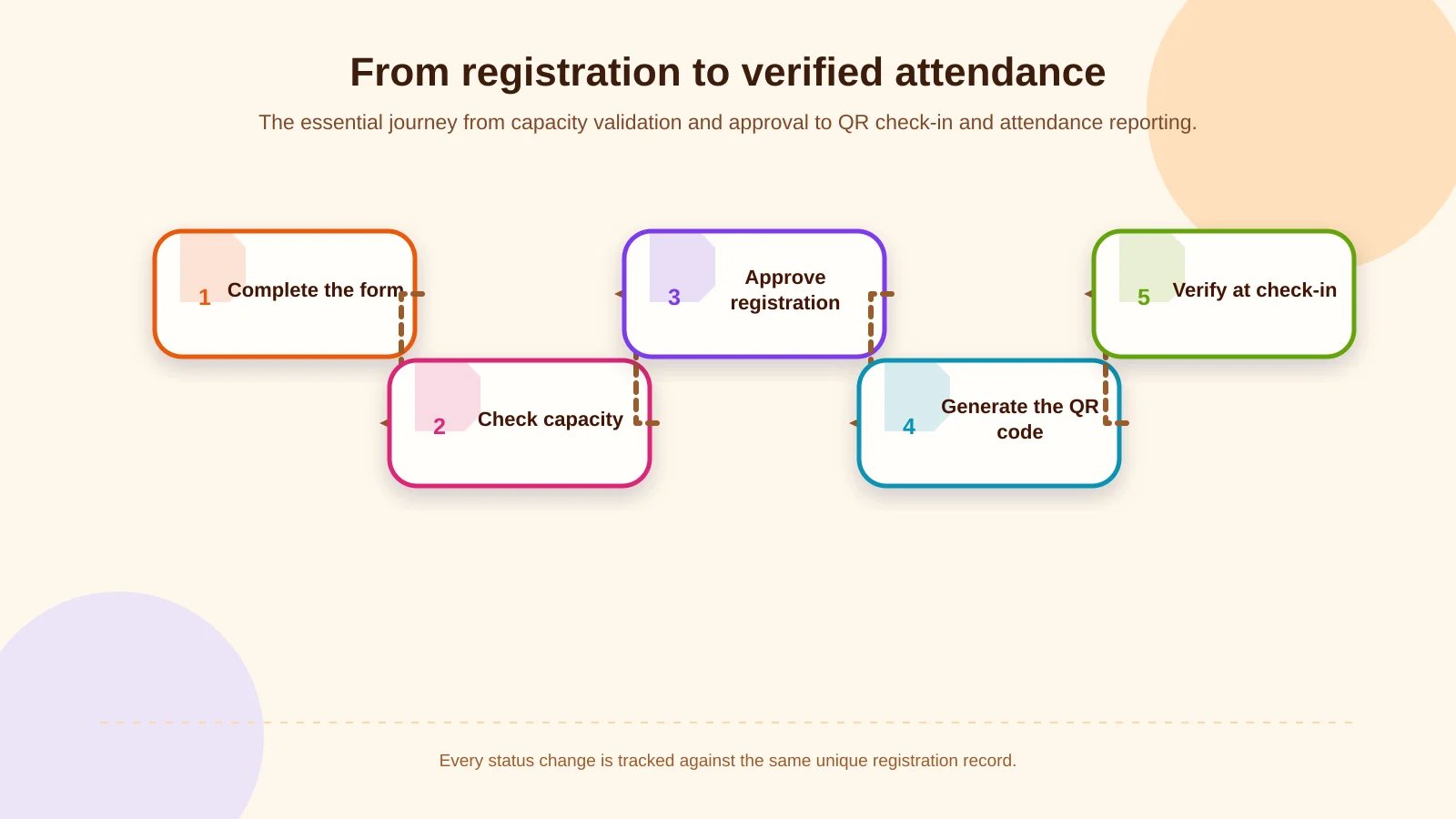
Every stage should use one unique registration identifier. When a form is submitted, the system records the application state and updates the relevant capacity rule. Once any required review or payment is complete, it generates a unique, hard-to-guess verification value and associates it with that attendee’s QR code. The code can then be delivered by email or displayed in a secure attendee area.
At the venue, scanning should trigger server-side validation. Rather than placing a name, phone number or email address in the QR code as plain text, the system can use a revocable token. The design must also consider screenshots and forwarded codes. Depending on the event’s risk profile, staff may confirm the attendee’s name, request identification or perform an additional verification step. The NIST Digital Identity Guidelines describe aligning authentication strength with risk and verifying control of the relevant authenticator. The proportionate method for a physical event should be determined through the organiser’s own risk assessment.
- The attendee completes the appropriate registration form.
- Business rules and available capacity determine the registration status.
- The system creates a unique QR code for an approved registration.
- A mobile-friendly staff interface validates the code online.
- Successful and rejected attempts are recorded with time and entrance details.
- Verified check-in activity becomes measurable attendance data.
Capacity management is more than maintaining a counter
Total venue capacity matters, but it is rarely the only limit. An event may span several days, rooms, time slots, ticket types or attendee groups. The system should support overall capacity alongside limits for individual sessions, categories and time periods. If attendees can choose multiple sessions, scheduling conflicts and capacity rules should be enforced during registration rather than discovered at the venue.
| Status | Effect on capacity | QR check-in | Reporting category |
|---|---|---|---|
| Application received | Reserved according to the rule | Not yet valid | Application |
| Approved | Place allocated | Valid | Approved registration |
| Waitlisted | No place allocated | Invalid | Waitlisted |
| Cancelled | Place released | Revoked | Cancellation |
| Checked in | No change | Used | Verified attendance |
Distinguishing a reservation from a confirmed registration
If payment, documentation or manager approval sits between form submission and confirmation, the organisation must decide when a place is reserved. A temporary reservation window can hold capacity while an attendee completes the required action. When the deadline expires, an incomplete application releases the place automatically. Without an explicit rule, visible availability and genuinely usable capacity can diverge.
Waitlists and cancellation workflows
When capacity is reached, a waitlist may be more useful than closing the form. If an approved attendee cancels, the system can invite the next eligible person automatically or after manager approval. The invitation should have a response deadline, and an unaccepted place should pass to the next person. Recording each state change gives attendees a clearer experience and helps the organiser use capacity efficiently.
How should QR code check-in work?
At the entrance, a staff member scans the attendee’s QR code with a phone or tablet. The software checks whether the token belongs to the correct event, whether the registration is approved or cancelled, and whether the code has already been used. In a crowded environment, the outcome should be immediately understandable through colour, a short message and, where appropriate, sound or vibration.
A successful scan should record more than a simple attended flag. Useful operational fields may include the timestamp, entrance, device and staff member. A repeated scan should clearly return an “already checked in” result. An authorised user may still need to add a reasoned override for a mistaken action or controlled re-entry.
Consistent event logging supports troubleshooting and accountability. The OWASP Logging Cheat Sheet explains the value of logs for operational monitoring and audit trails while warning against recording too much or too little information.
Handling poor connectivity and peak arrival times
A solution should not assume ideal connectivity without analysing conditions at the venue. With a weak connection, it can display a clear error and use safe retry behaviour. Where the scope and risk permit, it may provide limited offline validation. Offline operation introduces the possibility that the same code is accepted on different devices, so conflict resolution must be defined for when those devices reconnect.
Because staff may use different phones and tablets, testing should cover touch targets, camera permissions, low light, screen brightness and one-handed operation. When deeper device capabilities or offline workflows are required, the experience can also be planned as a dedicated mobile application. A connection-resilient web approach may also be relevant; the related guide, What Is a PWA?, discusses installable and mobile-friendly workflows in operational environments.
What data should an attendance report include?
Registration volume and attendance are different metrics. Applications, approvals, cancellations, waitlisted records and verified entries should be reported separately. Core indicators may include total applications, approved registrations, completed check-ins, approved no-shows, cancellation rate and capacity utilisation. For multi-session events, teams should be able to filter these figures by day, room, session and attendee segment.
Reporting should improve operations, not merely support a management presentation. Hourly arrival patterns can inform how many check-in points a future event needs. Repeated scans and rejected codes may reveal unclear attendee communication or a training issue among staff. If campaign, invitation group or form-source data is available, registrations can be compared with verified attendance to identify which channels bring people who actually arrive.
How do you protect reporting reliability?
Manual status changes should record the user, time and reason. Raw events should not be silently rewritten; corrections need an audit trail. Teams must also agree on metric definitions. Does “attendee” mean only someone verified by QR, a person admitted manually, or a session visit counted several times? Even accurate software produces misleading results when the underlying definition is ambiguous.
How should data security and privacy be addressed?
The registration form should request only the information needed to run the event. Marketing consent should not be disguised as a condition of attendance, and processing purposes and retention periods should be defined for the relevant scope. The Turkish Personal Data Protection Authority’s general principles for processing personal data call for specified and legitimate purposes, data minimisation and retention only for as long as necessary.
Technical planning should consider encrypted communications, secure session management, role-based authorisation, masking of sensitive fields, tested backups and controls against unauthorised exports. QR token creation, revocation and replacement also belong within the security model. Logs should not store unnecessary personal data or raw secrets that would allow a QR credential to be reused.
How do you scope custom event registration software?
Off-the-shelf products may be sufficient for standard, short-term events. A custom approach becomes more relevant when an organisation has distinctive approval stages, invitation segments, capacity rules, brand requirements or integration needs. Discovery should establish event types, annual event volume, peak concurrent arrivals and the roles that will operate the system.
Registration fields, state transitions, QR rules, check-in scenarios, report definitions and retention policies can then become written acceptance criteria. If the platform connects to CRM, email, payment, corporate directory or reporting systems, the scope should identify which system owns each field and how failures, duplicate requests and retries will be handled.
- Registration, approval, cancellation and waitlist rules
- Capacity by event, venue, room, session and attendee group
- QR code creation, replacement, revocation and re-entry policies
- Permissions for administrative and mobile staff interfaces
- Notification templates, triggers and delivery schedules
- Reporting, export, integration and data-retention requirements
Test scenarios for a successful launch
Testing must go beyond confirming that the form can be submitted. Scenarios should include two people attempting to claim the final place simultaneously, a cancelled QR code being scanned, one code appearing at two entrances, denied camera permission, lost connectivity and a code issued for the wrong event. Tests should also verify that unauthorised roles cannot view or export attendee data.
Before the live event, the team should conduct a controlled rehearsal using the actual devices. Desk layout, backup devices, charging, network access and the manual support procedure should be documented. Testing responsibilities and escalation decisions alongside the technology helps staff respond quickly during the opening rush.
One connected system from registration to measurable attendance
The value of event registration software comes not from producing a form, but from connecting registration, capacity, verification and reporting within one data flow. Clearly designed statuses protect availability, personal QR validation accelerates entry, and reliable activity records turn physical attendance into measurable information.
Kumsal Agency is an Istanbul-based web and mobile software agency that approaches event registration through user roles, business rules, mobile use, integrations and data security. To analyse your registration, capacity, QR check-in and reporting requirements and define the scope of a custom solution, contact Kumsal Agency.