


Aydınlatma metni yükleniyor…
Mandatory training requirements can vary by organisation, role, location and type of work. Occupational health and safety courses, technical qualifications, product training, site-access certificates and customer-specific competency records may all follow different rules. When HR, quality, health and safety, operations, compliance and contractor teams maintain these records separately, establishing the current position becomes difficult.
Spreadsheets, email attachments, shared folders and paper files often become fragmented parts of the same process. A certificate may exist in one folder while its expiry date is recorded elsewhere. Managers may know that training has taken place without being able to confirm whether the supporting document has been reviewed or remains valid.
An enterprise training certificate tracking portal brings this information into a shared data model. Its purpose is not simply to store files online. It should show authorised users who has completed each requirement, how long the certificate remains valid, which records are missing, what is awaiting review and which renewals require action.
This type of platform is custom web software shaped around the organisation’s actual operation rather than a generic document archive. Roles, data sources, workflows, notifications and integrations should be designed by considering the responsibilities of HR, quality, health and safety, operations, compliance and IT together.
Why does enterprise certificate tracking become difficult?
As the number of people and documents grows, certificate tracking becomes much more than a list of dates. One employee may work at several locations, while each role may require a different training package. A contractor may be permitted to enter one site when a designated team member holds a qualification, whereas another project may require every person on the team to have a current certificate.
In a fragmented record structure, the location of a file and its operational status become disconnected. A document may be present but expired. A spreadsheet may describe a record as valid even though a change of role has introduced additional requirements. Leavers, expired contractor agreements and revised training policies also create events that must be reflected in the system.
The portal therefore needs more meaningful states than “available” and “missing”. Records may be valid, approaching expiry, expired, awaiting a document, awaiting review or rejected. The rules that move a record between these states should be defined at the beginning of the project so that dashboards, notifications and reports use the same interpretation.
How should the employee, training and certificate data model be structured?
A reliable portal begins with a data model that reflects the organisation’s terminology and relationships. An employee, dealer representative or contractor record may include company, department, location, role, manager and active status. Training records may hold a category, provider, delivery method, scope of obligation and renewal interval. Certificate records may include the certificate number, issuing body, issue and expiry dates, file, verification status and reviewer notes.
A direct relationship between a person and a certificate is not always sufficient. The system may also need to capture the role, project, equipment, facility or customer condition that creates the requirement. It can then identify not only expired certificates but also people who are currently unsuitable for a particular assignment.
Requirement rules can be managed as a separate layer. For example, one course may be mandatory for everyone in a particular position, while another applies only to employees who operate specific equipment. Turning these rules into manageable definitions instead of scattering them throughout the code makes it easier to introduce new training types and revise policies. This is consistent with an enterprise resource planning approach that connects operational processes through shared, governed data.
Document upload and verification steps
A document may be uploaded by the certificate holder, their manager, the HR team or an authorised representative of an external company. Uploading it should not automatically make the record valid. The portal should check the file type and size, require essential metadata and, where appropriate, route the document to an authorised reviewer.
When a certificate is replaced, its previous version should not simply disappear. The record should show who uploaded the new file, when they uploaded it and which version it superseded. Illegible documents, certificates belonging to the wrong person and records with invalid dates should be rejected with a clear reason. The responsible user can then be notified of the correction required.
Validation rules also need to distinguish file quality from business validity. A technically acceptable PDF is not necessarily evidence that the correct course was completed. Review screens should give authorised users enough context—person, requirement, issuer, relevant dates and previous decisions—to make a consistent decision.
How should certificate validity and renewal workflows operate?
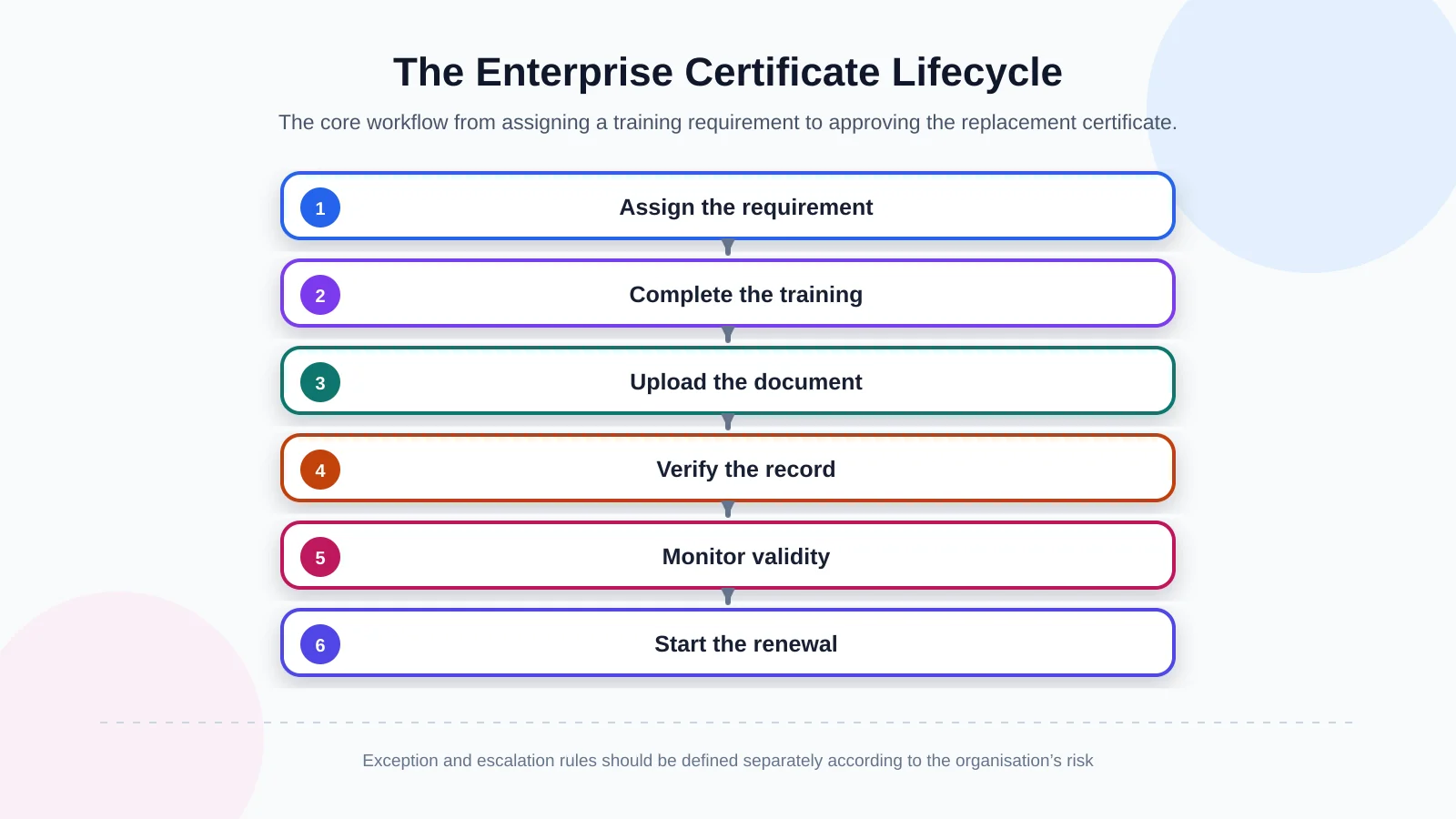
The certificate lifecycle begins when a requirement is identified. The relevant person is assigned a training or document obligation. After completion, evidence is uploaded and, if required, submitted for review. An approved record is monitored throughout its validity period. As its expiry date approaches, a renewal task is opened; once the replacement certificate has been approved, the previous record moves into the historical record.
The portal should manage this lifecycle through ownership and deadlines, not merely through one long list. When every stage has an owner, target date, completion condition and exception route, the organisation can see cases where a reminder was delivered but no action followed. Whether a person can be assigned to work with an expired certificate must be determined by the organisation’s policies and applicable legal or contractual requirements.
Date calculations deserve explicit rules. Some certificates expire on a fixed date, others remain valid for a defined interval from completion, and some may be affected by a role or policy change. The system should preserve the basis of the calculation so that users can understand why a record has entered a warning or expired state.
Notifications are more than email reminders
Notification timing should reflect the risk associated with the certificate and the preparation time required for renewal. Some qualifications may need warnings beginning 90 days before expiry; others may require a much shorter period. An initial message might go to the certificate holder, a later warning to their manager and an overdue escalation to the responsible department.
To avoid notification fatigue, the portal should consider actions already taken. If a replacement document has been uploaded and is awaiting review, it should not continue telling the holder to upload it. Email, in-portal alerts and corporate messaging channels can be selected according to the integration scope, user population and evidence required for delivery.
Notifications should also be traceable. The system should retain the trigger, recipient, delivery result and related record without exposing more personal information than necessary. This helps teams distinguish between a message that failed, a message that was delivered without action and a task that was completed through another route.
Why should roles and permissions be designed at the start?
Certificate files can contain personal data such as identity details, contact information, workplace information and professional history. A broad access model in which everyone can view every record is therefore inappropriate. Employees may see their own documents, managers the teams for which they are responsible, contractor administrators their own company’s personnel, and central teams only the areas required for their duties.
Permissions must be enforced at record, file and action level as well as on screens. Permission to view a certificate list does not automatically grant permission to download every file, change a date or approve a record. The OWASP Authorization Cheat Sheet recommends principles including least privilege, deny-by-default access and permission validation on every request. These principles should inform the technical implementation of the role matrix.
Türkiye’s Personal Data Protection Authority states that data controllers must prevent unlawful access to personal data and take the necessary technical and administrative measures to provide an appropriate level of security. The authority’s data security obligations guidance should be assessed with the organisation’s legal and compliance teams when defining the portal. Software alone does not guarantee legal compliance; the organisation must determine processing purposes, retention periods and access policies.
Audit trails and record history
Who uploaded a document, who changed its expiry date, and who approved or rejected it? Critical actions should be recorded in an audit trail so that these questions can be answered. Record history supports the investigation of operational errors and review of how privileged actions have been used.
The scope, access controls, protection and retention period of logs require separate planning. The NIST log management resources provide an approach to planning organisation-wide log management. The objective is not to generate the greatest possible volume of logs, but to retain meaningful records securely enough to reconstruct relevant events.
Audit information should itself be protected. Editing or deleting business records must not silently erase the associated history, and only properly authorised users should be able to search sensitive logs. Retention also needs to balance investigation, contractual and regulatory needs against unnecessary storage of personal data.
What should search, filtering and reporting screens show?
Operations teams usually look for groups of records that require action rather than a single certificate. Filters such as “field certificates expiring within 30 days”, “contractor personnel with missing documents” or “records awaiting review at a particular facility” make daily work faster. Users should be able to combine person, company, location, training type, status and date range criteria.
Dashboards should prioritise decision-ready indicators over raw document totals. Useful measures include upcoming expiries, overdue renewals, unmet mandatory requirements, review queues and completion rates by business unit. Each figure should open the underlying authorised list so that the relationship between a summary and its records remains clear.
Exported reports must preserve the same permission boundaries. A user who cannot view certain people in the portal must not gain access to them through an Excel or PDF export. Reports should also show when they were generated, which filters were applied and what data scope they represent. Scheduled reports require the same controls because a recipient’s access may change after a schedule is created.
| Status | Control point | System action | Primary owner |
|---|---|---|---|
| Valid | Expiry date is in the future | Periodic monitoring | Certificate holder |
| Approaching expiry | Warning threshold reached | Notification and renewal task | Employee / manager |
| Awaiting review | Document has been uploaded | Add to approval queue | Authorised reviewer |
| Missing | No mandatory record exists | Missing-document alert | Employee / contractor |
| Expired | Expiry date has passed | Escalation and assignment check | Manager / compliance team |
How should the portal integrate with HR and other systems?
If the employee master record is maintained in HR software, manually recreating the same people in the portal can cause inconsistencies. Employee number, department, role, manager and active status may be transferred on a schedule or in response to events. Disabling access for a leaver and handling their historical records under the retention policy should be part of the same lifecycle.
A learning management system may supply completion results, an ERP platform may provide contractor and company data, and an identity system may control accounts and sign-in. The integration specification should identify the source system, data owner, transfer frequency, field mapping, error handling and retry rules. A custom web development approach allows these connections to be designed around the real capabilities of existing systems instead of the constraints of a generic product.
Not every integration needs to enter the first release. A phased roadmap can prioritise operational value and source-data quality. Employee master data and single sign-on might come first, followed by automated training results, messaging channels and advanced reporting. Each phase should define reconciliation checks so that a successful technical response is not mistaken for correct business data.
Requirements analysis and rollout steps for a certificate portal
The project should begin by mapping the current process rather than listing screens. Workshops can clarify which training is mandatory for whom, who collects evidence, how validity is calculated and who acts when a deadline is missed. Existing spreadsheets, folders, forms and reports provide concrete input for the data dictionary and exception catalogue.
The team can then prepare the role-permission matrix, data dictionary, status rules, notification scenarios and integration boundaries. The first release should focus on the functions that provide the highest operational value. Deferring lower-priority features makes it possible to validate the core data and permission model with real users earlier.
- Identify the groups of people and certificate types to be tracked.
- Document requirement, validity and renewal rules.
- Define what each role can view, create, change, approve and export.
- Identify source systems, data owners and integration methods.
- Test notification, exception, reporting and audit scenarios.
A pilot can begin with one location, business unit or contractor group. Date calculations, bulk imports, invalid files, duplicate people, access boundaries and notification delivery should be tested with realistic examples. User acceptance testing should include not only the normal path but also expired certificates, role changes, rejected evidence, integration interruptions and corrected records.
Rollout planning should assign owners for data cleansing, support, policy questions and integration failures. Training should be tailored by role: certificate holders need clear task guidance, reviewers need consistent decision criteria, and administrators need controlled tools for rules and exceptions. Adoption measures can then focus on completed actions, queue age and data quality rather than login counts alone.
What outcome should a custom enterprise portal deliver?
A successful certificate tracking portal goes beyond digitising a document archive. It shortens the time needed to reach a reliable decision. Authorised teams can see approaching risks earlier, managers can focus on their areas of responsibility, and employees or contractor representatives can understand exactly what action is expected from them. A central history also supports operational follow-up and audit preparation.
Achieving this outcome requires the software to reflect the organisation’s roles, terminology, data sources and exceptions. Kumsal Agency is an Istanbul-based digital agency that designs and develops project-specific web software by assessing business processes, user roles, data security and integration requirements together. The focus is not a claim that one ready-made product fits every organisation, but a secure, manageable and sustainable platform shaped through requirements analysis.
To analyse your certificate tracking process, user roles, data sources and required integrations and plan the scope of a portal tailored to your organisation, contact Kumsal Agency.