


Aydınlatma metni yükleniyor…
A field sales representative may update an order without connectivity while the central team changes its delivery date. A service technician may close a work order offline just as customer support reopens it. In a warehouse, two devices may assign the same serial number to different transactions. When connectivity returns, reliably transferring these changes requires more than simply sending everything that accumulated offline.
An offline data conflict occurs when the same record—or related records—is changed incompatibly by different parties. A dependable solution defines which system controls each field, how changes are identified and what should happen when versions disagree. The objective is not to accept every update unconditionally. It is to create an explainable synchronisation model in which data is not silently lost, operations are not duplicated and business rules remain enforceable.
Why do offline data conflicts occur?
An offline mobile device works with a local copy of central data captured at a particular moment. While that copy remains on the device, another user, an ERP transaction, an automation or an integration may change the server record. When the device later submits an update based on its older copy, the system receives two outcomes that may each appear valid in isolation.
A conflict is not limited to two users editing the same field. A sales representative may change an order quantity while the ERP blocks the customer’s credit account. Although the changes affect different fields, accepting both could produce an invalid order. Likewise, an offline warehouse issue may contradict stock reserved centrally. Conflict detection therefore needs to operate at record, field and business-rule levels.
- The same customer, order or work order may have been changed on two devices.
- An ERP record may have been closed, cancelled or moved to another state while a mobile operation was waiting.
- An unstable connection may cause the same request to be submitted more than once.
- An incorrect device clock may make the sequence of changes appear misleading.
- An outdated app may create operations against a data schema that is no longer supported.
Android’s offline-first architecture guidance recommends coordinating local and network data sources and allowing the interface to read reliably from the local source. A local database alone, however, does not resolve conflicts. Teams must also decide what is stored, which operations can be performed offline and which rules govern their eventual submission.
Define data ownership and business rules first
No universal conflict algorithm suits every process. The most recent edit may be acceptable for a visit note, but applying the same policy to prices, inventory, serial numbers or approval states can cause financial and operational errors. Before development begins, create an ownership matrix for each dataset and identify the consequences of accepting, rejecting or delaying a change.
Which system is the source of truth?
Product prices and credit limits may come from the ERP, visit notes from the mobile app and permissions from a central identity service. For every field, define who can create, edit, approve and only view it. Instead of overwriting an ERP-owned price with an old mobile copy, the server might reprice the order line and show the difference to the user. When finance, sales and inventory need a shared structure, enterprise resource planning and the mobile workflow should be designed with explicit responsibility boundaries.
Write conflict rules for each record type
Each record type can have conditions for acceptance, automatic merging, rejection and human review. Independent note fields may be merged; a unique serial number cannot be consumed twice; reopening a completed work order may require managerial approval. Rules should be understandable to operational owners as well as developers, then converted into executable tests and measurable acceptance criteria.
How do version control and conflict detection work?
Every synchronised record should carry a persistent record ID, server version, last modifying party and operation ID. When a device downloads a record, it stores the version too. Its later request effectively says, “I changed these fields using version 3 as my base.” If the server still has version 3, the update may proceed. If the record is already at version 4, conflict evaluation begins.
This pattern can be implemented as optimistic concurrency control. In HTTP APIs, preconditions such as ETag and If-Match help prevent a write based on a stale representation. The If-Match definition in IETF HTTP Semantics specifies that a conditional request must not be performed when the condition does not match. The response can identify a conflict, but business rules must still determine whether to merge, reject or escalate the change.
Timestamps remain useful evidence, but they should not be the sole decision mechanism. Device clocks can drift, time zones can differ and a late submission is not necessarily less important. A server-generated version number or logical sequence provides a more dependable comparison point than client time.
How should a safe synchronisation flow be designed?
Synchronisation should not be a single uncontrolled action that submits every record as soon as the network becomes available. The app should operate a durable queue with dependencies, priorities, validation and explicit terminal states.
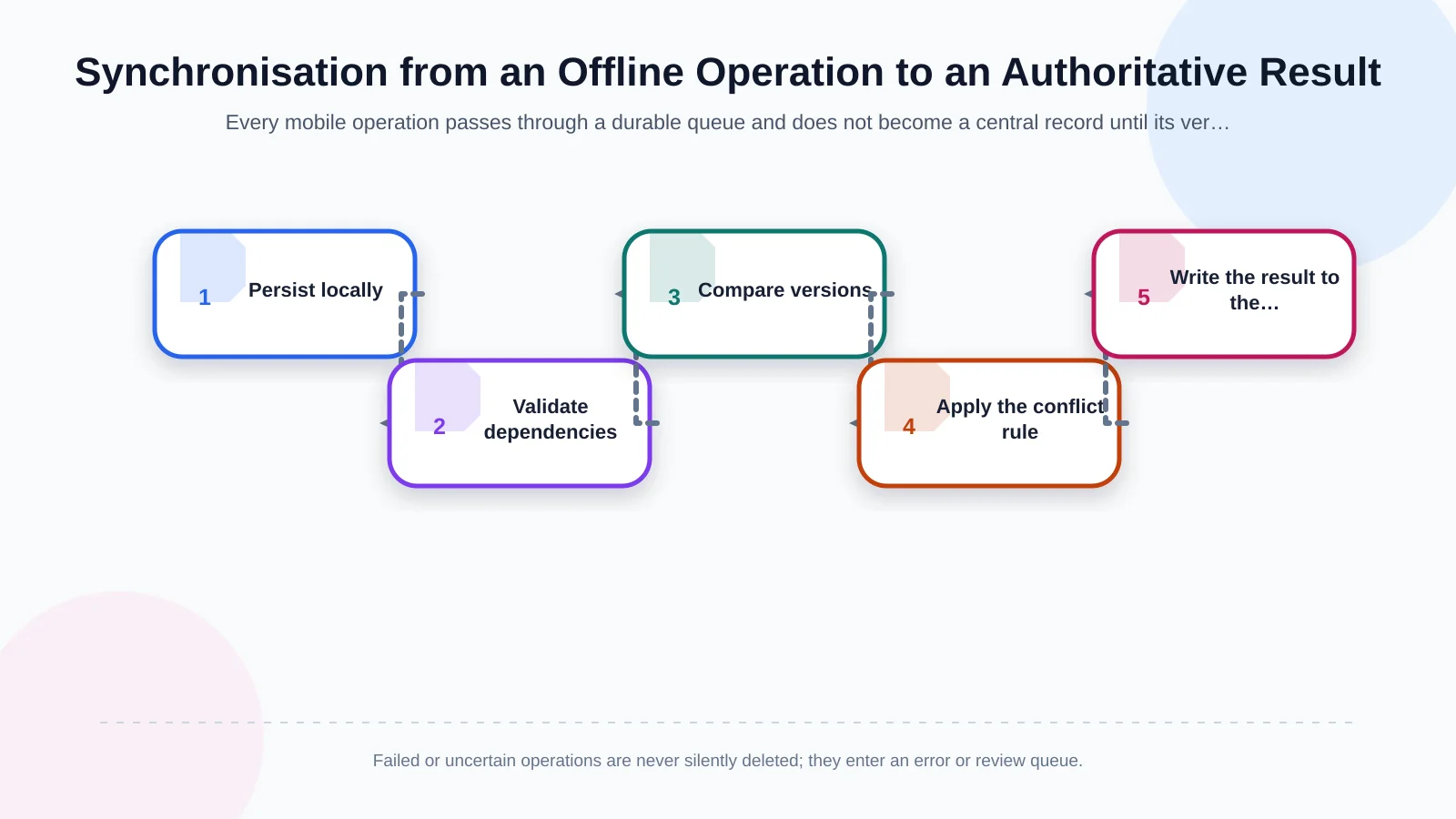
1. Persist the operation locally
Write the user’s operation to a local database first. The queue item should include a unique operation ID, record ID, base version, changed fields, user, device and creation time. Closing the app must not erase it. The interface should clearly distinguish records that are waiting on the device, being submitted, synchronised or awaiting review.
2. Validate dependencies and data
An order should not be submitted before its new customer, nor a consumed part before its work order is accepted. Sequence the queue according to those dependencies. Check required fields, file integrity, temporary-to-central ID mappings and supported app versions before making a network request.
3. Compare the server version
The server checks whether it has already processed the operation ID and whether the base version is current. If the same request arrives again, it returns the earlier result instead of creating another order or inventory movement. If the base version is stale, the latest server record and the mobile change go to the conflict engine.
4. Apply the rule and record the decision
Independent changes may be merged under a defined policy. A mobile change may be rejected when central data has priority, while a critical discrepancy may enter a review queue. Whatever the decision, record the previous value, submitted value, applied rule and final result in the audit trail.
5. Update the device and close the queue item
Return the authoritative result and new version to the device. Update the local record, and mark the operation complete only after a verified response. If the response is lost, repeat the request safely with the same operation ID. When this flow must span an API, administration interface and ERP connection, custom web development supplies the server-side rules, monitoring and exception handling that a mobile client cannot provide alone.
How should conflict resolution strategies be selected?
“Last write wins” is easy to implement but unsafe as a default. The clock used to identify the latest change may be unreliable, and a newer-looking mobile update may erase a critical central decision. Reserve this method for independent, low-risk fields where losing an earlier value has an explicitly accepted impact.
Field-level merging works when the parties changed genuinely independent fields. If the central team updates a delivery address while a representative adds a visit note, both changes may survive. Different fields do not automatically mean independent rules, however. Quantity and credit status may be stored separately while jointly determining whether an order is valid.
Source priority makes the ERP, central operations team or authorised role decisive for specific data. It is commonly appropriate for stock availability, approval status and pricing. Other activities are better modelled as immutable events rather than overwritable records. Payments, inventory movements and signatures should produce new events—and, where necessary, reversal events—rather than having their history replaced.
When no automated rule is sufficiently safe, request an authorised decision. The Apache CouchDB conflict model documentation shows how diverging revisions can be retained for application-led presentation or resolution. An enterprise app should present users with understandable field differences, the parties responsible, the operational impact and only the decisions their role permits.
| Data example | Suitable approach | Control point | Possible outcome |
|---|---|---|---|
| Visit note | Field-level merge | Was the same field changed? | Merge or present for review |
| Product price | ERP priority | Is the price version current? | Reprice the order |
| Serial number | Uniqueness rule | Is it used by another operation? | Reject and review |
| Work order status | Role and state rule | Is the transition authorised? | Request approval or reject |
Why are idempotent operations and retries critical?
A mobile server may complete an operation even though its response never reaches the device. Retrying must not create a second order, payment or stock issue. Assign every business operation a unique, persistent idempotency key on the client. The server should store that key with a request fingerprint, processing state and previous response for an appropriate retention period.
The idempotent method semantics in RFC 9110 describe the intended effect of applying an identical request multiple times. For business operations such as creating an order, the HTTP method alone is insufficient; an application-level operation ID and duplicate-detection policy are still required.
Retry only temporary network failures, timeouts and eligible server errors. Increase delays progressively and add random jitter so many reconnecting devices do not submit simultaneously. Permission failures, invalid data and business-rule rejections must not retry forever. After a defined limit, move the item to an error queue with enough context for the responsible team to investigate and safely resume it.
User experience, security and audit trails
After tapping Save, a user should know whether the record exists only on the device or has reached the central system. Alongside a general offline indicator, show record-level states such as pending, synchronised, rejected and review required. If the user can resolve a conflict, explain the differences in plain language and hide decisions outside their authority.
Encrypt sensitive local data according to the device risk profile, retain credentials in secure storage and define what offline access can do after a session expires. Queue entries should contain no more personal data than the operation requires. Plan device revocation, remote sign-out and appropriate local-data removal for lost or reassigned devices.
The audit trail should cover the user, device, operation ID, base and resulting versions, previous and submitted values, applied rule, ERP response and server time. Apply access controls and retention policies to these logs. This makes it possible to answer not only which value won, but why it won.
What should testing and acceptance scenarios cover?
Testing should extend far beyond creating one record in aeroplane mode and reconnecting. Interrupt connectivity at different submission stages. Test app termination, clock changes, unsupported app versions, large queues, partial ERP success and use of the same account on two devices.
- Change the same record on two devices, first in different fields and then in the same field.
- Disconnect immediately after the server completes an operation but before its response arrives.
- Submit the same operation ID repeatedly and verify that no duplicate business record appears.
- Send a pending mobile update after the ERP has closed or cancelled the record.
- Attempt conflict resolution with both authorised and unauthorised users.
- Correct an error-queue item and reprocess it without losing its history.
- Reconstruct the decision and data history from the audit trail.
Acceptance criteria should be measurable: no duplicate business records, no silent loss of pending operations, every conflict reaching a defined terminal state and every critical decision remaining explainable through the audit trail. Operational dashboards can track queue age, failed attempts, conflict rates and critical records waiting for review.
How should a project-specific offline architecture be planned?
A reliable solution begins by observing real field conditions before designing screens. Establish where connectivity fails, how long devices may remain offline, which data must be available locally and what each type of loss or delay would cost the business. Then document data ownership, role permissions, state transitions, conflict rules, error handling and the ERP contract as one operating model.
Enterprise apps built with React Native can share business logic across iOS and Android, but background-execution limits, secure storage and network behaviour still require platform-specific testing. Kumsal Agency approaches custom mobile application development by designing user needs, real operational workflows, custom web software and ERP integration within the same architecture.
Plan your workflows and conflict rules with Kumsal Agency if your mobile application requires offline operation, synchronisation and ERP connectivity. When ownership, retries, versioning and exceptions are explicit, restored connectivity becomes a secure, traceable and understandable business workflow rather than an uncertain data transfer.