


Aydınlatma metni yükleniyor…
Short answer: website accessibility is not achieved by running a single automated audit when the project is almost complete. The intended scope should be defined during discovery and proposal work. Colour, readability and interaction states belong in design; text alternatives and media descriptions belong in content preparation; keyboard use, visible focus, forms and technical structure belong in development. Before launch, automated checks, manual user journeys and client acceptance should be reviewed together.
This approach does not automatically mean that every project fully conforms to a particular standard. It turns accessibility from a vague item to “look at later” into a visible plan showing what will be checked, at which stage and by whom.
Why Should Accessibility Not Be Left Until the End of a Project?
Accessibility is not a matter that a developer can solve entirely in code. If a designer selects a low-contrast colour combination, the content team cannot explain the purpose of an image, or a form error does not tell the user how to correct their input, technical implementation alone cannot resolve the whole problem.
Likewise, an element that looks correct in a design file may not work with a keyboard on the real page. A menu might open with a pointer but remain unreachable with the Tab key. A focus indicator may have been removed for visual reasons. Keyboard focus may become trapped inside a dialog. These issues become visible only when the implemented interaction is tested.
Accessibility should therefore be divided into five areas of work:
- Discovery and proposal
- Design
- Content preparation
- Development
- Testing, acceptance and handover
When defining the broader goals, users and scope of a website, you can also use our guide to preparing a website requirements document. Accessibility should appear in that document as page- and function-specific acceptance criteria, not as a general note added at the end.
A Basic Check Is Not the Same as a “WCAG-Conformant” Claim
The W3C overview of WCAG 2 organises web accessibility under four principles: perceivable, operable, understandable and robust. Its success criteria are arranged at Levels A, AA and AAA.
Checking colour contrast, trying a few screens with a keyboard or receiving a high automated score can all be useful. On their own, however, these checks are not sufficient to claim that a page conforms to WCAG 2.2. The conformance section of WCAG 2.2 requires the applicable success criteria at the selected level to be satisfied across the full page. Checking only selected components does not establish conformance for the whole page.
The checklist in this guide is therefore a starting point and a project acceptance framework. If a formal conformance claim, legal requirement or high-risk use case applies, the scope, target level, sample, test method and specialist assessment need to be defined separately.
A Five-Stage Website Accessibility Plan
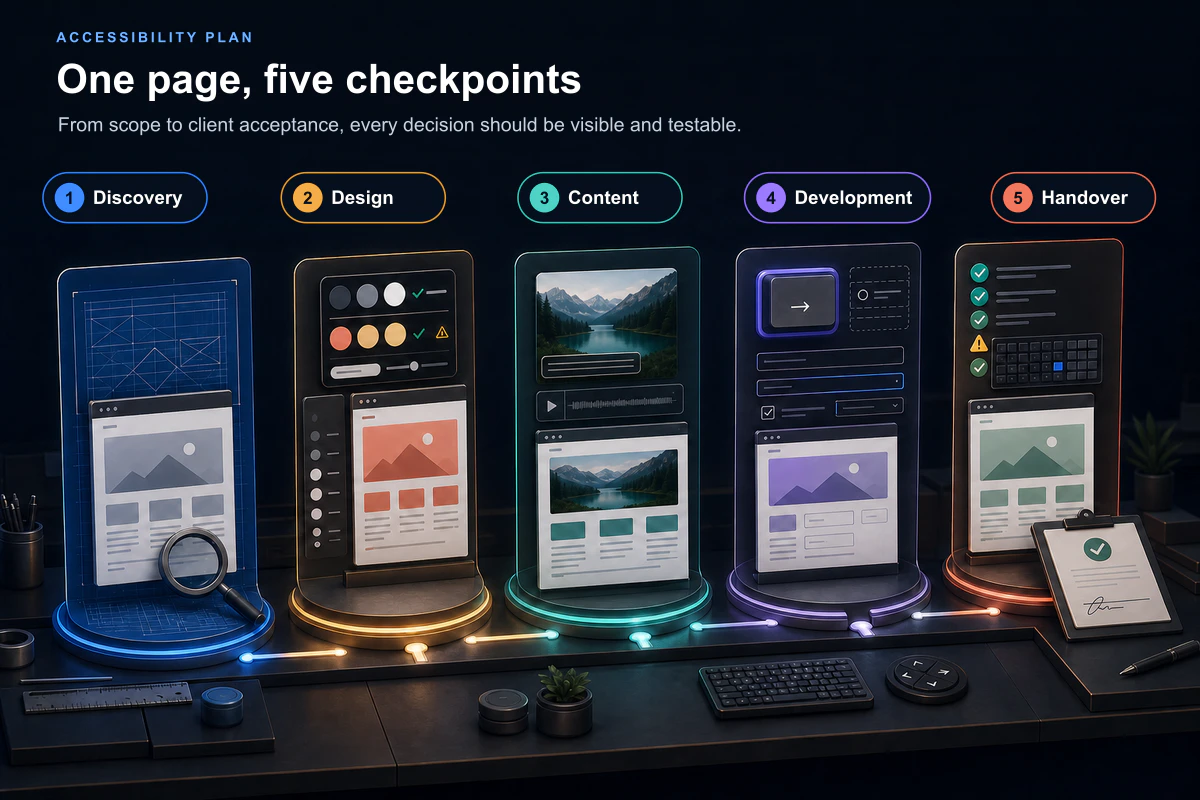
1. Discovery and Proposal: Write Down the Goal and Scope
Instead of stating only that “the website will be accessible”, ask which users, pages and functions are priorities. Public information pages, application forms, payment journeys, account features, videos and downloadable documents do not all require the same depth of testing.
The discovery record can answer:
- Which pages and functions are critical?
- Is there a target accessibility standard or organisational policy?
- Is testing with a keyboard, screen reader or another assistive technology expected?
- Who will prepare content alternatives?
- Which manual tests will accompany automated checks?
- Who will provide final acceptance?
Kumsal Ajans considers accessibility requirements according to the needs of each project. Where no standard or scope has been specified, the basic checks that are performed should not be described as a commitment to a particular conformance level.
2. Design: Do Not Separate Visual Decisions from Interaction States
Design review should look beyond whether brand colours work well together. It should consider whether text is distinguishable from its background, whether type is readable, whether buttons are understandable and whether information depends on colour alone.
Kumsal Ajans performs basic checks for contrast, type size and readability during design. A single colour value is not enough, however. Normal, hover, selected, disabled and keyboard-focus states may each appear differently. Buttons, links, error messages and success messages should be reviewed in their relevant states.
Add questions like these to design approval:
- Is body copy sufficiently distinguishable from its background?
- Is a link identified by more than colour alone?
- Does an active or selected item use an additional visual cue?
- Are text, buttons and form fields comfortable to use on small screens?
- Does the design show how keyboard focus will remain visible?
3. Content: The Client Owns Meaning; the Team Manages Implementation
Alt text is not simply a filename placed in another field. It is difficult to write a useful description without understanding the purpose of the image on that page. A decorative image and a diagram explaining a service should not be described in the same way.
In the Kumsal Ajans approach, a client may provide the context-specific description. Kumsal Ajans applies it to the appropriate technical field and makes necessary implementation adjustments. This division clarifies responsibility: the content owner manages meaning and accuracy, while the development team manages technical presentation.
A similar distinction applies to video and audio. The source material for captions, a transcript or a necessary visual description is generally supplied by the client, while Kumsal Ajans handles the technical integration. If content production is included as a separate service, the division of work can be adjusted in the project scope.
The content review should record:
- Which images communicate meaning and which are decorative?
- Who owns and approves the alt text?
- Are captions or a transcript available for video?
- Can link text describe its destination without surrounding context?
- Do headings form a meaningful hierarchy rather than relying on visual size alone?
4. Development: Verify Keyboard, Focus and Form Behaviour
The fact that a page works with a pointer does not prove that it works with a keyboard. Menus, buttons, links, form fields, dialogs and other interactive components should be reachable with Tab and Shift+Tab, and the user should be able to see which element currently has focus.
Kumsal Ajans performs basic keyboard-use checks on menus, buttons and forms. We also check that the active element remains visible while navigating by keyboard. This assessment considers not only whether a focus outline exists, but also whether the sequence is understandable and whether the user can avoid becoming trapped inside a component.
Forms need review at three levels:
- Labels: Users should understand what information a field expects.
- Required fields: A required field should not be indicated by colour alone, and its requirement should be clear before the user attempts to submit.
- Errors: A message should do more than say that an error occurred; it should explain which field needs correction and why.
W3C Easy Checks includes initial checks for page titles, text alternatives, headings, contrast, text resize, keyboard access and visible focus, form labels and errors, and media alternatives. The W3C also states that these are quick preliminary checks rather than a comprehensive or definitive accessibility evaluation.
5. Testing, Acceptance and Handover: Record the Result
Depending on the project, Kumsal Ajans uses Lighthouse and similar automated accessibility checks. The team completes the technical accessibility review, and project handover is completed with client approval.
Instead of storing only a score, the handover record should include:
- The page or journey that was tested
- The automated tool and test date
- The manual scenario that was performed
- The issue and affected component
- The correction that was made
- The result of retesting
- Any item outside the agreed scope or requiring specialist review
- The people responsible for technical review and client acceptance
This record does not guarantee that the website will remain unchanged and accessible after every future update. Relevant checks should be repeated when a new video, image, form, menu or third-party component is introduced. For the broader pre-launch process, use this guide alongside our website handover checklist.
Accessibility Responsibility and Acceptance Table
| Stage | Basic check | Input owner | Technical owner | Acceptance result |
|---|---|---|---|---|
| Discovery | Target scope, critical pages and expected tests | Client and project team | Project team | Written requirements |
| Design | Contrast, readability, non-colour cues and focus appearance | Design and brand inputs | Design team | Approved component states |
| Content | Alt text, video captions/transcripts and meaningful links | Usually the client or content service | Content and development teams | Complete content inventory |
| Development | Keyboard order, visible focus, menus, form labels and error behaviour | Approved design and content | Development team | Working test scenarios |
| Handover | Automated and manual checks, correction and retesting | Technical team | Kumsal Ajans | Technical review record and client approval |
The table does not impose the same scope on every project. An application portal may require detailed review of forms and authentication journeys, while a straightforward corporate site may prioritise content structure, navigation and the contact form. The important point is to define the scope before testing begins.
Why Is an Automated Accessibility Score Not Enough?
Automated tools can quickly identify issues such as missing labels, insufficient contrast and some incorrect technical relationships. They are useful in development and quality assurance. They cannot always determine whether alt text accurately represents the purpose of an image, whether keyboard order makes sense to a user, or whether an error message is genuinely understandable.
The W3C guide to selecting accessibility evaluation tools explains that tools cannot check every aspect of accessibility automatically and that human judgement is required. Tools assist an accessibility evaluation; they do not determine accessibility on their own.
The Chrome documentation for the Lighthouse accessibility score describes the score as a weighted average of automated accessibility audits. Manual audits are not included in that score. A high result should therefore not be interpreted to mean that no manual review remains.
A practical sequence is:
- Run an automated scan to identify detectable issues quickly.
- Use the keyboard to test critical pages and journeys.
- Review visual meaning, form instructions and error messages with human judgement.
- Correct the issues found.
- Repeat the same scenario and record the result.
A General Correction Scenario
Button text may not be sufficiently distinguishable from its background, or a dropdown menu may work with a pointer while remaining inaccessible from a keyboard. In such a case, the aim should not be limited to increasing an automated score. The effect on the user's journey needs to be understood.
Colour values and button states can be revised. A visible focus style can be added. The menu's keyboard sequence and open/close behaviour can be rebuilt. Automated checks and manual navigation with Tab and Shift+Tab can then be repeated.
This is not presented as a measured result from a named Kumsal Ajans client project. It is a general check-and-correction scenario confirmed by the user and does not include a duration, score improvement or full-conformance claim.
Accessibility Questions to Ask in a Website Proposal
- Is the accessibility objective and review scope written into the proposal?
- Will design review include contrast, readability and visible-focus states?
- Will menus, forms and other interactions be tested with a keyboard?
- Who will prepare alt text and media transcripts?
- How will form labels, required fields and error messages be accepted?
- Which automated tools and manual scenarios will be used?
- Will testing cover sample pages only or every critical journey?
- Will corrections and retest results be recorded?
- Will specialist evaluation or assistive-technology user testing be scoped separately when needed?
- Who owns technical sign-off and client acceptance?
When assessing the supplier's broader technical approach, you can also use our web software company technical capability checklist.
Conclusion: Manage Accessibility as a Project Decision, Not a Score
Website accessibility is not a single check added after design is complete. Scope belongs in discovery; visual states in design; meaningful alternatives in content; keyboard and form behaviour in development; and automated and manual review in project handover.
Kumsal Ajans performs basic contrast and readability, keyboard, visible-focus and form checks, supported by project-appropriate automated audits. Content meaning and media transcripts are managed with the client. The team completes the technical review, and handover is confirmed through client approval. This approach does not, by itself, guarantee a particular WCAG level or legal compliance. It makes requirements, responsibilities and acceptance results visible.
If you want to define accessibility requirements before the design of your new corporate website begins, Kumsal Ajans can help you identify critical pages, content responsibilities and the appropriate testing scope.