


Aydınlatma metni yükleniyor…
As training programmes for employees, dealers, field teams and business partners grow, publishing videos or documents is no longer enough. An organisation needs to know who should complete each course, how far they have progressed, what competencies they demonstrated in an exam and where the process is breaking down. LMS software creates this visibility by bringing courses, assessments, users and learning records together in one system.
An effective corporate learning platform is not simply a catalogue of standard features. Training scenarios, organisational structure, user roles, permission boundaries, assessment methods and existing systems must be considered together. Designed this way, an LMS becomes more than a separate content platform: it becomes a manageable business process shared by HR, learning and development, operations and IT teams.
What does LMS software do?
An LMS, or learning management system, is the digital infrastructure used to create or import training content, assign it to the right users, monitor completion, deliver assessments and report results. In a corporate setting, its purpose is not merely to publish online courses. It should establish an uninterrupted and auditable record between a training requirement and a measurable outcome.
For example, an orientation programme can be assigned automatically when an employee joins the company. Field personnel may see only the health and safety courses relevant to their region and role. Dealers can be enrolled in different programmes according to their product groups, while renewal dates for partner certifications can be monitored centrally. A manager may view their team’s status without gaining access to another department’s individual results.
Technology alone will not eliminate scattered emails, spreadsheets and disconnected testing tools. Process rules must first be defined and then translated into a custom web software architecture. The starting point for a successful LMS project is therefore the organisation’s learning operation, not a generic feature checklist.
How should course management reflect the real organisation?
Course management is about more than uploading content. It must determine who receives that content, under what conditions and for how long. One course may combine video, text, presentations, documents, external resources, practical assignments and exams. Modules may follow a compulsory sequence, later sections may remain locked until prerequisites are completed, and experienced users may be exempt from selected units.
Assignment rules and learning paths
Manual assignment can work for small groups, but it becomes error-prone as user numbers increase. Fields such as department, job title, location, dealer type, product authorisation, seniority or certification status can drive automated rules. If a user’s role changes, a new learning path can begin automatically. Assignments that no longer apply can be closed or archived while preserving their historical records, depending on organisational policy.
- Separate mandatory, optional and manager-recommended courses.
- Define start dates, completion deadlines and certification renewal dates.
- Document prerequisites, module order and retake rules.
- Configure reminders for learners, managers and training administrators.
- Store both the content version and the version completed by each learner.
Content versions and refresher training
When a policy, product or regulation changes, replacing a file inside an existing course may undermine the meaning of historical records. The LMS should track content versions and effective dates. When a new version is published, reassignment can depend on the extent of the change, the learner’s role and their previous completion date. “Completed” then remains meaningful because the organisation can establish precisely which material the user completed.
How should the exam and assessment workflow be designed?
An exam module should do more than generate a score from multiple-choice questions. First define the purpose of the assessment. Checking knowledge, verifying practical competence, granting certification and identifying a development need each require different rules. A question bank can be organised by topic, difficulty, competency and language, allowing the system to generate different sets while maintaining the required distribution.
Pass marks, time limits, attempt limits, negative marking, feedback timing and re-entry conditions should be explicit. A high-stakes certification exam may randomise both questions and answer options. A low-risk development quiz may instead explain each answer immediately. After a failed attempt, the system can reassign relevant learning material rather than allowing unlimited repetitions without intervention.
Assessment security should remain proportionate to the use case. Identity verification, time limits, question pools, session records and unusual-behaviour checks may be appropriate. Heavy monitoring is not justified for every programme. The objective is a reasoned balance between learner privacy and confidence in the result.
How do courses, exams and learning records connect?
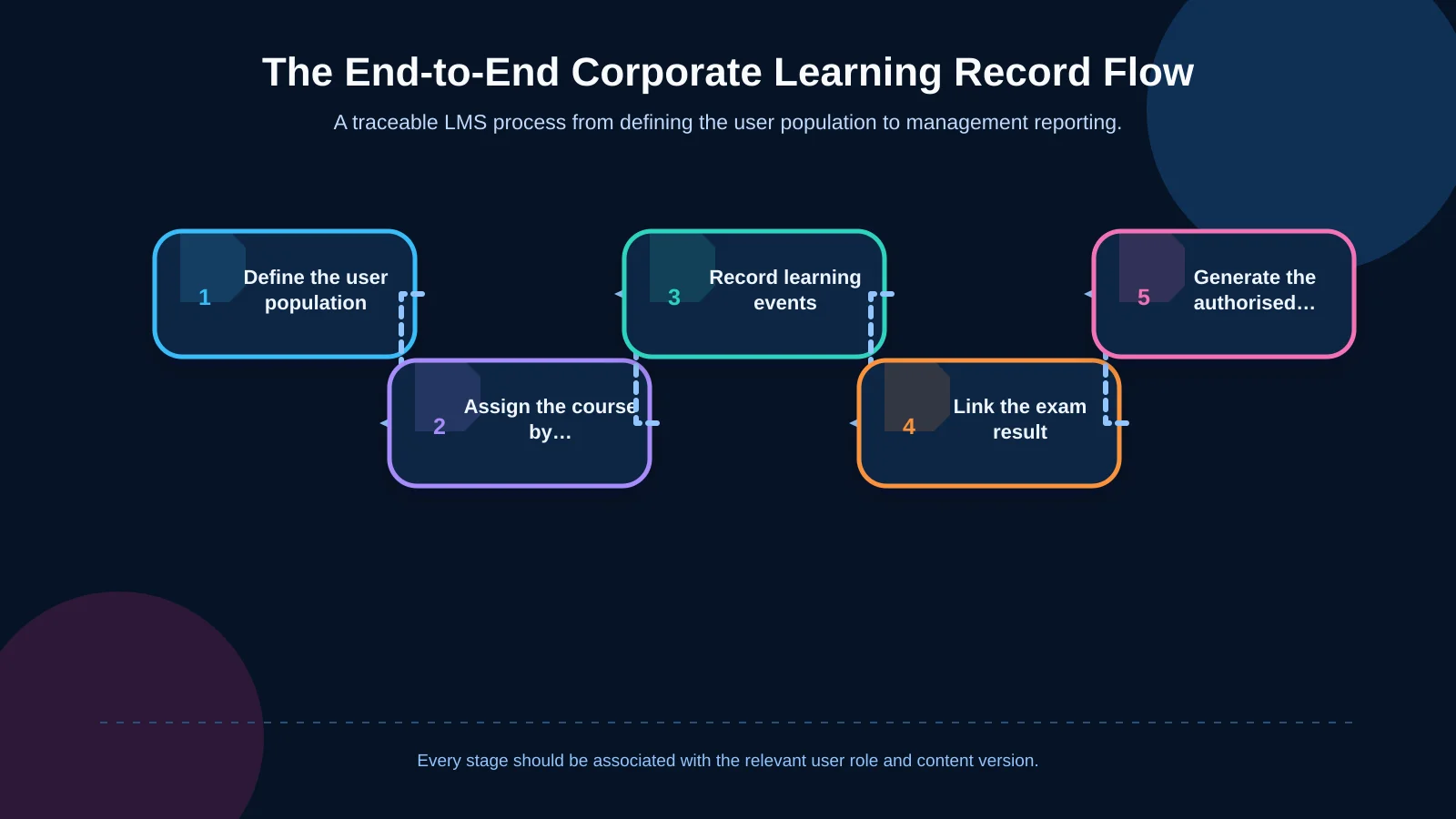
A traceable LMS workflow begins by identifying the relevant user population. The assignment engine opens the appropriate course, and the platform records events such as viewing a module, completing an activity and spending time in a learning unit. Exam results are connected to the relevant course and content version. Reports then transform these records into decision-ready indicators for authorised teams.
If learning data will come from several applications, the event model should be designed at the beginning of the project. ADL’s cmi5 and xAPI guidance describes actor, action and activity relationships in learning records, together with the Learning Record Store approach. Standards do not automatically produce useful reports, but they can provide a shared language for learning events collected from different sources.
The rules behind a progress percentage
The meaning of “80% complete” must be unambiguous. Watching part of a video, opening a page, receiving approval for an assignment and passing an exam may not carry equal weight. Completion rules should be configurable by course, while critical results should be verified on the server rather than relying on a single client-side signal. Acceptance rules should also cover interrupted connections, replayed media, switching devices and changes to the content version.
Which questions should LMS reporting answer?
A useful reporting screen does not display every available data point. It supports a decision. Learning and development teams may evaluate programme effectiveness; HR may monitor mandatory training; operations managers may look for risks within their teams; and IT may focus on integrations and data quality. The same underlying data should therefore be presented with different scopes and levels of detail according to role.
- Numbers of users assigned, started, approaching a deadline, completed or failed
- Completion rates by course, team, location, dealer or reporting period
- Performance distributions by question and competency
- Overdue mandatory training and certifications due for renewal
- Audit records for assignments, exemptions, result changes and exports
A completion rate alone does not prove an effect on job performance. If the organisation needs evidence from exam results, practical assignments, manager reviews or operational KPIs, the relationships between those measures should be included in the project scope. Reports should display their calculation definition, filter scope and last refresh time so that the same metric does not produce conflicting results across different screens.
| Role | Primary question | Priority indicator | Action |
|---|---|---|---|
| Learning and development | Is the programme effective? | Completion and performance | Improve the content |
| Human resources | Have requirements been met? | Overdue training | Send reminders and escalate |
| Operations manager | Where is the team at risk? | Competency gap | Assign targeted training |
| Information technology | Is the data reliable? | Transfer errors | Correct the integration |
How should user roles and permissions be structured?
A corporate LMS may include learners, instructors, content administrators, exam owners, department managers, dealer managers, auditors and system administrators. The viewing and action boundaries of every role should be defined separately. Permission to assign a course to a team does not imply permission to view exam questions or another business unit’s personal results.
Role-based access must also account for organisational scope. The system should check not only whether someone is a manager, but also which company, location, dealer or team they manage. Temporary access can have an expiry date, critical actions can require second approval, and sensitive exports can be recorded. These checks must be enforced on the server for every request rather than implemented merely by hiding interface controls.
How do integrations strengthen LMS operations?
The HR system may be the master source for employees, departments, titles and employment status. An identity platform may provide single sign-on, while ERP, CRM or dealer systems supply business data that determines training eligibility. Notification services can deliver reminders, and business intelligence platforms can combine authorised, aggregated learning data with broader corporate indicators.
The integration plan should document data ownership, transfer direction, frequency, field mappings, error queues and retry behaviour. When external tools must operate securely with the LMS, the 1EdTech LTI standard provides a framework that may support tool launches, user roles and result exchange. Suitability should be verified against both the connected products and the organisation’s actual use case.
For field teams, mobile delivery requires more than shrinking desktop screens. Connection quality, resume behaviour, media size, touch interaction and notification preferences all affect the experience. Depending on operational needs, the organisation may choose a responsive web platform or an enterprise mobile application. Offline use also requires explicit conflict-resolution and synchronisation rules.
Data security and sustainable infrastructure
An LMS may hold identity data, training histories, exam answers and records that can be associated with performance. Data minimisation should be applied, with a documented purpose and retention period for each field. Access should follow least-privilege principles. Encryption in transit and at rest, backups, restoration tests, security updates and incident-response ownership should be planned from the outset.
The audit trail should cover critical events such as course assignment, role changes, exam-result corrections, report exports and administrative actions. The OWASP Logging Cheat Sheet recommends considering when, where, who and what for logged events while avoiding direct logging of passwords, access tokens and unnecessary personal data. Learning records and security logs serve different purposes, so their access and retention policies should also be separated.
Sustainability is not just a question of server capacity. Monitoring, error alerts, performance measurement, versioning, test environments and maintenance responsibilities all require named owners and operating procedures. This keeps the platform supportable as user numbers, content libraries and integrations expand.
How should an LMS project be planned?
Begin by mapping user groups and concrete training scenarios. Next define the course structure, exam rules, assignment conditions and reporting decisions. Once the integration inventory and data ownership are clear, the team can prepare a role-permission matrix, interface flows and technical architecture. Prototypes should be validated with real users, followed by combined testing of business rules, security, performance and data transfers.
A pilot should use a limited but representative user group and training programme. The project team can observe assignment accuracy, reminder timing, progress calculations, exam outcomes and reporting consistency. Findings should become process and interface improvements before general release. Success criteria should go beyond whether the system launched, using measures such as assignment accuracy, completion time, support demand and report usability.
When does a custom LMS approach make sense?
A custom approach becomes relevant when user groups, assignment logic, assessments or integrations extend beyond the practical limits of a standard product. Examples include managing several companies, dealer networks or field organisations with different permission boundaries; operating specialised certification workflows; or exchanging data in both directions with HR and operational systems.
Custom development does not mean unnecessarily building every component from scratch. Established standards, dependable components and existing services can still be used. The distinction is that the architecture follows the organisation’s real operating model. A phased scope can launch core course, assessment and tracking flows first, with advanced analytics or additional integrations introduced as evidence confirms the need.
Bringing course assignments, exams and progress data into one corporate learning system makes training visible, auditable and manageable. To plan LMS software around your organisation’s roles, learning scenarios, assessment model, reporting needs and integrations, contact Kumsal Agency.