


Aydınlatma metni yükleniyor…
Portal software is a web-based workspace that gives customers, dealers, employees or business partners secure access to the information and transactions assigned to them. A well-planned portal does more than display documents. It can manage requests, orders, approvals, payments and status tracking through defined business rules.
The first question should therefore not be “which screens do we need?” It should be “who needs to complete which task, using which data, under which authority?” This guide provides a practical route from choosing a portal type to defining roles, data ownership, integrations and comparable proposal scope.
What does portal software do?
A portal brings fragmented communication and process steps into one role-specific workflow. A customer can retrieve the current contract version instead of searching through email. A dealer can place an order using the price assigned to its account. An employee can send a request through the correct approval chain. A partner can access only the project documents intended for that organisation.
The goal is not to put every piece of company information on one screen. It is to expose the data and actions required by each role while restricting everything else. Portal success should be judged by whether people can complete their tasks securely and with a traceable outcome, not by the number of screens delivered.
How do portal types differ?
“Portal” does not describe a single product category. A shared technical foundation can support very different users and operating processes.
| Portal type | Primary user | Typical tasks | Common connections |
|---|---|---|---|
| Customer portal | Individual or business customer | Requests, documents, payments, status and account management | CRM, accounting, payment and support systems |
| B2B or dealer portal | Dealer, distributor or trade customer | Product search, account pricing, orders, balance and shipment tracking | ERP, inventory, pricing, logistics and collection systems |
| Employee portal | Employees and managers | Announcements, documents, leave, requests and approvals | HR, document and identity systems |
| Supplier portal | Suppliers and procurement teams | Quotes, documents, purchase orders, delivery and compliance | Procurement, ERP and document management |
| Service portal | Customers, technicians and service managers | Fault reports, work orders, appointments, parts and service outcomes | CRM, ERP, field application and notification services |
An organisation may need more than one portal type. However, forcing all users into the same navigation and data model can create permission complexity and usability problems. Even where the infrastructure is shared, each user journey should be designed separately.
For the budget implications of membership, documents, requests and payments on the customer side, see our complementary customer portal cost guide.
How should a portal scope matrix be prepared?
It is easy to create a long feature list during discovery while leaving the problem behind each feature unclear. The Kumsal Ajans portal scope matrix defines every user group through six fields:
- Role: Who signs in?
- Task: What outcome does this person need from the portal?
- Data: What must the person view or change?
- Transaction: Which request, approval, document or payment is involved?
- Rule: Which permissions, limits, verification steps and exceptions apply?
- Evidence: How is completion recorded, and who can inspect it?
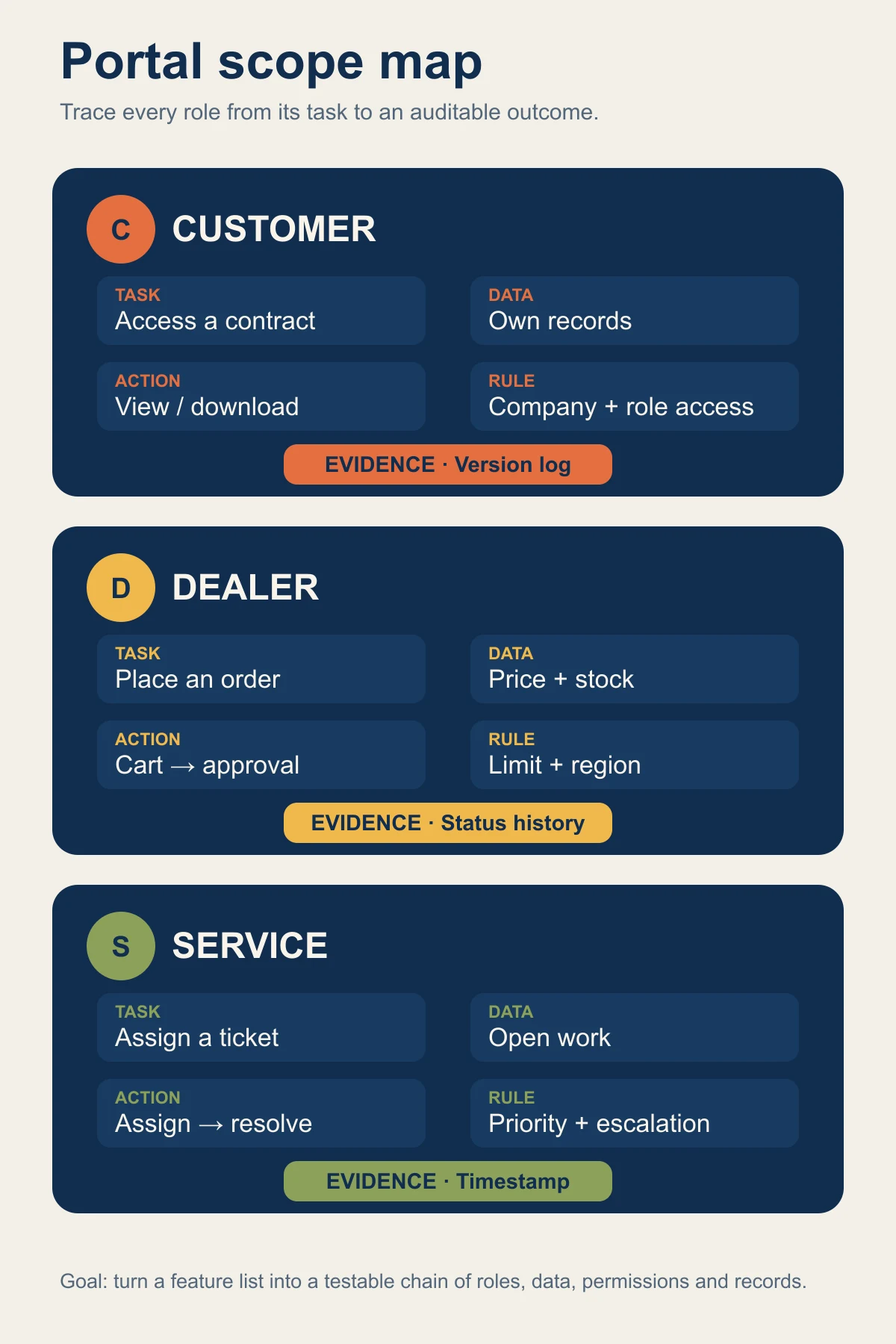
For example, saying that a dealer user “creates an order” is not enough. The scope must also state which price list the user sees, what happens when inventory is unavailable, who approves an order above the credit limit, when it enters the ERP system and how a failed transfer is resolved.
This framework makes hidden rules and responsibilities comparable, not just the visible screens listed in a proposal.
How should roles and permissions be designed?
Portal security does not end at the sign-in screen. Once authenticated, every read, edit, download and approval action must still be authorised. OWASP recommends least privilege, deny-by-default behaviour and permission validation on every request. The practical principles are set out in the OWASP Authorization Cheat Sheet.
Role design should answer questions such as:
- Can one user belong to several companies or branches?
- Can a company administrator add and disable its own users?
- Do sensitive downloads, payments or limit changes require additional verification?
- How is access removed when a person leaves the organisation?
- What happens when temporary access or delegated authority expires?
- Can an administrator review who accessed or changed a record?
NIST’s zero trust architecture guidance also explains why trust should not be granted automatically because of network location or asset ownership. The scope is available in NIST SP 800-207. These references do not by themselves guarantee a secure product. Each project still needs a threat model, test plan and defined operational ownership.
Which modules can a portal include?
Module selection should follow the portal type and user tasks. Not every project requires every module.
- Account and profile: Companies, users, contacts, preferences and permissions.
- Document centre: Contracts, invoices, certificates, reports or manuals with version and access records.
- Request management: Support, service, quotation, change or information requests with status and ownership.
- Orders and payments: Product selection, account pricing, credit rules, approvals, payment and shipment visibility.
- Approval workflows: Routing based on amount, role, category or exception.
- Notifications: Email, SMS or in-product notifications defined by event, recipient and retry rules.
- Reporting: Completed transactions, pending requests, failures and usage trends.
- Administration: Content, users, roles, rules, integrations and audit records.
Module names are not enough. Instead of accepting “document centre included”, ask who publishes a document, how versions change, whether previous versions remain available and how access is audited.
How should integration scope be defined?
The portal is often not the system that owns the underlying data. Account balances may live in ERP, customer and opportunity data in CRM, payment status at a payment provider and user identity in the organisation’s identity service. Each data field should therefore have a named source system.
An integration table should cover at least:
| Data or event | Source system | Direction | Timing | Failure behaviour |
|---|---|---|---|---|
| Customer account | CRM or ERP | One-way or two-way as required | Real-time or scheduled | Unmatched records enter a review queue |
| Inventory and price | ERP | To portal | Based on business need | Define stale-data display or transaction blocking |
| Request | Portal | To CRM/support | On event | Retry and manual review path |
| Payment result | Payment provider | To portal and accounting | During transaction | Reconciliation path for an uncertain result |
Our web software integration guide explains the boundaries between APIs, ERP, CRM and payment systems in more detail.
Why are usability and accessibility part of scope?
A portal is a working tool that people may use repeatedly. If a frequent task is difficult to find, a long form cannot be completed or an error offers no clear recovery path, a technically functional system can still slow the operation down.
Task-based navigation, clear status labels, reversible actions, useful error messages and keyboard access should be addressed during design. The W3C Web Content Accessibility Guidelines 2.2 provides testable criteria for perceivable, operable, understandable and robust interfaces.
Testing should cover real phone screens as well as desktop layouts, particularly sign-in, file download, tables, form completion and error correction.
Off-the-shelf platform, customisation or custom development?
The decision should not begin with the assumption that custom software is always superior.
An off-the-shelf product may be the faster option when standard document sharing, request management and common integrations meet the need. Licence terms, user-based costs, data portability and customisation limits still need review.
A customised platform can offer a balanced route when most processes are standard but branding, roles, forms or reporting differ.
Custom development becomes relevant when pricing, approval, data or integration rules exceed the boundaries of existing products. It also creates greater responsibility for analysis, testing, security and long-term maintenance.
The right choice follows the uniqueness and expected change rate of the process, not the number of proposed screens.
What stages should a portal project include?
- Discovery: Identify users, problems, existing systems and success measures.
- Scope: Define modules and exceptions through the role–task–data–transaction matrix.
- Information architecture: Organise navigation, screens and content around user tasks.
- Prototype: Test critical journeys with realistic data before full development.
- Technical design: Define data ownership, integrations, permissions, logging and failure behaviour.
- Development and integration: Divide functions into small, verifiable deliveries.
- Acceptance testing: Test unauthorised access, missing data and connection failures alongside normal flows.
- Migration and training: Plan the movement of users, data, documents and operational responsibilities.
- Operations: Continue monitoring, support, backup, updates and improvement.
These stages are not a fixed delivery promise. Duration depends on user groups, modules, integrations, data migration and the speed of business decisions.
What information should be prepared before requesting proposals?
Provide the following information to receive comparable proposals:
- Portal type and intended user groups
- Three to five critical tasks for each role
- Existing ERP, CRM, payment and identity systems
- Approximate scope of data and document migration
- Critical permission, approval and audit requirements
- Expected user, company and transaction volumes
- Mobile use and accessibility expectations
- Delivery, testing, training, support and maintenance responsibilities
- Data ownership, export and technical handover expectations
Compare more than the total price. Check exclusions, third-party licences, testing methods, security ownership and the process for handling change.
The next step for your portal
Choose three real user tasks from your customer, dealer, employee or partner process. Describe each task through role, data, transaction, rule and evidence. This matrix will reveal the modules and integrations the project actually requires.
If you would like to evaluate a portal project with Kumsal Ajans, share your current workflow, user groups and systems that must be connected. The first discussion should determine whether the need is best met by a standard product, a customised platform or project-specific web development, rather than forcing the process into a predetermined package.