


Aydınlatma metni yükleniyor…
The success of an enterprise mobile app depends on far more than delivering screens for iOS and Android. The product must connect to real business processes, manage different user roles, exchange data securely with enterprise systems and provide a consistent experience under demanding conditions. React Native can enable teams to share a substantial portion of the codebase across both platforms, but it does not solve these requirements on its own. Sustainable results require a clearly defined scope, layered architecture, measurable performance targets and carefully controlled integrations.
Enterprise mobile app development with React Native should therefore be considered in broader terms than “one codebase for two apps.” Before development begins, teams need to understand which tasks users must complete in the field, where the required data comes from, how the app should behave when connectivity is unavailable and how critical transactions will be monitored. These decisions shape the product’s architecture, delivery plan and long-term operating cost.
Why choose React Native for an enterprise project?
React Native allows teams to share much of the business logic, data-access code and user interface across iOS and Android. Shared components and development standards can reduce behavioural differences that often emerge when two entirely separate product teams maintain native applications. Product management may also become more manageable because new features can be released together and many defects can be corrected in shared code.
However, the percentage of shared code is not a useful success metric on its own. Platform-specific work may still be needed for cameras, location services, notifications, biometric authentication, barcode scanners or Bluetooth devices. Even when both apps use the same design system, iOS and Android users have different navigation and interaction expectations. A sound approach shares business logic where it adds value while preserving platform-appropriate behaviour where necessary.
React Native’s New Architecture uses JSI for communication between JavaScript and native layers, together with the Fabric renderer and Turbo Native Modules. Moving to the New Architecture or selecting a recent framework version does not automatically make an application fast. Library compatibility, screen structure, data volume, rendering frequency and native-module requirements must still be assessed for the individual project.
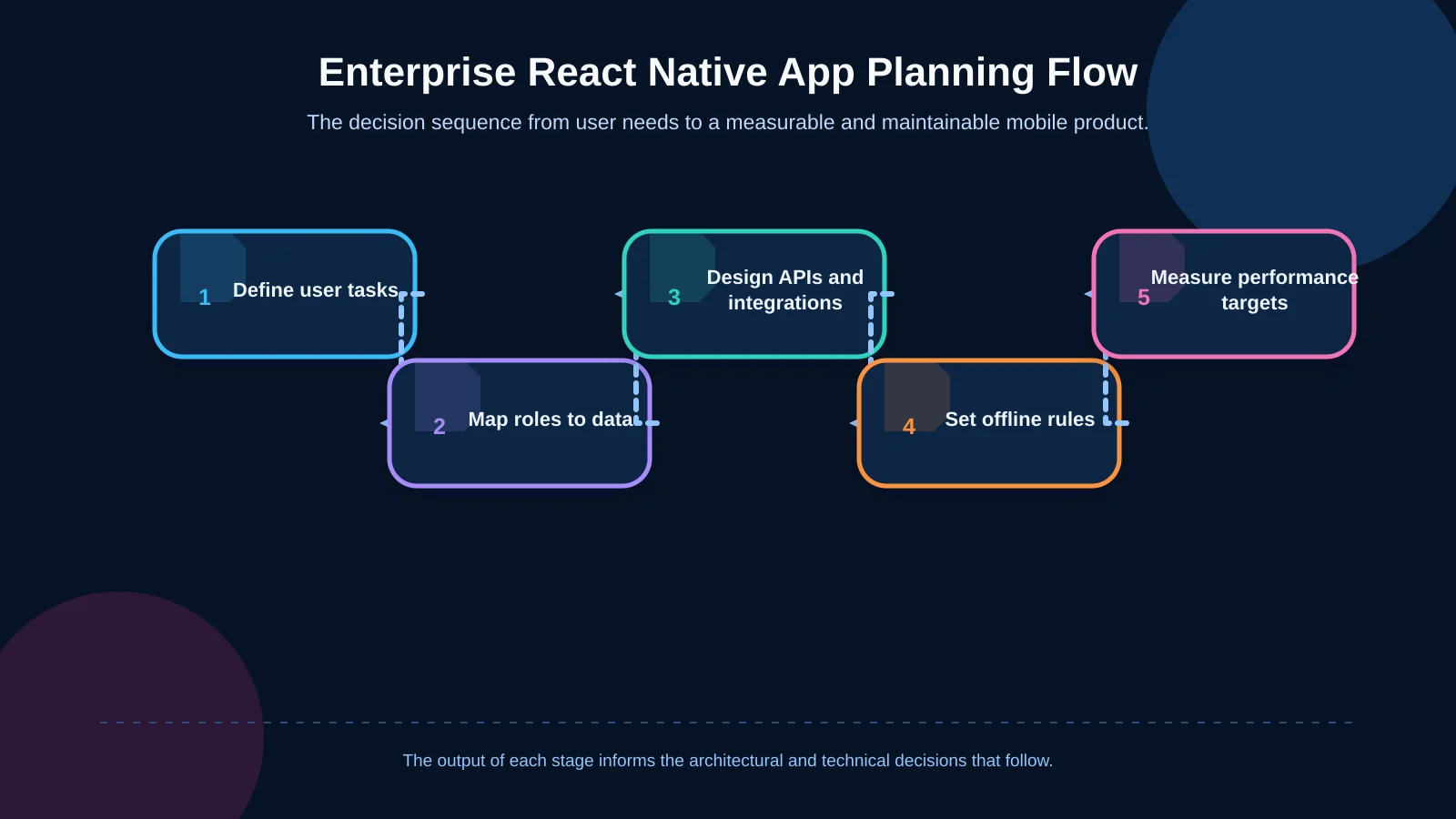
Architecture planning should begin with user tasks
In an enterprise product, the team should map tasks before compiling a list of screens. A sales representative creating an order, a warehouse employee scanning a serial or lot number, a manager approving a request and a technician closing a service record are separate workflows. Each one should have a defined starting condition, required data, permissions, possible exceptions and successful outcome.
A field order, for example, is not merely a form. The same process may depend on the customer’s current balance, contract price, available inventory, discount authority, delivery address and confirmation that the ERP system accepted the transaction. The operational decisions behind this type of workflow are examined in the field sales mobile app planning guide. If these dependencies are discovered late, the mobile app may begin duplicating back-office rules and become difficult to maintain.
A layered and modular application structure
A maintainable React Native project should separate presentation, business rules, data access and platform services. Screen components should not need to understand ERP field names or the details of individual API endpoints. User actions should pass through defined services, while network communication, local storage and device capabilities are handled through separate adapters. When an API version changes, this separation reduces the likelihood that every affected screen must be rewritten.
As the product grows, modules can be organised around business domains such as customers, orders, inventory or service records. Each module can own its screens, validation rules and data-access behaviour. Cross-cutting capabilities—including the design system, session management, analytics, notifications and error reporting—can be supplied through shared packages. This structure supports parallel team delivery while keeping dependencies visible and controlled.
Design the API layer for mobile requirements
Connecting a mobile client directly to an ERP or another enterprise system creates security, performance and version-management risks. A project-specific API layer should instead manage authentication, authorisation, data transformation, caching and integration errors. Where appropriate, a backend-for-frontend can assemble the exact data required by a mobile workflow into a purpose-built response.
API contracts should define field names, mandatory values, error codes, pagination rules and versioning policies. Long-running operations need explicit timeout, retry and status-query behaviour. If a request is resubmitted after a connection failure, it must not create the same order twice. Idempotency keys and transaction deduplication are therefore especially important for critical write operations.
How should ERP and enterprise integrations be structured?
ERP, CRM, warehouse management, payment, identity and document systems have different data models, ownership rules and processing speeds. The mobile app should not expose those technical limitations directly to users. An integration layer should normalise data, return only authorised fields and produce responses suited to mobile network and interaction constraints.
Every important data entity needs a defined system of record. Products and customer accounts may belong to the ERP, user profiles to the identity provider, and unfinished mobile drafts to a dedicated application service. Teams must also decide which exchanges are synchronous and which can be asynchronous. A price check may need an immediate answer, while a historical report could be generated through a queue. Integration success should mean that the destination system has accepted and recorded the transaction—not simply that the app sent a request.
Offline operation and synchronisation architecture
Reliable connectivity cannot be assumed in field, warehouse and service environments. If offline support is required, it should not be treated as a cache added shortly before release. The architecture must establish which data is stored on the device, how long it remains valid, which actions are permitted offline and how conflicts are resolved.
Local transactions can be queued with their status, creation time, user identity and a unique transaction ID. When connectivity returns, the queue should be submitted in a controlled sequence. Failed items must remain visible and be safe to retry. If server data has changed in the meantime, a simple “last write wins” policy will not suit every process. Inventory, price and approval conflicts may require an explainable reconciliation flow. The warehouse mobile app guide explores related decisions for barcode, serial-number, lot and offline workflows.
| Area | Key risk | Architectural approach | Validation |
|---|---|---|---|
| API and ERP | Tight coupling | Versioned integration layer | Contract testing |
| Offline transactions | Loss or duplication | Queueing and deduplication | Synchronisation testing |
| Authorisation | Unauthorised data access | Server-side role controls | Role-based scenarios |
| Performance | Lag and slow startup | Budgets and profiling | Real-device measurements |
| Release quality | Production defects | Gradual rollout | Crash and error monitoring |
User roles and mobile data security
Enterprise mobile security extends well beyond the sign-in screen. Access should be evaluated by user, role, company, branch and transaction scope, with critical controls enforced on both the interface and the server. Sensitive information stored on a device should be minimised, access tokens should use secure storage mechanisms, and administrators should be able to revoke sessions centrally.
The OWASP Mobile Application Security Verification Standard provides controls covering storage, authentication, network communication, platform interaction and code quality. A project can select a risk-based control set from this framework. TLS, certificate and hostname validation, secure logging policies, screenshot restrictions and policies for rooted or jailbroken devices should be evaluated according to the sensitivity of the data and the threat model.
Server passwords and permanent secret keys must never be embedded in the application package. Logs should not contain personal data, access tokens or commercially sensitive information. Lifecycle events—including a lost device, an employee leaving the organisation or a role change—also require defined procedures for terminating sessions and revoking device access.
How should React Native performance be managed?
Performance is not a one-off optimisation exercise carried out after development. Teams should set targets for app startup, time to readiness for critical screens, scrolling responsiveness, API latency, memory consumption and crash-free usage. Measurements need to be taken on real devices, with realistic data volumes and production builds.
React Native’s official performance guide explains why development mode is unsuitable for representative measurements and why the JavaScript and UI threads should be evaluated separately. When a screen responds slowly, the cause may be an API request, expensive JavaScript work, unnecessary re-renders or a native UI operation. Performance telemetry should therefore identify individual screens and transactions instead of recording only a generic “the app is slow” complaint.
Optimising lists, images and state management
Rather than transferring thousands of records to a screen at once, the API should support pagination and the interface should use virtualised lists. Row components should avoid unnecessary re-renders, and predictable dimensions can be declared in advance where practical. Search interfaces can apply debouncing and request cancellation instead of running an expensive query after every keystroke. Large images should be delivered at appropriate dimensions, governed by a clear caching policy and not loaded unnecessarily when they are outside the visible area.
Placing every temporary interface value in a global state store can enlarge the scope of each update. Server data, local UI state and persistent user preferences have different lifecycles and should be managed accordingly. This separation improves both troubleshooting and performance work. Applying memoisation indiscriminately before profiling reveals a bottleneck, by contrast, can add complexity without a measurable benefit.
Startup, network and native-module costs
The initial experience should take priority over loading every service, screen and data set at startup. Lazy loading large modules, removing unnecessary dependencies and consolidating initial API requests may reduce time to readiness. Where native modules are involved, iOS and Android behaviour should be profiled separately. Cameras, maps, animation and high-frequency device data should be tested on the intended device classes instead of assessed through synthetic assumptions.
Testing and observability are part of production
In an enterprise mobile project, unit tests protect business rules, integration tests verify API contracts and end-to-end tests safeguard critical user journeys. Automating every screen is not essential. Priority should go to workflows with substantial operational or financial impact, such as sign-in, order submission, offline queues, approval and payment. Both platform versions should be validated across relevant screen sizes, operating-system versions and network conditions.
Production monitoring should cover anonymised errors, crashes, API durations and failed synchronisations. Linking technical measurements to business outcomes makes their impact easier to understand. Teams can then see how many orders remain queued after a service failure or whether form-completion rates declined in a particular release. Rollouts should be gradual, with release health monitored and a rollback plan prepared for critical issues.
A decision framework for a sustainable React Native project
A sound delivery plan brings scope, architecture and performance into one framework. It begins with user tasks and intended business outcomes, followed by data sources, roles, integrations and offline boundaries. After defining API contracts and the security model, a prototype can validate the highest-risk technical areas. Performance budgets and quality checks should remain part of release acceptance throughout development.
- Define the user, task, data source and success measure for every module.
- Place a manageable, versioned API layer between the mobile client and the ERP.
- Establish queueing, retry, deduplication and conflict rules for offline transactions.
- Do not rely exclusively on device-side controls for authorisation or data security.
- Measure production builds on target devices with realistic data volumes.
- Protect critical workflows with automated tests and production observability.
Kumsal Agency develops React Native applications for iOS and Android by considering the business idea, real user needs and technical requirements together. Its work can also include custom web software and API infrastructure, as well as ERP and enterprise-system integrations. The goal is not merely to deliver functioning screens, but to create a secure, measurable mobile product that internal and delivery teams can maintain over time.
Contact Kumsal Agency to plan the scope, architecture, integrations and performance targets of your enterprise mobile application.