


Aydınlatma metni yükleniyor…
For companies working with many suppliers, certificates of activity, quality certificates, insurance policies, contracts, licences and similar records can easily become scattered across inboxes, folders and spreadsheets. It may be unclear which version is current, who is responsible for renewal or whether purchasing should stop when a critical document expires. When delivery, quality and commercial performance data also sits in separate systems, forming a reliable view of each supplier becomes difficult.
A supplier portal brings document collection, verification, approval, renewal and performance evaluation into a shared workflow. A successful portal, however, is more than a file-upload screen. Document types, validity rules, user roles, scoring criteria, appeals and data exchange with enterprise systems must be designed together.
Why should a supplier portal become the central management hub?
Manual tracking can create duplicate files, allow an outdated version to be treated as valid or send a renewal email to the wrong person. Procurement monitors commercial relationships, quality teams examine certificates and non-conformities, finance reviews financial records, and operations follows delivery outcomes. Without a shared record structure, these teams may assess the same supplier using different information.
A central portal makes the supplier profile the single operational reference point. Authorised users can see valid, expiring, rejected, missing and pending documents. Performance results can be reviewed on the same profile by period, category, facility or contract. Decisions are then based on current data and a recorded history rather than the latest email or an employee’s memory.
Because suppliers are external stakeholders, access must be deliberately restricted. Each supplier should see only its own organisation, documents, tasks and results, while internal teams receive permissions matching their responsibilities. Where mobile access or connection resilience matters, the principles discussed in this guide to PWAs for B2B field operations and customer portals may also inform the experience.
How should the document validity lifecycle be structured?
Document management should be treated as a state-based lifecycle that begins with a requirement and ends with replacement or archival. For every document type, the organisation can define applicability, issuing authority, start and expiry dates, accepted formats, responsible reviewer and renewal lead time. Requirements may vary by supplier category, serviced facility, purchased product group or risk level.
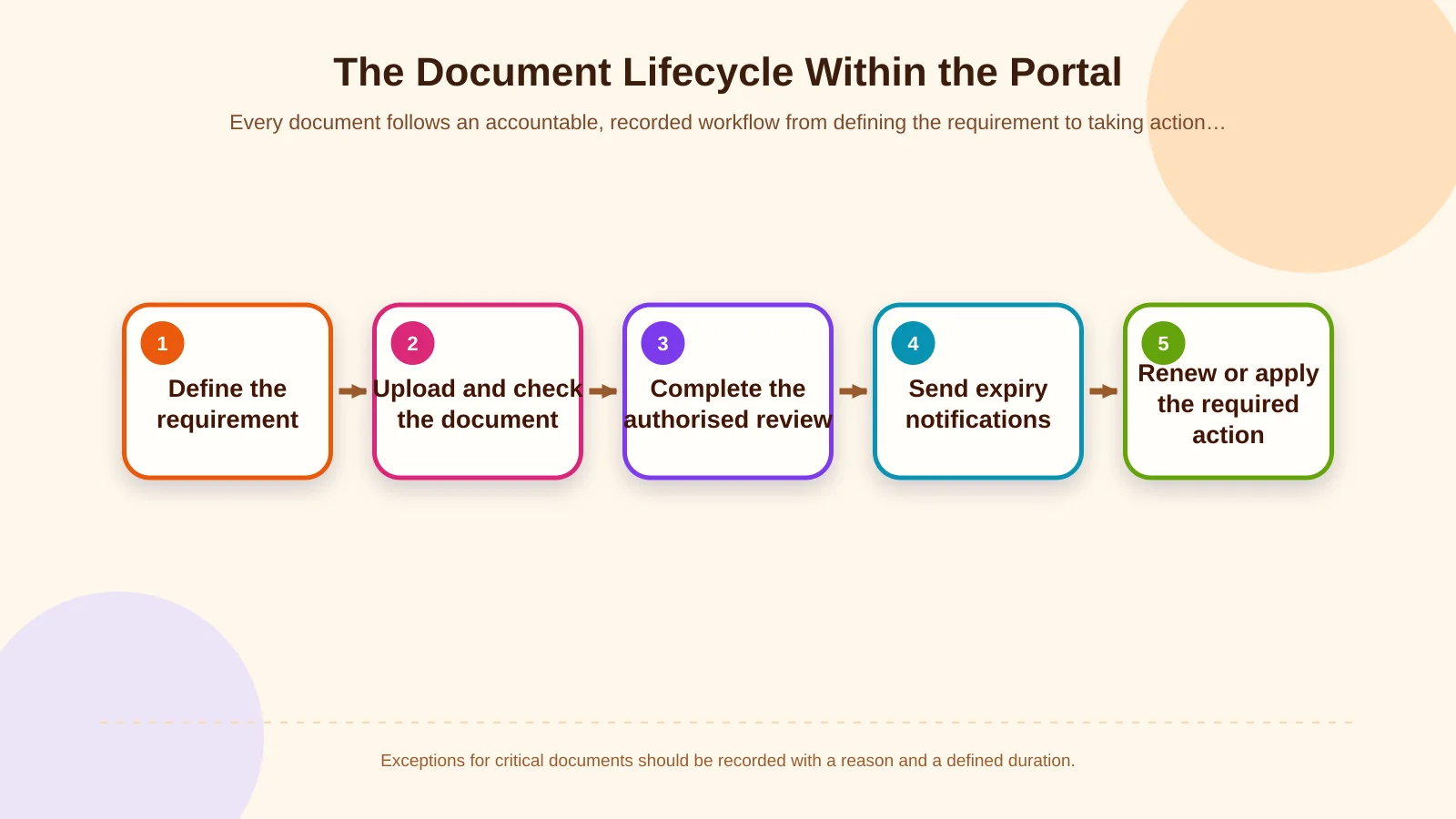
1. Define the requirement and document type
The first step is not to request identical paperwork from every supplier. Build a document matrix around risk and the commercial relationship. A logistics provider may need transport authorisations, a food supplier may require relevant quality and safety records, and a service company sending personnel on-site may need different compliance evidence. The portal should explain conditional requirements clearly and show why each document is requested.
2. Upload and run automated checks
When uploading a document, the supplier enters fields such as type, reference number, issue date and expiry date. The system can immediately check file size, format, required fields and date consistency. Automation does not replace a final decision about authenticity or suitability; it prevents incomplete or obviously invalid submissions from entering the review queue.
3. Verify and obtain authorised approval
The record enters a queue owned by quality, procurement, legal or finance according to its type. The reviewer can approve it, request a correction or reject it, recording a reason for the decision. For critical evidence, the organisation may separate preparer and approver responsibilities or use two-stage approval. ISO guidance on externally provided processes and competence emphasises defining and communicating the qualifications expected from suppliers; further context is available in the ISO 9001 Auditing Practices Group document.
4. Notify before expiry and manage renewal
An approved document’s expiry date must trigger action rather than remain a passive field. Alerts might be sent 60, 30 and 7 days before expiry. The first can go to the supplier, the second to the supplier manager, and a critical final alert to the internal process owner. When a replacement is uploaded, the previous file should be archived with its version history instead of deleted, and the new record should enter approval again.
5. Apply an expiry rule
Not every expired document should produce the same outcome. Depending on risk, the system may issue a warning, block new purchase orders, place incoming deliveries under review or temporarily deactivate the supplier. High-impact automated actions should allow an authorised exception with a reason, defined duration and complete audit record.
Document statuses and their operational consequences
A shared status dictionary prevents teams from interpreting the same label differently. “Uploaded” is not equivalent to “valid,” because the file may not yet have been reviewed. Likewise, a document approaching expiry can remain legally or operationally valid while still presenting a renewal risk.
- Missing: A mandatory document has not been uploaded for the supplier profile.
- Under review: The file is present, but authorised approval is incomplete.
- Correction required: The supplier must address an incorrect field, unreadable file or missing page.
- Valid: The document is approved and within its defined validity period.
- Expiring soon: The document remains valid but has crossed a renewal notification threshold.
- Expired: The end date has passed and the relevant business rule is active.
- Rejected: The document was found unsuitable, with the decision and reason recorded.
Dashboards should provide filters such as supplier category, responsible team, critical document type and remaining days instead of showing only a total file count. Users can then identify the exact record requiring intervention rather than receiving an unexplained red number.
| Status | Meaning | Owner | Recommended action |
|---|---|---|---|
| Missing | Mandatory record is unavailable | Supplier | Send a document request |
| Under review | Awaiting approval | Internal approver | Review the queue |
| Expiring soon | Renewal threshold reached | Supplier manager | Start staged alerts |
| Expired | Validity period has ended | Process owner | Apply the rule or an approved exception |
| Rejected | Document was found unsuitable | Supplier and approver | Request correction with a recorded reason |
How should supplier performance evaluation be designed?
Complete documentation should not automatically make a supplier a high performer. Document compliance is an eligibility condition; delivery, quality, cost, service and collaboration require separate evidence. Every criterion should have a written definition, source system, calculation period, weight and accountable owner.
Delivery performance
For an on-time delivery rate, define whether the baseline is the requested date, confirmed date or actual acceptance date. Partial deliveries, customer-requested date changes and force majeure should have explicit exception codes. Otherwise, teams may interpret identical events differently and undermine comparison.
Quality performance
Possible measures include rejection rate, non-conformity count, rework, returns, defect severity and corrective-action closure time. Event counts alone can mislead; delivered quantity and operational impact also matter. One critical non-conformity may deserve more weight than numerous low-impact defects.
Commercial and service indicators
Price competitiveness, quotation response time, compliance with contract terms, invoice accuracy, technical support and communication quality can be scored according to the business model. For subjective ratings, evaluators should enter an explanation and attach supporting evidence where possible. This turns personal opinion into a reviewable assessment.
Weighted scores and decision thresholds
The total need not be a simple average. Quality may carry more weight for a critical-component supplier, while delivery may dominate for a logistics provider. Formulas should be versioned so historical assessments retain the rules used at the time. Thresholds can lead to outcomes such as approved, improvement plan required, conditional status or suspension review, while leaving consequential decisions subject to human approval.
From evaluation period to action closure
The portal creates value not merely by calculating a score but by making the resulting action visible. When an evaluation period opens, source data can be frozen, tasks assigned and missing-data checks run. After the responsible team reviews the calculated result, it can be shared with the supplier.
Suppliers may be allowed to view results, add an explanation or appeal within a defined period. For low performance, the portal records the root cause, corrective action, owner and target date. The next review should consider not only the new score but also whether previous actions were completed. Evaluation then becomes a continuous-improvement process instead of an annual form.
User roles, security and audit trails
A supplier user should see only their company’s records; access may need further restriction across facilities or subsidiaries. Internal roles can include procurement specialist, quality evaluator, finance controller, legal approver, manager and system administrator. Permissions should cover actions—not just screens—including viewing, uploading, editing, approving, exporting and granting exceptions.
For critical events such as uploads, field changes, approvals, rejections, score updates and permission changes, record the user, timestamp, previous value, new value and reason. NIST SP 800-53 treats access control and audit and accountability as distinct control families. Its risk-based, customisable approach can be reviewed in the current NIST SP 800-53 publication.
If the portal stores names, contact details or signed documents, its scope should include a data inventory, retention periods, access boundaries and disposal rules. Turkey’s Personal Data Protection Authority states that data controllers must take appropriate technical and administrative measures to prevent unlawful processing and access and to safeguard personal data. Its official explanation of data-security obligations is a direct reference for security planning.
ERP and enterprise system integrations
If supplier master data resides in the ERP, the portal should not create a competing source of truth. Data ownership must be defined for supplier code, legal name, tax details, purchasing category and active status. Orders, goods receipts, quality inspections, returns and invoices can feed performance metrics through integrations. Approval or suspension results may return to the ERP under agreed rules.
The connection between the portal and enterprise resource planning is more than data transport. Teams must design field mappings, synchronisation frequency, error queues, retries, duplicate prevention and reconciliation screens. If a source system is unavailable, the transaction should remain recoverable and the interface must not display a misleading success message.
Reporting and management indicators
Reports should separately support operational intervention and management decisions. An operational view may highlight documents expiring today, pending reviews, overdue approvals and upcoming renewals. A management view can show compliance by category, critical-supplier exposure, performance trends, corrective-action closure time and data completeness.
Each KPI should explain its definition, scope, calculation, source and last update. A dashboard that shows a falling score without explaining why does not improve decision quality. Users should be able to drill from the total score into a delivery line, the relevant order and any recorded exception.
How should a custom supplier portal project be planned?
Begin with the current operating model, not a ready-made screen list. Identify supplier groups, who requests and verifies each document, what expires, which transactions are affected and who makes performance decisions. The team can then prepare the role matrix, document catalogue, state model, notification scenarios, scoring formulas and integration contracts.
Kumsal Agency can design custom web software and supplier portals around the organisation’s real processes. User experience, secure data infrastructure, role-based permissions, approval workflows, performance screens, reporting and required ERP connections are considered within one architecture rather than added as disconnected modules.
An initial release can focus on critical document types, essential roles and the most reliable performance data. Feedback from a pilot supplier group can refine notification thresholds, screens and exception rules before broader rollout. This validates uncertain business rules in practice and creates a sustainable foundation for future suppliers and workflows.
Controlled and traceable supplier management
A supplier portal goes beyond collecting files in one place: it makes document validity and operational performance visible within the same decision framework. With the right design, missing and expired records are identified early, approval responsibilities become clear, evaluations become comparable and the history behind critical decisions remains available.
Let us analyse your supplier documentation and performance process together and plan a portal around your user roles, approval workflows, evaluation criteria and integration requirements. The result can reduce today’s manual workload while supporting sustainable growth across new suppliers, sites and processes.