


Aydınlatma metni yükleniyor…
Successful mobile app beta testing is not simply about reaching a large number of people. It depends on assembling the right mix of participants. One hundred similar users repeating the same journey may reveal less than a smaller group representing different roles, devices, abilities and working conditions. Your beta group should therefore be designed as a compact but balanced model of the audience the product will serve.
A strong programme includes first-time users, experienced specialists, employees responsible for critical operations, people using different devices and operating-system versions, participants working with unreliable connectivity and users with accessibility requirements. The objective is not to represent every possible customer. It is to expose the meaningful differences most likely to challenge the product after release.
Why should you avoid selecting beta testers at random?
Turning a general volunteer list into a beta group is convenient, but volunteers are often close to the brand, comfortable with technology and unusually tolerant of unfinished products. The real audience may include occasional users, people with older phones, employees working under time pressure and customers who know very little about the underlying process.
Poor representation directly affects the reliability of test results. An employee-only test may not reveal that external users cannot understand internal terminology. Participants with new phones may miss performance problems, while people testing exclusively on fast Wi-Fi will not expose offline storage or synchronisation failures. The first question should therefore be “Which users can reveal each risk?” rather than “How many people can we recruit?”
How should you select a mobile app beta testing group?
User personas alone are not enough. Product objectives, critical tasks, technical conditions and operational risks should be assessed together. The following process turns a pool of candidates into a defensible beta plan.
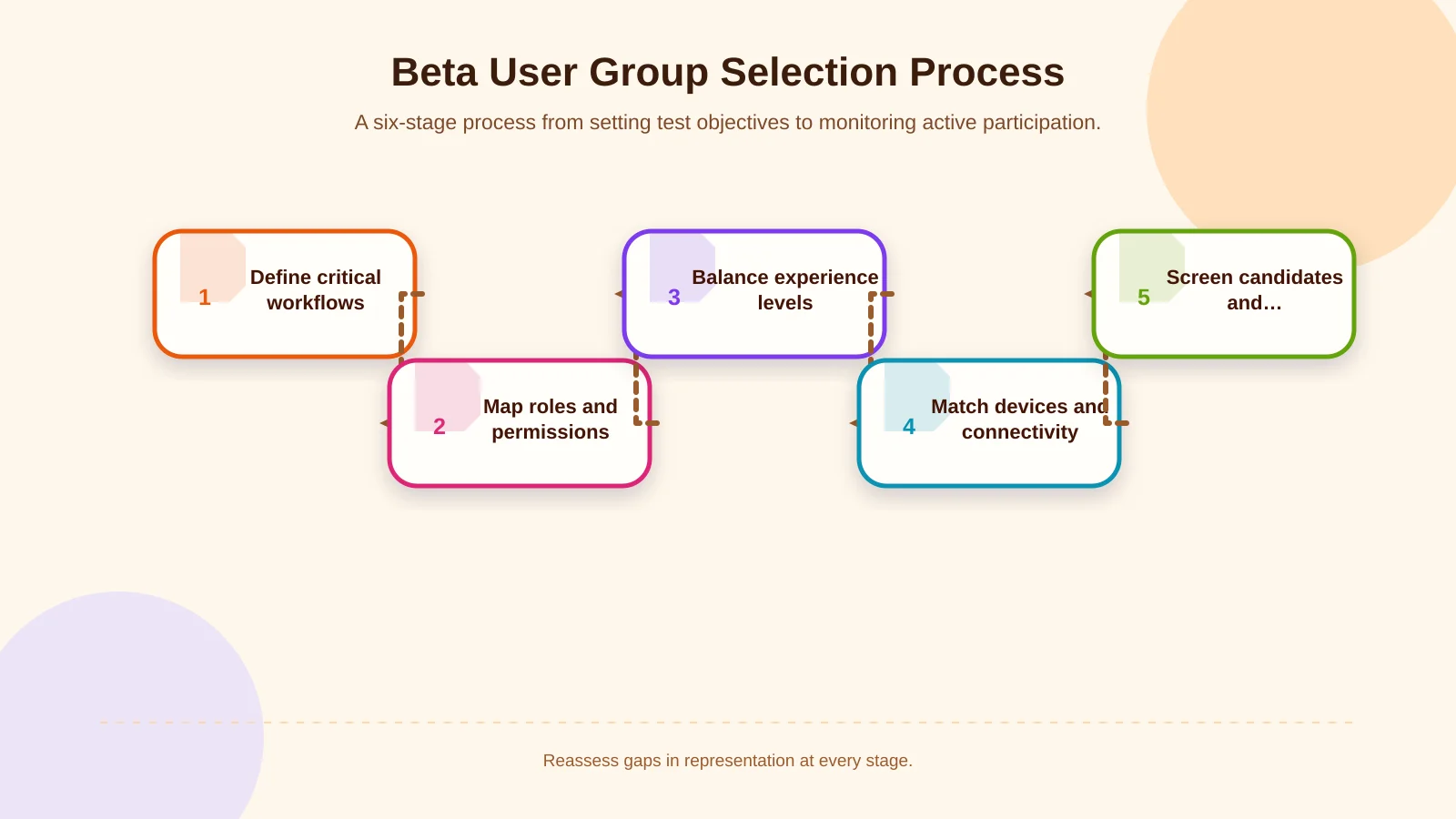
1. Define critical workflows and testing objectives
Begin by documenting the outcomes the beta build must validate. Which journeys influence the release decision: registration, authentication, search, ordering, payment, barcode scanning, location access, document upload or management approval? For every critical workflow, define the successful outcome, likely failure states and real environment in which it will be used.
In a field app, successfully submitting a form is only part of the requirement. The record should remain available if connectivity disappears, should not be duplicated when the network returns and should reach the ERP under the correct user identity. Defining such risks before recruitment allows candidates to be selected for the evidence they can provide, not merely for demographic fit.
2. Map user roles and permission levels
Customers, field staff, warehouse employees, managers, dealers and support specialists may see entirely different screens within the same application. Their sign-in methods, data access, approval authority and responses to errors can also differ. Every role that touches a critical workflow should therefore be represented.
For an enterprise product, the person initiating a transaction is no more important than the manager approving it, the employee checking the ERP result or the support specialist resolving an exception. When role-based software design and integration requirements are considered together within the scope of mobile application development, beta scenarios can remain traceable to product and engineering decisions.
3. Balance experience levels
Recruit first-time, occasional and advanced users. New users expose onboarding, registration and guidance problems. Experienced users are better at identifying missing domain rules, inefficient shortcuts and weaknesses that emerge under intensive use. Testing only with experts can hide usability barriers they overcome through familiarity.
4. Build a device and connectivity matrix
An iOS and Android split should cover more than platform names. Include supported operating-system versions, screen sizes, memory constraints, cameras and biometric features. Alongside popular devices, test older models close to the minimum supported specification.
Wi-Fi, mobile data, limited bandwidth, high latency and temporary outages are distinct test conditions, especially for field, service and warehouse applications. Teams assessing connection-resilient experiences can also review how installable and offline-capable journeys are approached in this guide to PWAs for B2B field operations and customer portals.
5. Screen candidates and fill coverage gaps
A concise screening form can capture role, app experience, device model, operating-system version, connection environment, usage frequency and accessibility requirements. Use the responses to identify missing cells in the coverage matrix rather than simply accepting candidates in arrival order. A participant who fills an uncovered condition is usually more valuable than another person with characteristics already represented several times.
6. Measure participation and refresh the group
Track invitation acceptance, installation, completed tasks, feedback quality and repeat participation. Someone who accepts an invitation but never installs the build adds no coverage. If a segment remains silent, it may need a reminder, clearer instructions or replacement candidates. A beta group is a living sample that should be rebalanced as evidence emerges, not a fixed mailing list.
Essential user segments for mobile app beta testing
The right distribution varies by product, but the following segments provide a practical starting point. One person may represent several segments, provided that this overlap is recorded clearly in the test matrix.
Genuine target users
The centre of the group should consist of people who genuinely experience the problem the product is intended to solve. For a delivery app, that may include active couriers, customers and operations coordinators. For enterprise sales software, it could include field representatives, regional managers and order-control teams. Friends or colleagues without the underlying need can comment on the interface, but they cannot reliably confirm whether the workflow reflects real work.
New, occasional and frequent users
First-time users test learnability, occasional users test whether interactions remain memorable and frequent users test speed, resilience and repetition. Heavy users may expose requirements for batch actions, rapid navigation and session continuity. New users are more likely to notice unexplained terms, ambiguous permission requests and missing guidance.
Critical-task and exception-handling users
Recruit people responsible for workflows that affect revenue, service continuity, inventory accuracy or compliance. Users who routinely handle returns, failed payments, cancellations, missing stock, rejected approvals, duplicate records and integration outages provide evidence that cannot be obtained from a perfect happy-path journey.
Users in different device and environmental conditions
Technical diversity can include lower-capacity phones, small screens, Android devices from different manufacturers, older supported iPhones, tablets and enterprise handheld terminals. Context matters too. People working in bright sunlight, wearing gloves, moving between locations or operating in noisy environments experience the interface differently from participants sitting at a desk.
Users with accessibility requirements
Include people who use screen readers, magnification, high-contrast settings, switch control or voice input. W3C explains that evaluation with disabled and older users can reveal usability problems that standards-based checks alone may not identify. It also warns against generalising from one person’s experience to everyone with similar needs. Recruit across different requirements and levels of assistive-technology experience. The methodology is explained in the W3C guidance on involving users in accessibility evaluation.
Internal stakeholders and support teams
Product, quality assurance, operations, customer service and information-security teams are valuable in the first wave. They can quickly report requirement gaps and system failures. However, their familiarity with internal language and expected behaviour means they cannot replace external users. Treat internal testing as a separate stage that removes fundamental blockers before wider access.
How should internal, closed and open beta groups be phased?
Expanding the programme as risk decreases gives the team more control than opening one build to a broad audience immediately. In the first wave, developers, QA and product teams focus on blockers such as crashes, failed installation, account errors and data loss. In the second, selected target users test critical tasks and edge cases. A broader third wave then provides stronger signals about performance, device coverage and comprehension.
Google Play Console testing documentation describes a progression from internal testing to targeted closed testing and open testing. Internal testing supports rapid distribution for early quality checks, closed testing enables focused feedback from selected users and open testing allows broader participation.
For iOS, Apple TestFlight supports internal and external tester groups, assigning different builds to groups and reviewing feedback with platform and operating-system context. Platform capacity should not determine group size by itself. Recruitment criteria must still come from product risk and representation needs.
A practical selection matrix for beta group distribution
There is no universally correct number of testers. A consumer app with one payment journey does not have the same needs as a multi-role enterprise app that works offline and connects to an ERP. Start by checking whether every critical role and condition has representation. Use multiple participants in high-risk cells so conclusions do not depend on one person’s behaviour or device.
The matrix can place user roles in rows and experience, device, connection and critical-task conditions in columns. Once participants are mapped, overrepresented and empty areas become visible. Ten Android participants may sound sufficient, but coverage remains narrow if all ten use current flagship devices on reliable networks.
| Segment | Primary evidence | Technical condition | Example task |
|---|---|---|---|
| New user | Learnability | Common device | Registration and first action |
| Frequent user | Speed and resilience | Long session | Repeated transaction |
| Operations role | Process accuracy | Weak connectivity | Save a record offline |
| User with accessibility requirements | Interaction barriers | Assistive technology | Complete a critical task |
| Manager or approver | Permissions and exceptions | ERP/API connection | Reject and correct a request |
Which testing tasks should participants receive?
“Use the app and tell us what you think” does not produce comparable evidence. Give each segment short tasks that reflect real context: a new customer creates an account, a field worker saves a record during an outage, a manager rejects a request and a customer recovers from a payment failure. Specify the intended outcome without telling participants which buttons to press.
Feedback should include the device and software version, task performed, expected result, actual result, reproduction steps and, where safe, a screenshot. Combine qualitative observations with measures such as crash rate and task completion. Severity depends not only on frequency but also on whether the problem blocks a critical workflow, damages data integrity or leaves the user unable to recover.
Common beta tester selection mistakes
- Filling the group exclusively with employees, friends or technically confident users.
- Considering user roles while ignoring device, connectivity and workplace diversity.
- Treating invitation volume as a quality measure without monitoring installation and task participation.
- Testing only successful journeys while excluding errors, cancellations, outages and retries.
- Postponing participation by users with accessibility requirements until after release.
- Using production data without adequate controls or granting participants excessive access.
- Sending identical tasks to every group despite differences in roles and risks.
How can you protect security, data and integration scope?
Enterprise beta testing must balance realism with data protection. Give each participant only the permissions required for their role, use synthetic or masked data where possible and place time limits on test accounts. Remember that screenshots and diagnostic logs may expose personal or commercially sensitive information.
For apps connected to ERP, CRM, payment or identity services, document exactly which systems the test environment can update. Assign responsibility for failed requests, timeouts, duplicate submissions and rollbacks. A shared React Native codebase also does not remove the need to validate iOS and Android separately on real devices.
What evidence should support the release decision?
A beta should close when predefined exit criteria are met, not simply when the calendar runs out. Review blocker status, critical-task completion, data-loss and duplication risks, stability across supported devices, accessibility findings and integration results together. Confirm that every important segment actively participated rather than merely receiving an invitation.
The right beta group is not a randomly reduced version of the market. It is a deliberately constructed system representing the product’s business, experience and technical risks. Kumsal Agency brings business ideas, user needs and technical requirements together to plan React Native mobile products with strong software infrastructure, data security and enterprise integrations. To plan beta groups and scenarios around real user needs and technical requirements, contact Kumsal Agency.