


Aydınlatma metni yükleniyor…
A brand story is more than a long account of founding dates, values and achievements. It is a strategic narrative that helps visitors understand why the brand matters, how it has evolved and what it offers today. A scroll-based web experience transforms that narrative into a visual, interactive journey whose pace is shaped by the visitor’s movement through the page.
Adding a few animated elements, however, does not automatically create a meaningful brand experience. If motion is disconnected from the content, the mobile page is too demanding or visitors cannot find essential information, the result is little more than a short-lived spectacle. Lasting value comes from treating brand strategy, content hierarchy, art direction, user flow and software development as parts of one system.
This guide explains how marketing managers, brand teams and corporate decision-makers can plan a scroll-led narrative, identify content that genuinely benefits from motion and deliver the experience without sacrificing accessibility, performance or maintainability.
What is a scroll-based web experience?
A scroll-based experience connects changes in content or visuals to the visitor’s progress through a page. The parts of a product might assemble as the user scrolls, company milestones might appear in sequence, or a brand’s transformation could unfold within one continuous scene. The visitor does not simply read the story; they influence its pace through their own movement.
There are two principal approaches. In a scroll-triggered experience, an animation begins when the user reaches a defined section. In a scroll-driven experience, the animation’s progress is directly connected to scroll distance, so the sequence may also reverse when the user scrolls back. The MDN guide to scroll-driven animation timelines explains the technical distinction between timelines based on overall scroll progress and those based on an element’s position within the viewport.
The right method depends on the scene’s purpose. A triggered animation may be enough to emphasise a message when it enters view. A production process, product assembly or before-and-after transformation may benefit from progress controlled directly by scrolling. Technology should support comprehension rather than compete with the story.
How to divide a brand story into scenes
The starting point is not animation but the narrative structure. First define the question that brings the target user to the page and what that person should understand, feel or do by the end. The story can then be divided into scenes, each carrying one primary message.
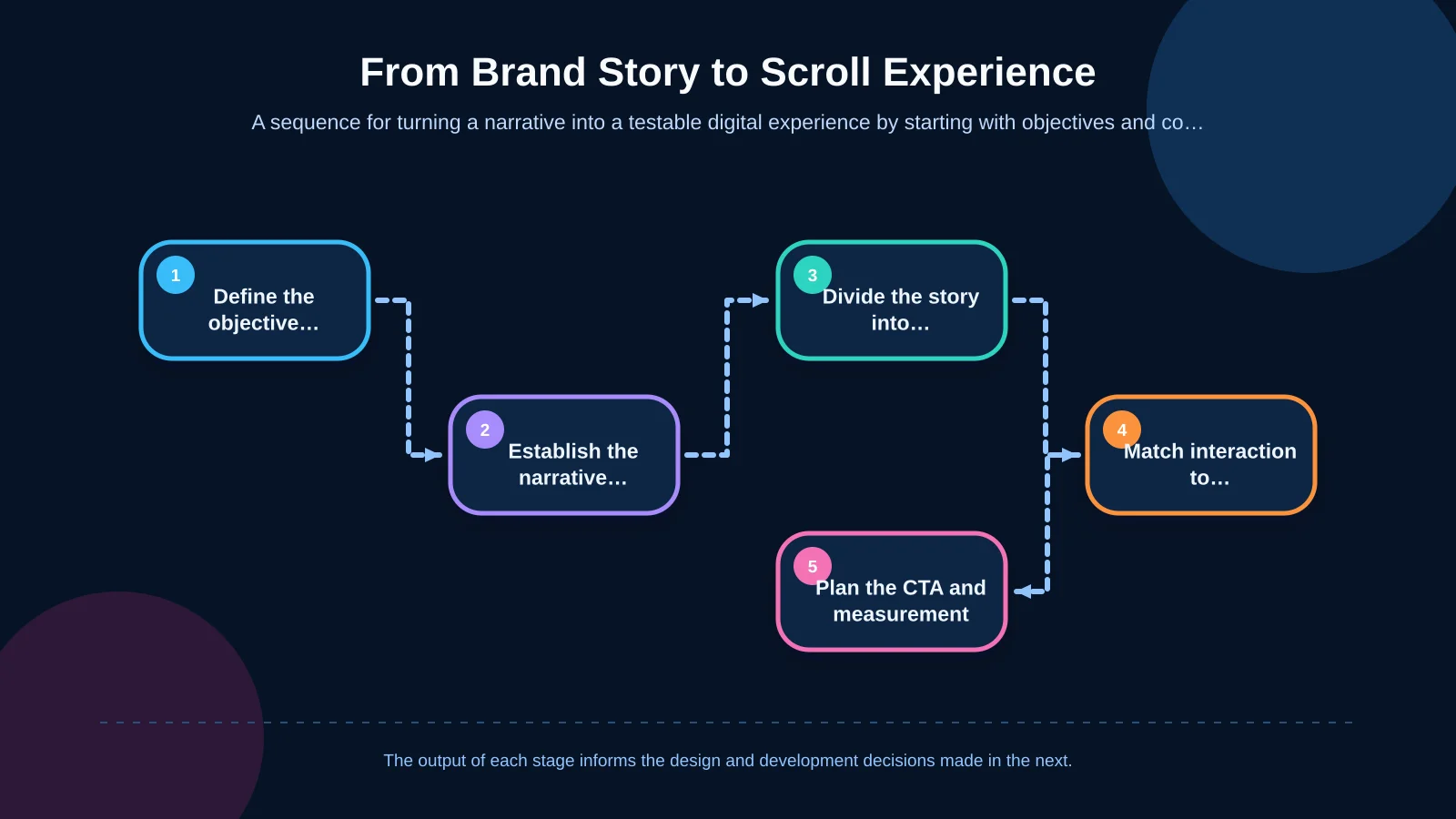
1. Define the communication objective and audience
A corporate transformation story intended to reassure investors cannot be structured in the same way as the launch of a new product family for consumers. Document the audience’s existing knowledge, decision time, preferred devices and expected next action. Replace a vague ambition such as “create an impressive page” with a measurable objective—for example, “help visitors understand the brand’s path to specialisation and continue to a relevant project.”
2. Establish the narrative spine
A strong flow often moves through context, a problem or need, transformation, evidence and future direction. The order can be adapted to the brand, but the cause-and-effect relationship between scenes must remain clear. A content matrix can document each section’s purpose, required assets, owner, approval status and intended next step before visual production begins.
3. Give each scene one message
If a scene tries to cover the company’s origins, product benefits, social impact and an executive statement at once, attention becomes fragmented. Its heading, supporting copy, visual evidence and transition should all perform one communication task. Visitors must still be able to understand the page’s main argument when motion is unavailable.
4. Match interaction to content
A timeline might follow a route, product layers might be revealed through controlled magnification, and geographic growth might appear as locations opening across a map. For every scene, ask: “Which information does this movement make easier to understand?” If there is no clear answer, simplify or remove the animation.
5. Make the next step visible
The story should not end with a decorative finale. It should lead visitors toward a project, service, quotation request or conversation. Calls to action can appear at suitable points where intent has developed, not only at the bottom of the page. Avoid interrupting the narrative with repeated pop-ups or constantly moving buttons.
Creative direction should come before motion
The visual language of a scroll-based page should extend the brand identity into motion. Typography, colour, photography, illustration, sound and transition rhythm need to support one creative idea. Familiar visual shorthand—such as adding neon lines to any technology brand—rarely creates a distinctive or credible meaning.
In an Art Director-led process, the team first defines a visual metaphor for the story. A materials manufacturer’s transformation could follow raw material as it becomes a finished product. A long-established service company might tell its story through physical objects passed between generations. The metaphor then provides a shared direction for photography, video, 3D assets and typographic motion. Kumsal Agency’s digital brand consulting approach similarly brings visual direction, experience principles and the communication system together within a research-led roadmap.
A storyboard should show the opening, transition and final state of every scene. Mobile framing needs to be considered at the same stage as desktop, rather than after the main concept is approved. This makes shot lists, animation assets, copy limits and development requirements visible early, reducing expensive changes during production.
How can content hierarchy and user control be preserved?
A scroll narrative may look linear, but user behaviour is not. Visitors might scroll quickly, enter halfway down the page, move backwards or scan only the headings. The content must therefore remain understandable before an animation finishes, and important evidence should never exist only in a fleeting frame.
Headings should be concise and descriptive, while body copy should remain comfortable to read. If sections are pinned, users need a sense of how much progress is required. Excessively long sticky scenes can make the interface feel trapped. Progress indicators, section markers or visible continuation cues can clarify the visitor’s position without adding unnecessary controls.
Keyboard focus, meaningful link labels, image alternatives and sufficient colour contrast must be planned as part of the moving interface. When animation is disabled, the reading order should remain intact and the page should continue to work as a standard document. This also gives search engines a clearer relationship between headings, copy and supporting media.
Performance and mobile compatibility are design decisions
High-resolution video, large image sequences and JavaScript work that runs on every scroll event may look impressive on a powerful desktop computer but stutter on a mid-range phone. Performance optimisation is therefore not a final cleanup exercise. It is a scope decision made while the creative concept is being formed.
Where possible, animations should prioritise transform and opacity instead of properties that repeatedly trigger layout or painting. The web.dev guide to high-performance CSS animations explains these rendering costs and recommends keeping suitable animation work in the compositing stage. Optimisation hints such as will-change should be applied selectively in response to measured needs, not added indiscriminately to every moving element.
Images and videos should be produced at appropriate dimensions, compressed into suitable modern formats and deferred until they approach the viewport. Mobile delivery may use fewer scenes, remove certain parallax layers or replace a video with a carefully selected still frame. This is not an incomplete copy of the desktop page; it is the same story directed for different device conditions.
The technical scope should be tested across target browsers, lower-powered devices, slower connections and reduced-motion settings. If an enhancement has limited browser support, the core content requires a dependable fallback. When animation logic, content management and integrations must be tailored to the project, custom web development should be planned alongside design rather than introduced after creative approval.
| Control area | Risk | Planned measure | Validation |
|---|---|---|---|
| Animation properties | Layout and paint overhead | Prioritise transform and opacity | Performance profile |
| Images and video | Slow loading and excessive data use | Correct sizing, compression and deferred loading | Mobile network test |
| Device compatibility | Stuttering on lower-powered phones | Simplify scenes and layers | Real-device test |
| Browser support | Experience fails to operate | Fallback for core content | Target-browser matrix |
| User preference | Discomfort caused by motion | Reduced-motion alternative | Accessibility test |
Reduced-motion preferences and accessible experiences
Parallax, rapid zooming and movement across large areas can cause discomfort, distraction or nausea for some users. The experience should recognise the operating system’s reduced-motion preference and provide a calmer alternative without losing the central message.
The W3C technique for using prefers-reduced-motion describes how motion triggered by interaction can be prevented through this media query. In practice, large movements can be removed, transitions can become brief fades, or content can appear directly in its final state.
Reduced-motion mode must not become a separate, incomplete experience. All copy, evidence, links and calls to action should remain available. Audio should not play automatically, and video needs appropriate pause and playback controls. The creative idea then becomes a user-controlled storytelling tool rather than a choreography imposed on every visitor.
How should content management and sustainability be planned?
A major risk in scroll-based projects is requiring developer involvement for every copy change. If story scenes are designed as a content model, authorised teams can manage fields such as headings, descriptions, media, calls to action and sequence through the content management system. Limits on text length and media ratios are still useful because unrestricted editing can disrupt the designed rhythm.
The model should also support multilingual delivery. Translations vary in length, so scenes that depend on fixed heights can fail. Text expansion, right-to-left requirements, localised imagery and language-specific video should form part of the test plan where applicable.
Post-launch responsibilities should cover animation libraries, browser compatibility, media optimisation, security updates and backups. Analytics must also operate without undermining performance or conflicting with users’ consent choices. Clear ownership turns the experience from a one-off campaign asset into a maintainable part of the corporate website.
Which indicators should measure success?
Success cannot be judged solely by an increase in time on page. A long visit may indicate interest, but it can also mean that users are struggling to find their way. Measurement should be defined against the original brand and business objective.
Reach and completion rates for critical story scenes
Click-through rates to relevant project, service or product pages
CTA impressions, clicks and form completion rates
Scene-level abandonment on mobile and desktop devices
Loading, visual stability and interaction performance in real-user data
Differences in task completion between standard and reduced-motion experiences
Before launch, task-based usability sessions can ask participants to explain the brand promise, locate a specific piece of evidence and complete the intended contact journey. After launch, analytics, user feedback and performance measurements should be interpreted together. If a scene attracts attention but blocks progress, it needs revision even when it appears creatively successful.
How should a scroll-based project be scoped?
A reliable proposal requires more detail than a page count. Brand-story research, copywriting, creative concept, storyboards, original photography, video or 3D production, animation, development, content management, languages, analytics, device testing and post-launch support should be evaluated as distinct workstreams with clear dependencies.
Instead of animating an entire website immediately, the first release could focus on the homepage section or dedicated narrative page that carries the story most effectively. A prototype can validate pacing, interaction and technical feasibility before the system expands. This also gives stakeholders something concrete to test before the costliest production decisions are locked in.
Kumsal Agency combines research-led brand consulting, Art Director-led creative design, production support and a strong software foundation within one project flow. Scroll experiences are therefore considered not only as eye-catching animation, but also through information architecture, responsive behaviour, performance, data security and editorial manageability.
To evaluate your brand story, target users and expected business outcomes together—and define the right scope for a scroll-based web experience—contact Kumsal Agency.