


Aydınlatma metni yükleniyor…
A dealer application and onboarding portal is more than a paper form moved online. It turns organisational identity, channel eligibility, document evidence, accountable decisions and account-readiness conditions into a traceable process.
This guide is for channel sales, operations, finance, legal and technology teams. Its goal is not automatic acceptance. It is a secure application system in which verifiable evidence, separated authority and human judgement work together.
Why onboarding is larger than one application form
An applicant does not become a dealer after submitting contact details. Business activity, territory, channel conflict, commercial review, document validity, agreement and account permissions are separate decisions. Compressing them into one approved flag hides incomplete evidence, unclear ownership and unsafe account activation.
NIST describes identity proofing through resolution, validation, verification and enrolment. A dealer portal does not have to adopt the standard as a certification programme, but it should preserve the difference between “a file was uploaded” and “the organisation and representative were verified.” NIST SP 800-63A explains the risk-based identity-proofing process.
The seven-gate dealer acceptance model
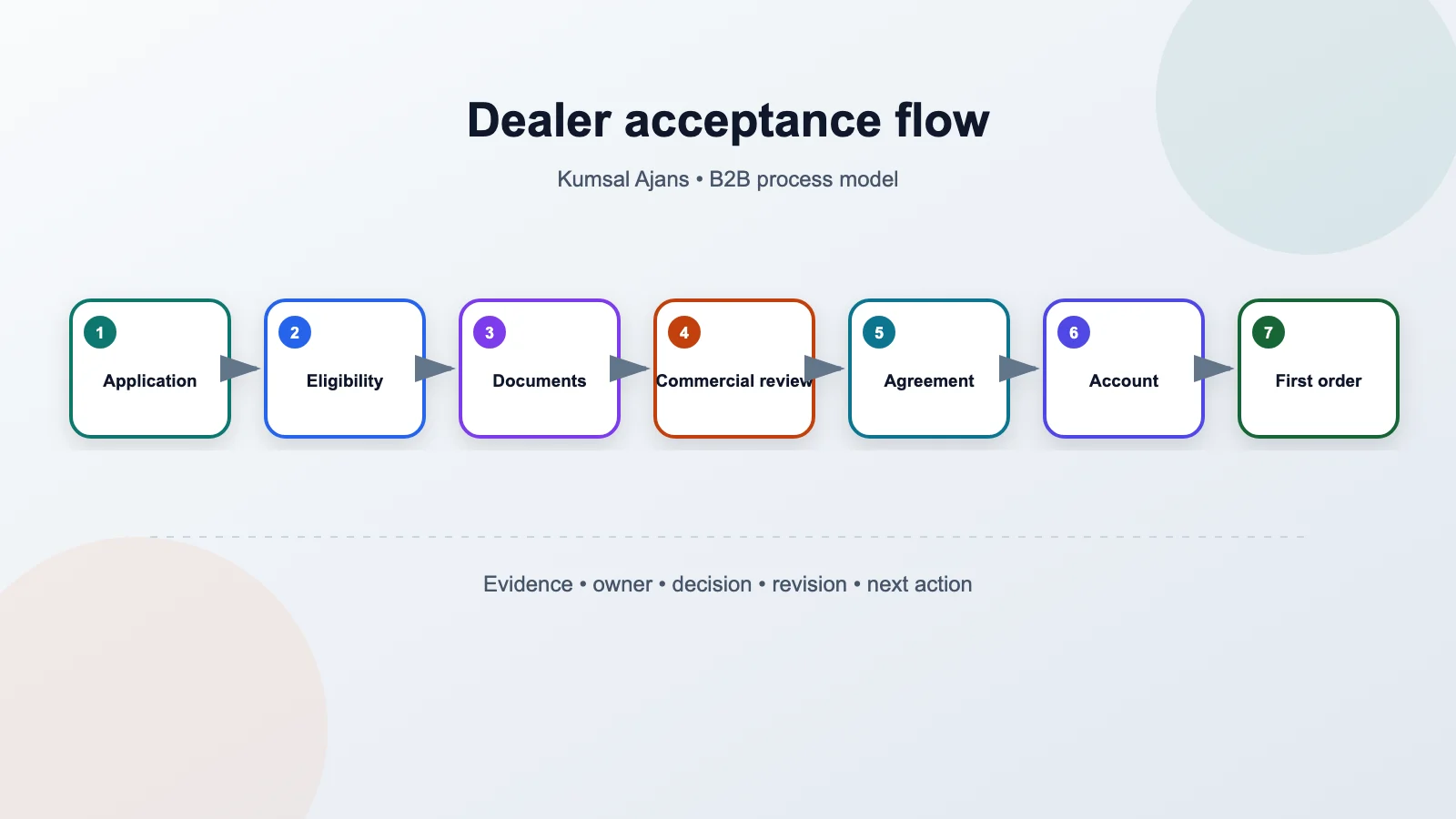
- Application: capture organisation, representative, territory and activity.
- Eligibility: review channel, product-group and territory rules.
- Documents: validate required files by type, revision and validity.
- Commercial review: decide price group, payment model and limit.
- Agreement: accept the correct text, party and revision.
- Account creation: create ERP, CRM and portal identities under control.
- First-order readiness: test users, addresses, prices and permissions.
Separate the data model from application status
The applicant organisation, representative, application, document, review, decision, agreement and activated account should be separate records. When one organisation applies for another territory, its identity is not copied; the new application retains its own scope and decision history.
Record who changed a field, when, from which source and why. Use controlled rejection, return and waiting reasons alongside notes. Keep internal comments behind distinct permissions when applicants must not see them.
Make the form conditional and resumable
Do not request every possible field on the first screen. Reveal requirements according to organisation type, country, activity and channel. Provide save-and-resume, a completion checklist and an explanation for every required document. If the same fact appears in a form and a document, define which source prevails.
Email and phone verification prove control of a communication channel; they do not by themselves prove authority to represent a company. Preserve that distinction in both interface language and decision rules.
Treat document upload as a security process
Do not trust a filename extension. Allowlist necessary types, inspect file signatures, rename uploads, enforce size limits, scan content and keep files away from the public web root. OWASP recommends combining extension, content type, signature, filename, size, storage and authorisation controls. The OWASP File Upload Cheat Sheet summarises this layered approach.
Do not reduce a document to present or absent. Record its type, owning organisation, period, revision, uploader, verifier, validity and rejection reason. Define separately how an expiring document affects an already active dealer account.
Let automation support a decision, not own it
Field formats, duplicate registration numbers, missing documents and prohibited file types can be checked automatically. Commercial suitability, territory conflict or exceptional credit conditions should be assigned to accountable roles. When a rule stops an application, retain the rule version and an explainable reason.
A rejection should provide an understandable category and, where appropriate, a route to reapply without exposing unnecessary internal detail. Manual overrides require a privileged role and a mandatory reason.
Sequence CRM, ERP and portal account creation
A CRM prospect, ERP customer account and portal user may not all be created successfully in one transaction. Define idempotency keys, external identifiers, states, retry behaviour and a human review queue for each system. Prevent ordering if the portal account exists but the required ERP account failed.
Document the source of truth for price group, currency, tax treatment, fulfilment warehouse, sales representative and payment terms. The same field-ownership method is explained in the ecommerce and ERP integration guide.
Start access control from the organisation account
The first user should not automatically remain an unrestricted administrator forever. Design invitation, acceptance, revocation and transfer rules for organisation administrators, buyers, finance users and warehouse roles. An administrator must be able to remove a departing employee, with a controlled recovery route when no administrator remains.
Acceptance tests and useful measures
- A duplicate registration number with a legitimate new-territory application;
- A renamed, oversized, corrupt or malicious document;
- A document revision that changes during active review;
- An approver who is absent or whose permission was removed;
- Successful CRM creation but failed and retried ERP account creation;
- An attempt to open another organisation’s application or document URL;
- Form completion on mobile, keyboard and screen reader.
Application volume alone is not success. Observe completion, waiting time by gate, repeated document requests, unexplained rejection, integration errors, first sign-in and first-valid-order readiness. Set targets from real baseline data rather than assuming universal improvements.
Conclusion
Divide implementation into four deliverables
Discovery and decision map: review existing applications, real rejection and rework reasons, document types, approval times and system failures through sample records. Define the input, owner, service expectation, applicant message and exit condition for each gate. Ask accountable legal and compliance owners to confirm requirements instead of assuming them.
Pilot product: begin with one country, limited dealer types and a small document set. Complete the form, saved draft, file handling, review queue, decision history and core notifications. A controlled ERP-creation task can be safer than full automation during the first pilot because teams can verify field mappings against real applications.
Integration and authority: transfer approved fields to CRM and ERP through idempotent operations and attach returned identifiers to the application. Activate the organisation account, first user, role invitations and order-readiness checks as separate stages.
Measurement and expansion: learn which fields lead to abandonment, which documents are repeatedly requested and which decisions wait. Add a country, dealer type or automation rule only with an owner, tests and rollback plan.
What should the implementation proposal deliver?
- Application, organisation, representative, document, decision, agreement and account data models;
- Conditional form, saved-draft behaviour and document-requirement matrix;
- State dictionary, approval roles, escalation and delegation flows;
- File security, retention, deletion and access policies;
- CRM/ERP field mapping, exception queue and retry rules;
- Accessibility, security, integration and boundary-case tests;
- Operations workspace, audit trail, baseline reporting and technical handover.
Do not scope the product through a vague promise that artificial intelligence reads documents and activates dealers. Define which fields are extracted, which evidence validates them, who reviews low-confidence results and how an incorrect result can be corrected.
Sound onboarding means clearer decisions, safer evidence, controlled authority and traceable integration before it means a faster form. To scope a dealer application and onboarding product, explore Kumsal Agency’s web software services. Bring the current form, document list, approval roles, agreement revisions and system fields to discovery.