


Aydınlatma metni yükleniyor…
In ERP systems, B2B portals, e-commerce administration tools and custom enterprise software, data tables often sit at the centre of daily operations. Sales teams use them to review open quotations, finance teams monitor overdue receivables, purchasing teams process pending requests, and warehouse teams identify critical stock. When a table containing thousands of records is treated as a simple collection of rows and columns, users spend more time finding the right record and face a greater risk of acting on the wrong result set.
A well-designed data-heavy table helps users understand their scope, narrow the dataset, establish meaningful priorities and act on selected records with confidence. Search, filtering, sorting, pagination and bulk actions should therefore be designed as connected parts of the same query and workflow. This turns the table from a passive list into a measurable, traceable operational tool.
Why data-heavy table design is more than a visual decision
Table usability depends on modelling the business process correctly before deciding how many columns fit on screen. An orders table may appear complete with an order number, customer, date and total. If the team also uses that screen to investigate shipping delays, check payment risk and assign ownership, however, warehouse, status history, payment and assignee data become part of the decision.
Before interface design begins, define the questions each user role needs to answer. A sales representative may need to see their own accounts, a regional manager may need an aggregated team view, and a finance specialist may need accounts that are overdue or above their risk limit. Even when every role uses the same data source, default columns, available filters and permitted actions can differ.
For projects involving organisation-specific data models, permissions and integrations, a custom web development approach connects interface decisions to back-end business rules. Every option presented in the table can then correspond to a real access policy and verified transaction authority.
How should the filtering, sorting and action flow work?
The experience should follow the user’s natural working sequence. First establish the task and accessible data scope. Then narrow the result set through search and filters. Sorting reveals priorities, selection defines the action scope, and a preview provides a final opportunity to verify the consequences.
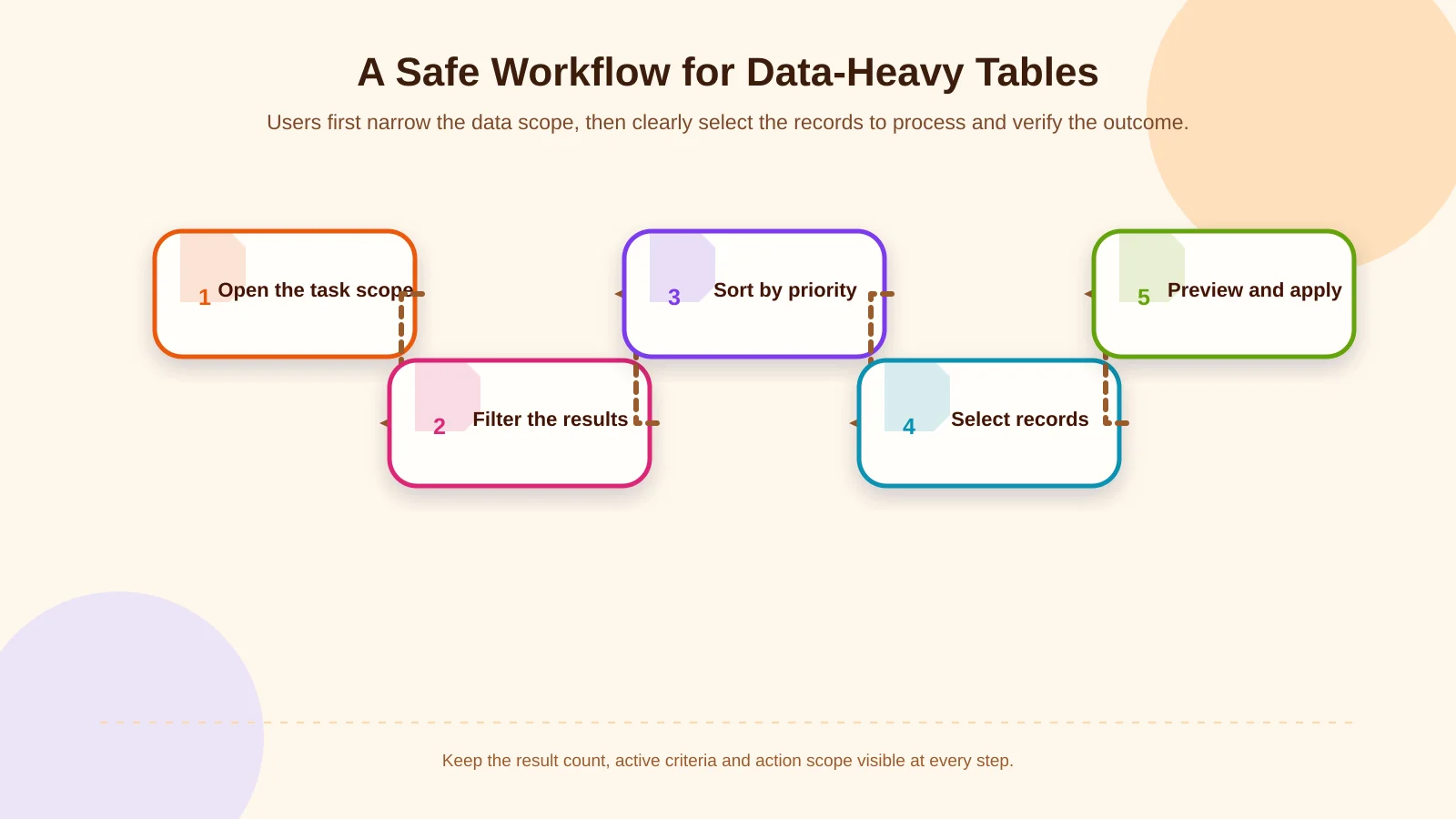
1. Open with a task-relevant data scope
Showing every record in the organisation is rarely the best default. Views such as “Assigned to me”, “Shipping today” or “Awaiting approval” reduce query load and unnecessary scanning. The initial scope must still be stated clearly so users understand which records are shown and why.
2. Narrow the result set with search and filters
Free-text search should operate on declared fields such as order number, account code, product name or email address. Users should not have to guess which fields are searched or whether partial matches are supported. Structured criteria such as status, date range, warehouse, assignee and value should be offered as separate filters.
3. Make operational priority visible through sorting
Sorting is not merely alphabetical ordering. Due date, risk value, stock shortfall and last-updated time can reveal what requires attention first. The active column and direction should remain visible. Where multi-column sorting is supported, the primary and secondary criteria must be clearly numbered or otherwise explained.
4. Select the records to be processed
Row selection creates a temporary action scope. Keep the selected count visible and explain whether selection persists when users change pages. Selecting 50 records on the current page is fundamentally different from selecting all 8,420 records matching the filters.
5. Preview, apply and record the outcome
Before a bulk assignment or status update, show the number of affected records, the new value and any records that cannot be processed. After execution, separate successful, failed and skipped records. Record the transaction identifier, user and time in the audit trail.
Which principles make filters effective?
Filters should not be created by exposing every database field. Begin with recurring business questions: Which orders may be delayed today? Which invoices are awaiting approval? Which products have reached critical stock? These questions translate into useful filter groups such as date, status, assignee, customer segment and stock level.
Instant filtering works well for a small number of criteria that return quickly. An explicit “Apply filters” action is more controlled when users select across several categories or each change triggers an expensive server query. Carbon Design System’s filtering guidance similarly notes that batching filter changes can reduce unnecessary refreshes in complex or slower datasets.
Summarise active criteria as visible labels outside the filter panel and let users remove them individually. A “Clear filters” control should return the table safely to its defined initial state. If a preliminary result count can be calculated affordably, show it before application; after filtering, always update the definitive total.
Date controls must define the time zone and whether range boundaries are inclusive. Monetary filters need a currency context, while status filters must reflect the current workflow rather than obsolete labels. A technically valid query can still produce an operationally incorrect result when these meanings are ambiguous.
Priority and consistency in sorting design
Sortable columns need an explicit control in their headers. Colour or hover states alone make the feature unclear on touchscreens and for keyboard users. Sorting direction should have an accessible name, while dates, numbers and text must be evaluated according to their underlying data types. A formatted value such as “£1,250.00” should be sorted numerically, not as text.
Apply a stable secondary order when multiple rows share the same value. Records with the same due date might be ordered by order number, for example. This prevents rows from shifting unpredictably between pages. With server-side sorting, filtering, sorting and pagination must operate in one query context. Sorting only the visible browser page creates a misleading view of the dataset.
Frequently used configurations can be stored as saved views. An “Overdue high-risk orders” view might preserve filters, sorting, selected columns and density together. Decide whether views are personal or shared, who may publish them, and how later changes by the owner affect other users.
Scope, permissions and feedback in bulk action design
Bulk actions save time but amplify the consequences of a mistake. The relationship between selection and action must therefore remain visible. A bulk-action bar can appear after the first row is selected and should show only actions available for every applicable record. Carbon’s data table guidelines recommend disabling row-specific actions while bulk-action mode is active, helping prevent scope confusion.
| Control point | Information shown to the user | System behaviour | Audit record |
|---|---|---|---|
| Selection | Number of selected records | Distinguish the page from the complete result set | Filter summary |
| Permission | Records that cannot be processed | Revalidate every record | User and role |
| Confirmation | Changed value and expected impact | Require approval based on risk | Reason and time |
| Outcome | Successful, failed and skipped records | Offer a safe retry | Transaction identifier |
State the selection scope explicitly
The select-all checkbox may initially select only the visible page. If users can subsequently select every filtered result, present that as a distinct second step with a clear message. Changing filters may clear, preserve or recalculate a selection, but that behaviour must be an intentional product rule and must never occur silently.
Permissions are not just button visibility
Hiding a button is not an adequate security control. At execution time, the server should revalidate every record against role, organisation, branch, ownership and workflow-state rules. If a user can update some selected records but only view others, define how partial success will be handled. In projects where shared ERP data and processes establish these rules, enterprise resource planning must be considered alongside the interface.
High-risk actions need stronger safeguards
For deletion, cancellation, price changes or financial-status updates, a confirmation dialog should say more than “Are you sure?” Summarise the affected count, changed value, reversibility and integration impact. Very large or sensitive changes may require a reason, a second confirmation or approval from an authorised person.
Make outcomes traceable at record level
Long-running actions can execute as background jobs. Users should be able to track progress and return to the result after closing the screen. Completion feedback must distinguish successful, failed and skipped records, with failures available as a filtered view or actionable export. For exports, log the requester, filter summary, generation time and file-retention period.
Balancing pagination, progressive loading and performance
Pagination is effective when users need to return to a known position or understand the total record count. Progressive loading can feel smoother for browsing, but it complicates keyboard access, selection and the meaning of “all results”. Infinite scrolling is usually a poor fit for operational screens where users compare thousands of records or perform bulk actions.
Server-side filtering, sorting and pagination provide more consistent performance for large datasets. Measure indexes, calculated-column costs, total-count queries and ERP integration latency together. During loading, provide a skeleton or progress state, and distinguish an empty result from a connection failure or timeout.
These principles also apply to high-volume order intake. The workflow described in planning B2B bulk ordering shows how validation, previews and record-level errors can protect users before data is submitted to ERP systems.
Accessibility across devices and screen sizes
Squeezing every desktop column onto a mobile screen damages readability. Keep priority fields visible, move secondary information into expandable row details, or offer a task-focused card layout. The meaning of an action and its permission checks should remain consistent across devices.
Keyboard focus must be visible, and checkboxes, sorting controls and row actions need understandable names. The W3C interactive grid pattern explains arrow-key navigation, focus management, selection and sorting information for advanced grids. A standard HTML table should not receive complex grid behaviour unnecessarily; choose semantics that match the actual interaction model.
Never communicate status through colour alone. Delayed or invalid records should also include text or an icon with an accessible label. Bulk-action results must be announced to assistive technologies without unexpectedly moving focus to the top of the table. Test real tasks with keyboards, screen readers, zoom and narrow viewports.
Project analysis and acceptance criteria
A successful table specification is more than a screen mock-up. Define the data dictionary, role-permission matrix, filter rules, sorting criteria, selection scope, bulk-action states, integration failures and audit events together. Prototype testing with sales, finance, purchasing and operations teams can expose unnecessary columns and missing controls early.
Acceptance tests should use measurable scenarios. Can a user find the correct record by reference number? Do two filters produce the correct total together? Does selection behave as expected after a page change? Are unauthorised records excluded at execution time? Is retrying safe after a partial failure? Performance tests should use realistic data volumes and concurrent-user levels.
Kumsal Agency approaches web design, custom web software, mobile applications, e-commerce and ERP from a shared business-process perspective. The goal is to turn data-heavy tables into operational tools where users can reach the correct record quickly, understand their decisions and complete multi-record actions with fewer errors.
Plan your data-heavy tables around real workflows
A complete filtering, sorting and bulk-action experience cannot be delivered by choosing a ready-made table component alone. Data sources, user roles, action risk, performance targets and integration behaviour must inform the same design system. To analyse your tables against real workflows, permissions and integration requirements—and plan a project-specific experience—contact Kumsal Agency.