


Aydınlatma metni yükleniyor…
Laboratory sample tracking software manages every movement between the physical receipt of a sample and the controlled release of a verified result. Its purpose is not simply to display where a sample is. The system should also show who received it, when and under what conditions it arrived, which analyses were requested, who completed the work, who reviewed the findings and which report version was released to the customer.
This shared record connects sample reception, laboratory, quality, field, operations and customer relations teams. Barcode or QR identification, role-based permissions, timestamps, document management and ERP integration reduce dependence on personal follow-up and disconnected spreadsheets. The right solution, however, is not a fixed collection of screens imposed on every laboratory. It is custom software that reflects the organisation’s sample types, approval rules, responsibilities and operational exceptions.
Why is sample receipt more than a registration step?
Sample receipt establishes the foundation for every subsequent laboratory activity. A single “received” status is rarely sufficient. The record may need to include the sender, receiving employee, date and time, sample type and quantity, packaging, temperature or storage conditions, requested tests and accompanying documents. Where relevant, field collection details, the carrier and earlier custody events should also be associated with the same sample.
A sample that fails the acceptance criteria should not enter the standard workflow without explanation. Damaged packaging, insufficient quantity, an unreadable label, an unsuitable container, late delivery or an unacceptable temperature can open an exception record. The user may attach photographs or an incident form, while the quality team decides whether to accept the sample conditionally, reject it or request a replacement. This makes it possible to connect the nonconformity to the eventual result and explain its significance to the customer.
How should the end-to-end sample and result approval workflow be designed?
A well-designed workflow gives every status explicit entry and exit conditions. Instead of a broad status such as “in the laboratory,” the system can use operational states including awaiting receipt, accepted, assigned to analyst, analysis in progress, awaiting technical review, awaiting quality approval and published. Recording each transition with the user, timestamp, previous status and reason gives every team a consistent operational view.
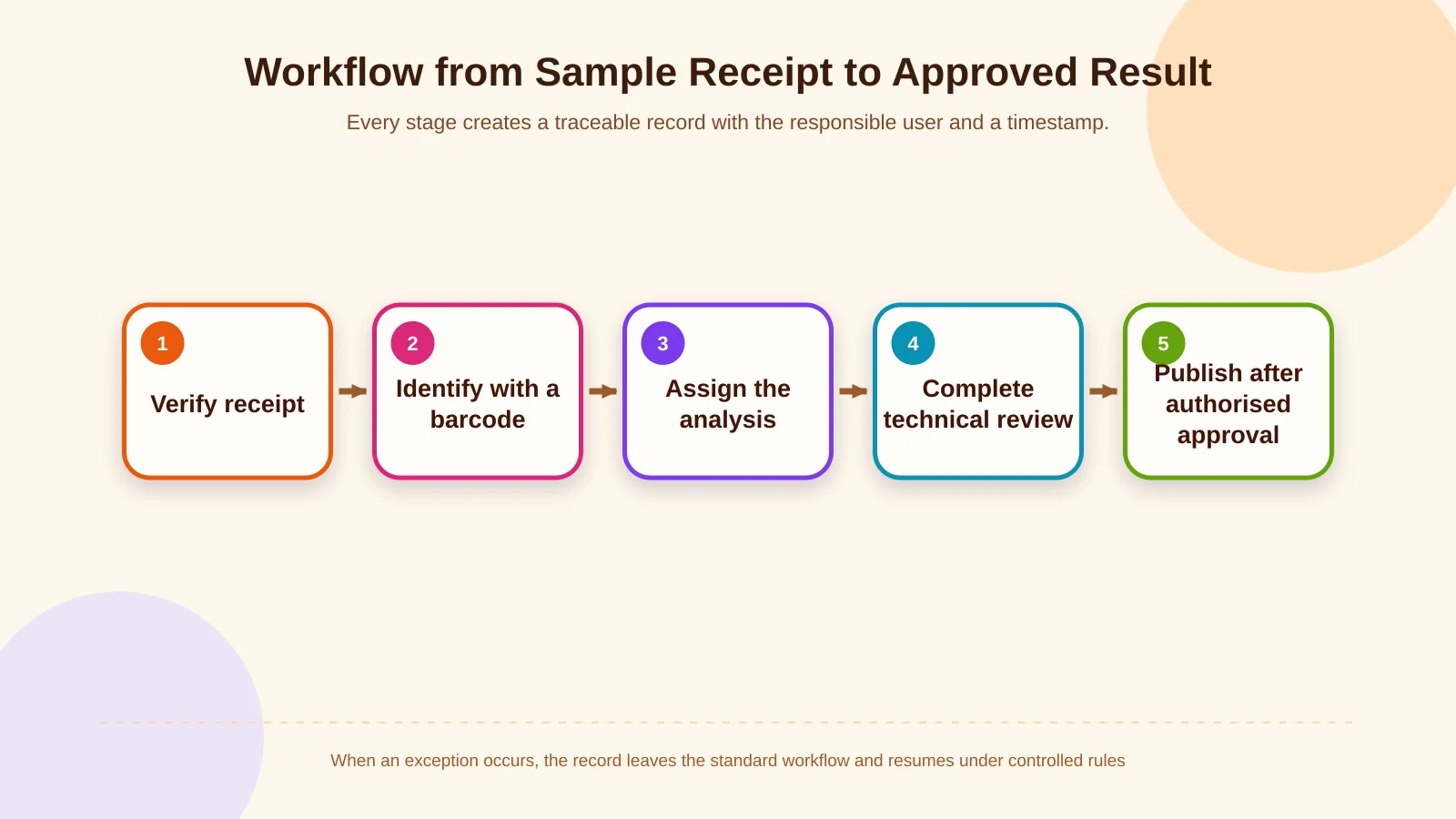
1. Pre-registration and receipt acceptance
A preliminary record is created from a customer portal, field team or ERP request. When the physical sample arrives, the responsible employee verifies its details, completes the acceptance checks and closes the receipt task. Differences between the advance record and the delivered item are flagged separately. Expected samples that never arrive therefore remain visible instead of disappearing from operational reporting.
2. Identification with a barcode or QR code
Each accepted sample receives a unique system identifier and an appropriate label. Subsamples, divided portions and repeat tests can have their own identifiers while retaining a link to the parent record. Scanning at each handover helps reduce the risks of processing the wrong sample, entering identifiers manually or recording several movements retrospectively at the end of a shift.
3. Analysis task and responsibility assignment
Requested tests are assigned to a department, analyst or instrument queue. The task can display the method, priority, target completion time, preparation requirements and dependencies. When several analyses run in parallel, each test keeps its own status, while the overall sample status is calculated from those component tasks. Delays, failed controls or repeat work can trigger notifications to the responsible team.
4. Result entry and technical review
Results may arrive through a manual form, an instrument file or an integration. The measurement unit, method, reference or acceptance range, instrument, analysis time and supporting files should remain attached to the result. During technical review, the authorised user checks mandatory fields, unexpected values, calculations and attachments. The record is then sent for approval or returned for correction with a documented reason.
5. Authorised approval and publication
A technically completed result should not automatically become visible to the customer. The authorised approver evaluates its scope, explanatory notes, report version and any deviations. Approval is recorded with the user identity, timestamp and exact version approved. Only then should the report be published through the portal or a notification be sent to defined recipients.
How do roles and permissions strengthen confidence in results?
Sample reception staff, analysts, laboratory managers, quality officers, customer representatives, system administrators and customer users should not receive identical access. Role-based controls separate viewing, creation, editing, technical review, result approval, cancellation, export and external publication. Segregation of duties can prevent the person entering a result from publishing it without an independent review.
Permissions must extend beyond menu visibility. Rules should define which laboratory, customer, project, sample type and data field a user can access. NIST’s guidance on attribute-based access control explains how user, resource, action and environmental attributes can contribute to an authorisation decision. During a custom web software development project, these rules can be modelled around actual responsibilities, temporary delegation and approval thresholds.
| Role | Primary action | Boundary |
|---|---|---|
| Sample reception | Records delivery and conditions | Does not approve results |
| Analyst | Performs the analysis and enters results | Cannot publish independently |
| Quality officer | Reviews and approves | Does not alter raw records without an audit trail |
| Customer user | Views published reports | Cannot access internal notes |
How should result revisions and exceptions be managed?
Directly overwriting an approved result makes it difficult to establish what the customer previously received. The safer approach is to create a revision, preserve the earlier version, record the reason for the change and send the new version through review and approval again. If the customer has already been notified, the correction type and current report should be communicated clearly.
The workflow must also accommodate instrument failure, insufficient sample volume, out-of-limit findings, repeat analysis, a method change, customer cancellation and transfer to an external laboratory. Each exception can have an owner, target date, decision and closure evidence. Treating exceptions as managed work prevents them from being hidden among ordinary status updates and enables teams to monitor recurring causes.
Which audit trail and document records should be retained?
An audit trail should chronologically identify who created the sample, which field changed from what value to what new value, every status transition and assignment, result entry, approval, report download and external share. These records need protection against unauthorised alteration or deletion. The NIST guide to computer security log management emphasises both a robust organisation-wide logging infrastructure and sustainable processes for managing it.
Receipt forms, photographs, analysis outputs, instrument files, certificates and result reports should be linked to the sample with their document type, version, uploader and timestamp. Retention, archiving, backup and deletion rules should reflect the relevant data class. ISO identifies the sampling and handling of test items and the accurate reporting of results among important laboratory activities. Its overview of testing and calibration laboratories in the ISO/IEC 17025 context can inform software scope, but software implementation alone does not guarantee compliance or accreditation.
Controlled result sharing through a customer portal
A customer portal should expose only the samples belonging to the customer’s organisation and permitted account scope. Users may view receipt status, expected completion dates, completed analyses and formally published reports. Unreviewed raw values, internal comments and data belonging to other customers must be excluded from portal responses as well as the visible interface.
The system can record the report version, accessing user and download time. Sensitive information may justify additional authentication, expiring links or download restrictions. Where personal data is involved, access, retention and security decisions should be assessed against applicable law and internal policy. Article 5 of the GDPR establishes principles including data minimisation, integrity and confidentiality. A controlled portal can also reduce telephone and email traffic by giving customer relations teams and clients the same verified information.
How should ERP and enterprise system integrations be planned?
Laboratory software may connect to an ERP, CRM, field application, instrument platform, document management system or identity provider. The first decision is ownership of each data field. Customer and order information might originate in the ERP, sample movements in the laboratory application and sales opportunities in the CRM. Defining a source system and update direction prevents two platforms from independently changing the same information.
Integration design must cover failure as well as successful transfer. Connection loss, missing fields, duplicate messages, timeouts and rejection by the receiving system require controlled handling. Transaction identifiers, idempotent processing, retry policies and error queues help teams see what is waiting and avoid creating duplicate records. When finance, purchasing, inventory and operations also require a shared data structure, the laboratory integration can be assessed as part of a wider enterprise resource planning scope.
How do you scope custom laboratory tracking software?
Scoping should begin with a process map rather than a list of screens. Teams identify sample types, acceptance rules, analysis methods, user roles, approval levels, report templates, notifications, integrations and exceptions. Existing spreadsheets, forms and documents are reviewed to establish which fields are mandatory, conditional or derived. This discovery work reveals differences between the documented procedure and the way work is actually completed.
Priority user journeys can then be prototyped before the data model and integration contracts are finalised. Acceptance tests should go beyond confirming that a screen opens. They should cover conditional acceptance of a damaged sample, an unauthorised approval attempt, customer notification after a revision and successful retry following an ERP outage. Before launch, data migration, training, permission reviews, backups, monitoring, maintenance and support ownership must all be clear.
Which metrics can measure success?
The value of the system should not be measured only by the number of records created. Useful indicators include receipt-to-acceptance time, percentage of analyses completed on schedule, repeat-work volume, approval waiting time, incomplete receipt records, proportion of reports accessed through the portal and integration incident resolution time. Segmenting these indicators by laboratory, analysis type or customer group helps reveal bottlenecks that an overall average may conceal.
Each metric needs a defined data source, calculation rule, owner and review frequency. Speed targets must not weaken quality: a short approval time is not inherently positive if revision and nonconformity rates increase. Reading these measures together turns the dashboard into a management tool that supports decisions rather than merely displaying activity.
Build a secure and traceable workflow for your laboratory
Laboratory sample tracking software brings receipt records, barcode identification, analysis tasks, technical review, authorised approval and customer publication into one connected chain. The right scope makes real responsibilities and exceptions visible, allowing the software to make laboratory operations safer, measurable and easier to manage.
Kumsal Agency approaches this requirement as custom web software shaped by the organisation’s data model, user permissions, integrations, security, maintenance and operating needs—not as a one-size-fits-all package. To map your laboratory’s sample receipt, analysis and result approval workflows and define the scope of a tailored tracking system, contact Kumsal Agency.