


Aydınlatma metni yükleniyor…
Selecting the wrong currency on a purchase order, entering an incorrect quantity in a production order or assigning a payment to the wrong customer account can begin as a small form error and spread into inventory, accounting and fulfilment. UX that prevents incorrect data entry in critical enterprise transactions is therefore about more than displaying a warning after something goes wrong. It should make the correct data easier to choose, prevent invalid combinations and help users verify high-impact decisions before completion.
This cannot be solved at the interface layer alone. User roles, business rules, master-data sources, ERP and CRM integrations, authority limits and exception processes must be designed as one system. Effective enterprise UX balances speed with transaction safety according to context: routine tasks should remain efficient, while difficult-to-reverse actions should introduce a deliberate checkpoint.
Why is incorrect data entry more than a form-validation problem?
Format validation can prevent a required field from being left empty or reject letters in a numeric field. It cannot prove that the value is correct in its business context. A date may be technically valid but belong to a closed accounting period. A product code may exist but be unavailable to the selected customer. A discount may fall within the accepted numeric range while exceeding the user’s authority.
OWASP recommends validating both input syntax and whether a value is meaningful within the transaction context. Because browser-side checks can be bypassed, the same rules must also be enforced on the server. The OWASP Input Validation Cheat Sheet explains this principle in detail. For enterprise software, field validation must therefore be reinforced by business-rule and authorisation checks.
The user may not be the source of the error. An outdated ERP record, delayed inventory synchronisation, missing credit limit or incompatible unit codes across systems can all present the wrong choices. Good UX must account for where displayed data comes from and how current it is. Kumsal Agency’s approach to custom web development structures interfaces around actual operations, roles, data and integration requirements.
How should an error-prevention process be designed?
The first step is not drawing a polished form but understanding transaction risk. Which incorrect values could cause financial loss, regulatory exposure, production downtime or customer dissatisfaction? Which decisions can be reversed, and which are immediately transferred to other systems? Once these questions are answered, controls can be applied according to real risk instead of adding equal friction to every field.
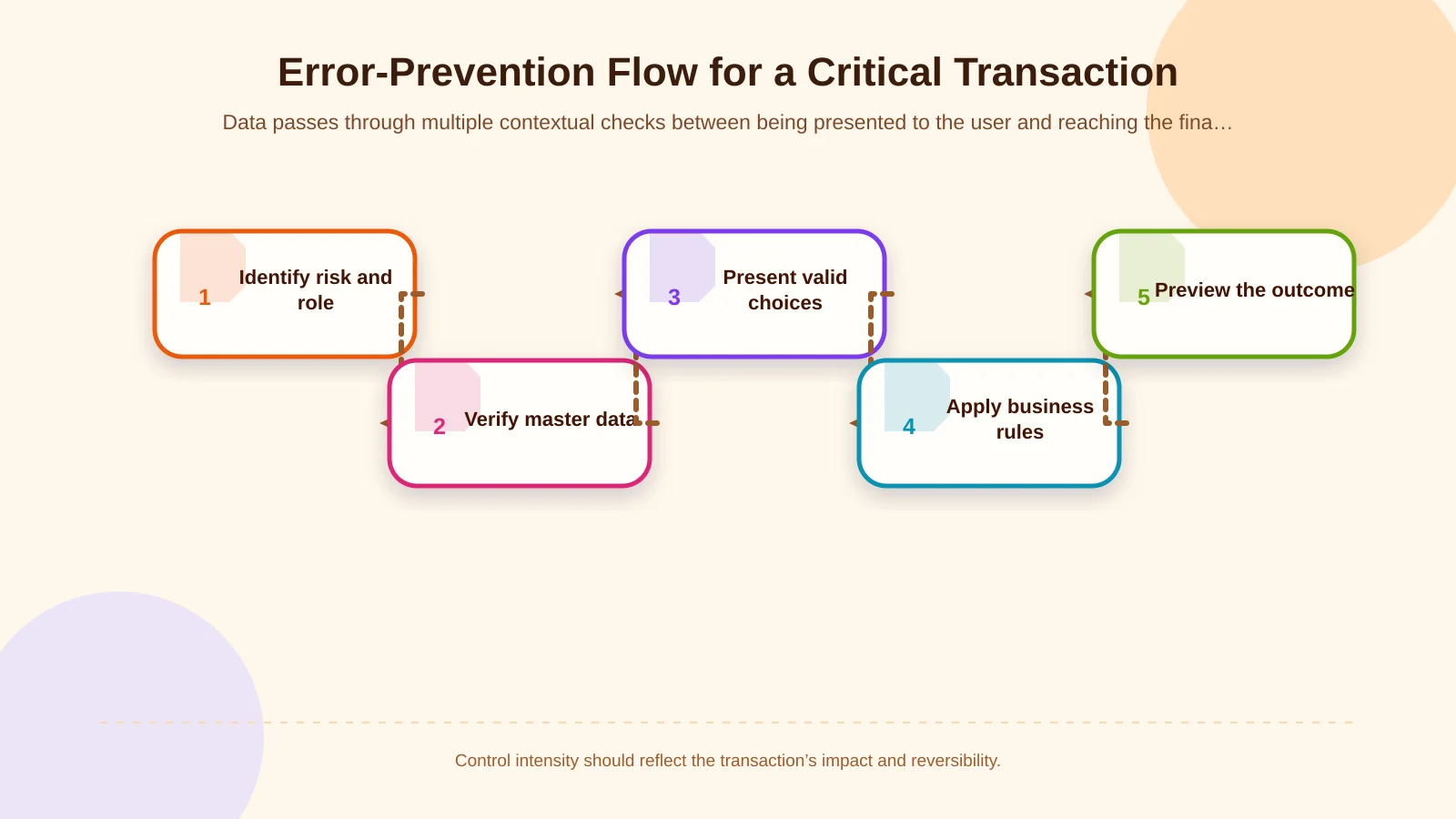
1. Map the transaction, roles and impact of errors
Document who creates, changes and approves each part of the transaction. A sales representative may create an order, while only a regional manager may change its price and only finance may release a credit block. Giving everyone the same fields and actions creates unnecessary complexity and operational risk. Visibility, editing and approval permissions should be defined separately.
Assess each critical field by impact, frequency of error and reversibility. A low-impact notes field does not require the same safeguards as a bank account, dispatch warehouse or bill of materials. High-risk fields may need source information, comparison or approval; low-risk fields should preserve workflow speed.
2. Establish the authoritative data source and business rule
Identify the system of record for customers, products, prices, inventory, accounts and tax information. Where possible, the interface should retrieve selectable values from that source instead of asking users to type copies manually. If synchronisation is delayed, show when the data was last updated. When critical information cannot be verified, the system should not silently proceed with a stale value.
This is particularly important in ERP and enterprise resource planning solutions that connect finance, sales, inventory, purchasing, production and operations through a shared data model. Rules should live centrally in the relevant service or business-logic layer, not exclusively in interface code, so web portals, mobile apps and administration panels produce consistent decisions.
3. Guide users towards the correct choice
Free-text fields appear flexible, but they create spelling variations and duplicate records where standard data is required. Use searchable selections for products, warehouses, currencies, payment terms and tax types. Long lists should not be merely alphabetical: prioritise options relevant to the user’s role, customer, location and recent activity.
Contextual defaults can accelerate entry, but they must remain visible. A default warehouse, delivery address or payment term should be clearly displayed and editable where authority permits. Rather than repeating the previous choice blindly, evaluate the current customer, company, channel and transaction type together.
4. Provide timely, explanatory feedback
Do not wait until submission to present a long list of errors. Explain correctable problems beside the relevant field at an appropriate moment. A message should not say only “Invalid value”; it should identify the problem and indicate how to resolve it. The GOV.UK error-message guidance likewise recommends specific, actionable messages located near the affected input.
Immediate validation does not mean displaying red warnings after every keystroke. Formatting assistance can work during entry, while broader business-rule checks can run when the field is complete or its dependencies are selected. Never rely on colour alone: support it with text, an icon and a programmatic relationship. Keyboard focus and screen-reader announcements should be included in accessibility testing.
5. Preview, confirm and record the critical outcome
A generic “Are you sure?” dialog is insufficient for hard-to-reverse actions. The confirmation view should summarise what the user needs to judge: customer, total, currency, account, warehouse, delivery date and exception reasons. Highlighting changed or unusual values makes discrepancies easier to detect.
W3C’s WCAG 2.2 guidance for error prevention identifies reversal, checking and the opportunity to review and correct information before final submission as safeguards for important financial and data transactions. These options are described in the WCAG 3.3.4 error-prevention guidance. The right mechanism may be a draft, a short cancellation window, dual approval or versioned rollback, depending on the transaction.
Which UX controls should be used for critical fields?
Field constraints should define the accepted data type, length, precision and range. A quantity field can reject negative values; an IBAN can be grouped for readability; a localised date can be displayed while a standard representation is stored. Automatic formatting must not change the meaning of the user’s value. After pasted content is normalised, the resulting value should be shown again for verification.
Dependent selections reduce invalid combinations at source. After a company is selected, display only its warehouses; after a customer is selected, display valid delivery addresses; after a product is selected, display permitted units. If an earlier selection changes, dependent values must be revalidated rather than silently retained. When invalidated, explain what changed and why a new choice is required.
Cross-field validation evaluates relationships instead of isolated inputs. A delivery date cannot precede an order date; a discounted total may not exceed an available credit limit; an issue quantity above available stock may require an exception. Instead of leaving legitimate edge cases at a dead end, provide a controlled path through which an authorised user can enter a reason and request approval.
For high-impact changes, compare values explicitly. Old and new bank accounts, prices, discounts or supplier details can be displayed side by side. Large monetary values need unambiguous currency labels and digit grouping. The design should help users recognise meaning, not merely satisfy a technical input pattern.
How should roles, approvals and exception workflows be structured?
Blocking every anomaly can bring operations to a halt, while allowing every warning to be overridden makes controls meaningless. Classify rules into outcomes such as block, warn, request justification and send for approval. The result should depend on risk, role, transaction value and reversibility.
For example, a sales representative may save an order within the standard price range. A discount above the limit can require a reason and initiate manager approval. A credit block may be releasable only by finance. Similar role, limit and exception principles are essential when planning auditable B2B ordering, including validation and ERP submission in B2B bulk-order workflows.
An exception screen should explain why processing stopped, which information is needed, who will receive the request and what happens next. Approvers need more than Accept and Reject buttons: show previous values, the reason for change, related documents and the breached rule. Approval then becomes an informed decision rather than a ceremonial click.
| Situation | System behaviour | What the user sees | Next step |
|---|---|---|---|
| Format error | Block | Correct format and an example | Correct the field |
| Unusual value | Warn | Potential impact and current value | Review and continue |
| Authority limit exceeded | Request justification | Limit and amount exceeded | Send for approval |
| Critical rule violation | Stop the transaction | Reason and responsible role | Authorised intervention |
Why are integration and server-side controls essential?
Data that appeared valid in a web or mobile interface may have changed in the ERP by the time it is submitted. Inventory may have been allocated to another order, a customer’s credit limit reduced or an accounting period closed. Critical rules must therefore run again on the server at final submission. If a conflict exists, explain the changed state and available options instead of presenting only a technical error code.
Network delay can also cause the same action to be submitted twice. Temporarily disabling the submit button helps, but it is not sufficient. The API layer needs a unique transaction key, idempotent processing and consistent state management. The interface must clearly distinguish successful, pending and failed outcomes so users do not retry an operation whose result is merely delayed.
Integration failures should not be presented as user mistakes. If the ERP is unavailable, “Check this field” is misleading. State whether the transaction was recorded, whether an automatic retry will occur and what the user should do. Technical details belong in protected logs; sensitive data and infrastructure information should not appear in the interface.
How can error-preventing UX be measured and tested?
Success should not be measured by form-completion time alone. Track error rates by field, correction time, abandonment, invalid combinations, exception requests, rejected approvals, duplicate submissions and post-transaction corrections. A frequent error may indicate a misleading label, unsafe default or poorly designed rule—not careless users.
Testing must extend beyond the happy path. Cover unauthorised roles, closed periods, stale stock, simultaneous updates, dropped connections, double clicks, mobile devices, keyboard navigation and screen readers. For React Native warehouse or field applications, also test how offline records are revalidated after reconnection and how conflicts are explained without losing the user’s work.
After launch, product, operations and software teams should review error records together. Record the owner, effective date and affected channels for every business-rule change. Otherwise, controls may diverge across the web portal, e-commerce platform, mobile application and ERP, eventually creating new sources of error.
End-to-end design for sustainable transaction safety
Strong UX for critical enterprise transactions does not mean placing more warnings in front of users. It means building a system that narrows incorrect choices, presents the right context and makes serious consequences visible before completion. Field constraints, defaults and timely validation create lasting value only when combined with roles, central business rules, reliable data sources, server-side verification and exception management.
Kumsal Agency brings UX and interface design together with custom web software, ERP, B2B and e-commerce platforms, React Native mobile applications, and data and system integrations. To analyse your critical workflows, user roles and integration requirements and plan enterprise software or a portal that reduces incorrect data entry at source, contact Kumsal Agency.