


Aydınlatma metni yükleniyor…
Enterprise portal projects often begin with a screen list: login, customer record, order, document, approval and report. Yet complexity sits in who can access which record in which state, which system owns the data, how approvals move and how a transaction recovers when an integration fails. A demo designed without these decisions may look complete while collapsing under real operational exceptions.
This guide uses Levent and Maslak as a bounded enterprise scenario; it makes no claim about a physical office or local result. Its purpose is to scope customer, dealer, employee or partner portals through roles, objects, states, integrations and acceptance evidence.
Begin portal scope with the business process, not screens
Write the tasks the portal must complete: requesting a proposal, checking an order, uploading a document, approving an expense, opening support or reviewing performance. Define the entry condition, required data, decision owner, final state and exception path for every task. The same task may have different permissions and approvals for different users.
Customer, dealer and employee are not sufficient role definitions. Organisation, contract, territory, product group, duty or transaction value may change access. Record the user type, target object, permitted action and applicable condition together.
Seven control layers of an enterprise portal
Kumsal Ajans developed this model to show the controls required from interface to operation on one scope. When a layer is undefined, teams often attempt to solve its resulting problems in the wrong part of the system.
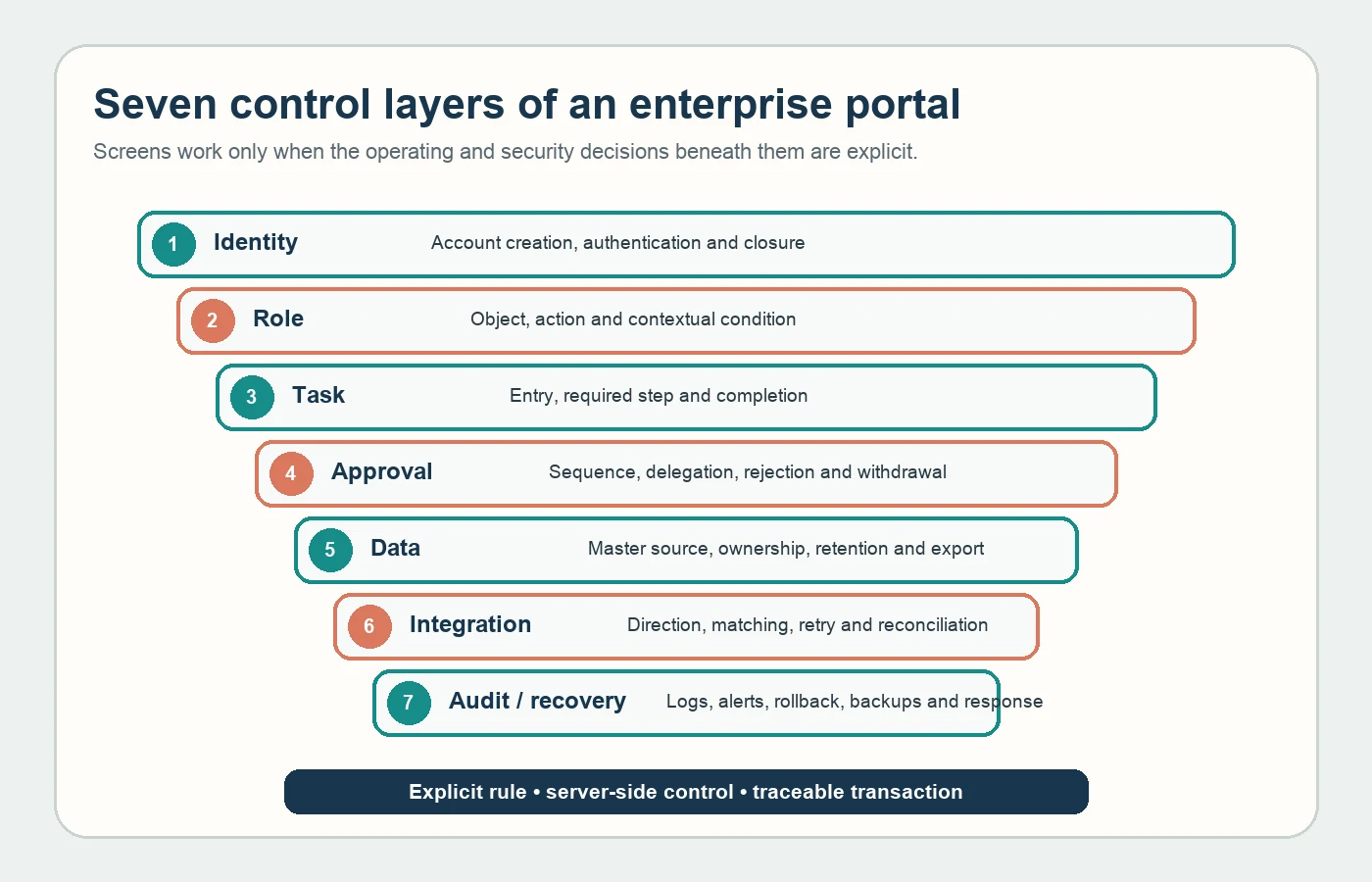
- Identity: How users authenticate and how accounts are created and closed.
- Role: Which objects and actions users can access under which conditions.
- Task: The work presented to users, required steps and completion evidence.
- Approval: Decision sequence, separation of duties, rejection and withdrawal.
- Data: Master source, field ownership, accuracy, retention and export.
- Integration: Data direction, matching, retries and reconciliation.
- Audit and recovery: Logs, alerts, rollback, backups and incident response.
Build a role–object–action matrix
Do not limit the matrix to menu access. For every object—customer, order, price list, contract, document, account and report—evaluate view, create, change, approve, export and delete separately. A dealer may see its own order but never another dealer's record. A manager may approve a transaction but be prevented from approving one they created.
OWASP recommends least privilege, deny by default and permission validation on every request (OWASP Authorization Cheat Sheet). Hiding a button or using hard-to-guess identifiers is insufficient; the server must check the user–object–action relationship on every call.
Write approval as an explicit state machine
Document states such as draft, under review, changes requested, approved, rejected, cancelled and completed, together with valid transitions. Who can act in each state? Who delegates during absence? Does higher value require another approval? Is a rejection reason mandatory? What happens to a transaction already sent to another system when approval is withdrawn?
OWASP's business logic guidance recommends storing multi-step workflows as explicit server-side state and validating every transition against the current state (OWASP Business Logic Security). A UI that displays steps in order does not prevent direct requests from skipping them. Test invalid order, replayed approval, concurrent actions and expired drafts.
Decide data ownership before drawing integrations
Customer names may come from CRM, limits from ERP, contracts from document management and portal preferences from the web application. State the master source, editing authority and update direction for every field. Two-way synchronisation should not be a default; data can be silently corrupted when conflict ownership is unclear.
Turkey's data protection authority states that personal data should serve specified, explicit and legitimate purposes, remain relevant, limited and proportionate, and be retained only as required (KVKK general principles). Connect portal fields, external mappings, role access, logs and exports to one data inventory. Have qualified owners verify legal grounds and retention decisions.
Scope integration failure as carefully as success
For every connection define the trigger, schema, authentication owner, timeout, retry, duplicate prevention and error queue. “An API exists” does not define capacity, version, environments, quotas, support or change management. Separation of test and production data and secret management also belong in the proposal.
If the connection fails, will the portal queue the task, show an error or create manual work? Recovery must not apply the same transaction twice or let stale data overwrite a newer state. A reconciliation report can expose missing or mismatched records between systems.
Do not confuse logs with reports
A business report shows order count or approval time. An audit trail explains who changed which record, when and from which previous value to which new value. Security logs also track failed authentication, authorisation violations and suspicious behaviour. These datasets have different purposes, permissions and retention requirements.
OWASP recommends logs with sufficient “when, where, who and what” context and protection against unauthorised access or alteration (OWASP Logging Cheat Sheet). Never log passwords, complete access secrets or unnecessary personal data. Define alert thresholds, response owners and expected action before launch.
Test the portal through exceptions
Include an empty task list, unauthorised record, expired link, oversized file, invalid document type, two simultaneous approvals, integration outage, account transfer and employee departure. Test mobile use, keyboard access, large tables, filters and error feedback with representative data volumes.
Acceptance does not end when a screen loads. Verify that the transaction reaches the master system with correct data, creates the right task, appears in logs and reporting, and follows rollback policy.
Proposal and handover checklist
- Business tasks, states and transition rules
- Role–object–action–condition permission matrix
- Data dictionary, master sources and retention decisions
- Integration contracts, error queues and reconciliation
- Approval, delegation, rejection, withdrawal and concurrency scenarios
- Logging, alerting, reporting and support ownership
- Source, accounts, environments, documentation, backups and data export
Use the off-the-shelf and custom web software guide to evaluate the delivery model and review the Kumsal Ajans web software service for implementation scope.
An enterprise portal succeeds through tasks completed with the right permissions and data, observable exceptions and an operating model the organisation can hand over—not through the number of screens.