


Aydınlatma metni yükleniyor…
For retail, food, health, beauty or appointment-led brands with locations around Bağdat Avenue, Suadiye and Caddebostan, a website is more than a brand showcase. Visitors need to choose the right location, compare services and facilities, confirm current hours, book and prepare for a physical visit. When design compresses this journey into one “Find us” page, information may exist without supporting a decision.
This guide does not use the district as evidence of a Kumsal Ajans office or local results. It helps brands genuinely operating in these areas scope multi-location web design around accurate branch data, mobile usability and sustainable content operations.
Treat each location as a decision page before a map pin
Name, precise address, telephone, hours and directions are foundational, but may not be enough to choose. Depending on the business, visitors may need services, product or menu availability, booking requirements, step-free access, parking or public transport notes, child or pet policies and temporary notices.
A shared template creates consistency without hiding real differences. Classify fields as required, conditional or location-specific, and do not leave empty headings or icons when a branch has no value.
The visit-readiness acceptance map: six stages
Kumsal Ajans developed this acceptance map to test design through six visitor stages: discover, compare, confirm, book, arrive and recover. For each stage, record content, primary action, owner and acceptance evidence. Design is then assessed through completed visit tasks rather than attractive screens alone.
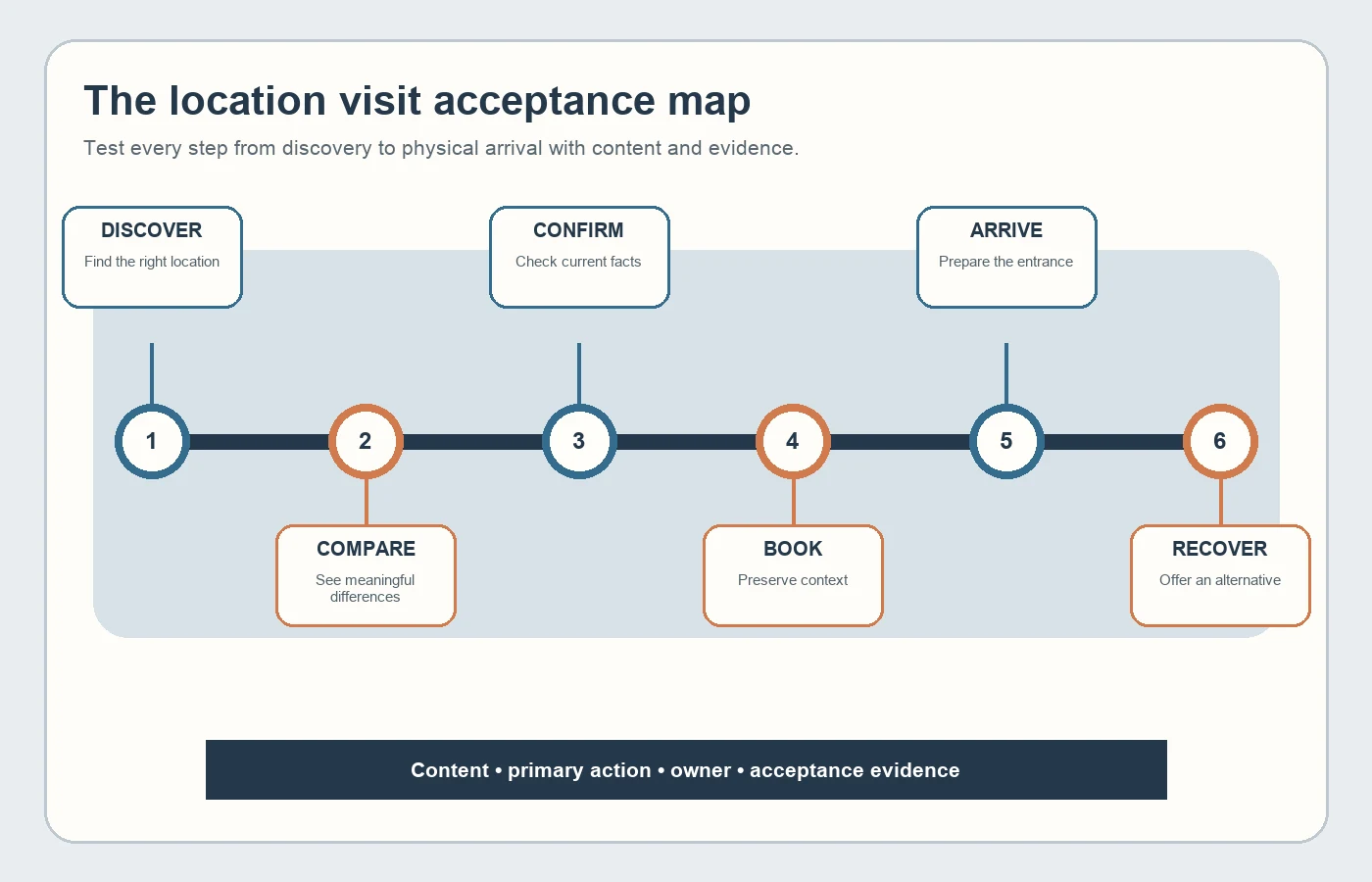
| Stage | Visitor question | Acceptance evidence |
|---|---|---|
| Discover | Which location fits my need? | List and filter task |
| Compare | How do services, hours and facilities differ? | Representative two-location test |
| Confirm | Is the information current and consistent? | Source and last update |
| Book | What am I selecting and what happens next? | Mobile completion test |
| Arrive | Are route, entrance and access details sufficient? | Pre-visit task test |
| Recover | What is the alternative when closed or full? | Failure and change scenario |
Design discovery around visitor criteria
The nearest location is not always the right location. A visitor may choose by service, stock, opening time, appointment availability or transport conditions. Map and list should complement each other; pins should not be the only discovery method without an accessible list and meaningful location links.
When location permission is refused, provide district, neighbourhood or free-text search. Label approximate distance as approximate. Do not let an automatic “near me” result replace the visitor's actual preference.
Assign one content owner for address, hours and telephone
Conflicting hours across the website, map profile, booking tool and social accounts weaken trust. Define the master source, updater, approver and special-hours workflow for every location field. Planned renovation, temporary closure, relocation and appointment-only operation need distinct content states.
Google Business Profile guidelines require a precise real-world address or service area, customer-facing hours that reflect actual operation and no duplicate page for one location (Google business representation guidelines). Website information should match real operations; do not add keywords to addresses or location names.
Create substantial location pages without cloned copy
Location pages should not be duplicates where only the district changes. Use verified differences: available services, team or expertise scope, physical facilities, arrival notes, current photography, booking method and valid notices. Never claim a facility, service or local experience that does not exist.
Page titles, breadcrumbs, internal links and language controls should make the current location clear. When a branch closes, plan the closure notice, alternative branch and redirect decision together instead of silently sending every visitor elsewhere.
Feed visible search information and structured data from one source
Google's LocalBusiness documentation explains that details such as address, hours and departments can be described in structured data (LocalBusiness structured data guidance). Markup should not introduce information that is invisible or unverified on the page.
Generating visible name, address, telephone, hours and structured fields from the same content model reduces disagreement. Technical acceptance should compare visible text, schema, canonical, locale and directions targets. This does not guarantee search visibility; it improves accuracy and consistency.
Keep booking inside the selected-location context
When a visitor starts from a location page, preserve location, service and any staff choice. Explain duration, fee presentation, cancellation terms, preparation and confirmation channel before date selection. If no time is available, offer another date, location or contact route.
A fixed mobile action must not cover content, and returning to the previous step must not erase location choice. Measure telephone, directions, messaging and third-party booking as distinct outbound actions and tell visitors clearly where they are going.
Support physical accessibility with digital accessibility
When verified, describe step-free entry, lifts, accessible toilets, parking and companion conditions in clear text. Icons alone may be ambiguous. Because outdated access claims can cause a serious failed visit, assign an owner and review interval.
Digitally, provide visible keyboard focus, descriptive headings and labels, adequate pointer targets and alternatives to dragging. WCAG 2.2 includes criteria covering these areas (WCAG 2.2). Test maps, date pickers and filters with real mobile and keyboard scenarios.
Use location photography as orientation, not decoration
Current exterior, entrance and waiting-area photography helps visitors prepare. Generic stock media, fictional representations or an old façade can mislead when presented as documentary evidence. Record capture date, rights, branch relationship and renewal owner.
Google recommends standard img or picture elements, relevant placement and contextual alt text (Google image SEO guidance). Alt text should explain the photograph's visit function, not list location keywords.
Deliverables and measurement to require
- Location data model, field owners and special-hours workflow
- List, filter, map and denied-location-permission scenarios
- Comparison criteria and location-content differentiation plan
- Booking, cancellation, no-availability and alternative-location journeys
- Physical and digital accessibility acceptance checks
- LocalBusiness, canonical, locale and visible-data consistency tests
- Search, directions, call, booking-start and completion events
Develop the scope with the website requirements guide and review the Kumsal Ajans web design service for implementation approach. Successful multi-location design does more than send a visitor to a map: it helps them choose correctly, confirms the facts and reduces uncertainty before the physical visit.