


Aydınlatma metni yükleniyor…
For engineering and heavy-industry companies, a corporate website should be more than a digital showcase for factory photography, product catalogues and quality certificates. A well-planned website helps procurement specialists, project engineers and technical managers find the right solution, assess a supplier’s capabilities and submit a complete request for quotation. It becomes a measurable channel connecting brand communication with sales operations.
At the centre of this system is the RFQ funnel. Its purpose is not to collect as many form submissions as possible. It is to capture commercially and technically useful enquiries, route them to the right team with the necessary documents and make every step traceable. Corporate web design, information architecture, custom software, data security and CRM or ERP integration must therefore be planned as parts of one operating system.
Why is a heavy-industry website different from a standard corporate site?
A consumer purchase may depend on a few product features and a visible price. Heavy-industry procurement can depend on material grade, capacity, operating conditions, tolerances, certification, lead time, project location and after-sales support. Engineering, procurement, quality, finance and management teams may all participate in the decision. The website must make this complex evaluation understandable without oversimplifying it.
The first standard is evidence. Generic claims such as “high quality” should be replaced with production capabilities, applicable standards, testing processes, machinery, certificates, industries served and completed project types. Where client confidentiality applies, case studies can still explain the problem, project scope, implemented solution and resulting technical value without exposing restricted information.
Trust also depends on context. A certificate logo alone does not tell the buyer which facility, process or product range it covers. Project photography without technical explanation offers limited support during supplier evaluation. Each proof point should answer a procurement question: Can this company manufacture within the required tolerances? Has it worked in this environment? Which controls reduce delivery or quality risk?
Build the information architecture around procurement questions
The sitemap should not simply reproduce the company’s organisational chart. It should reflect the problem the visitor is trying to solve, the product or service required and the criteria used to shortlist suppliers. Primary navigation may include products or services, industries, engineering capabilities, quality, projects and contact options. For complex portfolios, product-family, application, industry and technical-specification filters may need to work together.
Every product or solution page should prepare the visitor for the next decision. It may include applications, technical parameters, available options, relevant standards, downloadable documents, common engineering questions and related projects. Hiding every specification inside a PDF is not enough. Critical information should also appear as scannable HTML so it can be found, compared and maintained. Google’s guidance for developers highlights descriptive headings, meaningful links, mobile compatibility and semantic HTML as elements that help search engines understand content. Further details are available in the Google Search Central SEO guide for developers.
Use shared data fields in content templates
If different teams publish products using unrelated free-text layouts, comparison and maintenance become difficult. Define shared fields for product name, code, material, capacity range, dimensions, application, standards, certificates and downloadable files. The content-management system should enforce required fields and permissions where appropriate.
This structured model improves consistency and prepares the website for future data feeds from PIM, ERP or catalogue systems. It also supports filtered navigation and prevents important specifications from being embedded in images that editors cannot easily update. When systems exchange product data, ownership must be explicit: one platform should remain authoritative for each field.
How should the RFQ funnel be designed?
An effective quotation funnel is not a single “Request a Quote” button. The buyer discovers a suitable solution, evaluates technical compatibility, defines the requirement, attaches relevant files and verifies the submission. The enquiry is then assigned to sales or engineering, checked for qualification and developed into a quotation. Before interface design begins, each stage needs an owner, a required dataset and a success measure.
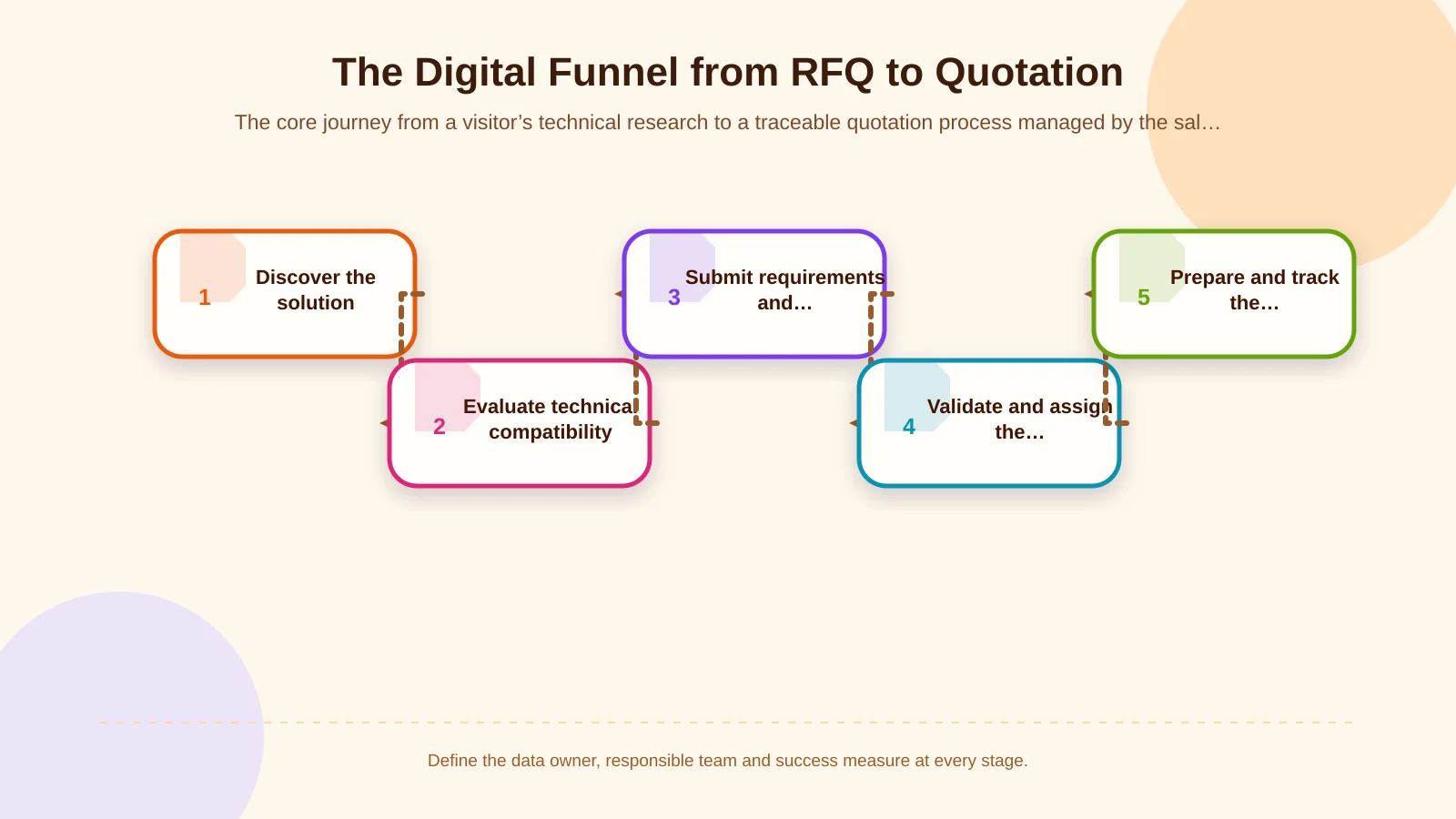
1. Discovery and trust
A visitor arriving through organic search, a direct visit, an industry directory or a campaign should reach the relevant product or industry page. The first screen should make clear what the company produces, whom it serves and which technical distinction it offers. Certificates should be explained in context, while project examples and quality processes should reduce perceived procurement risk.
Calls to action should match the visitor’s readiness. Someone conducting early research may need a technical data sheet or capability overview; another buyer may be ready to submit drawings. Giving both visitors an appropriate next step is more useful than directing every session immediately to a long form.
2. Structuring the requirement
The RFQ form should not place every field requested by sales on one screen. Conditional sections can open according to product family, application or industry. A metalworking enquiry might ask for material, dimensions, tolerances and quantity. A chemical-equipment request may require fluid, temperature, pressure and corrosion conditions. The buyer avoids irrelevant questions while the internal team receives information it can evaluate.
The W3C recommends asking only for information needed to complete the transaction, providing clear labels, grouping related controls and explaining how errors can be corrected. Dividing a long form into logical steps also gives users a sense of progress. These principles are described in the W3C accessible forms tutorial. Large touch targets, suitable mobile keyboards, readable validation messages and preservation of entered data are particularly important in mobile RFQ journeys.
3. Collecting files and technical documents
Drawings, specifications, photographs, bills of materials and CAD files are essential inputs for many quotations. Before selection, the interface should state accepted formats, maximum file size and any relevant restrictions. Larger uploads need progress feedback, a retry option and a reviewable file list before submission. Access rules must also define who can view commercially sensitive documents.
Accepting files is a security decision. OWASP recommends restricting permitted extensions, validating file types without relying only on the client-provided Content-Type value, enforcing size limits, generating filenames within the system and storing uploads outside the web root or on a separate server. Implementation considerations are covered in the OWASP File Upload Cheat Sheet. Malware scanning, authorisation, retention and audit logging should be added according to the organisation’s risk profile.
4. Confirmation, registration and ownership
After submission, a generic “Success” message is insufficient. The buyer should receive a unique request number, a summary of the submitted information, the expected response method and, where appropriate, a secure tracking link. Internally, sending an email notification is not a reliable workflow by itself. The request should be recorded centrally and assigned according to product, industry, country, customer type or capacity.
CRM handoff requires field mapping, duplicate-company and contact checks, consent records, source attribution, an exception queue and retry behaviour. These decisions are examined in Kumsal Agency’s guide to planning website–CRM integration from form submission to sales follow-up. If ERP integration is required, the business must also decide which system owns the customer record, product code, quotation number and quotation status.
Which fields are needed for a qualified RFQ?
Field selection should be derived from the quotation decision rather than assembled from every department’s wish list. Balance the number of mandatory fields against the complexity of the request, and provide options such as “Not yet determined” for technical values that may be unknown. Otherwise, a valuable buyer in the early research stage may be forced to guess or abandon the form.
- Company details: company name, country, contact person and business email address.
- Request context: product or service, industry, project location and use case.
- Technical requirements: capacity, material, dimensions, standards, operating conditions and special requirements.
- Commercial framework: estimated quantity, target delivery date, currency or delivery terms when genuinely required.
- Documents: specifications, drawings, photographs, BOM files or information about existing equipment.
- Consent and verification: privacy notice, contact preference, spam prevention and a submission summary.
A telephone number, budget or detailed corporate data should not be mandatory in every scenario. Sales and engineering teams should test when each field becomes necessary. For some businesses, a short initial enquiry followed by a specialist-led technical assessment is more effective than one long form.
| Stage | User need | Organisational action | Success measure |
|---|---|---|---|
| Discovery | Find a suitable solution | Present product and industry content | Engagement with relevant pages |
| Evaluation | Verify supplier capability | Show evidence of standards, quality and projects | RFQ start rate |
| Request | Communicate requirements completely | Validate conditional fields and files | Completed qualified RFQs |
| Handoff | Know that the request was received | Create the CRM/ERP record and assign an owner | First-response time |
| Quotation | Track status and revisions | Record versions and the final outcome | Conversion to quotation and sale |
Make the quotation process visible to the buyer and the business
Receiving an RFQ is not the end of the funnel. The management interface may use statuses such as new, under technical review, awaiting information, quotation in preparation, quotation sent, won and lost. Every status change should record the time, user and relevant note. Role-based access should ensure that sales representatives, engineers, managers and content editors see only the information required for their work.
If buyers need a tracking portal, sensitive commercial information must not be exposed through ordinary, predictable URLs. Authentication, expiring links, session controls and document-access logs should be selected through risk assessment. Requests for clarification, revisions and additional uploads should remain attached to the same RFQ record. This creates an auditable quotation history instead of fragmented email threads and untraceable document versions.
How should performance be measured?
Measuring only completed forms can make low-quality submissions look like growth. The analytics plan should include movement from product pages to RFQ starts, step-level abandonment, validation errors, upload success, completed requests, sales-accepted RFQs, first-response time, quotation conversion and won business. Personal data and technically sensitive form values should never be sent to analytics platforms.
Traffic source and enquiry quality should be reviewed together. A specialist industry page may attract limited traffic but generate a high proportion of viable quotations. A broad keyword may deliver volume while producing requests outside the company’s capabilities. Monthly reporting should therefore connect search visibility, content behaviour, RFQ quality and sales outcomes. SEO, design and sales optimisation can then be evaluated against the same commercial result.
Pre-launch corporate website checklist
- Are product, industry, capability, quality and project pages connected with meaningful links?
- Are technical specifications stored in manageable fields rather than hard-to-update images?
- Can the RFQ form be completed on mobile, and does it preserve data after an error?
- Are file validation, malware controls, storage rules and access permissions defined?
- Can failed CRM or ERP transfers be identified, investigated and retried safely?
- Do reports measure ownership, response time, status changes and quotation outcomes?
- Can content editors update pages safely without access to critical integrations?
Turn the website into a sustainable sales channel
Effective corporate web design for engineering and heavy-industry companies involves more than placing an attractive interface, technical content and a quotation form side by side. It combines the buyer’s research behaviour, internal sales responsibilities, document security, integrations and measurement model within one coherent journey. The result is not simply more forms; it is a pipeline of better-defined opportunities with clear ownership and traceability through to the quotation outcome.
Kumsal Agency is an Istanbul-based digital agency that combines Art Director-led creative direction with brand-specific corporate web design, custom web software, information architecture and integration capabilities. For an engineering or heavy-industry company, this approach can structure complex technical services clearly while aligning RFQ collection and quotation tracking with actual business processes, user needs and security requirements.